
Azure Machine Learning - Azure OpenAI 服务使用 GPT-35-Turbo and GPT-4
温馨提示:这篇文章已超过393天没有更新,请注意相关的内容是否还可用!
通过 Azure OpenAI 服务使用 GPT-35-Turbo and GPT-4
环境准备
- Azure 订阅 - 免费创建订阅
- 已在所需的 Azure 订阅中授予对 Azure OpenAI 服务的访问权限。 目前,仅应用程序授予对此服务的访问权限。 可以填写 https://aka.ms/oai/access 处的表单来申请对 Azure OpenAI 服务的访问权限。
- Python 3.7.1 或更高版本。
- 以下 Python 库:os。
- 部署了 gpt-35-turbo 或 gpt-4 模型的 Azure OpenAI 服务资源。
设置
使用以下项安装 OpenAI Python 客户端库:
- [OpenAI Python 0.28.1]
- [OpenAI Python 1.x]
pip install openai==0.28.1
pip install openai
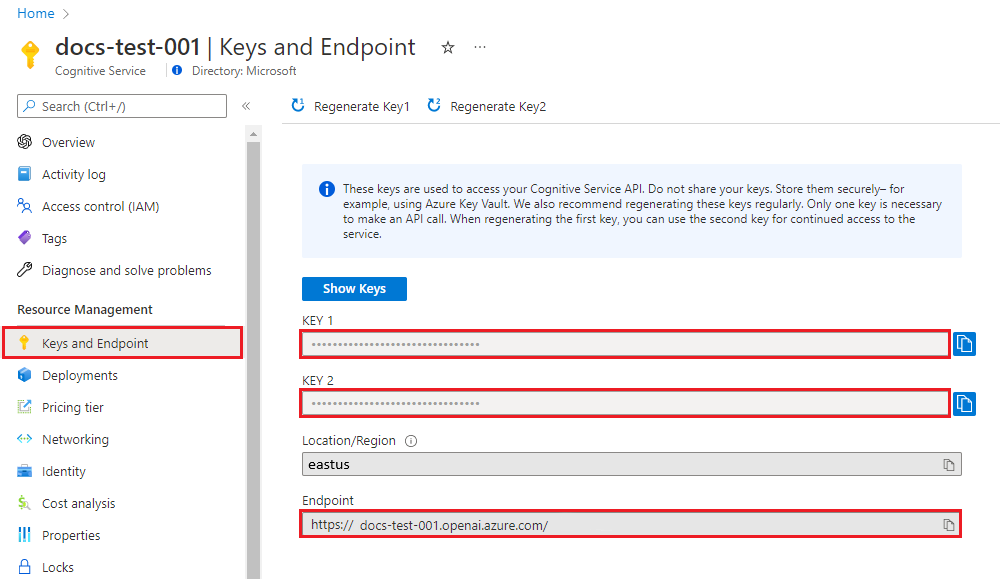
检索密钥和终结点
若要成功对 Azure OpenAI 发出调用,需要一个终结点和一个密钥。
变量名称 值 ENDPOINT 从 Azure 门户检查资源时,可在“密钥和终结点”部分中找到此值。 也可在“Azure AI Studio”>“操场”>“代码视图”中找到该值。 示例终结点为:https://docs-test-001.openai.azure.com/。 API-KEY 从 Azure 门户检查资源时,可在“密钥和终结点”部分中找到此值。 可以使用 KEY1 或 KEY2。 在 Azure 门户中转到你的资源。 可以在“资源管理”部分找到“终结点和密钥”。 复制终结点和访问密钥,因为在对 API 调用进行身份验证时需要这两项。 可以使用 KEY1 或 KEY2。 始终准备好两个密钥可以安全地轮换和重新生成密钥,而不会导致服务中断。
环境变量
为密钥和终结点创建和分配持久环境变量。
- [命令行]
- [PowerShell]
- [Bash]
setx AZURE_OPENAI_KEY "REPLACE_WITH_YOUR_KEY_VALUE_HERE"
setx AZURE_OPENAI_ENDPOINT "REPLACE_WITH_YOUR_ENDPOINT_HERE"
[System.Environment]::SetEnvironmentVariable('AZURE_OPENAI_KEY', 'REPLACE_WITH_YOUR_KEY_VALUE_HERE', 'User')[System.Environment]::SetEnvironmentVariable('AZURE_OPENAI_ENDPOINT', 'REPLACE_WITH_YOUR_ENDPOINT_HERE', 'User')echo export AZURE_OPENAI_KEY="REPLACE_WITH_YOUR_KEY_VALUE_HERE" >> /etc/environment && source /etc/environment
echo export AZURE_OPENAI_ENDPOINT="REPLACE_WITH_YOUR_ENDPOINT_HERE" >> /etc/environment && source /etc/environment
创建新的 Python 应用程序
-
创建名为 quickstart.py 的新 Python 文件。 然后在你偏好的编辑器或 IDE 中打开该文件。
-
将 quickstart.py 的内容替换为以下代码。
- [OpenAI Python 0.28.1]
- [OpenAI Python 1.x]
需要将变量 engine 设置为部署 GPT-3.5-Turbo 或 GPT-4 模型时选择的部署名称。 输入模型名称将导致错误,除非选择的部署名称与基础模型名称相同。
import os
import openai
openai.api_type = "azure"
openai.api_base = os.getenv("AZURE_OPENAI_ENDPOINT")
openai.api_key = os.getenv("AZURE_OPENAI_KEY")
openai.api_version = "2023-05-15"
response = openai.ChatCompletion.create(
    engine="gpt-35-turbo", # engine = "deployment_name".
    messages=[
        {"role": "system", "content": "You are a helpful assistant."},
        {"role": "user", "content": "Does Azure OpenAI support customer managed keys?"},
        {"role": "assistant", "content": "Yes, customer managed keys are supported by Azure OpenAI."},
        {"role": "user", "content": "Do other Azure AI services support this too?"}
    ]
)
print(response)
print(response['choices'][0]['message']['content'])
需要将变量 model 设置为部署 GPT-3.5-Turbo 或 GPT-4 模型时选择的部署名称。 输入模型名称将导致错误,除非选择的部署名称与基础模型名称相同。
import os from openai import AzureOpenAI client = AzureOpenAI( azure_endpoint = os.getenv("AZURE_OPENAI_ENDPOINT"), api_key=os.getenv("AZURE_OPENAI_KEY"), api_version="2023-05-15" ) response = client.chat.completions.create( model="gpt-35-turbo", # model = "deployment_name". messages=[ {"role": "system", "content": "You are a helpful assistant."}, {"role": "user", "content": "Does Azure OpenAI support customer managed keys?"}, {"role": "assistant", "content": "Yes, customer managed keys are supported by Azure OpenAI."}, {"role": "user", "content": "Do other Azure AI services support this too?"} ] ) print(response.choices[0].message.content)-
使用快速入门文件中的 python 命令运行应用程序:
python quickstart.py
输出
{
  "choices": [
    {
      "finish_reason": "stop",
      "index": 0,
      "message": {
        "content": "Yes, most of the Azure AI services support customer managed keys. However, not all services support it. You can check the documentation of each service to confirm if customer managed keys are supported.",
        "role": "assistant"
      }
    }
  ],
  "created": 1679001781,
  "id": "chatcmpl-6upLpNYYOx2AhoOYxl9UgJvF4aPpR",
  "model": "gpt-3.5-turbo-0301",
  "object": "chat.completion",
  "usage": {
    "completion_tokens": 39,
    "prompt_tokens": 58,
    "total_tokens": 97
  }
}
Yes, most of the Azure AI services support customer managed keys. However, not all services support it. You can check the documentation of each service to confirm if customer managed keys are supported.
了解消息结构
GPT-35-Turbo 和 GPT-4 模型经过优化,可以处理格式化为对话的输入。 变量 messages 传递一组字典,这些字典在由系统、用户和助手划定的对话中具有不同角色。 系统消息可用于通过包含有关模型应如何响应的上下文或说明来启动模型。
-
-
免责声明:我们致力于保护作者版权,注重分享,被刊用文章因无法核实真实出处,未能及时与作者取得联系,或有版权异议的,请联系管理员,我们会立即处理! 部分文章是来自自研大数据AI进行生成,内容摘自(百度百科,百度知道,头条百科,中国民法典,刑法,牛津词典,新华词典,汉语词典,国家院校,科普平台)等数据,内容仅供学习参考,不准确地方联系删除处理! 图片声明:本站部分配图来自人工智能系统AI生成,觅知网授权图片,PxHere摄影无版权图库和百度,360,搜狗等多加搜索引擎自动关键词搜索配图,如有侵权的图片,请第一时间联系我们,邮箱:ciyunidc@ciyunshuju.com。本站只作为美观性配图使用,无任何非法侵犯第三方意图,一切解释权归图片著作权方,本站不承担任何责任。如有恶意碰瓷者,必当奉陪到底严惩不贷!


