
Python uiautomation获取微信内容!聊天记录、聊天列表、全都可获取
温馨提示:这篇文章已超过389天没有更新,请注意相关的内容是否还可用!
Python uiautomation 是一个用于自动化 GUI 测试和操作的库,它可以模拟用户操作来执行各种任务。
通过这个库,可以使用Python脚本模拟人工点击,人工操作界面。本文使用 Python uiautomation 进行微信电脑版的操作。
以下是本次实验的版本号。

你需要安装 uiautomation
pip install uiautomation
示例代码
import time
import uiautomation as auto
import re
from plyer import notification

notification_history = {}  # 历史消息

def check_wechat_messages():

    # 获取微信窗口
    wechat_win = auto.WindowControl(Name="微信", ClassName="WeChatMainWndForPC")

    shoukuanWin = wechat_win.ListControl(Name="会话")
    bbb = shoukuanWin.GetChildren()

    for chatMsg in bbb:
        if "条新消息" in chatMsg.Name:

            # 计算消息条数
            match = re.match(r'([a-zA-Z0-9]+)(\d+)条新消息', chatMsg.Name)

            if match:
                nickname = match.group(1)
                message_count = int(match.group(2))

                printInfo = f"{nickname} 给你发送了 {message_count} 条消息"
                print(printInfo)
                print("------------")

                # 获取消息列表控件
                xiaoxis = wechat_win.ListControl(Name="消息")

                # 获取消息列表控件的子控件
                xiaoxi_children = xiaoxis.GetChildren()

                # 获取最后一个子控件
                last_xiaoxi = xiaoxi_children[-1]

                # 打印最后一条消息的内容
                print(last_xiaoxi.Name)

                # 在指定时间内不重发
                last_notification_time = notification_history.get((nickname, message_count), 0)
                current_time = time.time()

                if current_time - last_notification_time > 15:

                    # 依次发送
                    notification_title = f"来自 {nickname} 的 {message_count} 条消息"
                    notification_message = f"{last_xiaoxi.Name}"

                    notification.notify(
                        title=notification_title,
                        message=notification_message,
                        app_name="WeChat"
                    )

                    # 更新日志
                    notification_history[(nickname, message_count)] = current_time

if __name__ == "__main__":
    try:
        while True:
            check_wechat_messages()
            time.sleep(2)  #2秒检测一次UI组件
    except KeyboardInterrupt:
        print("程序退出~")
    except Exception as e:
        print(f"程序执行出现了问题: {str(e)}")
代码解析:
以上代码使用 uiautomation 实时获取微信聊天列表的消息状态,一旦有消息发过来,就会获取到发送人的微信昵称以及发送的消息内容、消息个数。
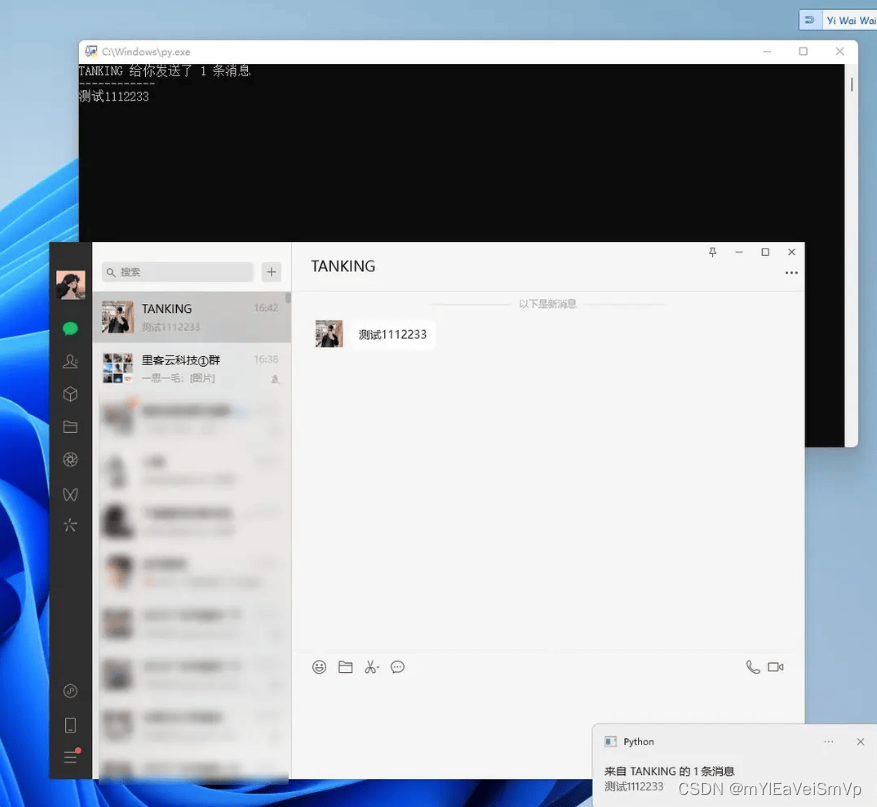
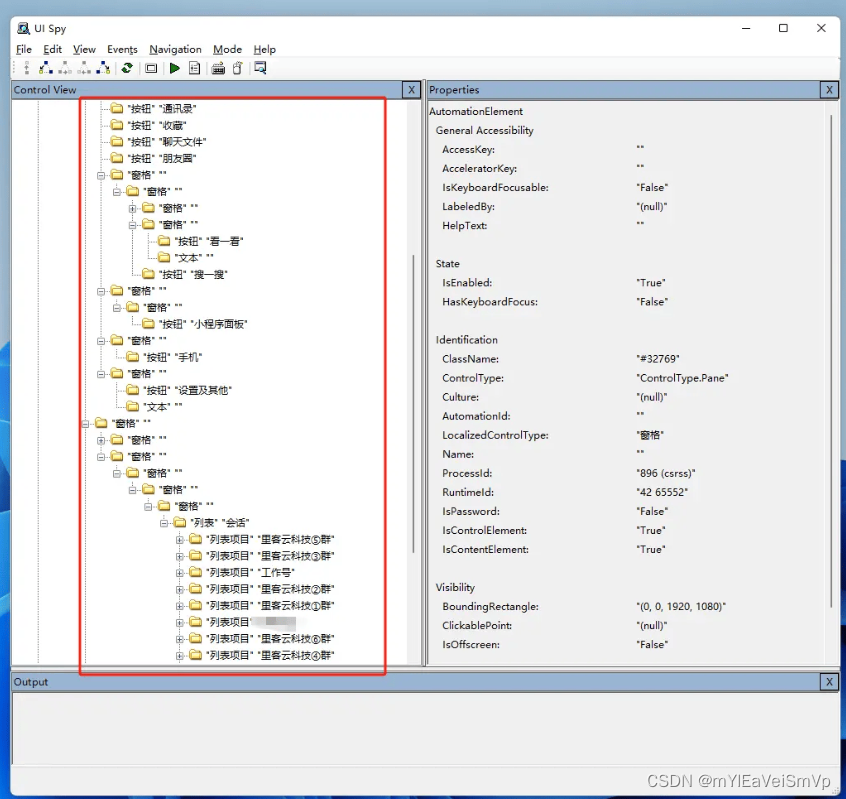
每2秒获取一次UI控件的内容,实测挂在后台对CPU和内存占用并无明显影响,结合Python uiautomation的各种用法,可以做成自动回复的功能。使用这款软件,可以获取到微信电脑版大部分控件的内容。例如:微信聊天列表、群名称、好友微信昵称、群人数、微信号等。
还可以获取到群内的每一条聊天内容,获取到你跟好友的聊天记录。
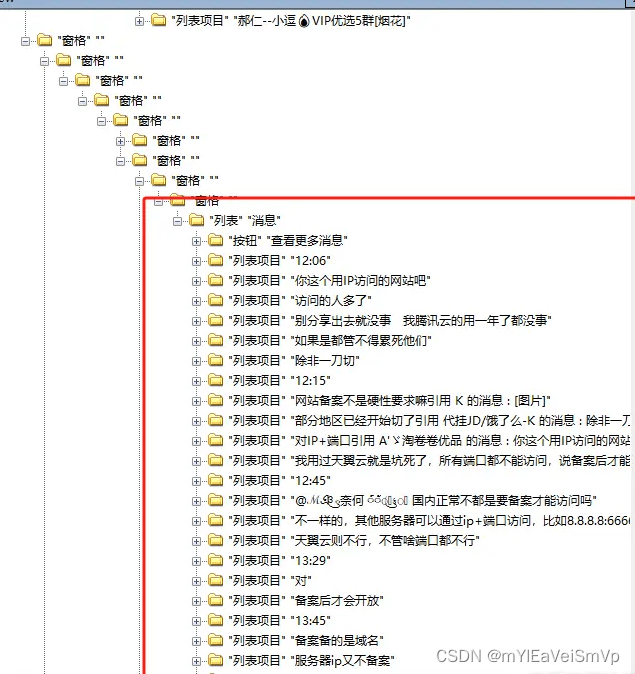 只要 UISpy.exe 可获取到的控件内容,那么你用 Python就可以获取到。
拓展
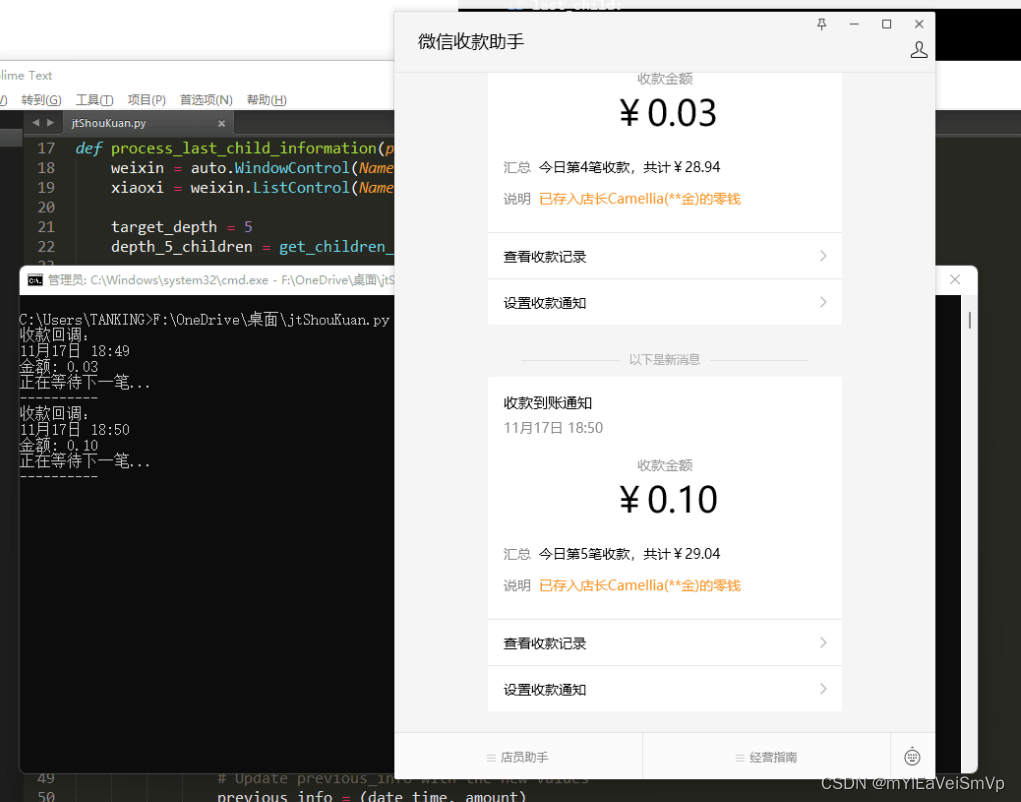
还可以用来做收款监控。将【微信收款助手】这个公众号单独窗口出来,然后监控这个窗口。
妥妥的实现了一个PC收款监控。可以用来做收款码的支付回调。
import uiautomation as auto
import re
import time

def get_children_at_depth(control, target_depth, current_depth=0):
    children = control.GetChildren()
    result = []

    for child in children:
        if current_depth == target_depth:
            result.append(child)
        else:
            result.extend(get_children_at_depth(child, target_depth, current_depth + 1))

    return result

def process_last_child_information(previous_info):
    weixin = auto.WindowControl(Name="微信收款助手", ClassName="ChatWnd")
    xiaoxi = weixin.ListControl(Name="消息")

    target_depth = 5
    depth_5_children = get_children_at_depth(xiaoxi, target_depth)

    # 正则表达式模式
    pattern = r'收款到账通知(\d+月\d+日 \d+:\d+)收款金额¥([0-9.]+)汇总'

    last_child = None

    for child in depth_5_children:
        match = re.search(pattern, child.Name)
        if match:
            last_child = child  # 保存最后一条子控件的引用

    # 在循环结束后,提取最后一条子控件的信息
    if last_child:
        match = re.search(pattern, last_child.Name)
        if match:
            date_time = match.group(1)
            amount = match.group(2)

            # 监听下一笔
            if (date_time, amount) != previous_info:
                print("收款回调:")
                print(date_time)
                print("金额:", amount)
                print("正在等待下一笔...")
                print("----------")

                previous_info = (date_time, amount)

    return previous_info

# 循环
previous_info = None

while True:
    previous_info = process_last_child_information(previous_info)
    # 每2秒执行一次循环
    time.sleep(2)
请勿使用这种技术用于非法行为,仅供大家开发一写小工具自己用。
如果使用这种技术来进行违法行为所带来的责任自行负责,与工具、教程作者、发布的平台无关。
免责声明:我们致力于保护作者版权,注重分享,被刊用文章因无法核实真实出处,未能及时与作者取得联系,或有版权异议的,请联系管理员,我们会立即处理! 部分文章是来自自研大数据AI进行生成,内容摘自(百度百科,百度知道,头条百科,中国民法典,刑法,牛津词典,新华词典,汉语词典,国家院校,科普平台)等数据,内容仅供学习参考,不准确地方联系删除处理! 图片声明:本站部分配图来自人工智能系统AI生成,觅知网授权图片,PxHere摄影无版权图库和百度,360,搜狗等多加搜索引擎自动关键词搜索配图,如有侵权的图片,请第一时间联系我们,邮箱:ciyunidc@ciyunshuju.com。本站只作为美观性配图使用,无任何非法侵犯第三方意图,一切解释权归图片著作权方,本站不承担任何责任。如有恶意碰瓷者,必当奉陪到底严惩不贷!


