
【unity实战】使用unity制作一个类似Rust的3D生存建造建筑系统,具有很好的吸附性(附项目源码)
文章目录
- 先看看最终效果
- 配置连接点
- 配置不同状态不同颜色的材质
- 连接器控制
- 建造系统代码
- 效果
- 源码
- 参考
- 完结
先看看最终效果

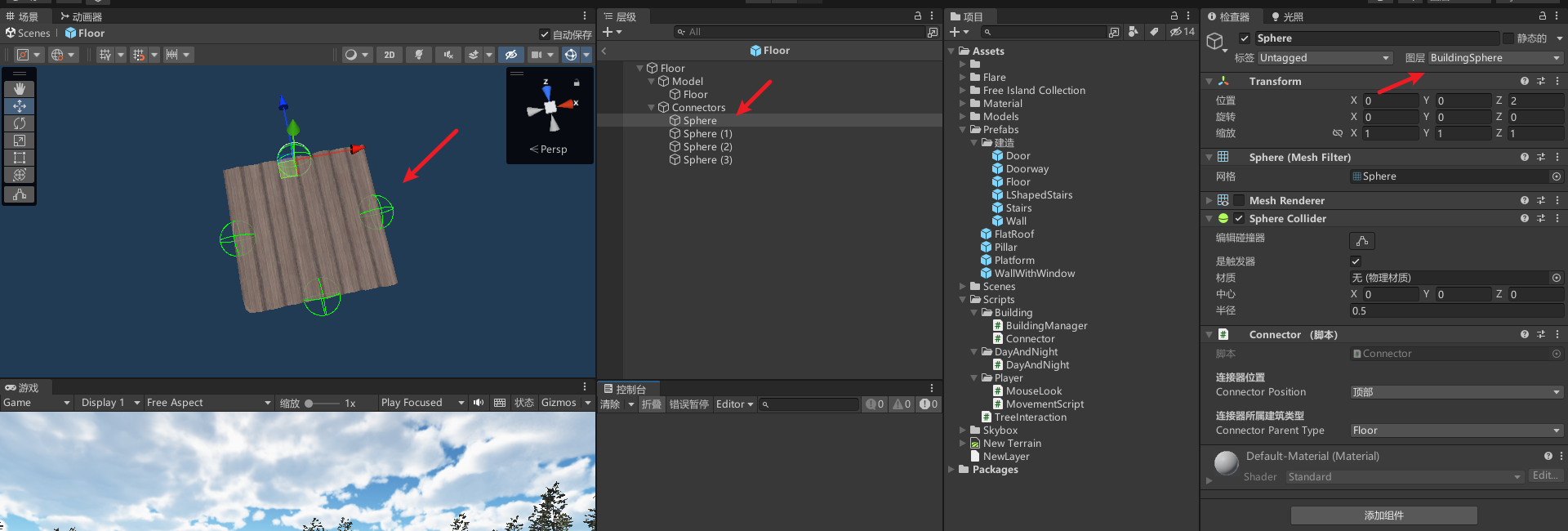
配置连接点
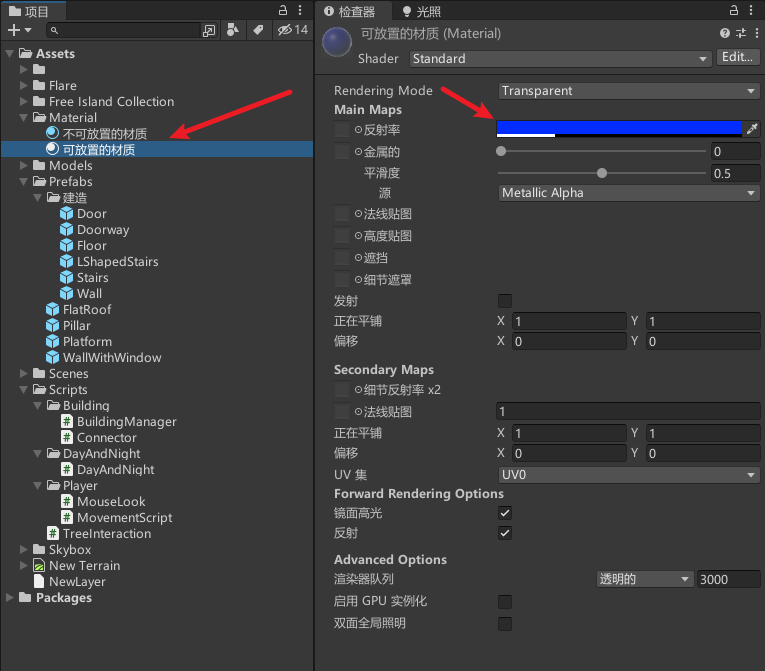
配置不同状态不同颜色的材质
连接器控制
public class Connector : MonoBehaviour
{
    [Header("连接器位置")]
    public ConnectorPosition connectorPosition;
    [Header("连接器所属建筑类型")]
    public SelectedBuildType connectorParentType;
    [Header("是否可以连接地面")]
    private bool canConnectToFloor = true;
    [Header("是否可以连接墙壁")]
    private bool canConnectToWall = true;
    [HideInInspector] public bool isConnectedToFloor = false; // 是否连接到地面
    [HideInInspector] public bool isConnectedToWall = false; // 是否连接到墙壁
    [HideInInspector] public bool canConnectTo = true; // 是否可以连接其他建筑
    //在场景中绘制连接器的可视化表示
    private void OnDrawGizmos()
    {
        // 根据 canConnectTo 变量设置颜色
        Gizmos.color = isConnectedToFloor ? (isConnectedToFloor ? Color.red : Color.blue) : (!isConnectedToWall ? Color.green : Color.yellow);
        // 在连接器位置绘制一个圆形表示连接状态
        Gizmos.DrawWireSphere(transform.position, transform.lossyScale.x / 2f);
    }
    // 更新连接器和附近的其他连接器的连接状态
    public void updateConnectors(bool rootCall = false)
    {
        Collider[] colliders = Physics.OverlapSphere(transform.position, transform.lossyScale.x / 2f); // 获取连接范围内的所有碰撞体
        isConnectedToFloor = !canConnectToFloor;
        isConnectedToWall = !canConnectToWall;
        foreach (Collider collider in colliders)
        {
            // 忽略自身的碰撞体
            if (collider.GetInstanceID() == GetComponent().GetInstanceID())
            {
                continue;
            }
            //忽略处于非激活状态的碰撞体
            if (!collider.gameObject.activeInHierarchy)
            {
                continue;
            }
            if (collider.gameObject.layer == gameObject.layer)
            {

                // 获取相邻连接器的信息
                Connector foundConnector = collider.GetComponent();
                if(!foundConnector) continue;
                // 如果相邻连接器是地面连接器,则更新 isConnectedToFloor 为 true
                if (foundConnector.connectorParentType == SelectedBuildType.floor)
                    isConnectedToFloor = true;
                // 如果相邻连接器是墙壁连接器,则更新 isConnectedToWall 为 true
                if (foundConnector.connectorParentType == SelectedBuildType.wall)
                    isConnectedToWall = true;
                // 如果是根调用,则继续递归更新相邻连接器的状态
                if (rootCall)
                    foundConnector.updateConnectors();
            }
        }
        // 根据连接状态更新 canConnectTo 的值
        canConnectTo = true;
        if (isConnectedToFloor && isConnectedToWall)
        {
            canConnectTo = false;
        }
    }
}
// 连接器位置枚举
[System.Serializable]
public enum ConnectorPosition
{
    left, // 左侧
    right, // 右侧
    top, // 顶部
    bottom // 底部
}
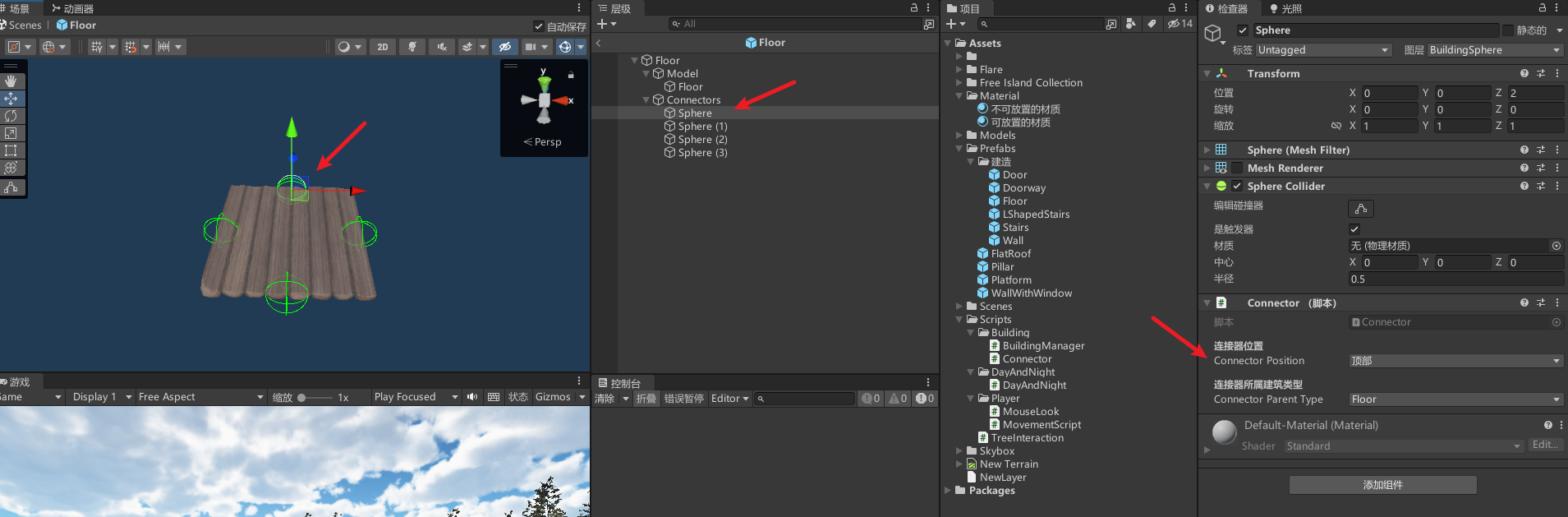
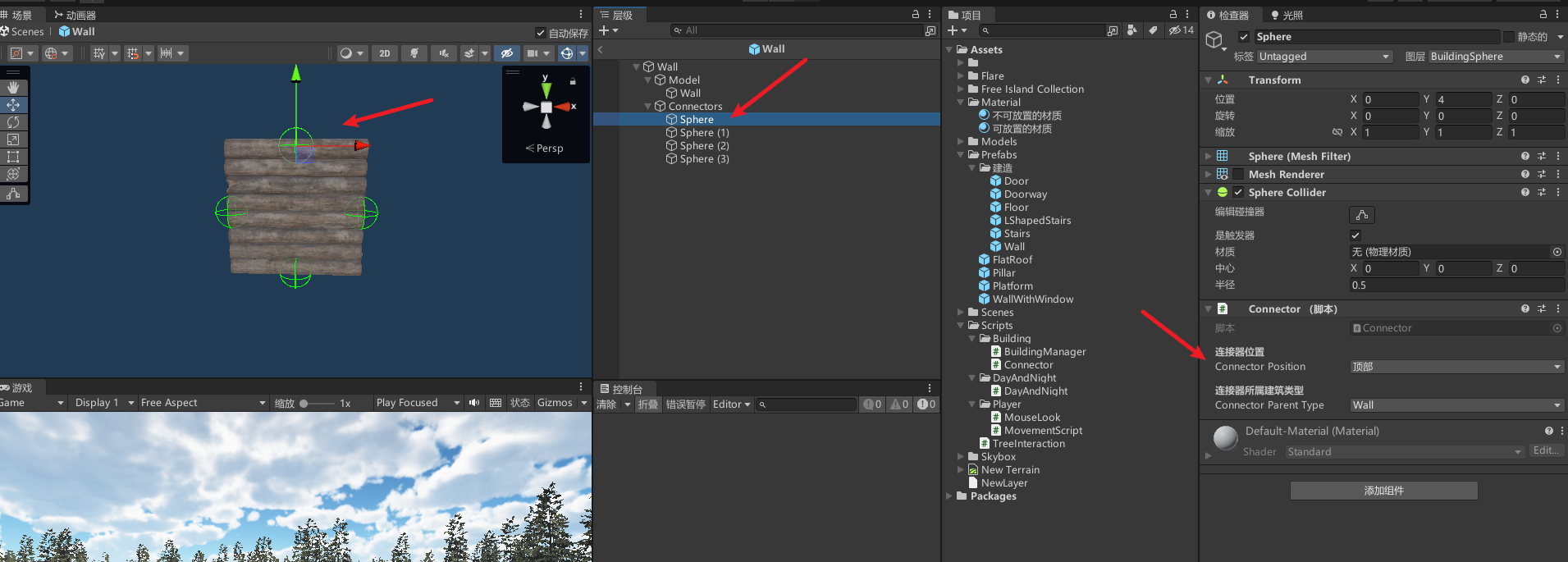
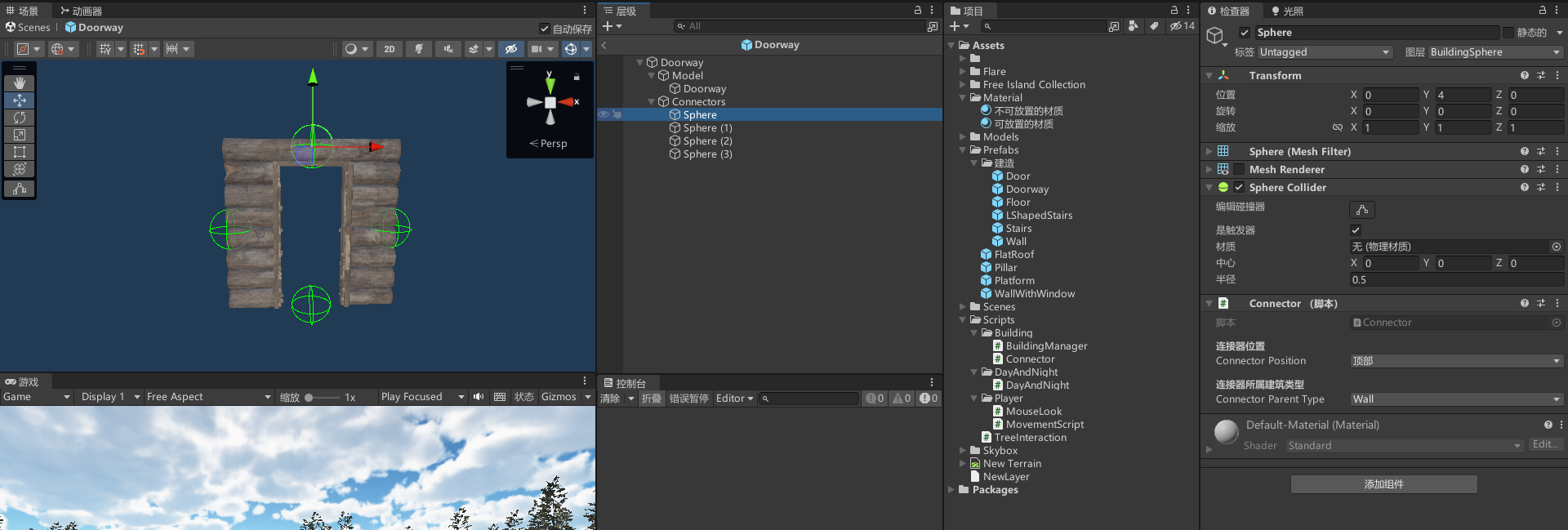
配置,注意xyz轴朝向不要弄错了,以此来定连接器位置
建造系统代码
public class BuildingManager : MonoBehaviour
{
    [Header("建筑物对象列表")]
    [SerializeField] private List floorObjects = new List();  // 地板建筑物的列表
    [SerializeField] private List wallObjects = new List();   // 墙壁建筑物的列表
    [Header("建筑设置")]
    [SerializeField] private SelectedBuildType currentBuildType;   // 当前选中的建筑类型
    [SerializeField] private LayerMask connectorLayer;   // 连接器所在的层
    [Header("鬼影设置")]
    [SerializeField] private Material ghostMaterialValid;   // 鬼影建筑物有效时的材质
    [SerializeField] private Material ghostMaterialInvalid;   // 鬼影建筑物无效时的材质
    [SerializeField] private float connectorOverlapRadius = 1f;   // 寻找附近连接器的检测半径
    [SerializeField] private float maxGroundAngle = 45f;   // 地面的最大可放置倾斜角度
    [SerializeField] private float placementDistance = 20f;   // 放置距离
    [Header("内部状态")]
    [SerializeField] private bool isBuilding = false;   // 是否正在建造中
    [SerializeField] private int currentBuildingIndex;   // 当前建造物的索引
    private GameObject ghostBuildGameobject;   // 鬼影建筑物对象
    private bool isGhostInValidPosition = false;   // 鬼影建筑物是否在有效位置
    private Transform ModelParent = null;   // 模型父对象的Transform
    [Header("拆除设置")]
    [SerializeField] private bool isDestroying = false;   // 是否在拆除建筑物
    private Transform lastHitDestroyTransform;   // 上次点击的拆除目标的Transform
    private List lastHitMaterials = new List();   // 上次点击的拆除目标的材质列表
    private void Update()
    {
        // 遍历数字1到7
        for (int i = 1; i
            // 检查是否按下对应的数字键
            if (Input.GetKeyDown(KeyCode.Alpha0 + i))
            {
                select(i);
            }
        }
        if (Input.GetKeyDown(KeyCode.X))   // 按下X键切换拆除模式
            isDestroying = !isDestroying;
        if (isBuilding && !isDestroying)   // 如果正在建造且不在拆除状态
        {
            ghostBuild();   // 显示鬼影建筑物
            if (Input.GetMouseButtonDown(0)) placeBuild();   // 点击鼠标左键放置建筑物
        }
        else if (ghostBuildGameobject)   // 如果没有在建造且鬼影建筑物存在,则销毁鬼影建筑物对象
        {
            Destroy(ghostBuildGameobject);
            ghostBuildGameobject = null;
        }
        if (isDestroying)   // 如果在拆除状态
        {
            ghostDestroy();   // 显示拆除的鬼影效果
            if (Input.GetMouseButtonDown(0)) destroyBuild();   // 点击鼠标左键拆除建筑物
        }
    }
    //选择建造测试
    void select(int number)
    {
        isBuilding = !isBuilding;
        if (number == 1)
        {
            currentBuildingIndex = 0;
            currentBuildType = SelectedBuildType.floor;
        }
        if (number == 2)
        {
            currentBuildingIndex = 1;
            currentBuildType = SelectedBuildType.floor;
        }
        if (number == 3)
        {
            currentBuildingIndex = 0;
            currentBuildType = SelectedBuildType.wall;
        }
        if (number == 4)
        {
            currentBuildingIndex = 1;
            currentBuildType = SelectedBuildType.wall;
        }
        if (number == 5)
        {
            currentBuildingIndex = 2;
            currentBuildType = SelectedBuildType.wall;
        }
        if (number == 6)
        {
            currentBuildingIndex = 3;
            currentBuildType = SelectedBuildType.wall;
        }
    }
    private void ghostBuild()
    {
        GameObject currentBuild = getCurrentBuild();   // 获取当前建筑物类型
        createGhostPrefab(currentBuild);   // 创建鬼影建筑物
        moveGhostPrefabToRaycast();   // 将鬼影建筑物移动到光线投射点
        checkBuildValidity();   // 检查建筑物的有效性
    }
    //创建鬼影建筑物
    private void createGhostPrefab(GameObject currentBuild)
    {
        if (ghostBuildGameobject == null)   // 如果鬼影建筑物对象不存在,则创建
        {
            ghostBuildGameobject = Instantiate(currentBuild);
            ModelParent = ghostBuildGameobject.transform.GetChild(0);   // 获取模型父对象的Transform
            ghostifyModel(ModelParent, ghostMaterialValid);   // 设置模型为鬼影材质
            ghostifyModel(ghostBuildGameobject.transform);   // 设置建筑物为鬼影材质
        }
    }
    //将鬼影建筑物移动到光线投射点
    private void moveGhostPrefabToRaycast()
    {
        Ray ray = Camera.main.ScreenPointToRay(Input.mousePosition);
        RaycastHit hit;
        if (Physics.Raycast(ray, out hit, placementDistance))   // 光线投射检测
        {
            ghostBuildGameobject.transform.position = hit.point;   // 将鬼影建筑物移动到光线投射点
        }
    }
    //检查建筑物的有效性
    private void checkBuildValidity()
    {
        Collider[] colliders = Physics.OverlapSphere(ghostBuildGameobject.transform.position, connectorOverlapRadius, connectorLayer);   // 检测鬼影建筑物附近的连接器碰撞体
        if (colliders.Length  0)   // 如果有连接器碰撞体
        {
            ghostConnectBuild(colliders);   // 连接鬼影建筑物到连接器上
        }
        else   // 如果没有连接器碰撞体
        {
            ghostSeparateBuild();   // 鬼影建筑物与连接器分离
            if (isGhostInValidPosition)   // 如果鬼影建筑物在有效位置
            {
                Collider[] overlapColliders = Physics.OverlapBox(ghostBuildGameobject.transform.position, new Vector3(2f, 2f, 2f), ghostBuildGameobject.transform.rotation);   // 检测鬼影建筑物周围是否与其他物体重叠
                foreach (Collider overlapCollider in overlapColliders)
                {
                    if (overlapCollider.gameObject != ghostBuildGameobject && overlapCollider.transform.root.CompareTag("Buildables"))   // 如果与其他可建造物体重叠,则设置鬼影建筑物为无效状态
                    {
                        ghostifyModel(ModelParent, ghostMaterialInvalid);
                        isGhostInValidPosition = false;
                        return;
                    }
                }
            }
        }
    }
    // 连接鬼影建筑物到连接器上
    private void ghostConnectBuild(Collider[] colliders)
    {
        Connector bestConnector = null;
        foreach (Collider collider in colliders)   // 遍历连接器碰撞体
        {
            Connector connector = collider.GetComponent();
            if (connector && connector.canConnectTo)   // 如果连接器存在且可连接
            {
                bestConnector = connector;
                break;
            }
        }
        if (bestConnector == null || currentBuildType == SelectedBuildType.floor && bestConnector.isConnectedToFloor || currentBuildType == SelectedBuildType.wall && bestConnector.isConnectedToWall)   // 如果没有找到合适的连接器或者当前建筑类型与连接器不匹配,则设置鬼影建筑物为无效状态
        {
            // 如果建筑无法连接或连接不合法,则将建筑模型设为不可放置的材质
            ghostifyModel(ModelParent, ghostMaterialInvalid);
            isGhostInValidPosition = false;
            return;
        }
        snapGhostPrefabToConnector(bestConnector);   // 将鬼影建筑物对齐到连接器上
    }
    //将鬼影建筑物对齐到连接器上
    private void snapGhostPrefabToConnector(Connector connector)
    {
        Transform ghostConnector = findSnapConnector(connector.transform, ghostBuildGameobject.transform.GetChild(1));   // 查找鬼影建筑物中对应的连接器
        ghostBuildGameobject.transform.position = connector.transform.position - (ghostConnector.position - ghostBuildGameobject.transform.position);   // 将鬼影建筑物移动到连接器位置
        if (currentBuildType == SelectedBuildType.wall)   // 如果当前建筑类型为墙壁,则调整鬼影建筑物的旋转角度
        {
            Quaternion newRotation = ghostBuildGameobject.transform.rotation;
            newRotation.eulerAngles = new Vector3(newRotation.eulerAngles.x, connector.transform.rotation.eulerAngles.y, newRotation.eulerAngles.z);
            ghostBuildGameobject.transform.rotation = newRotation;
        }
        // 将建筑模型设为可放置的材质
        ghostifyModel(ModelParent, ghostMaterialValid);
        isGhostInValidPosition = true;
    }
    // 鬼影建筑物与连接器分离
    private void ghostSeparateBuild()
    {
        Ray ray = Camera.main.ScreenPointToRay(Input.mousePosition);
        RaycastHit hit;
        if (Physics.Raycast(ray, out hit))
        {
            if (currentBuildType == SelectedBuildType.wall) // 如果当前建筑类型为墙,则将建筑模型设为不可放置的材质
            {
                ghostifyModel(ModelParent, ghostMaterialInvalid);
                isGhostInValidPosition = false;
                return;
            }
            if (Vector3.Angle(hit.normal, Vector3.up) = ghostBuildGameobject.transform.position.z ? ConnectorPosition.bottom : ConnectorPosition.top;
        }
        else
        {
            // 否则,根据玩家位置返回左侧或右侧连接点
            return cameraTransform.position.x >= ghostBuildGameobject.transform.position.x ? ConnectorPosition.left : ConnectorPosition.right;
        }
    }
    // 修改模型为鬼影材质
    private void ghostifyModel(Transform modelParent, Material ghostMaterial = null)
    {
        // 如果提供了鬼影材质,将模型的材质设为鬼影材质
        if (ghostMaterial != null)
        {
            foreach (MeshRenderer meshRenderer in modelParent.GetComponentsInChildren())
            {
                meshRenderer.material = ghostMaterial;
            }
        }
        else
        {
            // 否则,禁用模型的碰撞器
            foreach (Collider modelColliders in modelParent.GetComponentsInChildren())
            {
                modelColliders.enabled = false;
            }
        }
    }
    // 获取当前建筑对象
    private GameObject getCurrentBuild()
    {
        switch (currentBuildType)
        {
            case SelectedBuildType.floor:
                return floorObjects[currentBuildingIndex];
            case SelectedBuildType.wall:
                return wallObjects[currentBuildingIndex];
        }
        return null;
    }
    // 放置建筑
    private void placeBuild()
    {
        // 如果鬼影模型存在且在有效位置上
        if (ghostBuildGameobject != null & isGhostInValidPosition)
        {
            // 在鼠标指针位置实例化新的建筑物并销毁鬼影模型
            GameObject newBuild = Instantiate(getCurrentBuild(), ghostBuildGameobject.transform.position, ghostBuildGameobject.transform.rotation);
            Destroy(ghostBuildGameobject);
            ghostBuildGameobject = null;
            isBuilding = false;
            // 更新新建筑物的连接点
            foreach (Connector connector in newBuild.GetComponentsInChildren())
            {
                connector.updateConnectors(true);
            }
        }
    }
    //显示拆除的鬼影效果
    private void ghostDestroy()
    {
        Ray ray = Camera.main.ScreenPointToRay(Input.mousePosition);
        RaycastHit hit;
        if (Physics.Raycast(ray, out hit))
        {
            if (hit.transform.root.CompareTag("Buildables")) // 判断是否是可建造的对象
            {
                if (!lastHitDestroyTransform) // 如果上一次点击的建筑物为空,则记录当前点击的建筑物
                {
                    lastHitDestroyTransform = hit.transform.root;
                    lastHitMaterials.Clear();
                    // 获取建筑物的所有 MeshRenderer 组件的材质,并添加到材质列表
                    foreach (MeshRenderer meshRenderer in lastHitDestroyTransform.GetComponentsInChildren())
                    {
                        lastHitMaterials.Add(meshRenderer.material);
                    }
                    // 将建筑物设置为鬼影材质
                    ghostifyModel(lastHitDestroyTransform.GetChild(0), ghostMaterialInvalid);
                }
                else if (hit.transform.root != lastHitDestroyTransform) // 如果当前点击的建筑物与上次不同,则重置上一次点击的建筑物
                {
                    resetLastHitDestroyTransform();
                }
            }
            else // 如果点击的不是可建造的对象,则重置上一次点击的建筑物
            {
                resetLastHitDestroyTransform();
            }
        }
    }
    //重置上一个选中的建筑的材质
    private void resetLastHitDestroyTransform()
    {
        int counter = 0;
        foreach (MeshRenderer meshRenderer in lastHitDestroyTransform.GetComponentsInChildren())
        {
            meshRenderer.material = lastHitMaterials[counter];
            counter++;
        }
        lastHitDestroyTransform = null;
    }
    //拆除建筑物
    private void destroyBuild()
    {
        if (lastHitDestroyTransform)
        {
            // 禁用建筑物的所有连接点
            foreach (Connector connector in lastHitDestroyTransform.GetComponentsInChildren())
            {
                connector.gameObject.SetActive(false);
                connector.updateConnectors(true);
            }
            Destroy(lastHitDestroyTransform.gameObject); // 销毁建筑物
            isDestroying = false;
            lastHitDestroyTransform = null;
        }
    }
}
// 建筑类型枚举
[System.Serializable]
public enum SelectedBuildType
{
    floor,//地面
    wall//墙
}
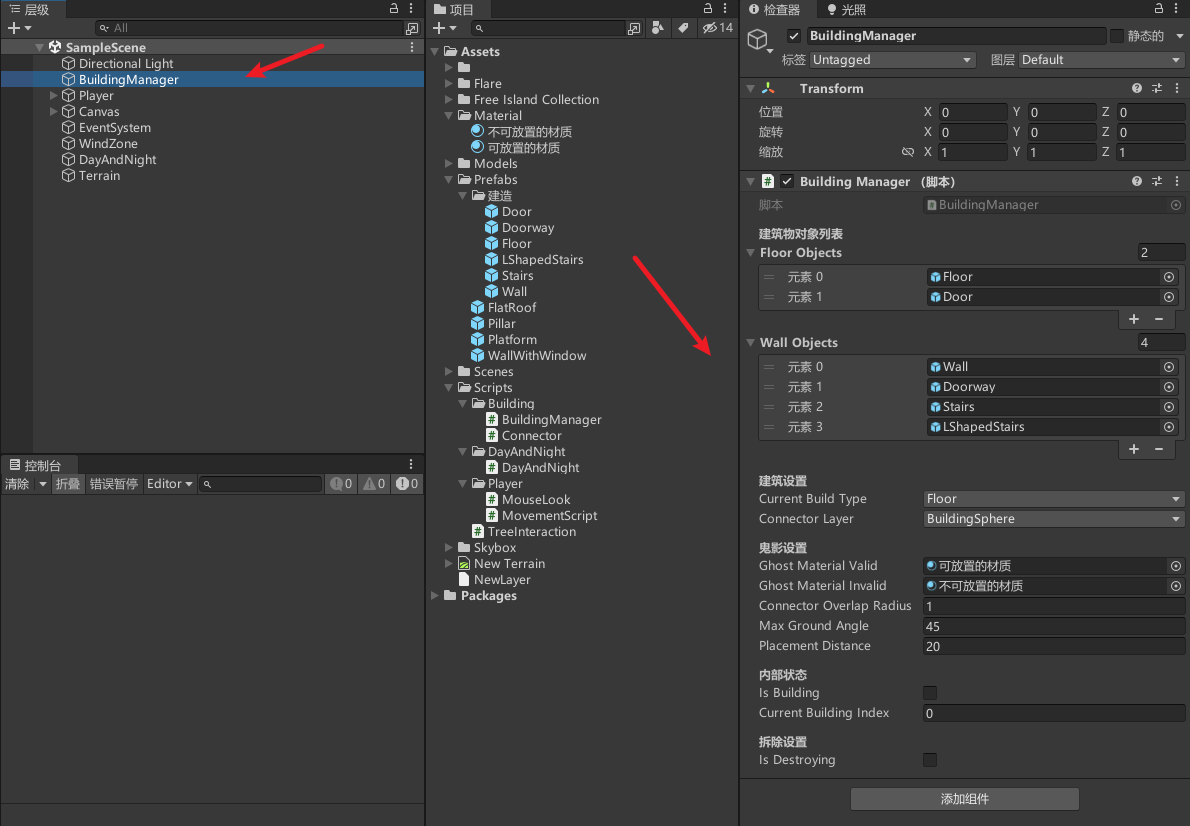
配置
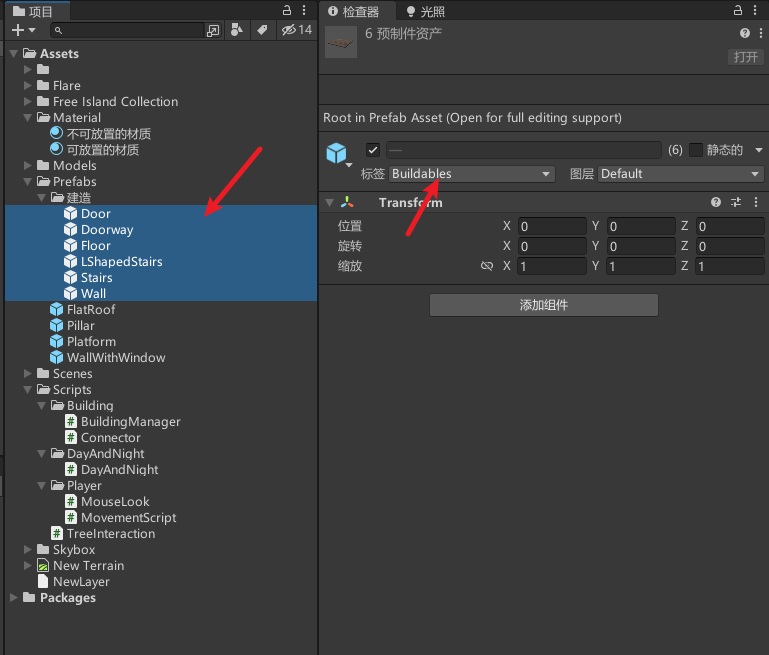
记得修改建筑的Tag
效果
数字键盘1~7切换建筑
按x进行拆除建筑模式,点击鼠标左键拆除建筑
源码
https://gitcode.net/unity1/3dbuildsystem
参考
https://www.youtube.com/watch?v=IYUhB97FqXo
完结
赠人玫瑰,手有余香!如果文章内容对你有所帮助,请不要吝啬你的点赞评论和关注,以便我第一时间收到反馈,你的每一次支持都是我不断创作的最大动力。当然如果你发现了文章中存在错误或者有更好的解决方法,也欢迎评论私信告诉我哦!
好了,我是向宇,https://xiangyu.blog.csdn.net
一位在小公司默默奋斗的开发者,出于兴趣爱好,最近开始自学unity,闲暇之余,边学习边记录分享,站在巨人的肩膀上,通过学习前辈们的经验总是会给我很多帮助和启发!php是工作,unity是生活!如果你遇到任何问题,也欢迎你评论私信找我, 虽然有些问题我也不一定会,但是我会查阅各方资料,争取给出最好的建议,希望可以帮助更多想学编程的人,共勉~

文章版权声明:除非注明,否则均为主机测评原创文章,转载或复制请以超链接形式并注明出处。


