
【Java】SpringBoot中实现Redis Stream队列
SpringBoot实现Redis Stream队列
前言
简单实现一下在SpringBoot中操作Redis Stream队列的方式,监听队列中的消息进行消费。
jdk:1.8
springboot-version:2.6.3
redis:5.0.1(5版本以上才有Stream队列)
准备工作
1pom
redis 依赖包(version 2.6.3)
            org.projectlombok
            lombok


            org.springframework.boot
            spring-boot-starter-data-redis
2 yml
spring:
  redis:
    database: 0
    host: 127.0.0.1
3 RedisStreamUtil工具类
import org.springframework.beans.factory.annotation.Autowired;
import org.springframework.data.redis.connection.stream.MapRecord;
import org.springframework.data.redis.connection.stream.StreamInfo;
import org.springframework.data.redis.connection.stream.StreamOffset;
import org.springframework.data.redis.core.RedisTemplate;
import org.springframework.stereotype.Component;
import java.util.List;
import java.util.Map;
@Component
public class RedisStreamUtil {
	@Autowired
	private RedisTemplate redisTemplate;
	/**
	 * 创建消费组
	 *
	 * @param key   键名称
	 * @param group 组名称
	 * @return {@link String}
	 */
	public String oup(String key, String group) {
		return redisTemplate.opsForStream().createGroup(key, group);
	}
	/**
	 * 获取消费者信息
	 *
	 * @param key   键名称
	 * @param group 组名称
	 * @return {@link StreamInfo.XInfoConsumers}
	 */
	public StreamInfo.XInfoConsumers queryConsumers(String key, String group) {
		return redisTemplate.opsForStream().consumers(key, group);
	}
	/**
	 * 查询组信息
	 *
	 * @param key 键名称
	 * @return
	 */
	public StreamInfo.XInfoGroups queryGroups(String key) {
		return redisTemplate.opsForStream().groups(key);
	}
	// 添加Map消息
	public String addMap(String key, Map value) {
		return redisTemplate.opsForStream().add(key, value).getValue();
	}
	// 读取消息
	public List read(String key) {
		return redisTemplate.opsForStream().read(StreamOffset.fromStart(key));
	}
	// 确认消费
	public Long ack(String key, String group, String... recordIds) {
		return redisTemplate.opsForStream().acknowledge(key, group, recordIds);
	}
	// 删除消息。当一个节点的所有消息都被删除,那么该节点会自动销毁
	public Long del(String key, String... recordIds) {
		return redisTemplate.opsForStream().delete(key, recordIds);
	}
	// 判断是否存在key
	public boolean hasKey(String key) {
		Boolean aBoolean = redisTemplate.hasKey(key);
		return aBoolean != null && aBoolean;
	}
}
代码实现
生产者发送消息
生产者发送消息,在Service层创建addMessage方法,往队列中发送消息。
代码中addMap()方法第一个参数为key,第二个参数为value,该key要和后续配置的保持一致,暂时先记住这个key。
@Service
@Slf4j
@RequiredArgsConstructor
public class RedisStreamMqServiceImpl implements RedisStreamMqService {
    private final RedisStreamUtil redisStreamUtil;
    /**
     * 发送一个消息
     *
     * @return {@code Object}
     */
    @Override
    public Object addMessage() {
        RedisUser redisUser = new RedisUser();
        redisUser.setAge(18);
        redisUser.setName("hcr");
        redisUser.setEmail("156ef561@gmail.com");
        Map message = new HashMap();
        message.put("user", redisUser);
        String recordId = redisStreamUtil.addMap("mystream", message);
        return recordId;
    }
}
controller接口方法
@RestController
@RequestMapping("/redis")
@Slf4j
@RequiredArgsConstructor
public class RedisController {
    private final RedisStreamMqService redisStreamMqService;
    @GetMapping("/addMessage")
    public Object addMessage() {
        return redisStreamMqService.addMessage();
    }
}
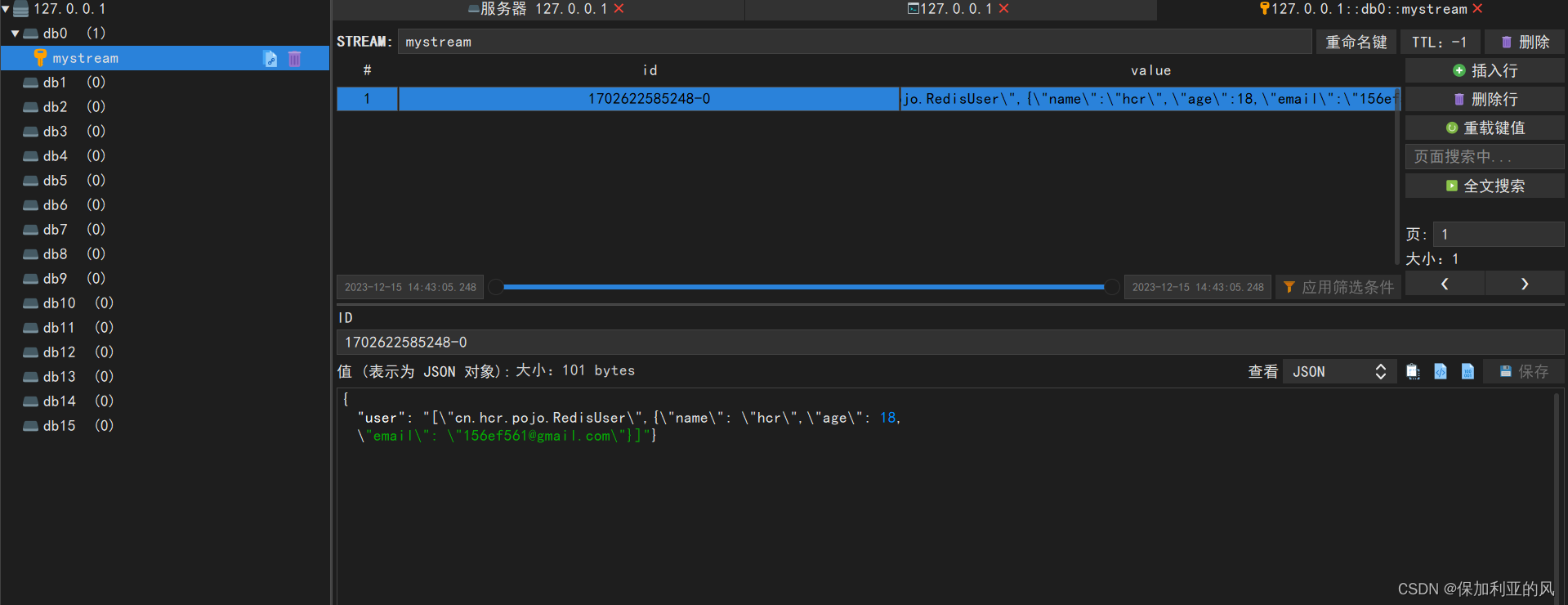
调用测试,查看redis中是否正常添加数据。
接口返回数据
1702622585248-0
查看redis中的数据
消费者监听消息进行消费
创建RedisConsumersListener监听器
import cn.hcr.utils.RedisStreamUtil;
import lombok.RequiredArgsConstructor;
import lombok.extern.slf4j.Slf4j;
import org.springframework.data.redis.connection.stream.MapRecord;
import org.springframework.data.redis.connection.stream.RecordId;
import org.springframework.data.redis.stream.StreamListener;
import org.springframework.stereotype.Component;
import java.util.Map;
@Component
@Slf4j
@RequiredArgsConstructor
public class RedisConsumersListener implements StreamListener {
    public final RedisStreamUtil redisStreamUtil;
    /**
     * 监听器
     *
     * @param message
     */
    @Override
    public void onMessage(MapRecord message) {
        // stream的key值
        String streamKey = message.getStream();
        //消息ID
        RecordId recordId = message.getId();
        //消息内容
        Map msg = message.getValue();
        log.info("【streamKey】= " + streamKey + ",【recordId】= " + recordId + ",【msg】=" + msg);
        //处理逻辑
        //逻辑处理完成后,ack消息,删除消息,group为消费组名称
        StreamInfo.XInfoGroups xInfoGroups = redisStreamUtil.queryGroups(streamKey);
        xInfoGroups.forEach(xInfoGroup -> redisStreamUtil.ack(streamKey, xInfoGroup.groupName(), recordId.getValue()));
        redisStreamUtil.del(streamKey, recordId.getValue());
    }
}
创建RedisConfig配置类,配置监听
package cn.hcr.config;
import cn.hcr.listener.RedisConsumersListener;
import cn.hcr.utils.RedisStreamUtil;
import com.fasterxml.jackson.annotation.JsonAutoDetect;
import com.fasterxml.jackson.annotation.PropertyAccessor;
import com.fasterxml.jackson.databind.ObjectMapper;
import lombok.extern.slf4j.Slf4j;
import lombok.var;
import org.springframework.context.annotation.Bean;
import org.springframework.context.annotation.Configuration;
import org.springframework.data.redis.connection.RedisConnectionFactory;
import org.springframework.data.redis.connection.stream.Consumer;
import org.springframework.data.redis.connection.stream.MapRecord;
import org.springframework.data.redis.connection.stream.ReadOffset;
import org.springframework.data.redis.connection.stream.StreamOffset;
import org.springframework.data.redis.core.RedisTemplate;
import org.springframework.data.redis.serializer.Jackson2JsonRedisSerializer;
import org.springframework.data.redis.serializer.StringRedisSerializer;
import org.springframework.data.redis.stream.StreamMessageListenerContainer;
import org.springframework.data.redis.stream.Subscription;
import javax.annotation.Resource;
import java.time.Duration;
import java.util.HashMap;
import java.util.Map;
import java.util.concurrent.LinkedBlockingDeque;
import java.util.concurrent.ThreadPoolExecutor;
import java.util.concurrent.TimeUnit;
import java.util.concurrent.atomic.AtomicInteger;
@Configuration
@Slf4j
public class RedisConfig {
    @Resource
    private RedisStreamUtil redisStreamUtil;
    /**
     * redis序列化
     *
     * @param redisConnectionFactory
     * @return {@code RedisTemplate}
     */
    @Bean
    public RedisTemplate redisTemplate(RedisConnectionFactory redisConnectionFactory) {
        RedisTemplate template = new RedisTemplate();
        template.setConnectionFactory(redisConnectionFactory);
        Jackson2JsonRedisSerializer jackson2JsonRedisSerializer = new Jackson2JsonRedisSerializer(Object.class);
        ObjectMapper om = new ObjectMapper();
        om.setVisibility(PropertyAccessor.ALL, JsonAutoDetect.Visibility.ANY);
        om.enableDefaultTyping(ObjectMapper.DefaultTyping.NON_FINAL);
        jackson2JsonRedisSerializer.setObjectMapper(om);
        StringRedisSerializer stringRedisSerializer = new StringRedisSerializer();
        template.setKeySerializer(stringRedisSerializer);
        template.setHashKeySerializer(stringRedisSerializer);
        template.setValueSerializer(jackson2JsonRedisSerializer);
        template.setHashValueSerializer(jackson2JsonRedisSerializer);
        template.afterPropertiesSet();
        return template;
    }
    @Bean
    public Subscription subscription(RedisConnectionFactory factory) {
        AtomicInteger index = new AtomicInteger(1);
        int processors = Runtime.getRuntime().availableProcessors();
        ThreadPoolExecutor executor = new ThreadPoolExecutor(processors, processors, 0, TimeUnit.SECONDS,
                new LinkedBlockingDeque(), r -> {
            Thread thread = new Thread(r);
            thread.setName("async-stream-consumer-" + index.getAndIncrement());
            thread.setDaemon(true);
            return thread;
        });
        StreamMessageListenerContainer.StreamMessageListenerContainerOptions options =
                StreamMessageListenerContainer
                        .StreamMessageListenerContainerOptions
                        .builder()
                        // 一次最多获取多少条消息
                        .batchSize(5)
                        .executor(executor)
                        .pollTimeout(Duration.ofSeconds(1))
                        .errorHandler(throwable -> {
                            log.error("[MQ handler exception]", throwable);
                            throwable.printStackTrace();
                        })
                        .build();

        //该key和group可根据需求自定义配置
        String streamName = "mystream";
        String groupname = "mygroup";
        initStream(streamName, groupname);
        var listenerContainer = StreamMessageListenerContainer.create(factory, options);
        // 手动ask消息
        Subscription subscription = listenerContainer.receive(Consumer.from(groupname, "zhuyazhou"),
                StreamOffset.create(streamName, ReadOffset.lastConsumed()), new RedisConsumersListener(redisStreamUtil));
        // 自动ask消息
           /* Subscription subscription = listenerContainer.receiveAutoAck(Consumer.from(redisMqGroup.getName(), redisMqGroup.getConsumers()[0]),
                    StreamOffset.create(streamName, ReadOffset.lastConsumed()), new ReportReadMqListener());*/
        listenerContainer.start();
        return subscription;
    }
    private void initStream(String key, String group) {
        boolean hasKey = redisStreamUtil.hasKey(key);
        if (!hasKey) {
            Map map = new HashMap(1);
            map.put("field", "value");
            //创建主题
            String result = redisStreamUtil.addMap(key, map);
            //创建消费组
            redisStreamUtil.oup(key, group);
            //将初始化的值删除掉
            redisStreamUtil.del(key, result);
            log.info("stream:{}-group:{} initialize success", key, group);
        }
    }
}
redisTemplate:该bean用于配置redis序列化
subscription:配置监听
initStream:初始化消费组
监听测试
使用addMessage()方法投送一条消息后,查看控制台输出信息。
【streamKey】= mystream,
【recordId】= 1702623008044-0,
【msg】=
{user=[
    "cn.hcr.pojo.RedisUser",
    {"name":"hcr","age":18,"email":"156ef561@gmail.com"}
    ]
}
总结
以上就是在SpringBoot中简单实现Redis Stream队列的Demo,如有需要源码或者哪里不清楚的请评论或者发送私信。
Template:该bean用于配置redis序列化
subscription:配置监听
initStream:初始化消费组
免责声明:我们致力于保护作者版权,注重分享,被刊用文章因无法核实真实出处,未能及时与作者取得联系,或有版权异议的,请联系管理员,我们会立即处理! 部分文章是来自自研大数据AI进行生成,内容摘自(百度百科,百度知道,头条百科,中国民法典,刑法,牛津词典,新华词典,汉语词典,国家院校,科普平台)等数据,内容仅供学习参考,不准确地方联系删除处理! 图片声明:本站部分配图来自人工智能系统AI生成,觅知网授权图片,PxHere摄影无版权图库和百度,360,搜狗等多加搜索引擎自动关键词搜索配图,如有侵权的图片,请第一时间联系我们,邮箱:ciyunidc@ciyunshuju.com。本站只作为美观性配图使用,无任何非法侵犯第三方意图,一切解释权归图片著作权方,本站不承担任何责任。如有恶意碰瓷者,必当奉陪到底严惩不贷!


