
ECharts 饼图颜色设置教程 - 4 种方式设置饼图颜色
ECharts 饼状图颜色设置教程
- 方法一:在 series 内配置饼状图颜色
- 方法二:在 option 内配置饼状图颜色
- 方法三:在 data 内配置饼状图颜色
- 方法四:配置 ECharts 饼状图随机颜色
Charts 饼状图中的每个扇形颜色其实都可以自定义或者随机显示颜色。本文讲解 4 种配置修改 ECharts 饼图颜色的方法。
方法一:在 series 内配置饼状图颜色
series: [
  itemStyle: {
    normal: {
      color: function (colors) {
         var colorList = [
                    '#fc8251',
                    '#5470c6',
                    '#9A60B4',
                    '#ef6567',
                    '#f9c956',
                    '#3BA272'
                  ];
         return colorList[colors.dataIndex];
       }
     },
   }
 ]
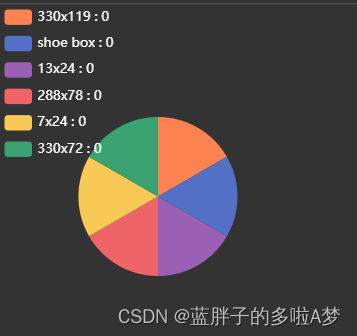
EChart.js 在 series 中设置饼状图颜色的 Demo 源代码:
 this.chart.setOption({
        legend: {
          orient: "vertical",
          left: "left",
          textStyle: {
            //图例中文字的样式
            color: "#ffffff",
            fontSize: 12,
          },
        },
        series: [
          {
            type: "pie",
            radius: "50%",
            data: this.optionData,
            emphasis: {
              itemStyle: {
                shadowBlur: 10,
                shadowOffsetX: 0,
                shadowColor: "rgba(0, 0, 0, 0.5)",
              },
            },
            labelLine: {
              show: false, //隐藏指示线
            },
            label: {
              show: false, //隐藏标示文字
            },
            itemStyle: {
              normal: {
                color: function (colors) {
                  var colorList = [
                    '#fc8251',
                    '#5470c6',
                    '#9A60B4',
                    '#ef6567',
                    '#f9c956',
                    '#3BA272'
                  ];
                  return colorList[colors.dataIndex];
                }
              },
            }
          },
        ],
      });
效果
方法二:在 option 内配置饼状图颜色
 this.chart.setOption({
        legend: {
          orient: "vertical",
          left: "left",
          textStyle: {
            //图例中文字的样式
            color: "#ffffff",
            fontSize: 12,
          },
        },
        color:['#fc8251','#5470c6','#9A60B4','#ef6567', '#f9c956','#3BA272'];
        series: [
          {
            type: "pie",
            radius: "50%",
            data: this.optionData,
            emphasis: {
              itemStyle: {
                shadowBlur: 10,
                shadowOffsetX: 0,
                shadowColor: "rgba(0, 0, 0, 0.5)",
              },
            },
            labelLine: {
              show: false, //隐藏指示线
            },
            label: {
              show: false, //隐藏标示文字
            },
          },
        ],
      });
方法三:在 data 内配置饼状图颜色
**data: [
        { value: 917, name: '搜索引擎',itemStyle: {color:'#fc8251'}},
        { value: 873, name: '微信朋友圈',itemStyle: {color:'#5470c6'}},
        { value: 678, name: 'Feeds 广告',itemStyle: {color:'#91cd77'}},
        { value: 583, name: '直接访问',itemStyle: {color:'#ef6567'}},
        { value: 432, name: '口碑介绍',itemStyle: {color:'#f9c956'}}
      ]
**
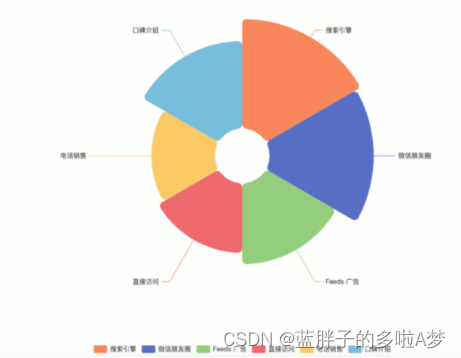
EChart.js 在 data 中设置饼状图颜色的 Demo 源代码:
option = {
  legend: {
    top: 'bottom'
  },
  series: [
    {
      name: '',
      type: 'pie',
      radius: [50, 250],
      center: ['50%', '50%'],
      roseType: 'area',
      itemStyle: {
        borderRadius: 8
      },
      data: [
        { value: 917, name: '搜索引擎',itemStyle: {color:'#fc8251'}},
        { value: 873, name: '微信朋友圈',itemStyle: {color:'#5470c6'}},
        { value: 678, name: 'Feeds 广告',itemStyle: {color:'#91cd77'}},
        { value: 583, name: '直接访问',itemStyle: {color:'#ef6567'}},
        { value: 332, name: '电话销售',itemStyle: {color:'#f9c956'} },
        { value: 432, name: '口碑介绍',itemStyle: {color:'#75bedc'}}
      ]
    }
  ]
};
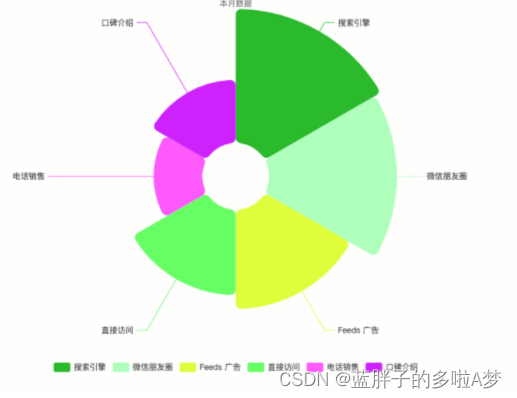
方法四:配置 ECharts 饼状图随机颜色
color: function () {
          return (
            'rgb(' +
            [
              Math.round(Math.random() * 270),
              Math.round(Math.random() * 370),
              Math.round(Math.random() * 400)
            ].join(',') +
            ')'
          );
        },
option = {
  legend: {
    top: 'bottom'
  },
  series: [
    {
      name: '',
      type: 'pie',
      radius: [50, 250],
      center: ['50%', '50%'],
      roseType: 'area',
      itemStyle: {
        color: function () {
          return (
            'rgb(' +
            [
              Math.round(Math.random() * 270),
              Math.round(Math.random() * 370),
              Math.round(Math.random() * 400)
            ].join(',') +
            ')'
          );
        },
        borderRadius: 8
      },
      data: [
        { value: 917, name: '搜索引擎'},
        { value: 873, name: '微信朋友圈'},
        { value: 678, name: 'Feeds 广告'},
        { value: 583, name: '直接访问'},
        { value: 332, name: '电话销售'},
        { value: 432, name: '口碑介绍'}
      ]
    }
  ]
};
免责声明:我们致力于保护作者版权,注重分享,被刊用文章因无法核实真实出处,未能及时与作者取得联系,或有版权异议的,请联系管理员,我们会立即处理! 部分文章是来自自研大数据AI进行生成,内容摘自(百度百科,百度知道,头条百科,中国民法典,刑法,牛津词典,新华词典,汉语词典,国家院校,科普平台)等数据,内容仅供学习参考,不准确地方联系删除处理! 图片声明:本站部分配图来自人工智能系统AI生成,觅知网授权图片,PxHere摄影无版权图库和百度,360,搜狗等多加搜索引擎自动关键词搜索配图,如有侵权的图片,请第一时间联系我们,邮箱:ciyunidc@ciyunshuju.com。本站只作为美观性配图使用,无任何非法侵犯第三方意图,一切解释权归图片著作权方,本站不承担任何责任。如有恶意碰瓷者,必当奉陪到底严惩不贷!


