
QT五子棋项目
目录
运行效果
代码分析
1.项目分析
2.创建项目
3.创建五子棋数据模型
4.绘制棋盘
在mainwindow.h包含数据模型头文件
设置窗口大小
绘制棋盘
执行效果:
5.初始化游戏
在窗口类中,添加棋盘数据指针。
初始化游戏数据
在游戏模型类中,添加startGame()
6.监听鼠标移动事件
代码实现:
检查效果:红色箭头表示光标。
7.落子并绘制棋子
鼠标单击并抬起后,实现落子。
效果:
8.添加落子音效
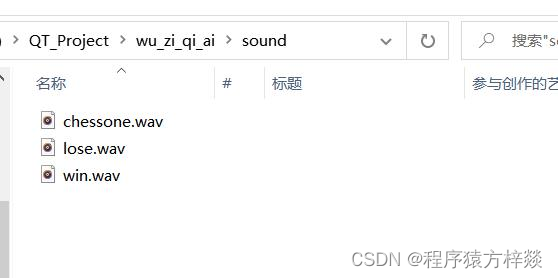
准备资源目录,把目录放在.pro项目文件的同目录下。
编辑
添加音效素材。
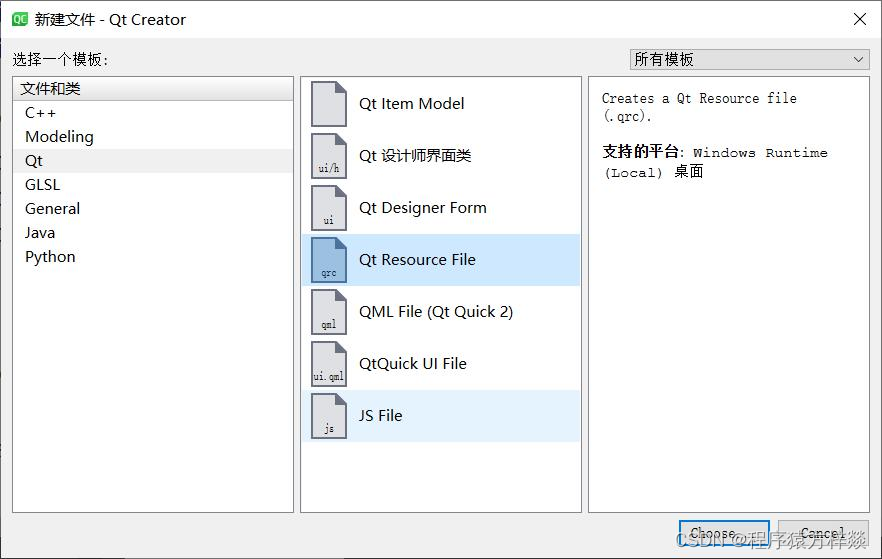
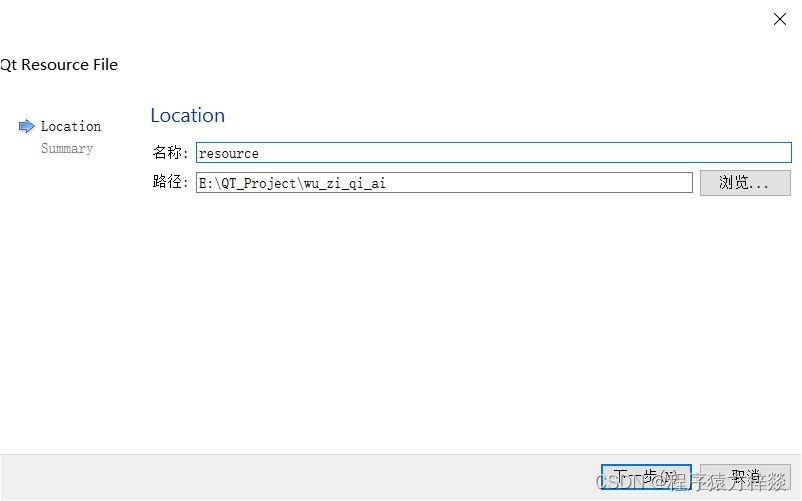
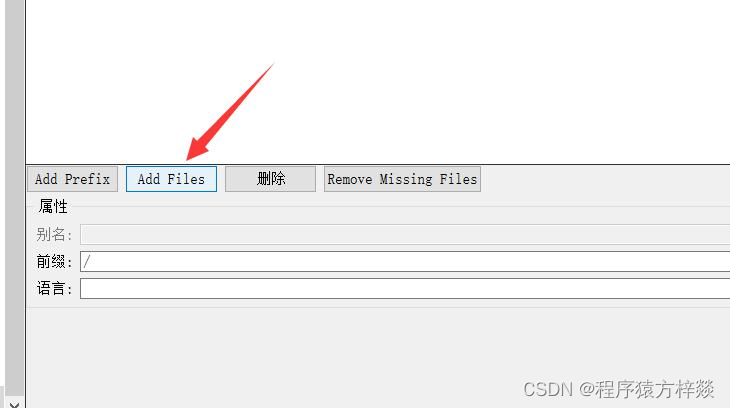
设置/为前缀添加资源文件
修改项目文件
9.判断输赢
在游戏模型中添加输赢判断功能。
在mainWindow窗口的重绘函数中,添加输赢判断。
检查效果:
10.使用AI功能
在游戏数据模型中,添加AI下棋功能
计算落子位置的权值:
在游戏窗体中使用AI功能
完整函数窗口,添加slots
11.主函数
12.主体功能完成!
完整代码
类
GameModel.h
MainWindow.h
GameModel.cpp
MainWindow.cpp
主函数
main.cpp
总结
附录
运行效果
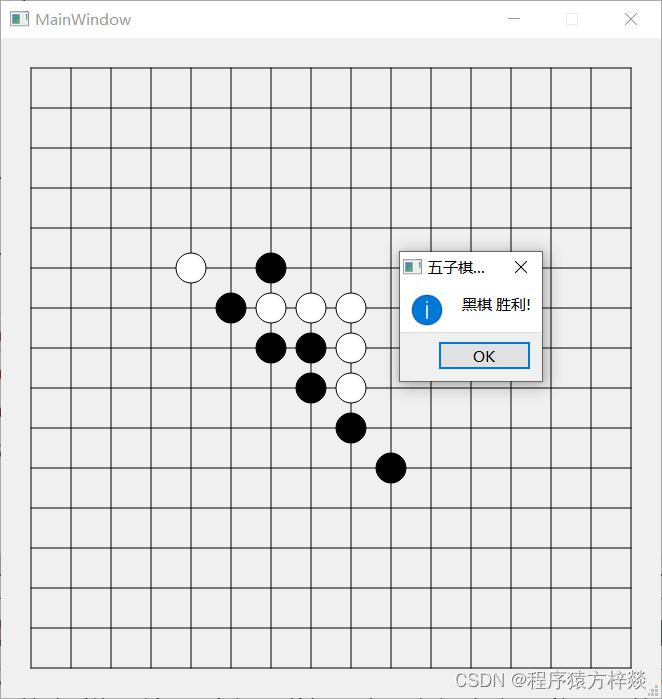 emm,这个是没有设置AI前测试的,可不要小看AI了哦!!!
代码分析
1.项目分析
Qt五子棋人机对战
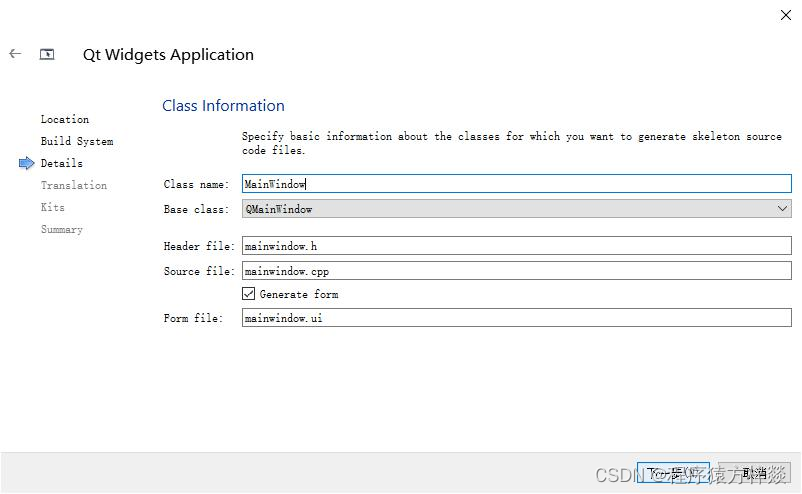
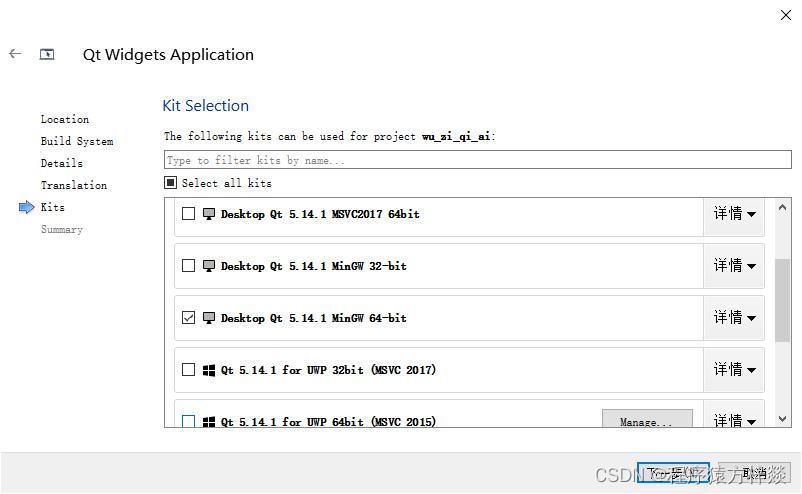
2.创建项目
使用默认配置:
3.创建五子棋数据模型
Gamemodel.h
#ifndef GAMEMODEL_H
#define GAMEMODEL_H
// ---- 五子棋游戏模型类 ---- //
#include
// 游戏类型,双人还是AI(目前固定让AI下黑子)
enum GameType
{
    MAN,
    AI   //人机对弈模式
};
// 游戏状态
enum GameStatus
{
    PLAYING,
    WIN,
    DEAD
};
// 棋盘尺寸
const int BOARD_GRAD_SIZE = 15;
const int MARGIN = 30; // 棋盘边缘空隙
const int CHESS_RADIUS = 15; // 棋子半径
const int MARK_SIZE = 6; // 落子标记边长
const int BLOCK_SIZE = 40; // 格子的大小
const int POS_OFFSET = BLOCK_SIZE * 0.4; // 20 鼠标点击的模糊距离上限
const int AI_THINK_TIME = 700; // AI下棋的思考时间
class GameModel
{
public:
    GameModel();
public:
    // 存储当前游戏棋盘和棋子的情况,空白为0,黑子1,白子-1
    std::vector gameMapVec;
    // 存储各个点位的评分情况,作为AI下棋依据
    std::vector scoreMapVec;
    // 标示下棋方, true:黑棋方  false: AI 白棋方(AI方)
    bool playerFlag;
    // 游戏模式:人机对弈,还是双人
    GameType gameType;
    // 游戏状态
    GameStatus gameStatus;
    void startGame(GameType type); // 开始游戏
    void actionByPerson(int row, int col);
    void updateGameMap(int row, int col);
    bool isWin(int row, int col); //判断输赢
    void calculateScore();
    void actionByAI(int &clickRow, int &clickCol); // 机器执行下棋
};
#endif // GAMEMODEL_H
4.绘制棋盘
在mainwindow.h包含数据模型头文件
mainwindow.h
#include"GameModel.h"
设置窗口大小
mainwindow.cpp
MainWindow::MainWindow(QWidget *parent)
    : QMainWindow(parent)
     , ui(new Ui::MainWindow)
{
    ui->setupUi(this);
    // 设置棋盘大小
    setFixedSize(MARGIN * 2 + BLOCK_SIZE * BOARD_GRAD_SIZE,
                 MARGIN * 2 + BLOCK_SIZE * BOARD_GRAD_SIZE);
}
绘制棋盘
Mainwindow.h
class MainWindow : public QMainWindow
{
    Q_OBJECT
public:
    MainWindow(QWidget *parent = nullptr);
    ~MainWindow();
    // 绘制
    void paintEvent(QPaintEvent *event);
};
Mainwindow.cpp
void MainWindow::paintEvent(QPaintEvent *event)
{
QPainter painter(this);
// 绘制棋盘
painter.setRenderHint(QPainter::Antialiasing, true); // 抗锯齿
for (int i = 0; i
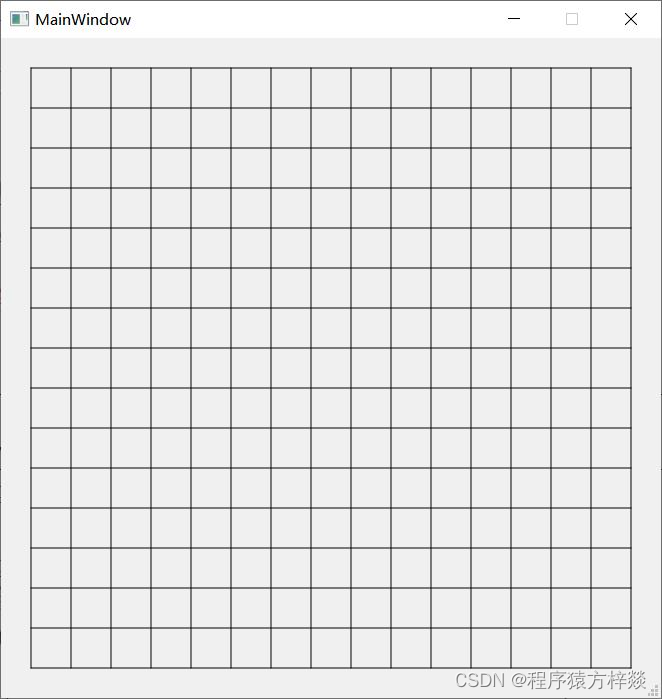
执行效果:
5.初始化游戏
在附近的落子位置画一个小正方形,黑方准备落子时,显示黑色正方形,白方准备落子时,显示白色正方形。
在窗口类中,添加棋盘数据指针。
Mainwindow.h
private:
GameModel *game; // 游戏指针
GameType game_type; // 存储游戏类型
初始化游戏数据
Mainwindow.cpp
MainWindow::MainWindow(QWidget *parent)
: QMainWindow(parent)
{
//......
// 开始游戏
initGame();
}
voidMainWindow::initGame(){
//初始化游戏模型
game=newGameModel;
initAIGame();
}
voidMainWindow::initAIGame(){
game_type=AI;
game->gameStatus=PLAYING;
game->startGame(game_type);
update();
}
在游戏模型类中,添加startGame()
GameModel.cpp
GameModel::GameModel()
{
}
void GameModel::startGame(GameType type)
{
gameType = type;
// 初始棋盘
gameMapVec.clear();
for (int i = 0; i
6.监听鼠标移动事件
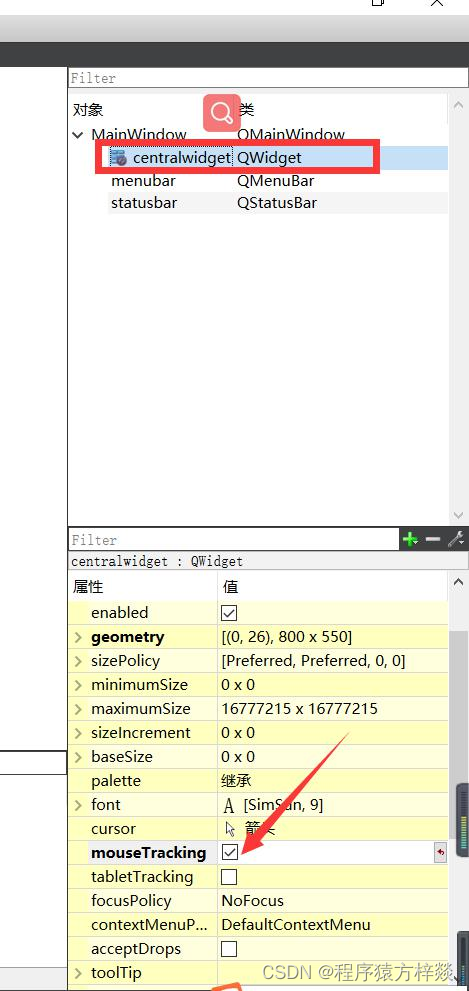
为了节省开销,默认不支持移动监听。设置支持鼠标移动监听:
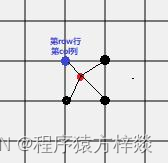
添加监听代码原理示意图,先计算出绿点,然后分别计算出3个黑点位置,计算当前位置离4个点的位置。如果小于阈值,就认为选择了哪个点。
代码实现:
void MainWindow::mouseMoveEvent(QMouseEvent *event)
{
// 通过鼠标的hover确定落子的标记
int x = event->x();
int y = event->y();
// 棋盘边缘不能落子
if (x >= MARGIN + BLOCK_SIZE / 2 &&
x = MARGIN + BLOCK_SIZE / 2 &&
y gameMapVec[clickPosRow][clickPosCol]==0) {
selectPos = true;
}
}
len = sqrt((x - leftTopPosX - BLOCK_SIZE) * (x - leftTopPosX - BLOCK_SIZE) + (y - leftTopPosY) * (y - leftTopPosY));
if (len gameMapVec[clickPosRow][clickPosCol]==0) {
selectPos = true;
}
}
len = sqrt((x - leftTopPosX) * (x - leftTopPosX) + (y - leftTopPosY - BLOCK_SIZE) * (y - leftTopPosY - BLOCK_SIZE));
if (len gameMapVec[clickPosRow][clickPosCol]==0) {
selectPos = true;
}
}
len = sqrt((x - leftTopPosX - BLOCK_SIZE) * (x - leftTopPosX - BLOCK_SIZE) + (y - leftTopPosY - BLOCK_SIZE) * (y - leftTopPosY - BLOCK_SIZE));
if (len gameMapVec[clickPosRow][clickPosCol]==0) {
selectPos = true;
}
}
}
// 存了坐标后也要重绘
update();
}
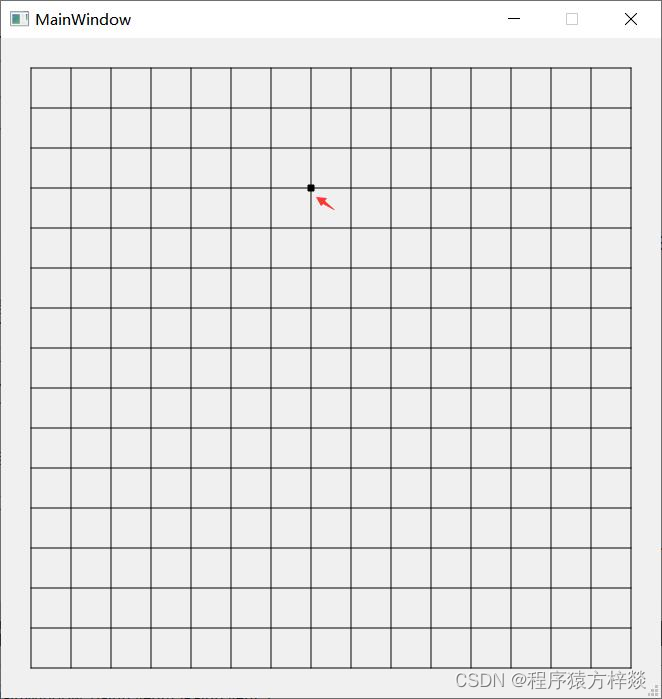
检查效果:红色箭头表示光标。
7.落子并绘制棋子
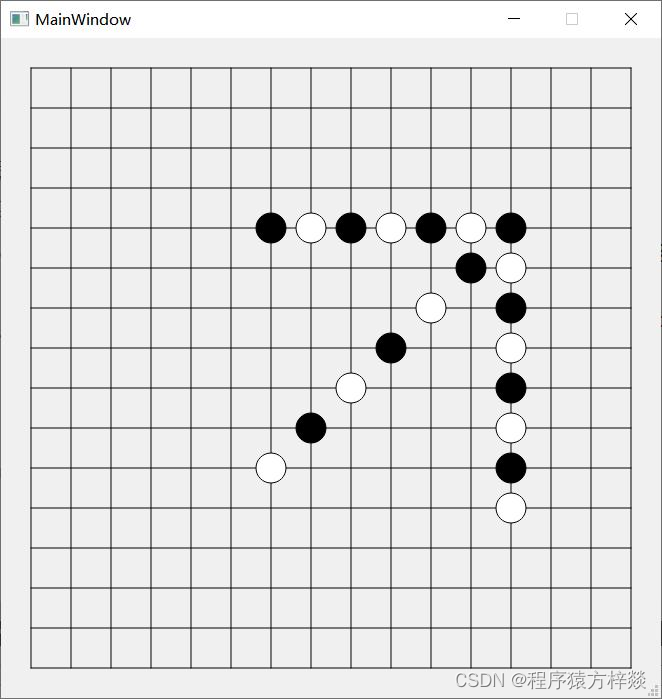
鼠标单击并抬起后,实现落子。
点击并抬起后,落子:
Mainwindow.cpp
void MainWindow::mouseReleaseEvent(QMouseEvent *event)
{
if (selectPos == false) {
return;
} else {
selectPos = false;
}
chessOneByPerson();
if (game_type == AI) { //人机模式
// AI 下棋
}
}
void MainWindow::chessOneByPerson()
{
// 根据当前存储的坐标下子
// 只有有效点击才下子,并且该处没有子
if (clickPosRow != -1 && clickPosCol != -1 && game->gameMapVec[clickPosRow][clickPosCol] == 0)
{
game->actionByPerson(clickPosRow, clickPosCol);
QSound::play(":sound/chessone.wav");
// 重绘
update();
}
}
效果:
8.添加落子音效
准备资源目录,把目录放在.pro项目文件的同目录下。
添加音效素材。
设置/为前缀添加资源文件
修改项目文件
QT+=coreguimultimedia
Mainwindow.cpp
#include
void MainWindow::chessOneByPerson()
{
// 根据当前存储的坐标下子
// 只有有效点击才下子,并且该处没有子
if (clickPosRow != -1 && clickPosCol != -1 && game->gameMapVec[clickPosRow][clickPosCol] == 0)
{
game->actionByPerson(clickPosRow, clickPosCol);
QSound::play(":sound/chessone.wav");
// 重绘
update();
}
}
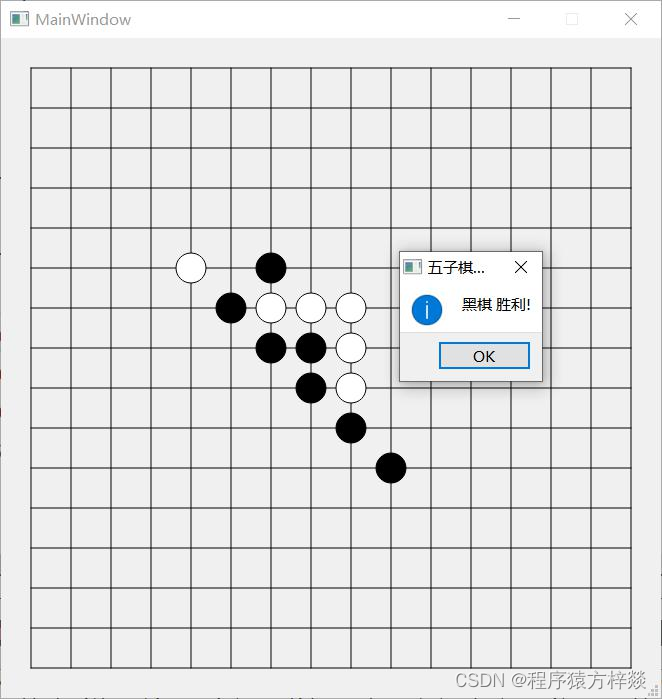
9.判断输赢
在游戏模型中添加输赢判断功能。
Gamemodel.cpp
bool GameModel::isWin(int row, int col)
{
// 横竖斜四种大情况,每种情况都根据当前落子往后遍历5个棋子,有一种符合就算赢
// 水平方向
for (int i = 0; i 0 &&
col - i + 4 0 &&
row - i + 4 0 &&
col - i > 0 &&
col - i + 4 0 &&
row - i + 4 0 &&
col - i + 4
在mainWindow窗口的重绘函数中,添加输赢判断。
Mainwindow.cpp
//......
if (game->isWin(clickPosRow, clickPosCol) && game->gameStatus == PLAYING)
{
//qDebug() gameStatus = WIN;
QSound::play(":sound/win.wav");
QString str;
if (game->gameMapVec[clickPosRow][clickPosCol] == 1)
str = "黑棋";
else if (game->gameMapVec[clickPosRow][clickPosCol] == -1)
str = "白棋";
QMessageBox::StandardButton btnValue = QMessageBox::information(this, "五子棋决战", str + " 胜利!");
// 重置游戏状态,否则容易死循环
if (btnValue == QMessageBox::Ok)
{
game->startGame(game_type);
game->gameStatus = PLAYING;
}
}
//......
检查效果:
10.使用AI功能
在游戏数据模型中,添加AI下棋功能
#include
#include
void GameModel::actionByAI(int &clickRow, int &clickCol)
{
// 计算评分
calculateScore();
// 从评分中找出最大分数的位置
int maxScore = 0;
std::vector maxPoints;
for (int row = 1; row maxScore) // 找最大的数和坐标
{
maxPoints.clear();
maxScore = scoreMapVec[row][col];
maxPoints.push_back(std::make_pair(row, col));
}
else if (scoreMapVec[row][col] == maxScore) // 如果有多个最大的数,都存起来
maxPoints.push_back(std::make_pair(row, col));
}
}
// 随机落子,如果有多个点的话
srand((unsigned)time(0));
int index = rand() % maxPoints.size();
std::pair pointPair = maxPoints.at(index);
clickRow = pointPair.first; // 记录落子点
clickCol = pointPair.second;
updateGameMap(clickRow, clickCol);
}
计算落子位置的权值:
// 最关键的计算评分函数
void GameModel::calculateScore()
{
// 统计玩家或者电脑连成的子
int personNum = 0; // 玩家连成子的个数
int botNum = 0; // AI连成子的个数
int emptyNum = 0; // 各方向空白位的个数
// 清空评分数组
scoreMapVec.clear();
for (int i = 0; i 0 && col > 0 &&
gameMapVec[row][col] == 0)
{
// 遍历周围八个方向
for (int y = -1; y 0 && row + i * y 0 && col + i * x 0 && col - i * x 0 && row - i * y 0 && col - i * x 0 && col + i * x 0 && row + i * y 0 && col + i * x 0 && col - i * x 0 && row - i * y 0 && col - i * x = 4)
scoreMapVec[row][col] += 20000; // 活五,应该具有最高优先级
}
}
}
}
}
在游戏窗体中使用AI功能
设置定时器的槽函数,注意slots:不能少!
Mainwindow.h
private slots:
void chessOneByAI();
Mainwindow.cpp
void MainWindow::chessOneByAI()
{
game->actionByAI(clickPosRow, clickPosCol);
QSound::play(":sound/chessone.wav");
update();
}
完整函数窗口,添加slots
Mainwindow.cpp
/*void MainWindow::mouseReleaseEvent(QMouseEvent *event)
{
if (selectPos == false) {
return;
} else {
selectPos = false;
}
chessOneByPerson();
if (game_type == AI) { //人机模式
// AI 下棋*/
QTimer::singleShot(AI_THINK_TIME, this, SLOT(chessOneByAI()));/*
}
}*/
11.主函数
main.cpp
#include "mainwindow.h"
#include
int main(int argc, char *argv[])
{
QApplication a(argc, argv);
MainWindow w;
w.show();
return a.exec();
}
12.主体功能完成!
完整代码
类
GameModel.h
#ifndef GAMEMODEL_H
#define GAMEMODEL_H
// ---- 五子棋游戏模型类 ---- //
#include
// 游戏类型,双人还是AI(目前固定让AI下黑子)
enum GameType
{
MAN,
AI //人机对弈模式
};
// 游戏状态
enum GameStatus
{
PLAYING,
WIN,
DEAD
};
// 棋盘尺寸
const int BOARD_GRAD_SIZE = 15;
const int MARGIN = 30; // 棋盘边缘空隙
const int CHESS_RADIUS = 15; // 棋子半径
const int MARK_SIZE = 6; // 落子标记边长
const int BLOCK_SIZE = 40; // 格子的大小
const int POS_OFFSET = BLOCK_SIZE * 0.4; // 20 鼠标点击的模糊距离上限
const int AI_THINK_TIME = 700; // AI下棋的思考时间
class GameModel
{
public:
GameModel();
public:
// 存储当前游戏棋盘和棋子的情况,空白为0,黑子1,白子-1
std::vector gameMapVec;
// 存储各个点位的评分情况,作为AI下棋依据
std::vector scoreMapVec;
// 标示下棋方, true:黑棋方 false: AI 白棋方(AI方)
bool playerFlag;
// 游戏模式:人机对弈,还是双人
GameType gameType;
// 游戏状态
GameStatus gameStatus;
void startGame(GameType type); // 开始游戏
void actionByPerson(int row, int col);
void updateGameMap(int row, int col);
bool isWin(int row, int col); //判断输赢
void calculateScore();
void actionByAI(int &clickRow, int &clickCol); // 机器执行下棋
};
#endif // GAMEMODEL_H
MainWindow.h
#ifndef MAINWINDOW_H
#define MAINWINDOW_H
#include
#include "GameModel.h"
QT_BEGIN_NAMESPACE
namespace Ui { class MainWindow; }
QT_END_NAMESPACE
class MainWindow : public QMainWindow
{
Q_OBJECT
public:
MainWindow(QWidget *parent = nullptr);
~MainWindow();
// 绘制
void paintEvent(QPaintEvent *event);
void initGame();
void initAIGame();
private:
Ui::MainWindow *ui;
GameModel *game; // 游戏指针
GameType game_type; // 存储游戏类型
int clickPosRow, clickPosCol; // 存储将点击的位置
bool selectPos = false; // 是否移动到合适的位置,以选中摸个交叉点
protected:
void mouseMoveEvent(QMouseEvent *event);
// 实际落子
void mouseReleaseEvent(QMouseEvent *event);
void chessOneByPerson();
private slots:
void chessOneByAI();
};
#endif // MAINWINDOW_H
GameModel.cpp
#include "GameModel.h"
#include
#include
GameModel::GameModel()
{
}
void GameModel::startGame(GameType type)
{
gameType = type;
// 初始棋盘
gameMapVec.clear();
for (int i = 0; i 0 &&
col - i + 4 0 &&
row - i + 4 0 &&
col - i > 0 &&
col - i + 4 0 &&
row - i + 4 0 &&
col - i + 4 maxScore) // 找最大的数和坐标
{
maxPoints.clear();
maxScore = scoreMapVec[row][col];
maxPoints.push_back(std::make_pair(row, col));
}
else if (scoreMapVec[row][col] == maxScore) // 如果有多个最大的数,都存起来
maxPoints.push_back(std::make_pair(row, col));
}
}
// 随机落子,如果有多个点的话
srand((unsigned)time(0));
int index = rand() % maxPoints.size();
std::pair pointPair = maxPoints.at(index);
clickRow = pointPair.first; // 记录落子点
clickCol = pointPair.second;
updateGameMap(clickRow, clickCol);
}
// 最关键的计算评分函数
void GameModel::calculateScore()
{
// 统计玩家或者电脑连成的子
int personNum = 0; // 玩家连成子的个数
int botNum = 0; // AI连成子的个数
int emptyNum = 0; // 各方向空白位的个数
// 清空评分数组
scoreMapVec.clear();
for (int i = 0; i 0 && col > 0 &&
gameMapVec[row][col] == 0)
{
// 遍历周围八个方向
for (int y = -1; y 0 && row + i * y 0 && col + i * x 0 && col - i * x 0 && row - i * y 0 && col - i * x 0 && col + i * x 0 && row + i * y 0 && col + i * x 0 && col - i * x 0 && row - i * y 0 && col - i * x = 4)
scoreMapVec[row][col] += 20000; // 活五,应该具有最高优先级
}
}
}
}
}
MainWindow.cpp
#include "mainwindow.h"
#include "ui_mainwindow.h"
#include
#include
#include
#include
#include
#include
MainWindow::MainWindow(QWidget *parent)
: QMainWindow(parent)
, ui(new Ui::MainWindow)
{
ui->setupUi(this);
//setMouseTracking(true);
// 设置棋盘大小
setFixedSize(MARGIN * 2 + BLOCK_SIZE * BOARD_GRAD_SIZE,
MARGIN * 2 + BLOCK_SIZE * BOARD_GRAD_SIZE);
// 开始游戏
initGame();
}
MainWindow::~MainWindow()
{
delete ui;
}
void MainWindow::paintEvent(QPaintEvent *event)
{
QPainter painter(this);
// 绘制棋盘
painter.setRenderHint(QPainter::Antialiasing, true); // 抗锯齿
for (int i = 0; i 0 && clickPosRow 0 && clickPosCol gameMapVec[clickPosRow][clickPosCol] == 0)
{
if (game->playerFlag)
brush.setColor(Qt::black);
else
brush.setColor(Qt::white);
painter.setBrush(brush);
painter.drawRect(MARGIN + BLOCK_SIZE * clickPosCol - MARK_SIZE / 2, MARGIN + BLOCK_SIZE * clickPosRow - MARK_SIZE / 2, MARK_SIZE, MARK_SIZE);
}
// 绘制棋子
for (int i = 0; i gameMapVec[i][j] == 1)
{
//brush.setColor(Qt::white);
brush.setColor(Qt::black);
painter.setBrush(brush);
painter.drawEllipse(MARGIN + BLOCK_SIZE * j - CHESS_RADIUS, MARGIN + BLOCK_SIZE * i - CHESS_RADIUS, CHESS_RADIUS * 2, CHESS_RADIUS * 2);
}
else if (game->gameMapVec[i][j] == -1)
{
//brush.setColor(Qt::black);
brush.setColor(Qt::white);
painter.setBrush(brush);
painter.drawEllipse(MARGIN + BLOCK_SIZE * j - CHESS_RADIUS, MARGIN + BLOCK_SIZE * i - CHESS_RADIUS, CHESS_RADIUS * 2, CHESS_RADIUS * 2);
}
}
// 判断输赢
if (clickPosRow > 0 && clickPosRow 0 && clickPosCol gameMapVec[clickPosRow][clickPosCol] == 1 ||
game->gameMapVec[clickPosRow][clickPosCol] == -1))
{
if (game->isWin(clickPosRow, clickPosCol) && game->gameStatus == PLAYING)
{
//qDebug() gameStatus = WIN;
QSound::play(":sound/win.wav");
QString str;
if (game->gameMapVec[clickPosRow][clickPosCol] == 1)
str = "黑棋";
else if (game->gameMapVec[clickPosRow][clickPosCol] == -1)
str = "白棋";
QMessageBox::StandardButton btnValue = QMessageBox::information(this, "五子棋决战", str + " 胜利!");
// 重置游戏状态,否则容易死循环
if (btnValue == QMessageBox::Ok)
{
game->startGame(game_type);
game->gameStatus = PLAYING;
}
}
}
}
void MainWindow::initGame()
{
// 初始化游戏模型
game = new GameModel;
initAIGame();
}
void MainWindow::initAIGame()
{
game_type = AI;
game->gameStatus = PLAYING;
game->startGame(game_type);
update();
}
void MainWindow::mouseMoveEvent(QMouseEvent *event)
{
// 通过鼠标的hover确定落子的标记
int x = event->x();
int y = event->y();
// 棋盘边缘不能落子
if (x >= MARGIN + BLOCK_SIZE / 2 &&
x = MARGIN + BLOCK_SIZE / 2 &&
y gameMapVec[clickPosRow][clickPosCol]==0) {
selectPos = true;
}
}
len = sqrt((x - leftTopPosX - BLOCK_SIZE) * (x - leftTopPosX - BLOCK_SIZE) + (y - leftTopPosY) * (y - leftTopPosY));
if (len gameMapVec[clickPosRow][clickPosCol]==0) {
selectPos = true;
}
}
len = sqrt((x - leftTopPosX) * (x - leftTopPosX) + (y - leftTopPosY - BLOCK_SIZE) * (y - leftTopPosY - BLOCK_SIZE));
if (len gameMapVec[clickPosRow][clickPosCol]==0) {
selectPos = true;
}
}
len = sqrt((x - leftTopPosX - BLOCK_SIZE) * (x - leftTopPosX - BLOCK_SIZE) + (y - leftTopPosY - BLOCK_SIZE) * (y - leftTopPosY - BLOCK_SIZE));
if (len gameMapVec[clickPosRow][clickPosCol]==0) {
selectPos = true;
}
}
}
// 存了坐标后也要重绘
update();
}
void MainWindow::mouseReleaseEvent(QMouseEvent *event)
{
if (selectPos == false) {
return;
} else {
selectPos = false;
}
chessOneByPerson();
if (game_type == AI) { //人机模式
// AI 下棋
QTimer::singleShot(AI_THINK_TIME, this, SLOT(chessOneByAI()));
}
}
void MainWindow::chessOneByPerson()
{
// 根据当前存储的坐标下子
// 只有有效点击才下子,并且该处没有子
if (clickPosRow != -1 && clickPosCol != -1 && game->gameMapVec[clickPosRow][clickPosCol] == 0)
{
game->actionByPerson(clickPosRow, clickPosCol);
QSound::play(":sound/chessone.wav");
// 重绘
update();
}
}
void MainWindow::chessOneByAI()
{
game->actionByAI(clickPosRow, clickPosCol);
QSound::play(":sound/chessone.wav");
update();
}
主函数
main.cpp
#include "mainwindow.h"
#include
int main(int argc, char *argv[])
{
QApplication a(argc, argv);
MainWindow w;
w.show();
return a.exec();
}
总结
这就是Qt五子棋人机对战,快拿走试试看吧!!!
记得点赞+关注吧!
附录
要声音素材si我哦


