
Python酷库之旅-比翼双飞情侣库(08)
目录
一、xlrd库的由来
二、xlrd库优缺点
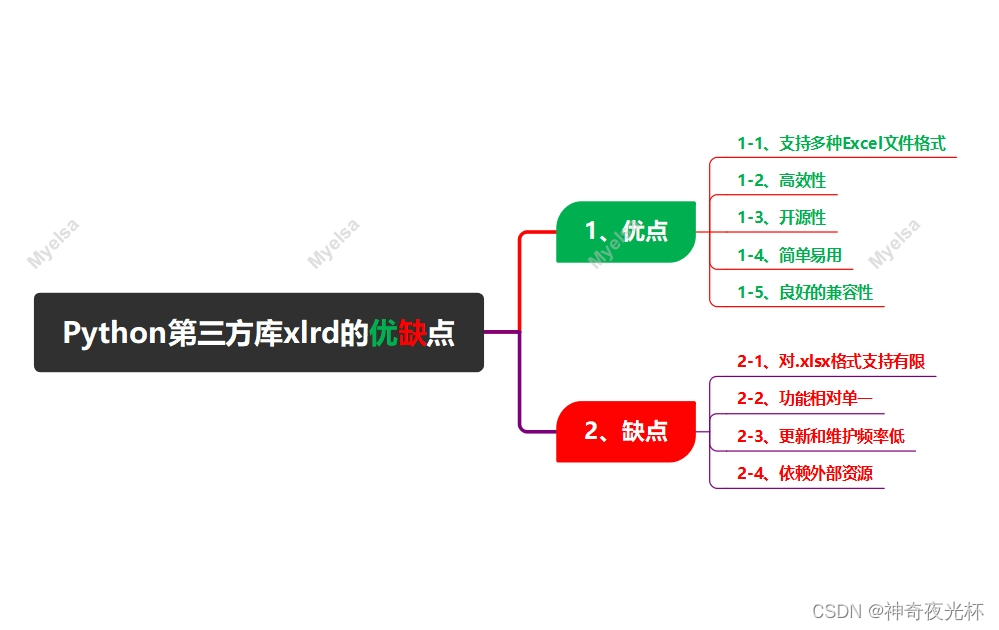
1、优点
1-1、支持多种Excel文件格式
1-2、高效性
1-3、开源性
1-4、简单易用
1-5、良好的兼容性
2、缺点
2-1、对.xlsx格式支持有限
2-2、功能相对单一
2-3、更新和维护频率低
2-4、依赖外部资源
三、xlrd库的版本说明
1、xlrd 1.2.0版本
2、xlrd 2.0.1版本
3、xlrd3(非官方名称)
四、如何学好xlrd库?
1、获取xlrd库的属性和方法
2、获取xlrd库的帮助信息
3、用法精讲
3-28、xlrd.xldate.xldate_as_datetime函数
3-28-1、语法
3-28-2、参数
3-28-3、功能
3-28-4、返回值
3-28-5、说明
3-28-6、用法
3-29、xlrd.xldate.xldate_from_date_tuple函数
3-29-1、语法
3-29-2、参数
3-29-3、功能
3-29-4、返回值
3-29-5、说明
3-29-6、用法
3-30、xlrd.xldate.xldate_from_datetime_tuple函数
3-30-1、语法
3-30-2、参数
3-30-3、功能
3-30-4、返回值
3-30-5、说明
3-30-6、用法
3-31、xlrd.xldate.xldate_from_time_tuple函数
3-31-1、语法
3-31-2、参数
3-31-3、功能
3-31-4、返回值
3-31-5、说明
3-31-6、用法
3-32、xlrd.open_workbook_xls函数
3-32-1、语法
3-32-2、参数
3-32-3、功能
3-32-4、返回值
3-32-5、说明
3-32-6、用法
五、推荐阅读
1、Python筑基之旅
2、Python函数之旅
3、Python算法之旅
4、Python魔法之旅
5、博客个人主页



在Excel中,通常所说的“情侣键”并非官方术语,而是对某些常用且经常成对出现的快捷键的一种形象化的称呼。其中,最为人熟知和广泛使用的“情侣键”是“Ctrl+C”和“Ctrl+V”。
1、Ctrl+C:这个快捷键的作用是“拷贝”或“复制”。当你在Excel中选中某个单元格、一行、一列或整个工作表的内容后,按下Ctrl+C键,这些内容就会被复制到计算机的剪贴板中,等待下一步的粘贴操作。
2、Ctrl+V:这个快捷键的作用是“粘贴”。在你按下Ctrl+C键将内容复制到剪贴板后,可以通过按下Ctrl+V键将这些内容粘贴到Excel中的另一个位置,这两个操作经常是连续进行的,因此Ctrl+C和Ctrl+V就像一对“情侣”,总是成对出现。
除了这对常见的“情侣键”外,Excel中还有许多其他的快捷键可以帮助用户更高效地完成各种操作。然而,这些快捷键通常并没有像Ctrl+C和Ctrl+V那样形成特定的“情侣”关系。
然而,今天我不再展开介绍“情侣键”,而是要重点推介Python中的“情侣库”,即xlrd和xlwt两个第三方库。
一、xlrd库的由来
xlrd库是一种用于在Python中读取Excel文件的库,它的名称中的"xl"代表Excel,"rd"代表读取,其开发者是John Machin(注:库名字符拆分诠释,只是一种猜测)。
xlrd最初是在2005年开始开发的,是基于Python的开源项目(下载:xlrd库官网下载)。
由于Excel文件在数据处理和分析中的重要性,xlrd库填补了Python在处理Excel文件方面的空白,使得用户可以方便地在Python环境中读取Excel文件的内容,并进行进一步的数据操作和分析。
二、xlrd库优缺点
1、优点
1-1、支持多种Excel文件格式
xlrd库支持多种Excel文件格式,包括`.xls`和`.xlsx`(在旧版本中),这使得无论数据存储在哪种格式的Excel文件中,用户都可以使用xlrd库来读取。
1-2、高效性
xlrd库使用C语言编写,因此其性能非常高,即使面对非常大的Excel文件,xlrd也可以快速地读取其中的数据。
1-3、开源性
xlrd是完全开源的,可以在GitHub等平台上找到其源代码,这使得任何人都可以根据自己的需求对其进行修改和扩展。
1-4、简单易用
xlrd提供了简单直接的API来获取单元格数据、行列数等,使得从Excel文件中读取数据变得简单而高效。
1-5、良好的兼容性
xlrd库适配多种Python版本,包括Python 2.7(不包括3.0-3.3)或Python 3.4及以上版本,这为用户提供了广泛的兼容性选择。
2、缺点
2-1、对.xlsx格式支持有限
在xlrd 1.2.0之后的版本中(大约从2020年开始),xlrd库不再支持`.xlsx`文件格式,这限制了xlrd在新版Excel文件(主要是`.xlsx`格式)上的应用。
2-2、功能相对单一
xlrd库主要专注于从Excel文件中读取数据,而不提供写入或修改Excel文件的功能,这使得在处理需要写入或修改Excel文件的任务时,用户需要结合其他库(如`openpyxl`或`xlwt`)使用。
2-3、更新和维护频率低
由于xlrd库主要关注于读取Excel文件的功能,并且随着`.xlsx`格式的普及,其使用范围逐渐缩小,因此,xlrd库的更新和维护频率可能相对较低。
2-4、依赖外部资源
在某些情况下,xlrd库可能需要依赖外部资源或库来完全发挥其功能,这可能会增加用户在使用xlrd库时的复杂性和不确定性。
总之,xlrd库在读取Excel文件方面具有高效、开源和简单易用等优点,但在对`.xlsx`格式的支持、功能单一以及更新和维护频率等方面存在一些缺点,用户在选择使用xlrd库时需要根据自己的需求进行权衡和选择。
三、xlrd库的版本说明
xlrd库适配的Python版本根据库的不同版本而有所不同。以下是针对几个主要版本的说明:
1、xlrd 1.2.0版本
1-1、适配Python>=2.7(不包括3.0-3.3)或Python>=3.4。
1-2、该版本支持xlsx文件格式,并且是一个广泛使用的版本,因为它能够处理小到中等大小的Excel文件,并且具有较好的性能表现。
2、xlrd 2.0.1版本
2-1、适配Python>=2.7(不包括3.0-3.5)或Python>=3.6。
2-2、该版本不再支持xlsx文件格式,仅支持旧版的xls文件格式,因为在xlrd 2.0版本之后,xlrd移除了对xlsx格式的支持。
3、xlrd3(非官方名称)
xlrd3是xlrd的开源扩展库,提供了对xlsx文件格式的支持,然而,请注意,xlrd3并不是xlrd的官方名称(下载:GitHub - Dragon2fly/xlrd3)。
四、如何学好xlrd库?
1、获取xlrd库的属性和方法
用print()和dir()两个函数获取xlrd库所有属性和方法的列表
# ['Book', 'FILE_FORMAT_DESCRIPTIONS', 'FMLA_TYPE_ARRAY', 'FMLA_TYPE_CELL', 'FMLA_TYPE_COND_FMT', 'FMLA_TYPE_DATA_VAL',
# 'FMLA_TYPE_NAME', 'FMLA_TYPE_SHARED', 'Operand', 'PEEK_SIZE', 'Ref3D', 'XLDateError', 'XLRDError', 'XLS_SIGNATURE',
# 'XL_CELL_BLANK', 'XL_CELL_BOOLEAN', 'XL_CELL_DATE', 'XL_CELL_EMPTY', 'XL_CELL_ERROR', 'XL_CELL_NUMBER', 'XL_CELL_TEXT', 'ZIP_SIGNATURE',
# '__VERSION__', '__builtins__', '__cached__', '__doc__', '__file__', '__loader__', '__name__', '__package__', '__path__',
# '__spec__', '__version__',
# 'biff_text_from_num', 'biffh', 'book', 'cellname', 'cellnameabs', 'colname', 'compdoc', 'count_records', 'decompile_formula',
# 'dump', 'dump_formula', 'empty_cell', 'error_text_from_code', 'evaluate_name_formula', 'formatting', 'formula', 'info',
# 'inspect_format', 'oBOOL', 'oERR', 'oNUM', 'oREF', 'oREL', 'oSTRG', 'oUNK', 'okind_dict', 'open_workbook', 'open_workbook_xls',
# 'os', 'pprint', 'rangename3d', 'rangename3drel', 'sheet', 'sys', 'timemachine', 'xldate', 'xldate_as_datetime', 'xldate_as_tuple', 'zipfile']
2、获取xlrd库的帮助信息
用help()函数获取xlrd库的帮助信息
Help on package xlrd:
NAME
    xlrd
DESCRIPTION
    # Copyright (c) 2005-2012 Stephen John Machin, Lingfo Pty Ltd
    # This module is part of the xlrd package, which is released under a
    # BSD-style licence.
PACKAGE CONTENTS
    biffh
    book
    compdoc
    formatting
    formula
    info
    sheet
    timemachine
    xldate
FUNCTIONS
    count_records(filename, outfile=)
        For debugging and analysis: summarise the file's BIFF records.
        ie: produce a sorted file of ``(record_name, count)``.

        :param filename: The path to the file to be summarised.
        :param outfile: An open file, to which the summary is written.

    dump(filename, outfile=, unnumbered=False)
        For debugging: dump an XLS file's BIFF records in char & hex.

        :param filename: The path to the file to be dumped.
        :param outfile: An open file, to which the dump is written.
        :param unnumbered: If true, omit offsets (for meaningful diffs).

    inspect_format(path=None, content=None)
        Inspect the content at the supplied path or the :class:`bytes` content provided
        and return the file's type as a :class:`str`, or ``None`` if it cannot
        be determined.

        :param path:
          A :class:`string ` path containing the content to inspect.
          ``~`` will be expanded.

        :param content:
          The :class:`bytes` content to inspect.

        :returns:
           A :class:`str`, or ``None`` if the format cannot be determined.
           The return value can always be looked up in :data:`FILE_FORMAT_DESCRIPTIONS`
           to return a human-readable description of the format found.

    open_workbook(filename=None, logfile=, verbosity=0, use_mmap=True, file_contents=None, encoding_override=None, formatting_info=False, on_demand=False, ragged_rows=False, ignore_workbook_corruption=False)
        Open a spreadsheet file for data extraction.

        :param filename: The path to the spreadsheet file to be opened.

        :param logfile: An open file to which messages and diagnostics are written.

        :param verbosity: Increases the volume of trace material written to the
                          logfile.

        :param use_mmap:

          Whether to use the mmap module is determined heuristically.
          Use this arg to override the result.

          Current heuristic: mmap is used if it exists.

        :param file_contents:

          A string or an :class:`mmap.mmap` object or some other behave-alike
          object. If ``file_contents`` is supplied, ``filename`` will not be used,
          except (possibly) in messages.

        :param encoding_override:

          Used to overcome missing or bad codepage information
          in older-version files. See :doc:`unicode`.

        :param formatting_info:

          The default is ``False``, which saves memory.
          In this case, "Blank" cells, which are those with their own formatting
          information but no data, are treated as empty by ignoring the file's
          ``BLANK`` and ``MULBLANK`` records.
          This cuts off any bottom or right "margin" of rows of empty or blank
          cells.
          Only :meth:`~xlrd.sheet.Sheet.cell_value` and
          :meth:`~xlrd.sheet.Sheet.cell_type` are available.

          When ``True``, formatting information will be read from the spreadsheet
          file. This provides all cells, including empty and blank cells.
          Formatting information is available for each cell.

          Note that this will raise a NotImplementedError when used with an
          xlsx file.

        :param on_demand:

          Governs whether sheets are all loaded initially or when demanded
          by the caller. See :doc:`on_demand`.

        :param ragged_rows:

          The default of ``False`` means all rows are padded out with empty cells so
          that all rows have the same size as found in
          :attr:`~xlrd.sheet.Sheet.ncols`.

          ``True`` means that there are no empty cells at the ends of rows.
          This can result in substantial memory savings if rows are of widely
          varying sizes. See also the :meth:`~xlrd.sheet.Sheet.row_len` method.


        :param ignore_workbook_corruption:

          This option allows to read corrupted workbooks.
          When ``False`` you may face CompDocError: Workbook corruption.
          When ``True`` that exception will be ignored.

        :returns: An instance of the :class:`~xlrd.book.Book` class.
DATA
    FILE_FORMAT_DESCRIPTIONS = {'xls': 'Excel xls', 'xlsb': 'Excel 2007 xl...
    FMLA_TYPE_ARRAY = 4
    FMLA_TYPE_CELL = 1
    FMLA_TYPE_COND_FMT = 8
    FMLA_TYPE_DATA_VAL = 16
    FMLA_TYPE_NAME = 32
    FMLA_TYPE_SHARED = 2
    PEEK_SIZE = 8
    XLS_SIGNATURE = b'\xd0\xcf\x11\xe0\xa1\xb1\x1a\xe1'
    XL_CELL_BLANK = 6
    XL_CELL_BOOLEAN = 4
    XL_CELL_DATE = 3
    XL_CELL_EMPTY = 0
    XL_CELL_ERROR = 5
    XL_CELL_NUMBER = 2
    XL_CELL_TEXT = 1
    ZIP_SIGNATURE = b'PK\x03\x04'
    __VERSION__ = '2.0.1'
    biff_text_from_num = {0: '(not BIFF)', 20: '2.0', 21: '2.1', 30: '3', ...
    empty_cell = empty:''
    error_text_from_code = {0: '#NULL!', 7: '#DIV/0!', 15: '#VALUE!', 23: ...
    oBOOL = 3
    oERR = 4
    oNUM = 2
    oREF = -1
    oREL = -2
    oSTRG = 1
    oUNK = 0
    okind_dict = {-2: 'oREL', -1: 'oREF', 0: 'oUNK', 1: 'oSTRG', 2: 'oNUM'...
VERSION
    2.0.1
FILE
    e:\python_workspace\pythonproject\lib\site-packages\xlrd\__init__.py
3、用法精讲
3-28、xlrd.xldate.xldate_as_datetime函数
3-28-1、语法
xldate_as_datetime(xldate, datemode)
    Convert an Excel date/time number into a :class:`datetime.datetime` object.

    :param xldate: The Excel number
    :param datemode: 0: 1900-based, 1: 1904-based.

    :returns: A :class:`datetime.datetime` object.
3-28-2、参数
3-28-2-1、xldate(必须):一个浮点数,表示Excel中的日期或时间。在Excel中,日期和时间是以从某个基准日期(通常是1900年1月0日或1904年1月0日,取决于Excel的版本和设置)开始的天数和小数部分(表示一天中的时间)来表示的。
3-28-2-2、datemode(可选):一个整数,表示Excel使用的日期系统。它有两种可能的值:
0:表示 Excel 使用的是基于1900年的日期系统。这是最常见的设置,特别是在Windows版本的Excel中。
1:表示Excel使用的是基于1904年的日期系统。这通常只在Mac版本的Excel中见到,但在某些特定的Windows应用程序或设置中也可能会遇到。
3-28-3、功能
将Excel中的日期和时间值(这些值在Excel中通常是以浮点数形式存储的)转换为Python的datetime对象,这对于从Excel文件中读取日期和时间数据并在Python中进行进一步处理非常有用。
3-28-4、返回值
一个datetime对象,表示转换后的日期和时间。这个对象包含了年、月、日、小时、分钟和秒(或者最接近的秒)的信息。
3-28-5、说明
无
3-28-6、用法
# 28、xlrd.xldate.xldate_as_datetime函数
import xlrd
# 打开Excel文件
workbook = xlrd.open_workbook(r'E:\360Downloads\test.xls')
# 选择第一个工作表
sheet = workbook.sheet_by_index(0)
# 假设第一列是日期数据,并且我们知道datemode
datemode = workbook.datemode
# 遍历第一列的所有行
for row_idx in range(sheet.nrows):
    # 读取第一列的值
    cell_value = sheet.cell_value(row_idx, 0)
    # 检查单元格类型是否为数值(包括日期)
    if sheet.cell_type(row_idx, 0) == xlrd.XL_CELL_NUMBER:
        # 检查单元格值是否为日期类型(通常是一个浮点数)
        if xlrd.xldate.is_date(cell_value, datemode):
            # 将Excel日期转换为Python datetime对象
            date_value = xlrd.xldate.xldate_as_datetime(cell_value, datemode)
            print(f"Row {row_idx + 1}: {date_value}")
        else:
            # 如果不是日期,但仍然是数值,则输出单元格值
            print(f"Row {row_idx + 1}: 数值但不是日期: {cell_value}")
    else:
        # 如果不是数值类型,则输出单元格值(可能是文本、空单元格等)
        print(f"Row {row_idx + 1}: {cell_value}")
        # 注意:上面的代码仅处理第一列,并且假设datemode已经通过workbook.datemode获得
3-29、xlrd.xldate.xldate_from_date_tuple函数
3-29-1、语法
xldate_from_date_tuple(date_tuple, datemode)
    Convert a date tuple (year, month, day) to an Excel date.

    :param year: Gregorian year.
:param month: ``1 


