
JavaWeb项目:航班信息管理系统(tomcat+jsp)
一:项目业务需求
航班信息管理系统是学习Javaweb的一个小项目,首先对该项目的业务需求进行分析,根据项目文档知它的主要实现技术为 SERVLET、JSP、MVC 架构、JDBC 和 MySQL。该项目着重学生的实际应用场景来设计,模拟 机场中的航班系统的业务实现以及扩展,能够实现航班信息管理的的所有功能,包括航班信息,航 班目的地查询等功能的实现;
本项目共实现八大功能模块
注册模块:用户输入用户名,真实姓名,密码进行注册,注册验证通过后,将用户存储到数据库中,如果数据库中已有相同用户名,则需要重新注册。
登录模块:对管理员输入的用户名,密码进行验证,验证通过后,管理员可以使用航班信息管 理系统中所有权限的功能,否则重新登录该系统。
航班信息管理功能:管理员登录成功,可以查询所有航班信息。 .
新增航班信息功能:管理员登录成功,可以新增航班信息,新增完毕以后跳转到主页面显示所
以航班信息
删除航班信息功能:管理员登录成功,可以删除航班信息,删除完毕以后跳转到主页面显示所 以航班信息
修改航班信息功能:管理员登录成功,可以修改航班信息,修改完毕以后跳转到主页面显示所 以航班信息
根据目的地查询功能:管理员登录成功,可以根据目的地对航班信息进行查询。
根据起飞时间查询功能:管理员登录成功,可以根据起飞时间对航班信息进行查询。
二:项目逻辑实现
在实现逻辑之前,先看一下项目演示
航班信息管理系统演示
项目演示完毕,我们分模块进行代码实现
首先,先看一下项目架构
后端
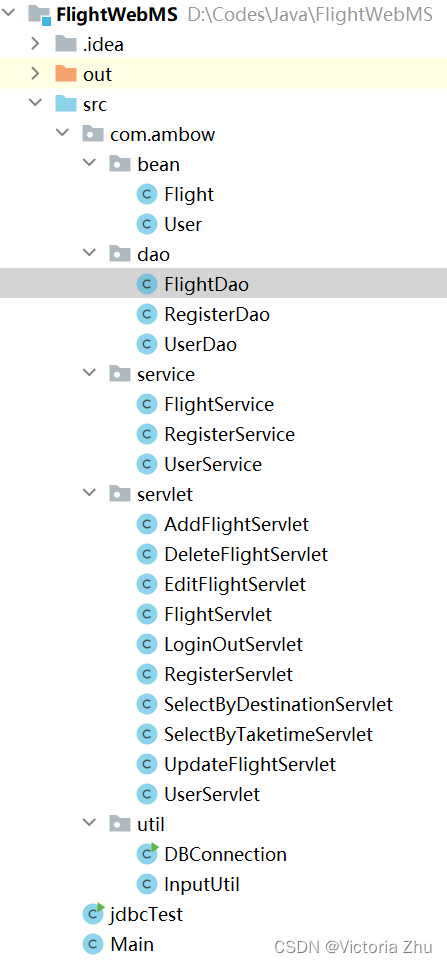
后端工程采用mvc架构,分别是bean(实体类)dao(处理类)service(服务类)servlet(启动类),util(工具类)以及一个jdbc连接数据库的测试类。
前端
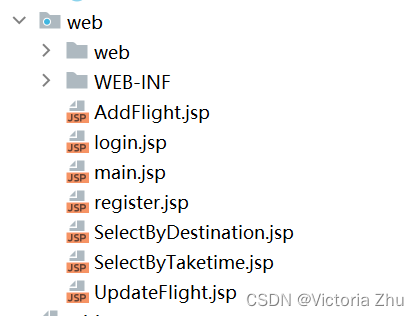
前端页面采用jsp页面和css样式
其中在WEB-INF文件夹中创建一个lib目录并引入三个jar包,右键lib目录点击 add libary

下面,我们开始写代码
首先创建实体类
User
package com.ambow.bean;
public class User {
    private int userId;
    private String userName;
    private String password;
    private String realName;
    public int getUserId() {
        return userId;
    }
    public void setUserId(int userId) {
        this.userId = userId;
    }
    public String getUserName() {
        return userName;
    }
    public void setUserName(String userName) {
        this.userName = userName;
    }
    public String getPassword() {
        return password;
    }
    public void setPassword(String password) {
        this.password = password;
    }
    public String getRealName() {
        return realName;
    }
    public void setRealName(String realName) {
        this.realName = realName;
    }
}
Flight
package com.ambow.bean;
import java.util.Date;
public class Flight {
    private int idFlight;  //航班编号
    private int flightId; //航班号
    private String destination;  //目的地
    private Date takeName;  //起飞时间
    public int getIdFlight() {
        return idFlight;
    }
    public void setIdFlight(int idFlight) {
        this.idFlight = idFlight;
    }
    public int getFlightId() {
        return flightId;
    }
    public void setFlightId(int flightId) {
        this.flightId = flightId;
    }
    public String getDestination() {
        return destination;
    }
    public void setDestination(String destination) {
        this.destination = destination;
    }
    public Date getTakeName() {
        return takeName;
    }
    public void setTakeName(Date takeName) {
        this.takeName = takeName;
    }
}
实体类写完,我们开始写Dao层,写Dao层的类需要连接数据库
我们先来测试一下数据库是否能连接成功,输入以下代码测试数据库连接是否成功
import java.sql.Connection;
import java.sql.DriverManager;
import java.sql.SQLException;
public class jdbcTest {
    public static void conn(){
        Connection connection;
        String url = "jdbc:mysql://localhost:3306/flightinformationmanagesystem";   //数据库连接的url地址
        String user = "root";   //数据库用户名
        String password = "123456";  //数据库密码
        try {
            //加载数据库驱动
            Class.forName("com.mysql.cj.jdbc.Driver");
            System.out.println("数据库驱动加载成功!");
        }catch (ClassNotFoundException e) {
            e.printStackTrace();
        }
        try{
            //通过DriverManager获取数据库连接
            connection = DriverManager.getConnection(url,user,password);
            System.out.println("数据库连接成功!");
        }catch (SQLException e) {
            e.printStackTrace();
        }
    }
    public static void main(String[] args) {
        jdbcTest.conn();
    }
}
输出

说明数据库连接成功
下面我们开始写Dao层代码
首先,创建一个连接数据库的工具类,将数据库连接封装到一个工具类中
package com.ambow.util;
import java.sql.*;
/*
封装数据库
 */
public class DBConnection {
    private static final String username = "root";
    private static final String password = "123456";
    private static final String url = "jdbc:mysql://localhost:3306/flightinformationmanagesystem";
    //加载数据库驱动
    public static void main(String[] args) {
        try{
            Class.forName("com.mysql.jdbc.Driver");
        }catch (ClassNotFoundException e){
            e.printStackTrace();
        }
    }
    //获取数据库连接方法
    public static Connection getConnection(){
        Connection connection = null;
        try {
            connection = DriverManager.getConnection(url,username,password);
        }catch (SQLException e){
            e.printStackTrace();
        }
        return connection;
    }
    //数据库释放三个资源
    public static void closeAll(Connection connection, PreparedStatement preparedStatement, ResultSet resultSet){
        try{
            if (connection != null){
                connection.close();
            }
            if (preparedStatement != null){
                preparedStatement.close();
            }
            if (resultSet != null){
                resultSet.close();
            }
        }catch (SQLException e){
            e.printStackTrace();
        }
    }
    //数据库释放两个资源
    public static void closeTwo(Connection connection, PreparedStatement preparedStatement){
        try{
            if (connection != null){
                connection.close();
            }
            if (preparedStatement != null){
                preparedStatement.close();
            }
        }catch (SQLException e){
            e.printStackTrace();
        }
    }
}
当连接数据库时,我们调用工具类进行连接
先写RegisterDao
package com.ambow.dao;
import com.ambow.util.DBConnection;
import java.sql.Connection;
import java.sql.PreparedStatement;
import java.sql.SQLException;
public class RegisterDao {
    //注册功能
    public boolean register(String username,String password, String realname){
        String sql = "insert into flightinformationmanagesystem.user(loginname, password, realname) values (?,?,?)";
        Connection connection = null;
        PreparedStatement preparedStatement = null;
        try{
            connection = DBConnection.getConnection();
            preparedStatement = connection.prepareStatement(sql);
            preparedStatement.setString(1,username);
            preparedStatement.setString(2,password);
            preparedStatement.setString(3,realname);
            int resultSet = preparedStatement.executeUpdate();
            return resultSet > 0;
        }catch (SQLException e){
            e.printStackTrace();
        }finally {
            DBConnection.closeTwo(connection,preparedStatement);
        }
        return false;
    }
}
然后是UserDao
package com.ambow.dao;
import com.ambow.bean.User;
import com.ambow.util.DBConnection;
import java.sql.Connection;
import java.sql.PreparedStatement;
import java.sql.ResultSet;
import java.sql.SQLException;
public class UserDao {
    //登录功能
    public User selectByNameAndPassword(String loginname, String password){
        User user = new User();
        String sql = "select * from flightinformationmanagesystem.user where loginname=? and password=?";
        Connection connection = null;
        PreparedStatement preparedStatement = null;
        ResultSet resultSet = null;
        try{
            //获取数据库连接对象
            connection = DBConnection.getConnection();
            //预编译
            preparedStatement = connection.prepareStatement(sql);
            //给参数赋值
            preparedStatement.setString(1,loginname);
            preparedStatement.setString(2,password);
            resultSet = preparedStatement.executeQuery();
            if (resultSet.next()){
                //创建用户对象
                user.setUserId(resultSet.getInt(1));  //1代表数据库中的第一列
                user.setUserName(resultSet.getString(2));  //2代表第二列
                user.setPassword(resultSet.getString(3));
                user.setRealName(resultSet.getString(4));
            }
        }catch (SQLException e){
            e.printStackTrace();
        }
        finally {
            DBConnection.closeAll(connection,preparedStatement,resultSet);
        }
        return user;
    }
}
FlightDao
package com.ambow.dao;
import com.ambow.bean.Flight;
import com.ambow.util.DBConnection;
import java.sql.*;
import java.util.ArrayList;
import java.util.List;
public class FlightDao {
    // 查找全部航班信息
    public static List selectAll() {
        String sql = "SELECT * FROM flightinformationmanagesystem.flight";
        Connection conn = null;
        PreparedStatement ps = null;
        ResultSet rs = null;
        List flightList = new ArrayList();
        try {
            // 获取数据库连接对象
            conn = DBConnection.getConnection();
            // 预编译并执行查询语句
            ps = conn.prepareStatement(sql);
            rs = ps.executeQuery();
            // 处理查询结果
            while (rs.next()) {
                Flight flight = new Flight();
                flight.setIdFlight(rs.getInt(1));
                flight.setFlightId(rs.getInt(2));
                flight.setDestination(rs.getString(3));
                flight.setTakeName(rs.getDate(4));
                flightList.add(flight);
            }
        } catch (SQLException e) {
            throw new RuntimeException(e);
        } finally {
            // 关闭资源
            DBConnection.closeAll(conn, ps, rs);
        }
        return flightList;
    }
    //按目的地查询航班信息
    public static List selectAllByDestination(Flight flight){
        String sql = "select * from flightinformationmanagesystem.flight where destination=?";
        Connection connection = null;
        PreparedStatement preparedStatement = null;
        ResultSet resultSet = null;
        List flightList = new ArrayList();
        try{
            //获取数据库连接对象
            connection = DBConnection.getConnection();
            preparedStatement = connection.prepareStatement(sql);
            preparedStatement.setString(1, flight.getDestination());
            resultSet = preparedStatement.executeQuery();
            while (resultSet.next()){
                flight.setIdFlight(resultSet.getInt("id"));
                flight.setFlightId(resultSet.getInt("flightid"));
                flight.setDestination(resultSet.getString("destination"));
                flight.setTakeName(resultSet.getDate("taketime"));
                flightList.add(flight); // 将新对象添加到列表
            }
        }catch (SQLException e){
            e.printStackTrace();
        }finally {
            DBConnection.closeAll(connection,preparedStatement,resultSet);
        }
        return flightList;
    }
    //按起飞时间查询航班信息
    public static List selectAllByTaketime(Flight flight){
        String sql = "select * from flightinformationmanagesystem.flight where taketime=?";
        Connection connection = null;
        PreparedStatement preparedStatement = null;
        ResultSet resultSet = null;
        List flightList = new ArrayList();
        try{
            //获取数据库连接对象
            connection = DBConnection.getConnection();
            preparedStatement = connection.prepareStatement(sql);
            preparedStatement.setDate(1, new java.sql.Date(flight.getTakeName().getTime()));
            resultSet = preparedStatement.executeQuery();
            while (resultSet.next()){
                flight.setIdFlight(resultSet.getInt("id"));
                flight.setFlightId(resultSet.getInt("flightid"));
                flight.setDestination(resultSet.getString("destination"));
                flight.setTakeName(resultSet.getDate("taketime"));
                flightList.add(flight); // 将新对象添加到列表
            }
        }catch (SQLException e){
            e.printStackTrace();
        }finally {
            DBConnection.closeAll(connection,preparedStatement,resultSet);
        }
        return flightList;
    }
    //按ID查询航班信息
    public  Flight selectById(int flightId){
        String sql = "select * from flightinformationmanagesystem.flight where id=?";
        Connection connection = null;
        PreparedStatement preparedStatement = null;
        ResultSet resultSet = null;
        Flight flight = null;
        try{
            //获取数据库连接对象
            connection = DBConnection.getConnection();
            preparedStatement = connection.prepareStatement(sql);
            preparedStatement.setInt(1, flightId);
            resultSet = preparedStatement.executeQuery();
            while (resultSet.next()){
                flight = new Flight();
                flight.setFlightId(resultSet.getInt("flightid"));
                flight.setDestination(resultSet.getString("destination"));
                flight.setTakeName(resultSet.getDate("taketime"));
            }
        }catch (SQLException e){
            e.printStackTrace();
        }finally {
            DBConnection.closeAll(connection,preparedStatement,resultSet);
        }
        return flight;
    }
    //增加航班
    public static int add(Flight flight){
        String sql = "insert into flightinformationmanagesystem.flight(flightid, destination, taketime) values(?,?,?)";
        Connection connection = null;
        PreparedStatement preparedStatement = null;
        int flag = 0;
        try{
            //获取数据库连接对象
            connection = DBConnection.getConnection();
            preparedStatement = connection.prepareStatement(sql);
            preparedStatement.setInt(1, flight.getFlightId());
            preparedStatement.setString(2, flight.getDestination());
            preparedStatement.setDate(3,new java.sql.Date(flight.getTakeName().getTime()));
            flag = preparedStatement.executeUpdate();
        }catch (SQLException e){
            e.printStackTrace();
        }finally {
            DBConnection.closeTwo(connection,preparedStatement);
        }
        return flag;
    }
    //修改航班
    public static int update(Flight flight){
        String sql = "update flightinformationmanagesystem.flight SET destination=?,taketime=? where flightid=?";
        Connection connection = null;
        PreparedStatement preparedStatement = null;
        int flag = 0;
        try{
            connection = DBConnection.getConnection();
            preparedStatement = connection.prepareStatement(sql);
            preparedStatement.setString(1, flight.getDestination());
            preparedStatement.setDate(2,new java.sql.Date(flight.getTakeName().getTime()));
            preparedStatement.setInt(3, flight.getFlightId());
            flag = preparedStatement.executeUpdate();
        }catch (SQLException e){
            e.printStackTrace();
        }finally {
            DBConnection.closeTwo(connection,preparedStatement);
        }
        return flag;
    }
    //删除航班
    public static int delete(Flight flight){
        String sql = "delete from flightinformationmanagesystem.flight where id=?";
        Connection connection = null;
        PreparedStatement preparedStatement = null;
        int flag = 0;
        try{
            connection = DBConnection.getConnection();
            preparedStatement = connection.prepareStatement(sql);
            preparedStatement.setInt(1, flight.getIdFlight());
            flag = preparedStatement.executeUpdate();
        }catch (SQLException e){
            e.printStackTrace();
        }finally {
            DBConnection.closeTwo(connection,preparedStatement);
        }
        return flag;
    }
}
下面写Service层
首先是RegisterService
package com.ambow.service;
import com.ambow.bean.User;
import com.ambow.dao.RegisterDao;
import com.ambow.util.DBConnection;
import java.sql.Connection;
import java.sql.PreparedStatement;
import java.sql.ResultSet;
import java.sql.SQLException;
public class RegisterService {
    //判断用户是否存在
    public User userIsExist(String username){
        String sql = "select loginname from flightinformationmanagesystem.user where loginname =?";
        User user = null;
        Connection connection = null;
        PreparedStatement preparedStatement =null;
        ResultSet resultSet = null;
        try{
            connection = DBConnection.getConnection();
            preparedStatement = connection.prepareStatement(sql);
            preparedStatement.setString(1,username);
            resultSet = preparedStatement.executeQuery();
            while (resultSet.next()){
                user = new User();
                user.setUserName(resultSet.getString("loginname"));
            }
        }catch (SQLException e){
            e.printStackTrace();
        }
        finally {
            DBConnection.closeAll(connection,preparedStatement,resultSet);
        }
        return user;
    }
    //调用RegisterDao类
    RegisterDao registerDao = new RegisterDao();
    public Boolean Register(String username,String password,String realname){
        boolean isSuccess = registerDao.register(username,password,realname);
        if (isSuccess){
            return isSuccess;
        }
        return null;
    }
}
UserService
package com.ambow.service;
import com.ambow.bean.User;
import com.ambow.dao.UserDao;
import com.ambow.util.DBConnection;
import java.sql.Connection;
import java.sql.PreparedStatement;
import java.sql.ResultSet;
import java.sql.SQLException;
public class UserService {
    public User userIsExist(String username){
        String sql = "select loginname from flightinformationmanagesystem.user where loginname =?";
        User user = null;
        Connection connection = null;
        PreparedStatement preparedStatement =null;
        ResultSet resultSet = null;
        try{
            connection = DBConnection.getConnection();
            preparedStatement = connection.prepareStatement(sql);
            preparedStatement.setString(1,username);
            preparedStatement.executeQuery();
            while (resultSet.next()){
                user = new User();
                user.setUserName(resultSet.getString("loginname"));
            }
        }catch (SQLException e){
            e.printStackTrace();
        }
        finally {
            DBConnection.closeAll(connection,preparedStatement,resultSet);
        }
        return user;
    }
    //调用UserDao类
    UserDao userDao = new UserDao();
    //service层的selectByNameAndPassword方法
    public User selectByNameAndPassword(String userName, String Password){
        //调用UserDao类的selectByNameAndPassword方法
        User isSuccess = userDao.selectByNameAndPassword(userName,Password);
        //如果isSuccess不为空且密码相等,返回应该isSuccess
        if (isSuccess != null && Password.equals(isSuccess.getPassword())){
            return isSuccess;
        }
        return null;
    }
}
FlightService
package com.ambow.service;
import com.ambow.bean.Flight;
import com.ambow.dao.FlightDao;
import java.util.Date;
import java.util.List;
public class FlightService {
    FlightDao flightDao = new FlightDao();
    //查询所有航班信息
    public List selectAll(){
        List flightList = FlightDao.selectAll();
        return flightList;
    }
    //通过id查询航班信息
    public Flight selectById(int flightId){
        Flight flight = flightDao.selectById(flightId);
        return flight;
    }
    //通过目的地查询航班信息
    public List selectByDestination(String destination){
        Flight flight =new Flight();
        flight.setDestination(destination);
        List flightList = FlightDao.selectAllByDestination(flight);
        return flightList;
    }
    //通过起飞时间查询航班信息
    public List selectByTaketime(Flight flight){
        List flightList = FlightDao.selectAllByTaketime(flight);
        return flightList;
    }
    //增加航班信息
    public boolean add(Flight flight){
        int flag = FlightDao.add(flight);
        if(flag == 1){
            return true;
        }else {
            return false;
        }
    }
    //修改航班信息
    public boolean update(Flight flight){
        int flag = FlightDao.update(flight);
        if(flag == 1){
            return true;
        }else {
            return false;
        }
    }
    //删除航班信息
    public boolean delete(Flight flight){
        int flag = FlightDao.delete(flight);
        if(flag == 1){
            return true;
        }else {
            return false;
        }
    }
}
然后是servlet层
servlet层代码较多,我们慢慢来
RegisterServlet
package com.ambow.servlet;
import com.ambow.bean.User;
import com.ambow.service.RegisterService;
import javax.servlet.ServletException;
import javax.servlet.annotation.WebServlet;
import javax.servlet.http.HttpServlet;
import javax.servlet.http.HttpServletRequest;
import javax.servlet.http.HttpServletResponse;
import java.io.IOException;
@WebServlet(name = "RegisterServlet",urlPatterns = "/RegisterServlet")
public class RegisterServlet extends HttpServlet {
    @Override
    protected void doGet(HttpServletRequest request, HttpServletResponse response) throws ServletException, IOException {
    }
    @Override
    protected void doPost(HttpServletRequest request, HttpServletResponse response) throws ServletException, IOException {
        //设置字符编码,防止乱码
        request.setCharacterEncoding("UTF-8");
        response.setContentType("text/html;charset=UTF-8");
        //获取表单信息
        String username = request.getParameter("username");
        String realname = request.getParameter("fullname");
        String password = request.getParameter("password");
        //检查用户名和密码是否为空
        if (username == null || username.isEmpty() || password == null || password.isEmpty()) {
          String scr ="alert('用户名和密码不能为空!');window.location.href='register.jsp'";
          response.getWriter().write(scr);
        }else{
            //调用Register类进行注册
            RegisterService registerService = new RegisterService();
            //检查用户名是否已经存在
            User userIsExist = registerService.userIsExist(username);
            if (userIsExist != null){
               String scrs =  "alert('用户名已经存在,请选择其他用户名!');window.location.href='register.jsp'";
               response.getWriter().write(scrs);
            }else {
                //注册用户
                Boolean register = registerService.Register(username, password, realname);
                if (register){
                 String scri ="alert('注册成功!');window.location.href='login.jsp'";
                 response.getWriter().write(scri);
                }else {
                    String scrip ="alert('注册失败!');window.location.href='register.jsp'";
                    response.getWriter().write(scrip);
                }
            }

        }
    }
}
UerServlet
package com.ambow.servlet;
import com.ambow.bean.User;
import com.ambow.service.UserService;
import javax.servlet.ServletException;
import javax.servlet.annotation.WebServlet;
import javax.servlet.http.HttpServlet;
import javax.servlet.http.HttpServletRequest;
import javax.servlet.http.HttpServletResponse;
import java.io.IOException;
@WebServlet(name = "LoginServlet",urlPatterns = "/LoginServlet")
public class UserServlet extends HttpServlet {
    @Override
    protected void doGet(HttpServletRequest request, HttpServletResponse response) throws ServletException, IOException {
        //设置中文字符,防止乱码
        request.setCharacterEncoding("UTF-8");
        response.setContentType("text/html;charset=utf-8");
        //提交客户端信息
        String userName = request.getParameter("username");
        String password = request.getParameter("password");
        // 检查用户名和密码是否为空
        if (userName == null || userName.isEmpty() || password == null || password.isEmpty()){
            String scr ="alert('用户名或密码为空!');window.location.href='login.jsp'";
            response.getWriter().write(scr);
        }else {
            //调用UserService
            UserService userService = new UserService();
            User user = userService.selectByNameAndPassword(userName,password);
            if(user != null){
//                request.setAttribute("user",userName);
//                response.sendRedirect("main.jsp");
                 //设置登录成功的标志
                request.setAttribute("loginSuccessful", true);
                request.getSession().setAttribute("user", user); // 将用户存储到 session 中,以便在后续请求中使用
                response.sendRedirect(request.getContextPath() + "/FlightServlet"); // 执行重定向到 /FlightServlet 路径
            }else {
               String scr ="alert('用户名或密码错误,请仔细检查后登录!');window.location.href='login.jsp'";
               response.getWriter().write(scr);
            }
        }
    }
    @Override
    protected void doPost(HttpServletRequest request, HttpServletResponse response) throws ServletException, IOException {
        doGet(request,response);
    }
}
LoginOutServlet
package com.ambow.servlet;
import javax.servlet.ServletException;
import javax.servlet.annotation.WebServlet;
import javax.servlet.http.HttpServlet;
import javax.servlet.http.HttpServletRequest;
import javax.servlet.http.HttpServletResponse;
import javax.servlet.http.HttpSession;
import java.io.IOException;
@WebServlet(name = "LogoutServlet", urlPatterns = "/LogoutServlet")
public class LoginOutServlet extends HttpServlet {
    @Override
    protected void doGet(HttpServletRequest request, HttpServletResponse response) throws ServletException, IOException {
        performLogout(request,response);
    }
    @Override
    protected void doPost(HttpServletRequest request, HttpServletResponse response) throws ServletException, IOException {
        performLogout(request,response);
    }
    private void performLogout(HttpServletRequest request, HttpServletResponse response) throws ServletException, IOException {
        HttpSession session = request.getSession();
         //清除 session 中的用户信息
        session.removeAttribute("user");
//        // 或者直接使整个 session 失效
//         session.invalidate();
        // 重定向到登录页面或其他页面
        response.sendRedirect(request.getContextPath() + "/login.jsp");
    }
}
AddServlet
package com.ambow.servlet;
import com.ambow.bean.Flight;
import com.ambow.service.FlightService;
import javax.servlet.ServletException;
import javax.servlet.annotation.WebServlet;
import javax.servlet.http.HttpServlet;
import javax.servlet.http.HttpServletRequest;
import javax.servlet.http.HttpServletResponse;
import java.io.IOException;
import java.text.ParseException;
import java.text.SimpleDateFormat;
import java.util.Date;
@WebServlet(name = "AddFlightServlet",urlPatterns = "/AddFlightServlet")
public class AddFlightServlet extends HttpServlet {
    @Override
    protected void doGet(HttpServletRequest request, HttpServletResponse response) throws ServletException, IOException {
    }
    @Override
    protected void doPost(HttpServletRequest request, HttpServletResponse response) throws ServletException, IOException {
        //设置编码格式
        request.setCharacterEncoding("UTF-8");
        response.setContentType("text/html;charset=utf-8");
        //获取客户端信息
        String flightid = request.getParameter("flightId");
        String destination = request.getParameter("destination");
        String taketime = request.getParameter("takeoffTime");
        //实例化Flight对象并设置属性
        Flight flight = new Flight();
        //将字符串类型转换成整形
        flight.setFlightId(Integer.parseInt(flightid));
        flight.setDestination(destination);
        //将字符串类型转换成Date类型
        SimpleDateFormat simpleDateFormat = new SimpleDateFormat("yyyy-MM-dd");
        Date taketimes =null;
        try{
             taketimes = simpleDateFormat.parse(taketime);
        }catch (ParseException e){
            e.printStackTrace();
        }
        flight.setTakeName(taketimes);
        //调用FlightService类
        FlightService flightService = new FlightService();
        boolean isAddSuccess = flightService.add(flight);
        if (isAddSuccess){
            // 重定向到航班信息页面
            response.sendRedirect(request.getContextPath() + "/FlightServlet");
        }else {
            String scr = "alert('航班信息添加失败,请重试!');window.location.href='AddFlight.jsp'";
            response.getWriter().write(scr);
        }
//        //获取返回主页面按钮
//        String btn = request.getParameter("back");
//        if ("back".equals(btn)){
//            // 重定向到航班信息页面
//            response.sendRedirect(request.getContextPath() + "/FlightServlet");
//        }
    }
}
DeleteServlet
package com.ambow.servlet;
import com.ambow.bean.Flight;
import com.ambow.service.FlightService;
import javax.servlet.ServletException;
import javax.servlet.annotation.WebServlet;
import javax.servlet.http.HttpServlet;
import javax.servlet.http.HttpServletRequest;
import javax.servlet.http.HttpServletResponse;
import java.io.IOException;
@WebServlet(name = "DeleteFlightServlet", urlPatterns = "/DeleteFlightServlet")
public class DeleteFlightServlet extends HttpServlet {
    @Override
    protected void doGet(HttpServletRequest request, HttpServletResponse response) throws ServletException, IOException {
    }
    @Override
    protected void doPost(HttpServletRequest request, HttpServletResponse response) throws ServletException, IOException {
        //获取要删除的航班id
        int idFlight = Integer.parseInt(request.getParameter("flightId"));
        //调用FlightService类中的delete方法进行删除
        FlightService flightService = new FlightService();
        Flight flight = new Flight();
        flight.setIdFlight(idFlight);
        boolean isDeleteSuccess = flightService.delete(flight);
        if (isDeleteSuccess) {
            // 删除成功,重定向到显示航班信息的页面
            response.sendRedirect(request.getContextPath() + "/FlightServlet");
        } else {
            // 删除失败,返回错误页面或其他处理
            String scr = "alert('航班信息删除失败,请重试!');window.location.href='main.jsp'";
            response.getWriter().write(scr);
        }
    }
}
EditFlightServlet
package com.ambow.servlet;
import com.ambow.bean.Flight;
import com.ambow.service.FlightService;
import javax.servlet.RequestDispatcher;
import javax.servlet.ServletException;
import javax.servlet.annotation.WebServlet;
import javax.servlet.http.HttpServlet;
import javax.servlet.http.HttpServletRequest;
import javax.servlet.http.HttpServletResponse;
import java.io.IOException;
import java.util.List;
@WebServlet(name = "EditFlightServlet", urlPatterns = "/EditFlightServlet")
public class EditFlightServlet extends HttpServlet {
    @Override
    protected void doGet(HttpServletRequest request, HttpServletResponse response) throws ServletException, IOException {
        //获取用户表单信息
        String flightIdParam = request.getParameter("id");
        if (flightIdParam != null && !flightIdParam.isEmpty()) {
            int Idflight = Integer.parseInt(flightIdParam);
            //查询数据库,获取航班信息
            FlightService flightService = new FlightService();
            Flight flights =  flightService.selectById(Idflight);
            //将航班信息存储到 request 属性中
            request.setAttribute("flights", flights);
            request.getRequestDispatcher("UpdateFlight.jsp").forward(request, response);
        }else {
            response.sendRedirect(request.getContextPath() + "/FlightServlet");
        }
    }
    @Override
    protected void doPost(HttpServletRequest request, HttpServletResponse response) throws ServletException, IOException {
    }
}
FlightServlet
package com.ambow.servlet;
import com.ambow.bean.Flight;
import com.ambow.bean.User;
import com.ambow.service.FlightService;
import javax.servlet.ServletException;
import javax.servlet.annotation.WebServlet;
import javax.servlet.http.HttpServlet;
import javax.servlet.http.HttpServletRequest;
import javax.servlet.http.HttpServletResponse;
import java.io.IOException;
import java.util.List;
@WebServlet("/FlightServlet")
public class FlightServlet extends HttpServlet {
    protected void doGet(HttpServletRequest request, HttpServletResponse response)
            throws IOException, ServletException {
        //创建service对象,调用查询所有的方法
        FlightService fs = new FlightService();
        //调用查询所有的方法
        List flights = fs.selectAll();
        //将信息储存到作用域中
        request.setAttribute("flights",flights);
        //转发到FlightInfo.jsp页面
        request.getRequestDispatcher("main.jsp").forward(request, response);
    }
}
SelectByDestinationServlet
package com.ambow.servlet;
import com.ambow.bean.Flight;
import com.ambow.service.FlightService;
import javax.servlet.ServletException;
import javax.servlet.annotation.WebServlet;
import javax.servlet.http.HttpServlet;
import javax.servlet.http.HttpServletRequest;
import javax.servlet.http.HttpServletResponse;
import java.io.IOException;
import java.util.List;
@WebServlet(name = "SelectByDestination",urlPatterns = "/SelectByDestination")
public class SelectByDestinationServlet extends HttpServlet {
    @Override
    protected void doPost(HttpServletRequest request, HttpServletResponse response) throws ServletException, IOException {
        //设置编码格式
        request.setCharacterEncoding("UTF-8");
        response.setContentType("text/html;charset=utf-8");
        // 获取客户端信息
        String destination = request.getParameter("destination");
        // 调用 FlightService 类
        FlightService flightService = new FlightService();
        List flights = flightService.selectByDestination(destination);
        if (flights != null && !flights.isEmpty()) {
            // 将信息储存到作用域中
            request.setAttribute("flights", flights);
            // 转发到 main.jsp 页面
            request.getRequestDispatcher("main.jsp").forward(request, response);
        } else {
            // 目的地找不到的处理逻辑
            String scr = "alert('该目的地找不到!');window.location.href='SelectByDestination.jsp'";
            response.getWriter().write(scr);
        }
    }
}
SelectByTaketimeServlet
package com.ambow.servlet;
import com.ambow.bean.Flight;
import com.ambow.service.FlightService;
import javax.servlet.ServletException;
import javax.servlet.annotation.WebServlet;
import javax.servlet.http.HttpServlet;
import javax.servlet.http.HttpServletRequest;
import javax.servlet.http.HttpServletResponse;
import java.io.IOException;
import java.text.ParseException;
import java.text.SimpleDateFormat;
import java.util.Date;
import java.util.List;
@WebServlet(name = "SelectByTaketime",urlPatterns = "/SelectByTaketime")
public class SelectByTaketimeServlet extends HttpServlet {
    @Override
    protected void doGet(HttpServletRequest request, HttpServletResponse response) throws ServletException, IOException {
    }
    @Override
    protected void doPost(HttpServletRequest request, HttpServletResponse response) throws ServletException, IOException {
        //设置编码格式
        request.setCharacterEncoding("UTF-8");
        response.setContentType("text/html;charset=utf-8");
        // 获取客户端信息
        String taketime = request.getParameter("taketime");
        //实例化Flight对象并设置属性
        Flight flight = new Flight();
        //将字符串类型转换成Date类型
        SimpleDateFormat simpleDateFormat = new SimpleDateFormat("yyyy-MM-dd");
        Date taketimes =null;
        try{
            taketimes = simpleDateFormat.parse(taketime);
        }catch (ParseException e){
            e.printStackTrace();
        }
        flight.setTakeName(taketimes);
        // 调用 FlightService 类
        FlightService flightService = new FlightService();
        List flights = flightService.selectByTaketime(flight);
        if (flights != null && !flights.isEmpty()) {
            // 将信息储存到作用域中
            request.setAttribute("flights", flights);
            // 转发到 main.jsp 页面
            request.getRequestDispatcher("main.jsp").forward(request, response);
        } else {
            // 目的地找不到的处理逻辑
            String scr = "alert('该起飞时间找不到!');window.location.href='SelectByTaketime.jsp'";
            response.getWriter().write(scr);
        }
    }
}
UpdateFlightServlet
package com.ambow.servlet;
import com.ambow.bean.Flight;
import com.ambow.service.FlightService;
import com.sun.xml.internal.ws.api.ha.HaInfo;
import javax.servlet.ServletException;
import javax.servlet.annotation.WebServlet;
import javax.servlet.http.HttpServlet;
import javax.servlet.http.HttpServletRequest;
import javax.servlet.http.HttpServletResponse;
import java.io.IOException;
import java.text.ParseException;
import java.text.SimpleDateFormat;
import java.util.Date;
@WebServlet(name = "UpdateFlightServlet",urlPatterns = "/UpdateFlightServlet")
public class UpdateFlightServlet extends HttpServlet {
    @Override
    protected void doGet(HttpServletRequest request, HttpServletResponse response) throws ServletException, IOException {
    }
    @Override
    protected void doPost(HttpServletRequest request, HttpServletResponse response) throws ServletException, IOException {
        //设置编码格式
        request.setCharacterEncoding("UTF-8");
        response.setContentType("text/html;charset=utf-8");
        //获取客户端信息
        String flightid = request.getParameter("flightId");
        String destination = request.getParameter("destination");
        String taketime = request.getParameter("takeoffTime");
        //调用Flight类
        Flight flight = new Flight();
        flight.setFlightId(Integer.parseInt(flightid));
        flight.setDestination(destination);
        //将字符串类型转换成Date类型
        SimpleDateFormat simpleDateFormat = new SimpleDateFormat("yyyy-MM-dd");
        Date taketimes =null;
        try{
            taketimes = simpleDateFormat.parse(taketime);
        }catch (ParseException e){
            e.printStackTrace();
        }
        flight.setTakeName(taketimes);
        //调用FlightService类中的update方法
        FlightService flightService =new FlightService();
        boolean isUpdateSuccess = flightService.update(flight);
        if (isUpdateSuccess){
            // 重定向到航班信息页面
            response.sendRedirect(request.getContextPath() + "/FlightServlet");
        }else {
            String scr = "alert('航班信息修改失败,请重试!');window.location.href='UpdateFlight.jsp'";
            response.getWriter().write(scr);
        }
    }
}
三:前端JSP页面
JSP是原生的HTML页面添入Java代码
下面开始编写JSP代码
AddFlight.jsp
    增加航班信息

    body {
      font-family: Arial, sans-serif;
      background-color: #f4f4f4;
      margin: 0;
      display: flex;
    }
    .sidebar {
      background-color: #333;
      color: #fff;
      width: 200px;
      padding: 20px;
      box-sizing: border-box;
    }
    .nav-link {
      text-decoration: none;
      color: #fff;
      font-family: 微软雅黑, serif;
      display: block;
      padding: 10px;
      margin-bottom: 10px;
      border-radius: 4px;
      transition: background-color 0.3s;
    }
    .nav-link:hover {
      background-color: #555;
    }
    .logout-link {
      margin-top: 20px;
      position: fixed;
      right: 3%;
      top: 3%;
    }
    .loginout{
      text-decoration: none;
      color: #4caf50;
    }
    .user{
      margin-top: 20px;
      position: fixed;
      right: 8%;
      top: 3%;
    }
    .content {
      margin-top: 100px;
      margin-left: 450px;
      padding: 20px;
    }
    .form-container {
      width: 400px;
      margin: 20px;
      padding: 20px;
      box-sizing: border-box;
      background-color: #fff;
      border-radius: 8px;
      box-shadow: 0 0 10px rgba(0, 0, 0, 0.1);
    }
    .form-group {
      margin-bottom: 15px;
    }
    .form-group label {
      display: block;
      font-weight: bold;
      margin-bottom: 5px;
    }
    .form-group input {
      width: 100%;
      padding: 8px;
      box-sizing: border-box;
      border: 1px solid #ccc;
      border-radius: 4px;
    }
    .form-group button {
      background-color: #4caf50;
      color: #fff;
      padding: 10px;
      margin: 10px;
      border: none;
      border-radius: 4px;
      cursor: pointer;
      width: 100%;
    }
    .form-group button:hover {
      background-color: #45a049;
    }


  系统
  主页
  按目的地查询
  按起飞时间查询


    你好, ${sessionScope.user.userName}


    注销


    登录


    注册


    新增航班信息


        航班号:


        目的地:


        起飞时间:


        保存
        返回主页面


  function redirectToMainPage() {
    window.location.href = "${pageContext.request.contextPath}/FlightServlet";
  }
login.jsp
  body {
    font-family: Arial, sans-serif;
    background-color: #f4f4f4;
    margin: 0;
    display: flex;
    align-items: center;
    justify-content: center;
    height: 100vh;
  }
  .login-container {
    background-color: #fff;
    padding: 20px;
    border-radius: 8px;
    box-shadow: 0 0 10px rgba(0, 0, 0, 0.1);
    width: 400px;
    height:450px;
  }
  .login-container h2 {
    text-align: center;
  }
  .form-group {
    margin-bottom: 15px;
  }
  .form-group label {
    display: block;
    font-weight: bold;
    margin-bottom: 5px;
  }
  .form-group input {
    width: 100%;
    padding: 8px;
    box-sizing: border-box;
    border: 1px solid #ccc;
    border-radius: 4px;
  }
  .form-group button {
    background-color: #4caf50;
    color: #fff;
    padding: 10px;
    border: none;
    border-radius: 4px;
    cursor: pointer;
    width: 100%;
  }
  .form-group button:hover {
    background-color: #45a049;
  }
  a{
    text-decoration: none;
    color: #fff;
  }
 .h2s{
   position: fixed;
   top: 7%;
   left: 42%;
   font-family: 幼圆, serif ;
   font-size: 35px;
 }


    登录


  航班信息管理系统

    用户登录


        用户名:


        密码:


        登录


        注册
main.jsp
    航班信息管理系统


        body {
            font-family: Arial, sans-serif;
            background-color: #f4f4f4;
            margin: 0;
            display: flex;
        }
        .sidebar {
            background-color: #333;
            color: #fff;
            width: 200px;
            padding: 20px;
            box-sizing: border-box;
        }
        .nav-link {
            text-decoration: none;
            color: #fff;
            font-family: 微软雅黑, serif;
            display: block;
            padding: 10px;
            margin-bottom: 10px;
            border-radius: 4px;
            transition: background-color 0.3s;
        }
        .nav-link:hover {
            background-color: #555;
        }
        .main-content {
            flex: 1;
            padding: 20px;
        }
        table {
            width: 100%;
            border-collapse: collapse;
            margin-top: 20px;
        }
        th, td {
            border: 1px solid #ddd;
            padding: 8px;
            text-align: left;
        }
        th {
            background-color: #333;
            color: #fff;
        }
        .logout-link {
            margin-top: 20px;
            position: fixed;
            right: 3%;
            top: 3%;
        }
        .loginout{
            text-decoration: none;
            color: #4caf50;
        }
        .user{
            margin-top: 20px;
            position: fixed;
            right: 8%;
            top: 3%;
        }
        .update{
            text-decoration: none;
            color: black;
        }


    系统
        主页
        新增
        按目的地查询
        按起飞时间查询


        你好, ${sessionScope.user.userName}


        注销


        登录


        注册


    航班信息管理系统
| 编号 | 航班号 | 目的地 | 起飞时间 | 操作 |
|---|---|---|---|---|
| ${flights.idFlight} | ${flights.flightId} | ${flights.destination} | ${flights.takeName} | 修改 删除 |
register.jsp
    注册


    body {
        font-family: Arial, sans-serif;
        background-color: #f4f4f4;
        margin: 0;
        display: flex;
        align-items: center;
        justify-content: center;
        height: 100vh;
    }
    .form-container {
        background-color: #fff;
        padding: 20px;
        border-radius: 8px;
        box-shadow: 0 0 10px rgba(0, 0, 0, 0.1);
        width: 400px;
    }
    .form-container h2 {
        text-align: center;
    }
    .form-group {
        margin-bottom: 15px;
    }
    .form-group label {
        display: block;
        font-weight: bold;
        margin-bottom: 5px;
    }
    .form-group input {
        width: 100%;
        padding: 8px;
        box-sizing: border-box;
        border: 1px solid #ccc;
        border-radius: 4px;
    }
    .form-group button {
        background-color: #4caf50;
        color: #fff;
        padding: 10px;
        border: none;
        border-radius: 4px;
        cursor: pointer;
        width: 100%;
    }
    .form-group button:hover {
        background-color: #45a049;
    }
    .form-group .login-link {
        text-align: center;
        margin-top: 10px;
    }
    .h2s{
        position: fixed;
        top: 7%;
        left: 42%;
        font-family: 幼圆, serif ;
        font-size: 35px;
    }


航班信息管理系统
    用户注册


            用户名:


            真实姓名:


            密码:


            注册


            已经有账号? 点击登录
SelectByDestination.jsp
    通过目的地查询

    body {
      font-family: Arial, sans-serif;
      background-color: #f4f4f4;
      margin: 0;
      display: flex;
    }
    .sidebar {
      background-color: #333;
      color: #fff;
      width: 200px;
      padding: 20px;
      box-sizing: border-box;
    }
    .nav-link {
      text-decoration: none;
      color: #fff;
      font-family: 微软雅黑, serif;
      display: block;
      padding: 10px;
      margin-bottom: 10px;
      border-radius: 4px;
      transition: background-color 0.3s;
    }
    .nav-link:hover {
      background-color: #555;
    }
    .logout-link {
      margin-top: 20px;
      position: fixed;
      right: 3%;
      top: 3%;
    }
    .loginout{
      text-decoration: none;
      color: #4caf50;
    }
    .user{
      margin-top: 20px;
      position: fixed;
      right: 8%;
      top: 3%;
    }
    .form-container {
      background-color: #fff;
      padding: 20px;
      border-radius: 4px;
      box-shadow: 0 0 10px rgba(0, 0, 0, 0.1);
      text-align: center;
      height: 350px;
      width: 400px;
      margin-left: 450px;
      margin-top: 200px;
    }
    .form-container h2 {
      margin-bottom: 20px;
    }
    .form-container label {
      display: block;
      margin-bottom: 10px;
    }
    .form-container input {
      width: 100%;
      padding: 10px;
      margin-bottom: 20px;
      box-sizing: border-box;
      border: 1px solid #ccc;
      border-radius: 4px;
    }
    .form-container button {
      background-color: #4caf50;
      color: #fff;
      padding: 10px 20px;
      border: none;
      border-radius: 4px;
      cursor: pointer;
      transition: background-color 0.3s;
    }
    .form-container button:hover {
      background-color: #45a049;
    }


    系统
    主页
    新增
    按起飞时间查询


      你好, ${sessionScope.user.userName}


      注销


    按目的地查询

      目的地:


      查询


    function redirectToMainPage() {
      window.location.href = "${pageContext.request.contextPath}/FlightServlet";
    }
SelectByTaketime.jsp
    通过起飞时间查询

    body {
      font-family: Arial, sans-serif;
      background-color: #f4f4f4;
      margin: 0;
      display: flex;
    }
    .sidebar {
      background-color: #333;
      color: #fff;
      width: 200px;
      padding: 20px;
      box-sizing: border-box;
    }
    .nav-link {
      text-decoration: none;
      color: #fff;
      font-family: 微软雅黑, serif;
      display: block;
      padding: 10px;
      margin-bottom: 10px;
      border-radius: 4px;
      transition: background-color 0.3s;
    }
    .nav-link:hover {
      background-color: #555;
    }
    .logout-link {
      margin-top: 20px;
      position: fixed;
      right: 3%;
      top: 3%;
    }
    .loginout{
      text-decoration: none;
      color: #4caf50;
    }
    .user{
      margin-top: 20px;
      position: fixed;
      right: 8%;
      top: 3%;
    }
    .form-container {
      background-color: #fff;
      padding: 20px;
      border-radius: 4px;
      box-shadow: 0 0 10px rgba(0, 0, 0, 0.1);
      text-align: center;
      height: 350px;
      width: 400px;
      margin-left: 450px;
      margin-top: 200px;
    }
    .form-container h2 {
      margin-bottom: 20px;
    }
    .form-container label {
      display: block;
      margin-bottom: 10px;
    }
    .form-container input {
      width: 100%;
      padding: 10px;
      margin-bottom: 20px;
      box-sizing: border-box;
      border: 1px solid #ccc;
      border-radius: 4px;
    }
    .form-container button {
      background-color: #4caf50;
      color: #fff;
      padding: 10px 20px;
      border: none;
      border-radius: 4px;
      cursor: pointer;
      transition: background-color 0.3s;
    }
    .form-container button:hover {
      background-color: #45a049;
    }


    系统
    主页
    新增
    按目的地查询


      你好, ${sessionScope.user.userName}


      注销


  按起飞时间查询

    起飞时间:


    查询


    function redirectToMainPage() {
        window.location.href = "${pageContext.request.contextPath}/FlightServlet";
    }
UpdateFlight.jsp
    修改航班信息

    body {
      font-family: Arial, sans-serif;
      background-color: #f4f4f4;
      margin: 0;
      display: flex;
    }
    .sidebar {
      background-color: #333;
      color: #fff;
      width: 200px;
      padding: 20px;
      box-sizing: border-box;
    }
    .nav-link {
      text-decoration: none;
      color: #fff;
      font-family: 微软雅黑, serif;
      display: block;
      padding: 10px;
      margin-bottom: 10px;
      border-radius: 4px;
      transition: background-color 0.3s;
    }
    .nav-link:hover {
      background-color: #555;
    }
    .logout-link {
      margin-top: 20px;
      position: fixed;
      right: 3%;
      top: 3%;
    }
    .loginout{
      text-decoration: none;
      color: #4caf50;
    }
    .user{
      margin-top: 20px;
      position: fixed;
      right: 8%;
      top: 3%;
    }
    .content {
      margin-left: 450px;
      margin-top: 150px;
      background-color: #fff;
      padding: 20px;
      border-radius: 8px;
      box-shadow: 0 0 10px rgba(0, 0, 0, 0.1);
      width: 350px;
      height: 450px;
      text-align: center;
    }
    form {
      margin-top: 20px;
    }
    label {
      display: block;
      margin-bottom: 8px;
      margin-left: 0;
    }
    input {
      width: 100%;
      padding: 8px;
      margin-bottom: 12px;
      box-sizing: border-box;
      border: 1px solid #ccc;
      border-radius: 4px;
    }
    button {
      background-color: #4caf50;
      color: #fff;
      padding: 10px;
      border: none;
      border-radius: 4px;
      cursor: pointer;
    }
    button:hover {
      background-color: #45a049;
    }


  系统
  主页
  新增
  按目的地查询
  按起飞时间查询


    你好, ${sessionScope.user.userName}


    注销


    登录


    注册


  编辑航班信息


      航班号:


      目的地:


      起飞时间:


      保存修改
      返回主页面


  function redirectToMainPage() {
    window.location.href = "${pageContext.request.contextPath}/FlightServlet";
  }
四:SQL语句
根据大家的需求,sql语句代码放在下面
本项目一共使用两个表,一个是user表,用来储存用户,一个flight表,用来存储航班信息
首先是user表
CREATE TABLE `user`  (
  `userid` int NOT NULL AUTO_INCREMENT,
  `loginname` varchar(30) CHARACTER SET utf8mb4 COLLATE utf8mb4_0900_ai_ci NOT NULL,
  `password` varchar(20) CHARACTER SET utf8mb4 COLLATE utf8mb4_0900_ai_ci NOT NULL,
  `realname` varchar(50) CHARACTER SET utf8mb4 COLLATE utf8mb4_0900_ai_ci NULL DEFAULT NULL,
  PRIMARY KEY (`userid`) USING BTREE
) ENGINE = InnoDB AUTO_INCREMENT = 16 CHARACTER SET = utf8mb4 COLLATE = utf8mb4_0900_ai_ci ROW_FORMAT = Dynamic;
然后是flight表
CREATE TABLE `flight`  (
  `id` int NOT NULL AUTO_INCREMENT,
  `flightid` int NOT NULL,
  `destination` varchar(50) CHARACTER SET utf8mb4 COLLATE utf8mb4_0900_ai_ci NULL DEFAULT NULL,
  `taketime` date NULL DEFAULT NULL,
  PRIMARY KEY (`id`) USING BTREE
) ENGINE = InnoDB AUTO_INCREMENT = 27 CHARACTER SET = utf8mb4 COLLATE = utf8mb4_0900_ai_ci ROW_FORMAT = Dynamic;
项目到此基本完成了,如果中间有问题请在评论区评论!
项目中涉及到的jar包我放在百度网盘了,有需要的大家自行提取
https://pan.baidu.com/s/1LHeAnZ6TsExQCYKEMNqOlg
提取码:zoyc


