
MySQL:MySQL的查询(上)
文章目录
- MySQL的增加
- 单行数据插入
- 多行数据插入
- 插入否则更新
- 替换
- MySQL的查询
- select列
- where语句
本篇开始总结的是MySQL当中的基本查询语句
对于数据库的查询,无非大致就是增删查改,因此对于这些内容进行一一解释:
MySQL的增加
单行数据插入
mysql> create table students ( id int unsigned primary key auto_increment, name
 varchar(20) not null, qq varchar(20) );
Query OK, 0 rows affected (0.12 sec)
mysql> desc students;
+-------+--------------+------+-----+---------+----------------+
| Field | Type         | Null | Key | Default | Extra          |
+-------+--------------+------+-----+---------+----------------+
| id    | int unsigned | NO   | PRI | NULL    | auto_increment |
| name  | varchar(20)  | NO   |     | NULL    |                |
| qq    | varchar(20)  | YES  |     | NULL    |                |
+-------+--------------+------+-----+---------+----------------+
3 rows in set (0.04 sec)
mysql> insert into students (name, qq) values ('小明', '123321');
Query OK, 1 row affected (0.01 sec)
mysql> insert into students  values (2, '小红', '1123321');
Query OK, 1 row affected (0.01 sec)
mysql> select * from students;
+----+--------+---------+
| id | name   | qq      |
+----+--------+---------+
|  1 | 小明   | 123321  |
|  2 | 小红   | 1123321 |
+----+--------+---------+
2 rows in set (0.00 sec)
在增加这个方面没有什么需要注意的,更多需要注意的是全列插入还是单列插入,如果指定了内容就是单列插入,如果在values前没有指定具体的内容,那就是全列插入
多行数据插入
insert语句也支持多行数据插入:
mysql> insert into students (name, qq) values ('小刚', 3333), ('小亮', 4444444);
Query OK, 2 rows affected (0.00 sec)
Records: 2  Duplicates: 0  Warnings: 0
mysql> select * from students;
+----+--------+---------+
| id | name   | qq      |
+----+--------+---------+
|  1 | 小明   | 123321  |
|  2 | 小红   | 1123321 |
|  3 | 小刚   | 3333    |
|  4 | 小亮   | 4444444 |
+----+--------+---------+
4 rows in set (0.01 sec)
插入否则更新
在前面的学习中也知道了主键和唯一键,正常来说如果插入相同的数据到这当中是会提示有错误的信息的,为了方便描述更改一下列的信息:
mysql> alter table students add unique (qq);
Query OK, 0 rows affected (0.09 sec)
Records: 0  Duplicates: 0  Warnings: 0
mysql> desc students;
+-------+--------------+------+-----+---------+----------------+
| Field | Type         | Null | Key | Default | Extra          |
+-------+--------------+------+-----+---------+----------------+
| id    | int unsigned | NO   | PRI | NULL    | auto_increment |
| name  | varchar(20)  | NO   |     | NULL    |                |
| qq    | varchar(20)  | YES  | UNI | NULL    |                |
+-------+--------------+------+-----+---------+----------------+
3 rows in set (0.00 sec)
进行主键和唯一键重复更新
mysql> select * from students;
+----+--------+---------+
| id | name   | qq      |
+----+--------+---------+
|  1 | 小明   | 123321  |
|  2 | 小红   | 1123321 |
|  3 | 小刚   | 3333    |
|  4 | 小亮   | 4444444 |
+----+--------+---------+
4 rows in set (0.00 sec)
mysql> insert into students (id, name, qq) values (1, '小纯', 123321);
ERROR 1062 (23000): Duplicate entry '1' for key 'students.PRIMARY'
mysql> insert into students (id, name, qq) values (1, '小纯', 123321) on duplicate key update id=1, name='小纯',qq=123321;
Query OK, 2 rows affected (0.01 sec)
mysql> select * from students;
+----+--------+---------+
| id | name   | qq      |
+----+--------+---------+
|  1 | 小纯   | 123321  |
|  2 | 小红   | 1123321 |
|  3 | 小刚   | 3333    |
|  4 | 小亮   | 4444444 |
+----+--------+---------+
4 rows in set (0.00 sec)
从上面所示的示意可以看出这两个的关系,当主键或者唯一键发生重复后,执行后面的语句可以直接进行替换
但是这样的方法还是比较繁琐,因为在MySQL中直接提供了进行替换的sql语句:
替换
mysql> select * from students;
+----+--------+---------+
| id | name   | qq      |
+----+--------+---------+
|  1 | 小纯   | 123321  |
|  2 | 小红   | 1123321 |
|  3 | 小刚   | 3333    |
|  4 | 小亮   | 4444444 |
+----+--------+---------+
4 rows in set (0.00 sec)
mysql> replace into students (id, name, qq) values (1, '小铁', 123321);
Query OK, 2 rows affected (0.01 sec)
mysql> select * from students;
+----+--------+---------+
| id | name   | qq      |
+----+--------+---------+
|  1 | 小铁   | 123321  |
|  2 | 小红   | 1123321 |
|  3 | 小刚   | 3333    |
|  4 | 小亮   | 4444444 |
+----+--------+---------+
4 rows in set (0.00 sec)
值得注意的是,当提示有Query OK, 2 rows affected (0.01 sec),这个2表示的就是有出现冲突的数据,并且发生了替换,这个所谓的2的意思就是删除了之后再重新插入,所以就是表示的是2行数据被修改
MySQL的查询
下面进行的是对于MySQL的查询模块
select列
一般来说尽量不要使用全列查询,因为可能数据量很大,会带来很大的问题,所以通常来说要选择的最好还是指定列
指定列查询
mysql> select id, name from students;
+----+--------+
| id | name   |
+----+--------+
|  1 | 小铁   |
|  2 | 小红   |
|  3 | 小刚   |
|  4 | 小亮   |
+----+--------+
4 rows in set (0.00 sec)
mysql> select name, id from students;
+--------+----+
| name   | id |
+--------+----+
| 小铁   |  1 |
| 小红   |  2 |
| 小刚   |  3 |
| 小亮   |  4 |
+--------+----+
4 rows in set (0.00 sec)
其中这个顺序是可以不保持创建顺序的,因为是对于一列一列的数据进行提取
表达式
在进行查询的时候也可以带有表达式,例如:
mysql> select id * 2 from students;
+--------+
| id * 2 |
+--------+
|      4 |
|      2 |
|      6 |
|      8 |
+--------+
4 rows in set (0.00 sec)
取别名
也可以对新的一列进行重命名的操作
mysql> select id * 2 as newid from students;
+-------+
| newid |
+-------+
|     4 |
|     2 |
|     6 |
|     8 |
+-------+
4 rows in set (0.00 sec)
mysql> select id * 2 newid from students;
+-------+
| newid |
+-------+
|     4 |
|     2 |
|     6 |
|     8 |
+-------+
4 rows in set (0.00 sec)
其中as可以省去
对于结果去重
利用distinct关键字可以对于结果进行去重的操作
mysql> select math from exam_result;
+------+
| math |
+------+
|   90 |
|   90 |
|   90 |
+------+
3 rows in set (0.01 sec)
mysql> select distinct math from exam_result;
+------+
| math |
+------+
|   90 |
+------+
1 row in set (0.03 sec)
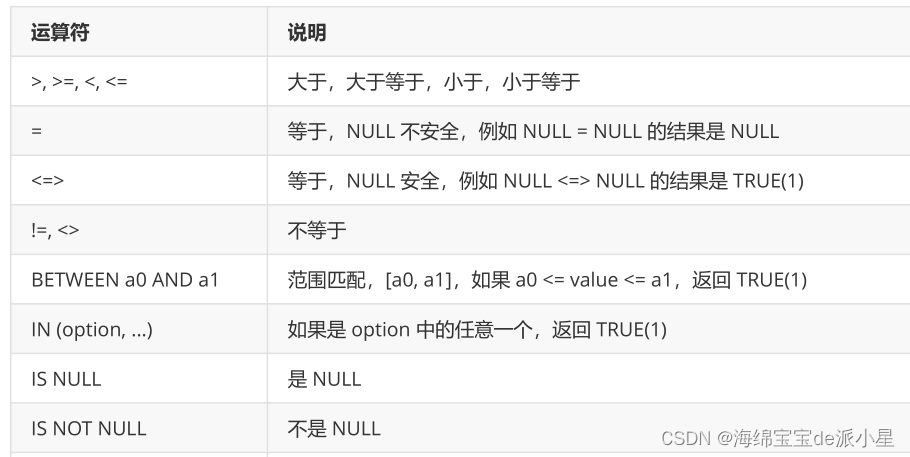
where语句
比较运算符:
结果排序
对于查询出的MySQL结果进行排序,常用的有asc表示升序,desc表示降序,默认采取的是降序排序
mysql> select math from exam_result order by math desc;
+------+
| math |
+------+
|   95 |
|   91 |
|   90 |
|   90 |
|   90 |
|   50 |
+------+
6 rows in set (0.00 sec)
mysql> select math from exam_result order by math asc;
+------+
| math |
+------+
|   50 |
|   90 |
|   90 |
|   90 |
|   91 |
|   95 |
+------+
6 rows in set (0.00 sec)
免责声明:我们致力于保护作者版权,注重分享,被刊用文章因无法核实真实出处,未能及时与作者取得联系,或有版权异议的,请联系管理员,我们会立即处理! 部分文章是来自自研大数据AI进行生成,内容摘自(百度百科,百度知道,头条百科,中国民法典,刑法,牛津词典,新华词典,汉语词典,国家院校,科普平台)等数据,内容仅供学习参考,不准确地方联系删除处理! 图片声明:本站部分配图来自人工智能系统AI生成,觅知网授权图片,PxHere摄影无版权图库和百度,360,搜狗等多加搜索引擎自动关键词搜索配图,如有侵权的图片,请第一时间联系我们,邮箱:ciyunidc@ciyunshuju.com。本站只作为美观性配图使用,无任何非法侵犯第三方意图,一切解释权归图片著作权方,本站不承担任何责任。如有恶意碰瓷者,必当奉陪到底严惩不贷!


