《springcloud alibaba》 四 seata安装以及使用

2024-04-08 1056阅读

目录

  • 准备
  • 调整db配置
    • 准备创建数据库
    • seata配置nacos
      • 配置confi.txt
      • 下载向nacos推送配置的脚本
      • 启动seata
      • 新建项目
      • order-seata项目 订单项目
        • 数据库脚本
        • pom.xml
        • application.yml
        • 启动类
        • 实体类
        • dao类
        • service类
        • controller类
        • feign类
        • mapper类
        • stock-seata 库存项目
          • 数据库脚本
          • pom.xml
          • application.yml
          • 启动类
          • 实体类
          • dao类
          • service类
          • controller类
          • mapper类
          • 测试
          • 特殊情况
          • 分布式事务
            • order-seata项目变动
              • pom.xml
              • application.yml
              • controller
              • stock-seata项目变动
                • pom.xml
                • application.yml
                • 脚本
                • 效果
                • 分布式事务原理
                  • nacos配置问题
                  • seata的几个表都是什么情况

                    准备

                    名称版本
                    Nacos1.4.5
                    seata1.4.0
                    alibabacloud2.2.5.RELEASE
                    • 本博客版本

                      seata官网地址

                      seata安装包下载

                      《springcloud alibaba》 四 seata安装以及使用

                      • 没有linux服务器,可本地搭建玩一下
                      • 注意alibaba版本跟seata版本一定要严格控制,不然会出现一些奇奇怪怪的问题

                        默认数据存储分为2钟,一种是存在bin目录下的root.data文件里面,还有一种是db方式,本文使用db模式

                        调整db配置

                        • 注意mysql数据库的版本得5.7以上。- 《springcloud alibaba》 四 seata安装以及使用
                        • 修改配置文件之前,别慌,先copy一遍再说,养成好习惯

                          《springcloud alibaba》 四 seata安装以及使用

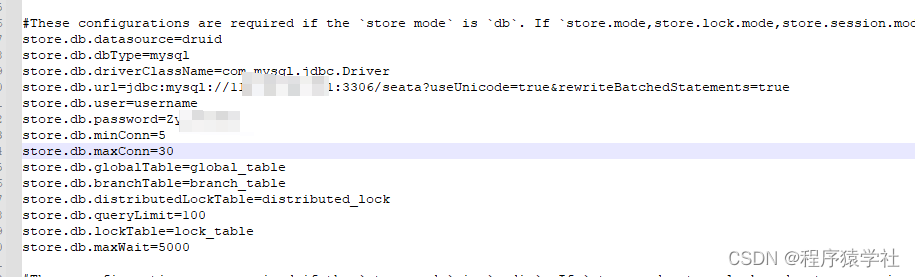
                        • 调整模式为db, 修改db对应的配置

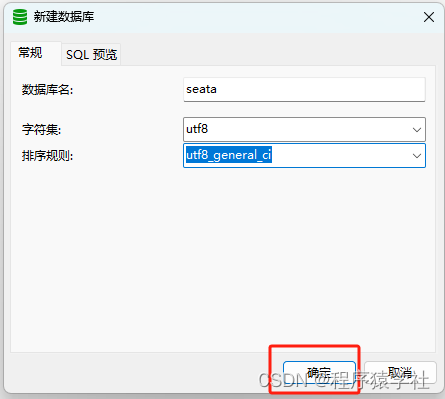
                          准备创建数据库

                          《springcloud alibaba》 四 seata安装以及使用

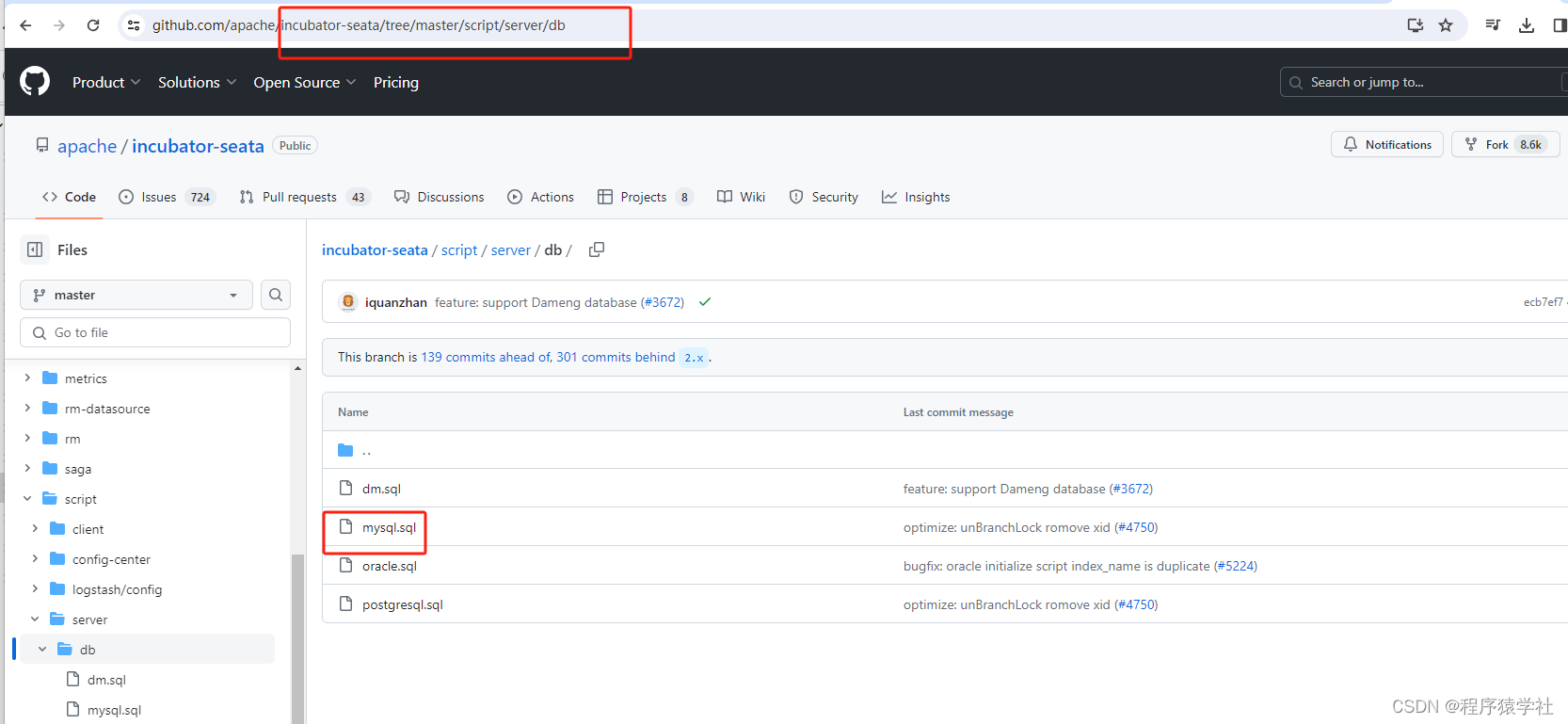
                          mysql脚本下载地址

                          《springcloud alibaba》 四 seata安装以及使用

                          《springcloud alibaba》 四 seata安装以及使用

                          《springcloud alibaba》 四 seata安装以及使用

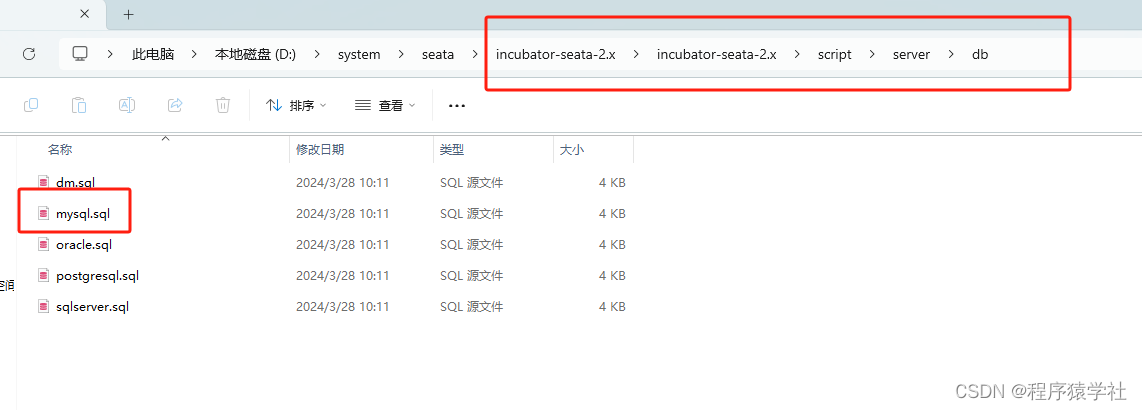
                          • 先把整个项目下载,然后到这个目录下,找到mysql.sql

                            seata配置nacos

                            《springcloud alibaba》 四 seata安装以及使用

                            • 先备份一下配置文件

                              《springcloud alibaba》 四 seata安装以及使用

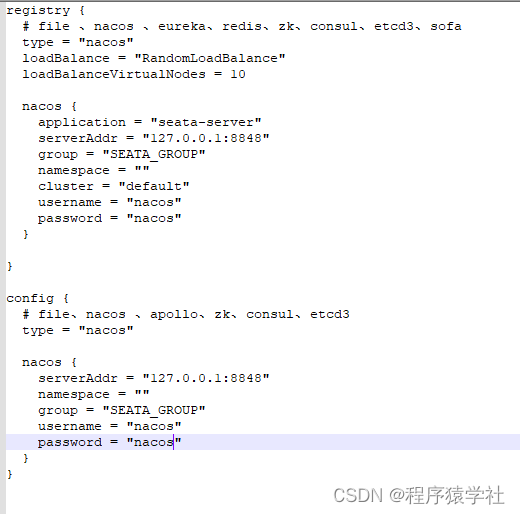
                            • 删除其他没有用的配置,调整一下配置

                              配置confi.txt

                              到之前下载好的依赖包中copy对应的config.txt文件,放到seata目录下

                              《springcloud alibaba》 四 seata安装以及使用

                              《springcloud alibaba》 四 seata安装以及使用

                              《springcloud alibaba》 四 seata安装以及使用

                              • 修改存储类型

                                《springcloud alibaba》 四 seata安装以及使用

                              • 调整为自己对应的url地址,以及账号和密码

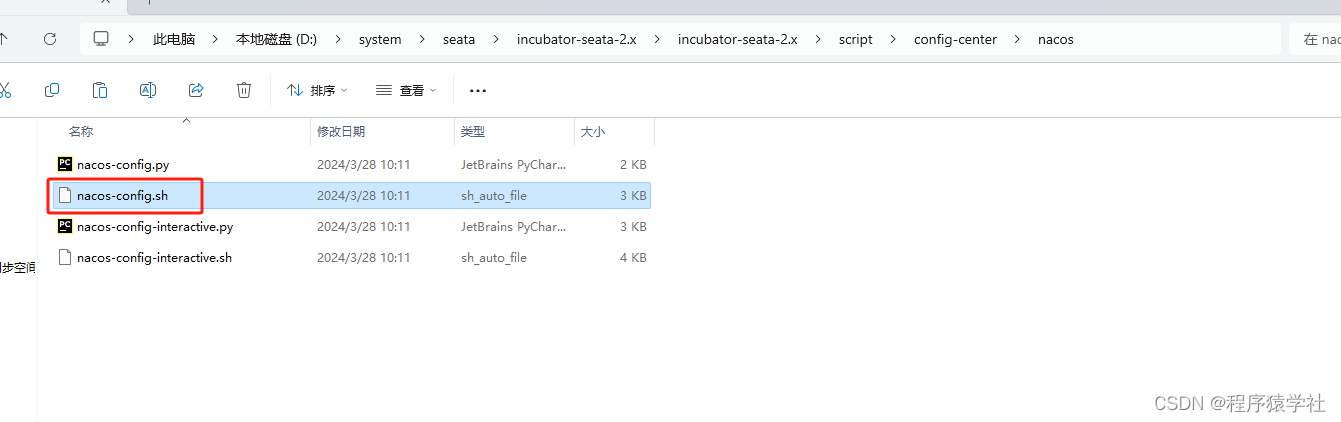
                                下载向nacos推送配置的脚本

                                《springcloud alibaba》 四 seata安装以及使用

                                • 将该脚本移动到seata的conf配置下

                                  《springcloud alibaba》 四 seata安装以及使用

                                  sh nacos-config.sh -h 127.0.0.1 -p 8848 -g SEATA_GROUP -t seata -u nacos -w nacos
                                  # h: nacos服务ip.
                                  # p: nacos服务端口号.
                                  # g: 想要的分组信息.
                                  # t: 第一步新建的命名空间.
                                  # u: nacos登录名.
                                  # w: nacos登录密码
                                  

                                  如果是本地没有做任务的修改,直接运行就行

                                  《springcloud alibaba》 四 seata安装以及使用

                                  • 大概运行5分钟左右

                                    《springcloud alibaba》 四 seata安装以及使用

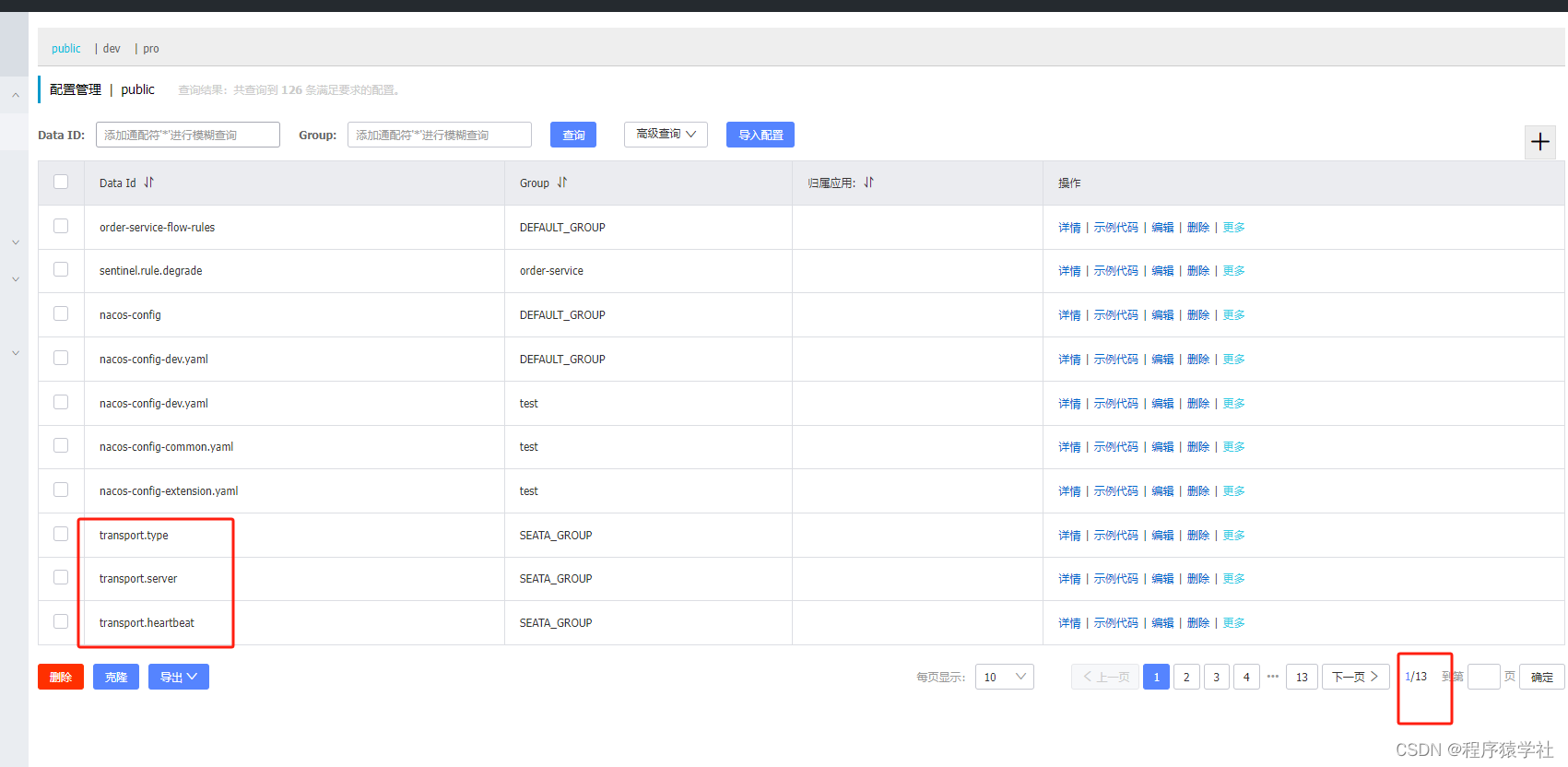
                                  • 很奇葩的设计,搞不懂为什么不单独弄一个文件来存储所有的内容,而是key value的方式,看起来很乱,建议单独创建一个seata的命令空间用来存储这些配置

                                    启动seata
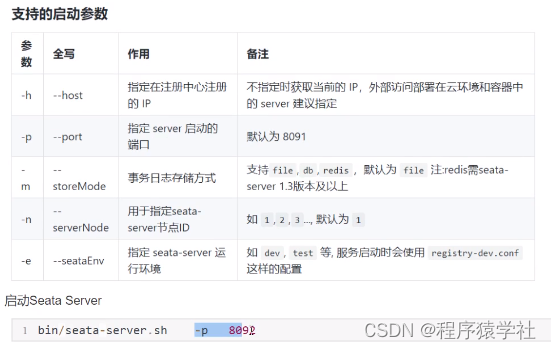
                                    《springcloud alibaba》 四 seata安装以及使用

                                    《springcloud alibaba》 四 seata安装以及使用

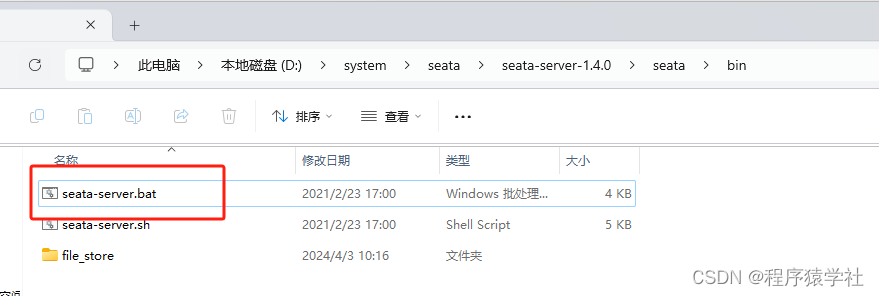
                                    • window启动用bat文件

                                      《springcloud alibaba》 四 seata安装以及使用

                                    • 可以看出默认端口为8091,也可以自定义

                                      《springcloud alibaba》 四 seata安装以及使用

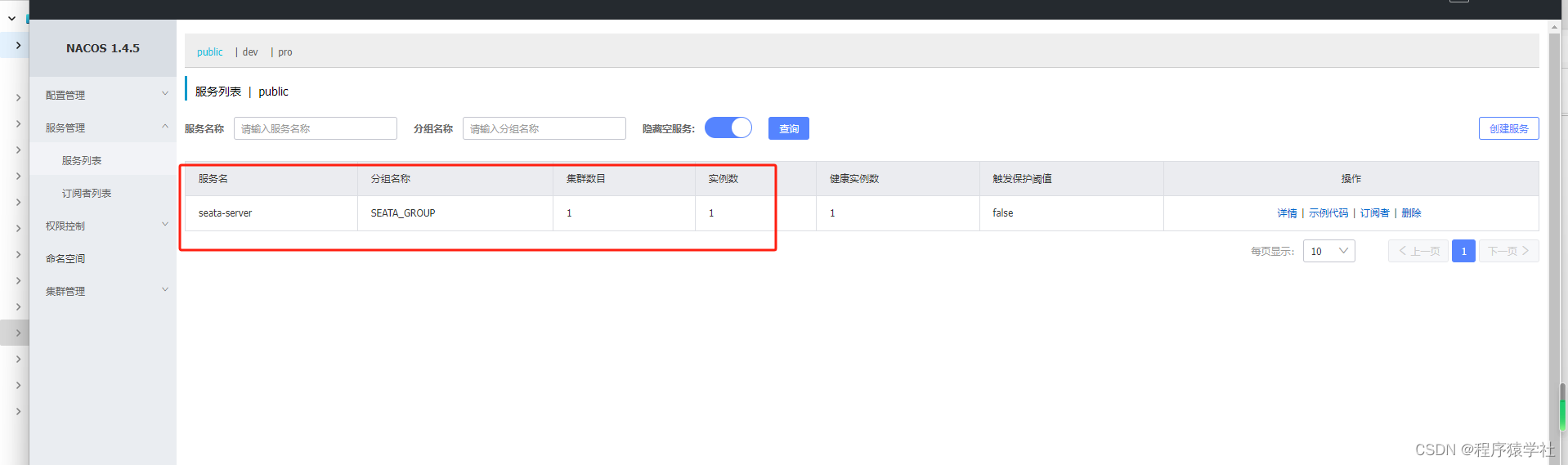
                                    • 在服务列表中,就可以看到多了一个seata-server的服务
                                    • 因为window版本,不好演示集群方式,所以我这里的集群数量是1

                                      新建项目

                                      《springcloud alibaba》 四 seata安装以及使用

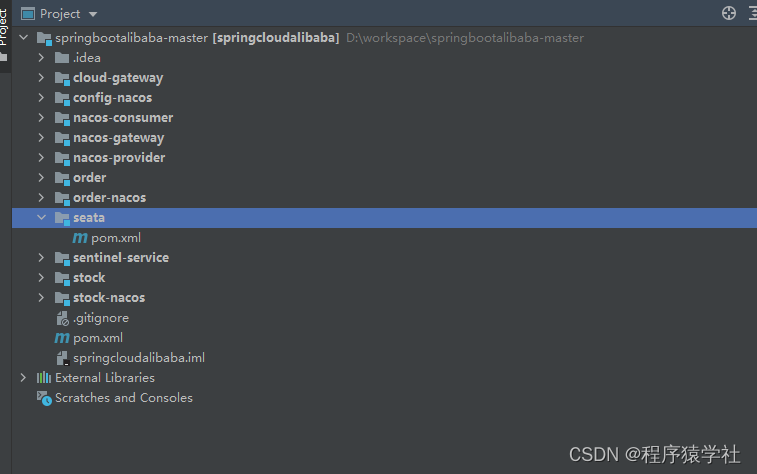
                                      在之前的基础上新增一个seata项目

                                      《springcloud alibaba》 四 seata安装以及使用

                                      • 注意,新增后,该项目是没有蓝点的

                                        《springcloud alibaba》 四 seata安装以及使用

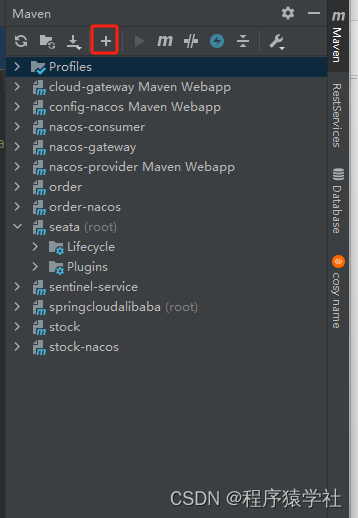
                                      • 添加+号,解决蓝点问题

                                        《springcloud alibaba》 四 seata安装以及使用

                                      • 自己手动补一下seata这个目录

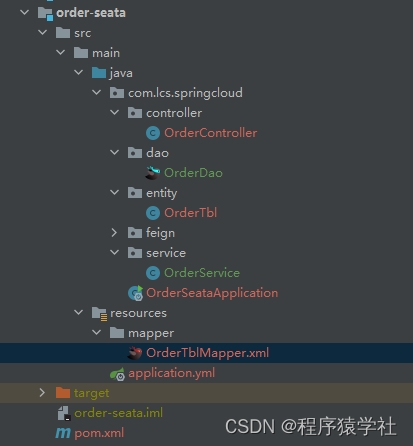
                                      • 创建模块order-seata和stock-seata

                                        order-seata项目 订单项目

                                        《springcloud alibaba》 四 seata安装以及使用

                                        • 新增这两个项目

                                          《springcloud alibaba》 四 seata安装以及使用

                                          • 库存项目的结构

                                            数据库脚本

                                            create database seata_order;
                                            use seata_order;
                                             
                                            CREATE TABLE `order_tbl` (
                                              `id` int(11) NOT NULL AUTO_INCREMENT,
                                              `product_id` varchar(200) DEFAULT NULL,
                                              `total_amount` decimal(10,3) DEFAULT NULL,
                                              `statu` int(11) DEFAULT NULL,
                                              PRIMARY KEY (`id`)
                                            ) ENGINE=InnoDB AUTO_INCREMENT=9 DEFAULT CHARSET=utf8
                                            
                                            • 新增数据库

                                              pom.xml

                                                  4.0.0
                                                  
                                                      com.lcs.springcloud
                                                      springcloudalibaba
                                                      0.0.1-SNAPSHOT
                                                  
                                                  order-nacos
                                                  jar
                                                  
                                                      
                                                          junit
                                                          junit
                                                          3.8.1
                                                          test
                                                      
                                                      
                                                          org.springframework.boot
                                                          spring-boot-starter-web
                                                      
                                                      
                                                          com.alibaba.cloud
                                                          spring-cloud-starter-alibaba-nacos-discovery
                                                          
                                                              
                                                                  org.springframework.cloud
                                                                  spring-cloud-starter-netflix-ribbon


                                                          com.alibaba.cloud
                                                          spring-cloud-starter-alibaba-sentinel
                                                      
                                                      
                                                          org.springframework.cloud
                                                          spring-cloud-starter-openfeign
                                                          
                                                              
                                                                  org.springframework.cloud
                                                                  spring-cloud-netflix-ribbon


                                                          org.springframework.cloud
                                                          spring-cloud-starter-loadbalancer


                                                      order


                                              application.yml

                                              server:
                                                port: 8190
                                              spring:
                                                application:
                                                  name: order-seata
                                                cloud:
                                                  nacos:
                                                    discovery:
                                                      namespace: public
                                                      server-addr: localhost:8848
                                                      username: nacos
                                                      password: nacos
                                                datasource:
                                                  type: com.alibaba.druid.pool.DruidDataSource
                                                  druid:
                                                    db-type: mysql
                                                    driver-class-name: com.mysql.jdbc.Driver
                                                    url: jdbc:mysql://192.168.10.108:3306/seata_order?useUnicode=true&characterEncoding=utf-8&allowMultiQueries=true&useSSL=false&serverTimezone=Asia/Shanghai&allowPublicKeyRetrieval=true&useCursorFetch=true
                                                    username: root
                                                    password: 12312312
                                              mybatis:
                                                mapper-locations: classpath:mapper/*.xml
                                              

                                              启动类

                                              package com.lcs.springcloud;
                                              import org.mybatis.spring.annotation.MapperScan;
                                              import org.springframework.boot.SpringApplication;
                                              import org.springframework.boot.autoconfigure.SpringBootApplication;
                                              import org.springframework.cloud.openfeign.EnableFeignClients;
                                              @SpringBootApplication
                                              @MapperScan("com.lcs.springcloud.dao")
                                              @EnableFeignClients
                                              public class OrderSeataApplication {
                                                  public static void main(String[] args) {
                                                      SpringApplication.run(OrderSeataApplication.class);
                                                  }
                                              }
                                              

                                              实体类

                                              package com.lcs.springcloud.entity;
                                              import java.math.BigDecimal;
                                              public class OrderTbl {
                                                  private Integer id;
                                                  private String product_id;
                                                  private BigDecimal total_amount;
                                                  private Integer statu;
                                                  public OrderTbl() {
                                                  }
                                                  public Integer getId() {
                                                      return id;
                                                  }
                                                  public void setId(Integer id) {
                                                      this.id = id;
                                                  }
                                                  public String getProduct_id() {
                                                      return product_id;
                                                  }
                                                  public void setProduct_id(String product_id) {
                                                      this.product_id = product_id;
                                                  }
                                                  public BigDecimal getTotal_amount() {
                                                      return total_amount;
                                                  }
                                                  public void setTotal_amount(BigDecimal total_amount) {
                                                      this.total_amount = total_amount;
                                                  }
                                                  public Integer getStatu() {
                                                      return statu;
                                                  }
                                                  public void setStatu(Integer statu) {
                                                      this.statu = statu;
                                                  }
                                                  @Override
                                                  public String toString() {
                                                      return "OrderTbl{" +
                                                              "id=" + id +
                                                              ", product_id='" + product_id + '\'' +
                                                              ", total_amount=" + total_amount +
                                                              ", statu=" + statu +
                                                              '}';
                                                  }
                                              }
                                              

                                              dao类

                                              package com.lcs.springcloud.dao;
                                              import com.lcs.springcloud.entity.OrderTbl;
                                              import org.springframework.stereotype.Repository;
                                              @Repository
                                              public interface OrderDao {
                                                  void insert(OrderTbl orderTbl);
                                              }
                                              

                                              service类

                                              package com.lcs.springcloud.service;
                                              import com.lcs.springcloud.dao.OrderDao;
                                              import com.lcs.springcloud.entity.OrderTbl;
                                              import org.springframework.beans.factory.annotation.Autowired;
                                              import org.springframework.stereotype.Service;
                                              @Service
                                              public class OrderService {
                                                  @Autowired
                                                  OrderDao orderDao;
                                                  public void insert(OrderTbl orderTbl) {
                                                      orderDao.insert(orderTbl);
                                                  }
                                              }
                                              

                                              controller类

                                              package com.lcs.springcloud.controller;
                                              import com.lcs.springcloud.entity.OrderTbl;
                                              import com.lcs.springcloud.feign.StockOpenFeign;
                                              import com.lcs.springcloud.service.OrderService;
                                              import org.springframework.beans.factory.annotation.Autowired;
                                              import org.springframework.web.bind.annotation.RequestMapping;
                                              import org.springframework.web.bind.annotation.RestController;
                                              import java.math.BigDecimal;
                                              @RestController
                                              @RequestMapping("/order")
                                              public class OrderController {
                                                  @Autowired
                                                  OrderService orderService;
                                                  @Autowired
                                                  StockOpenFeign stockOpenFeign;
                                                  @RequestMapping("/add")
                                                  public String add(){
                                                      OrderTbl orderTbl = new OrderTbl();
                                                      orderTbl.setProduct_id("10");
                                                      orderTbl.setTotal_amount(new BigDecimal(3000));
                                                      orderTbl.setStatu(0);
                                                      orderService.insert(orderTbl);
                                                      String reduct = stockOpenFeign.reduct(orderTbl.getProduct_id());
                                                      return "add order "+reduct;
                                                  }
                                              }
                                              

                                              feign类

                                              package com.lcs.springcloud.controller;
                                              import com.lcs.springcloud.entity.OrderTbl;
                                              import com.lcs.springcloud.feign.StockOpenFeign;
                                              import com.lcs.springcloud.service.OrderService;
                                              import org.springframework.beans.factory.annotation.Autowired;
                                              import org.springframework.web.bind.annotation.RequestMapping;
                                              import org.springframework.web.bind.annotation.RestController;
                                              import java.math.BigDecimal;
                                              @RestController
                                              @RequestMapping("/order")
                                              public class OrderController {
                                                  @Autowired
                                                  OrderService orderService;
                                                  @Autowired
                                                  StockOpenFeign stockOpenFeign;
                                                  @RequestMapping("/add")
                                                  public String add(){
                                                      OrderTbl orderTbl = new OrderTbl();
                                                      orderTbl.setProduct_id("10");
                                                      orderTbl.setTotal_amount(new BigDecimal(3000));
                                                      orderTbl.setStatu(0);
                                                      orderService.insert(orderTbl);
                                                      String reduct = stockOpenFeign.reduct(orderTbl.getProduct_id());
                                                      return "add order "+reduct;
                                                  }
                                              }
                                              

                                              mapper类


                                                      insert into order_tbl(product_id,total_amount,statu) values(
                                                                                  #{product_id},
                                                                                  #{total_amount},
                                                                                  #{statu}
                                                                              );


                                              stock-seata 库存项目

                                              《springcloud alibaba》 四 seata安装以及使用

                                              数据库脚本

                                               create database seata_stock;
                                              use seata_stock;
                                               
                                              CREATE TABLE `stock_tbl` (
                                                `id` int(11) NOT NULL AUTO_INCREMENT,
                                                `product_id` varchar(200) DEFAULT NULL,
                                                `count` int(11) DEFAULT NULL,
                                                PRIMARY KEY (`id`)
                                              ) ENGINE=InnoDB AUTO_INCREMENT=2 DEFAULT CHARSET=utf8
                                              INSERT INTO `seata_stock`.`stock_tbl` (`id`, `product_id`, `count`) VALUES (1, '10', 100);
                                              

                                              pom.xml

                                                  4.0.0
                                                  
                                                      com.lcs.springcloud
                                                      springcloudalibaba
                                                      0.0.1-SNAPSHOT
                                                  
                                                  stock-seata
                                                  jar


                                                          com.alibaba.cloud
                                                          spring-cloud-starter-alibaba-nacos-discovery


                                                          org.springframework.boot
                                                          spring-boot-starter-web


                                                          org.springframework.boot
                                                          spring-boot-starter-jdbc
                                                          2.3.5.RELEASE


                                                          org.mybatis.spring.boot
                                                          mybatis-spring-boot-starter
                                                          1.3.2


                                                                  org.springframework.boot
                                                                  spring-boot-starter-jdbc


                                                          mysql
                                                          mysql-connector-java
                                                          8.0.18
                                                          runtime


                                                          com.alibaba
                                                          druid-spring-boot-starter
                                                          1.1.9


                                                      order-seata


                                              application.yml

                                              server:
                                                port: 8200
                                              spring:
                                                application:
                                                  name: stock-seata
                                                cloud:
                                                  nacos:
                                                    discovery:
                                                      namespace: public
                                                      server-addr: localhost:8848
                                                      username: nacos
                                                      password: nacos
                                                datasource:
                                                  type: com.alibaba.druid.pool.DruidDataSource
                                                  druid:
                                                    db-type: mysql
                                                    driver-class-name: com.mysql.jdbc.Driver
                                                    #url: jdbc:mysql://10.153.96.31:3306/iomm-collection?useUnicode=true&characterEncoding=utf-8&allowMultiQueries=true&useSSL=false&serverTimezone=Asia/Shanghai&allowPublicKeyRetrieval=true&useCursorFetch=true
                                                    url: jdbc:mysql://112.74.51.171:3306/seata_stock?useUnicode=true&characterEncoding=utf-8&allowMultiQueries=true&useSSL=false&serverTimezone=Asia/Shanghai&allowPublicKeyRetrieval=true&useCursorFetch=true
                                                    username: root
                                                    password: Zy_746498
                                              mybatis:
                                                mapper-locations: classpath:mapper/*.xml
                                              

                                              启动类

                                              package com.lcs.springcloud;
                                              import org.mybatis.spring.annotation.MapperScan;
                                              import org.springframework.boot.SpringApplication;
                                              import org.springframework.boot.autoconfigure.SpringBootApplication;
                                              @SpringBootApplication
                                              @MapperScan("com.lcs.springcloud.dao")
                                              public class StockSeataApplication {
                                                  public static void main(String[] args) {
                                                      SpringApplication.run(StockSeataApplication.class,args);
                                                  }
                                              }
                                              

                                              实体类

                                              package com.lcs.springcloud.entity;
                                              public class StockTbl {
                                                  private Integer id;
                                                  private String product_id;
                                                  private Integer count;
                                                  public Integer getId() {
                                                      return id;
                                                  }
                                                  public void setId(Integer id) {
                                                      this.id = id;
                                                  }
                                                  public String getProduct_id() {
                                                      return product_id;
                                                  }
                                                  public void setProduct_id(String product_id) {
                                                      this.product_id = product_id;
                                                  }
                                                  public Integer getCount() {
                                                      return count;
                                                  }
                                                  public void setCount(Integer count) {
                                                      this.count = count;
                                                  }
                                              }
                                              

                                              dao类

                                              package com.lcs.springcloud.dao;
                                              import org.apache.ibatis.annotations.Param;
                                              import org.springframework.stereotype.Repository;
                                              @Repository
                                              public interface StockDao {
                                                  void updateStock(@Param("product_id")String product_id);
                                              }
                                              

                                              service类

                                              package com.lcs.springcloud.service;
                                              import com.lcs.springcloud.dao.StockDao;
                                              import org.springframework.beans.factory.annotation.Autowired;
                                              import org.springframework.stereotype.Service;
                                              @Service
                                              public class StockService {
                                                   @Autowired
                                                   StockDao stockDao;
                                                  public String updateStock(String product_id) {
                                                      try {
                                                          stockDao.updateStock(product_id);
                                                          return "扣减库存成功";
                                                      }catch (Exception e){
                                                          return "更新库存失败";
                                                      }
                                                  }
                                              }
                                              

                                              controller类

                                              package com.lcs.springcloud.controller;
                                              import com.lcs.springcloud.service.StockService;
                                              import org.springframework.beans.factory.annotation.Autowired;
                                              import org.springframework.beans.factory.annotation.Value;
                                              import org.springframework.web.bind.annotation.RequestMapping;
                                              import org.springframework.web.bind.annotation.RequestParam;
                                              import org.springframework.web.bind.annotation.RestController;
                                              @RestController
                                              @RequestMapping("/stock")
                                              public class StockController {
                                                  @Autowired
                                                  StockService stockService;
                                                  @Value("${server.port}")
                                                  String port;
                                                  @RequestMapping("/reduct")
                                                  public String reduct(@RequestParam(value = "product_id") String product_id){
                                                      return stockService.updateStock(product_id);
                                                  }
                                              }
                                              

                                              mapper类


                                                      update stock_tbl  SET count= count-1 where product_id=#{product_id}


                                              测试

                                              前提: 保持已经开启nacos,不知道的可以先学习一下nacos

                                              《springcloud alibaba》 四 seata安装以及使用

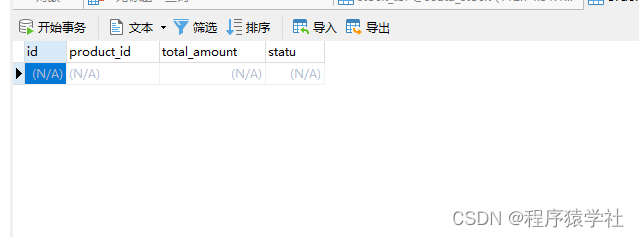
                                              • 订单表 默认为空

                                                《springcloud alibaba》 四 seata安装以及使用

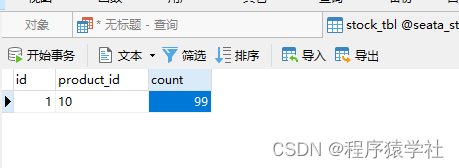
                                              • 库存表默认为100个库存

                                                运行http://localhost:8190/order/add

                                                《springcloud alibaba》 四 seata安装以及使用

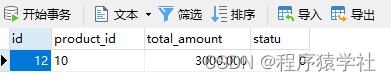
                                                结果如下:

                                                《springcloud alibaba》 四 seata安装以及使用

                                                《springcloud alibaba》 四 seata安装以及使用

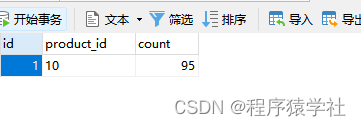
                                                • 订单表新增一条记录,库存表-1,说明项目搭建成功

                                                  特殊情况

                                                  已知: order和stock是两个库

                                                  把order的controller代码,改一下

                                                  package com.lcs.springcloud.controller;
                                                  import com.lcs.springcloud.entity.OrderTbl;
                                                  import com.lcs.springcloud.feign.StockOpenFeign;
                                                  import com.lcs.springcloud.service.OrderService;
                                                  import org.springframework.beans.factory.annotation.Autowired;
                                                  import org.springframework.transaction.annotation.Transactional;
                                                  import org.springframework.web.bind.annotation.RequestMapping;
                                                  import org.springframework.web.bind.annotation.RestController;
                                                  import java.math.BigDecimal;
                                                  @RestController
                                                  @RequestMapping("/order")
                                                  public class OrderController {
                                                      @Autowired
                                                      OrderService orderService;
                                                      @Autowired
                                                      StockOpenFeign stockOpenFeign;
                                                      @RequestMapping("/add")
                                                      @Transactional
                                                      public String add(){
                                                          OrderTbl orderTbl = new OrderTbl();
                                                          orderTbl.setProduct_id("10");
                                                          orderTbl.setTotal_amount(new BigDecimal(3000));
                                                          orderTbl.setStatu(0);
                                                          //1. 插入订单
                                                          orderService.insert(orderTbl);
                                                          //2. 扣减库存
                                                          String reduct = stockOpenFeign.reduct(orderTbl.getProduct_id());
                                                          // 3. 出现问题
                                                           int a= 1/0;
                                                          return "add order "+reduct;
                                                      }
                                                  }
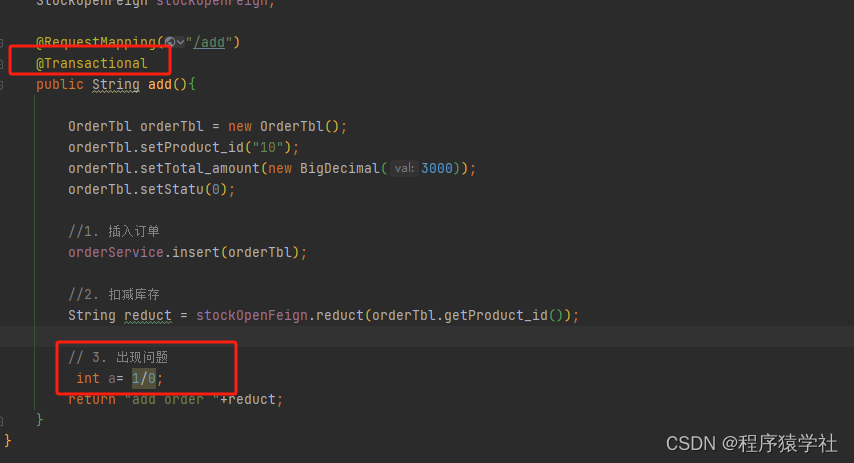
                                                  

                                                  《springcloud alibaba》 四 seata安装以及使用

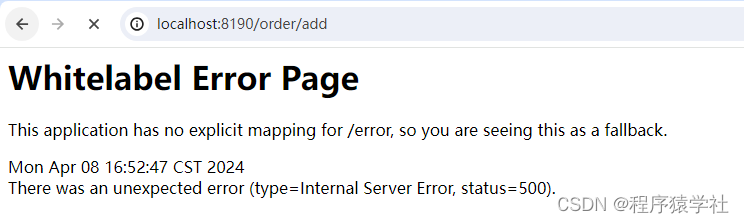
                                                  • 都知道0不能作为分母,必报错, 大家说一下这个接口是多少?

                                                    订单插入进行了回滚,库存表进行扣减库存,为什么?

                                                    这是因为@transaction事物是不支持跨库回滚的。

                                                    分布式事务

                                                    代码版本在上续上面做改动,请保证上面能先运行后, 再看该步骤

                                                    order-seata项目变动

                                                    pom.xml

                                                     
                                                                com.alibaba.cloud
                                                                spring-cloud-starter-alibaba-seata
                                                                2.2.5.RELEASE
                                                            
                                                            
                                                                cglib
                                                                cglib
                                                                3.3.0
                                                            
                                                    
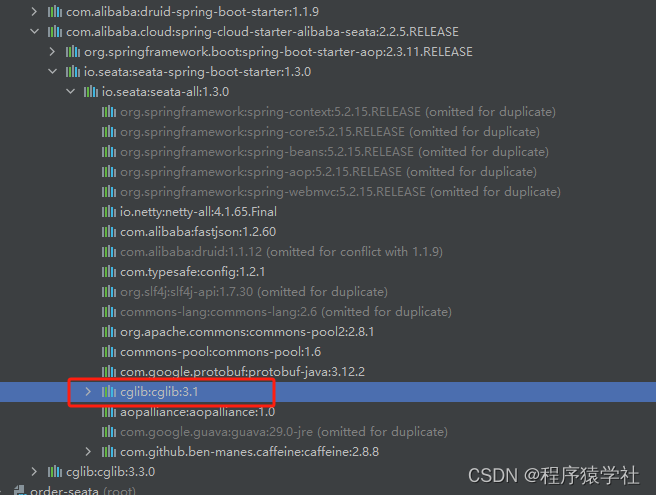
                                                    • 为什么加了一个cglib的包?

                                                      《springcloud alibaba》 四 seata安装以及使用

                                                    • 报cg相关的一个错,猜测估计是依赖冲突的问题,查了一下项目依赖,发现只有可能cglib的问题
                                                      《springcloud alibaba》 四 seata安装以及使用

                                                      application.yml

                                                      server:
                                                        port: 8190
                                                      spring:
                                                        application:
                                                          name: order-seata
                                                        cloud:
                                                          nacos:
                                                            discovery:
                                                              namespace: public
                                                              server-addr: localhost:8848
                                                              username: nacos
                                                              password: nacos
                                                          alibaba:
                                                            seata:
                                                              tx-service-group: default_tx_group
                                                        datasource:
                                                          type: com.alibaba.druid.pool.DruidDataSource
                                                          druid:
                                                            db-type: mysql
                                                            driver-class-name: com.mysql.jdbc.Driver
                                                            url: jdbc:mysql://127.0.0.1:3306/seata_order?useUnicode=true&characterEncoding=utf-8&allowMultiQueries=true&useSSL=false&serverTimezone=Asia/Shanghai&allowPublicKeyRetrieval=true&useCursorFetch=true
                                                            username: root
                                                            password: 123456
                                                      mybatis:
                                                        mapper-locations: classpath:mapper/*.xml
                                                      seata:
                                                        registry:
                                                          #配置seata的注册中心
                                                          type: nacos
                                                          nacos:
                                                            ### nacos服务器地址
                                                            server-addr: localhost:8848
                                                            username: nacos
                                                            password: nacos
                                                            ### nacos服务名
                                                            application: seata-server
                                                        config:
                                                          type: nacos
                                                          nacos:
                                                            ### nacos服务器地址
                                                            server-addr: localhost:8848
                                                            username: nacos
                                                            password: nacos
                                                            group: SEATA_GROUP
                                                      

                                                      《springcloud alibaba》 四 seata安装以及使用

                                                      • 为什么叫这个名字,看自己seata-server的配置

                                                        《springcloud alibaba》 四 seata安装以及使用

                                                        《springcloud alibaba》 四 seata安装以及使用

                                                      • 这里标红的,就是我们需要填写的名字,在网上可以查到很多叫guangzhou的,这是因为别人重命名咯

                                                        controller
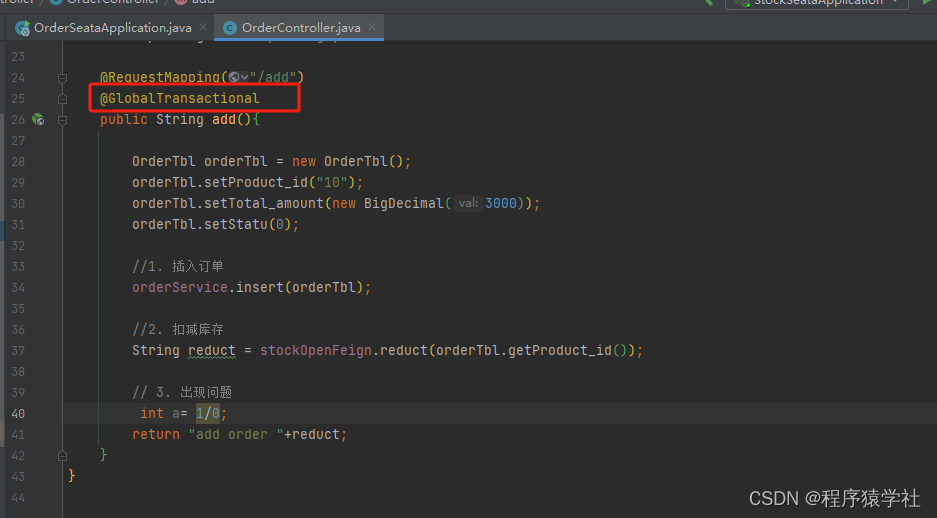
                                                        《springcloud alibaba》 四 seata安装以及使用

                                                        • 注解改为@GlobalTransactional,表示是分布式事务

                                                          stock-seata项目变动

                                                          pom.xml

                                                           
                                                                      com.alibaba.cloud
                                                                      spring-cloud-starter-alibaba-seata
                                                                      2.2.5.RELEASE
                                                                  
                                                                  
                                                                      cglib
                                                                      cglib
                                                                      3.3.0


                                                          application.yml

                                                          server:
                                                            port: 8200
                                                          spring:
                                                            application:
                                                              name: stock-seata
                                                            cloud:
                                                              nacos:
                                                                discovery:
                                                                  namespace: public
                                                                  server-addr: localhost:8848
                                                                  username: nacos
                                                                  password: nacos
                                                              alibaba:
                                                                seata:
                                                                  tx-service-group: default_tx_group
                                                            datasource:
                                                              type: com.alibaba.druid.pool.DruidDataSource
                                                              druid:
                                                                db-type: mysql
                                                                driver-class-name: com.mysql.jdbc.Driver
                                                                url: jdbc:mysql://127.0.0.1:3306/seata_stock?useUnicode=true&characterEncoding=utf-8&allowMultiQueries=true&useSSL=false&serverTimezone=Asia/Shanghai&allowPublicKeyRetrieval=true&useCursorFetch=true
                                                                username: root
                                                                password: 123456
                                                          mybatis:
                                                            mapper-locations: classpath:mapper/*.xml
                                                          seata:
                                                            registry:
                                                              #配置seata的注册中心
                                                              type: nacos
                                                              nacos:
                                                                ### nacos服务器地址
                                                                server-addr: localhost:8848
                                                                username: nacos
                                                                password: nacos
                                                                ### nacos服务名
                                                                application: seata-server
                                                            config:
                                                              type: nacos
                                                              nacos:
                                                                ### nacos服务器地址
                                                                server-addr: localhost:8848
                                                                username: nacos
                                                                password: nacos
                                                                group: SEATA_GROUP
                                                          
                                                          • 跟order项目类似,就是client跟seata以及nacos进行通信

                                                            脚本

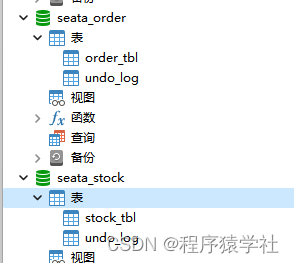
                                                            CREATE TABLE `undo_log` (
                                                              `id` bigint(20) NOT NULL AUTO_INCREMENT,
                                                              `branch_id` bigint(20) NOT NULL,
                                                              `xid` varchar(100) NOT NULL,
                                                              `context` varchar(128) NOT NULL,
                                                              `rollback_info` longblob NOT NULL,
                                                              `log_status` int(11) NOT NULL,
                                                              `log_created` datetime NOT NULL,
                                                              `log_modified` datetime NOT NULL,
                                                              `ext` varchar(100) DEFAULT NULL,
                                                              PRIMARY KEY (`id`),
                                                              UNIQUE KEY `ux_undo_log` (`xid`,`branch_id`)
                                                            ) ENGINE=InnoDB AUTO_INCREMENT=3 DEFAULT CHARSET=utf8;
                                                            

                                                            《springcloud alibaba》 四 seata安装以及使用

                                                            • 涉及到分布式事务的库,都需要新增该undo-log得表,他会记录修改前,以及修改后的sql,以便逆向回滚
                                                            • 例如你执行了新增,逆向就是删除

                                                              效果

                                                              《springcloud alibaba》 四 seata安装以及使用

                                                              • order表

                                                                《springcloud alibaba》 四 seata安装以及使用

                                                              • 库存表

                                                                《springcloud alibaba》 四 seata安装以及使用

                                                                执行http://localhost:8190/order/add,查看数据库,出现异常后

                                                                • 之前使用@transation是,订单回滚,库存减咯
                                                                • 选择使用@globaTransation注解,订单回滚,库存不变

                                                                  分布式事务原理

                                                                  nacos配置问题

                                                                  《springcloud alibaba》 四 seata安装以及使用

                                                                  启动后,在bin下面多了一个store开头的文件夹,why?

                                                                  我不是改成db模式吗?为什么配置没有生效,查了半天,才发现nacos的配置,竟然是默认的

                                                                  《springcloud alibaba》 四 seata安装以及使用

                                                                  • 搜索store.mode*改成db

                                                                    启动项目后,竟然报数据库的一个错误,怎么可能,我数据库的配置,都是copy的项目里面,不可能出问题,那原因只有一个,就是nacos里面的初始化配置又有问题

                                                                    《springcloud alibaba》 四 seata安装以及使用

                                                                    • 修改nacos这三个的配置,再启动项目,seata得bin下面,没有文件夹生成,说明切换成db模式成功

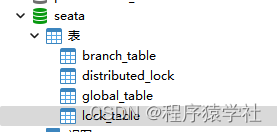
                                                                      seata的几个表都是什么情况
                                                                      《springcloud alibaba》 四 seata安装以及使用

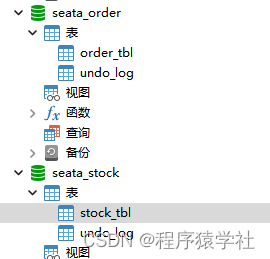
                                                                      • seata的表

                                                                        《springcloud alibaba》 四 seata安装以及使用

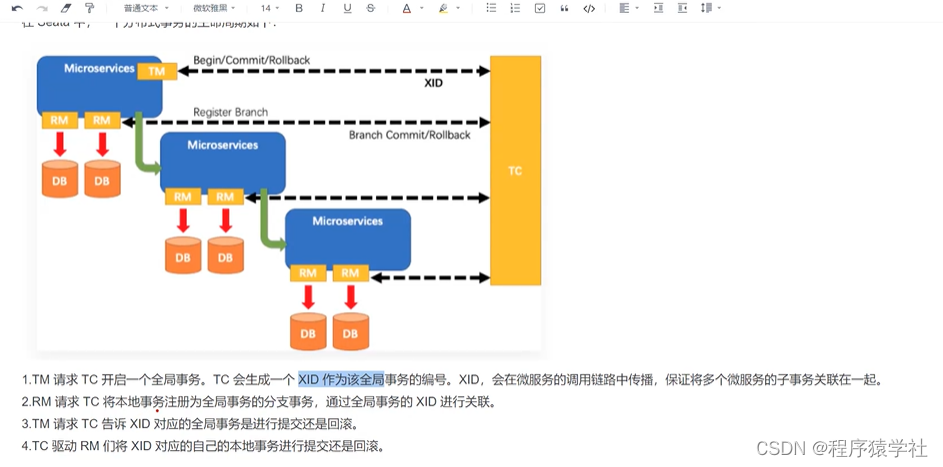
                                                                        • 这是seata的一个流程图

                                                                          《springcloud alibaba》 四 seata安装以及使用

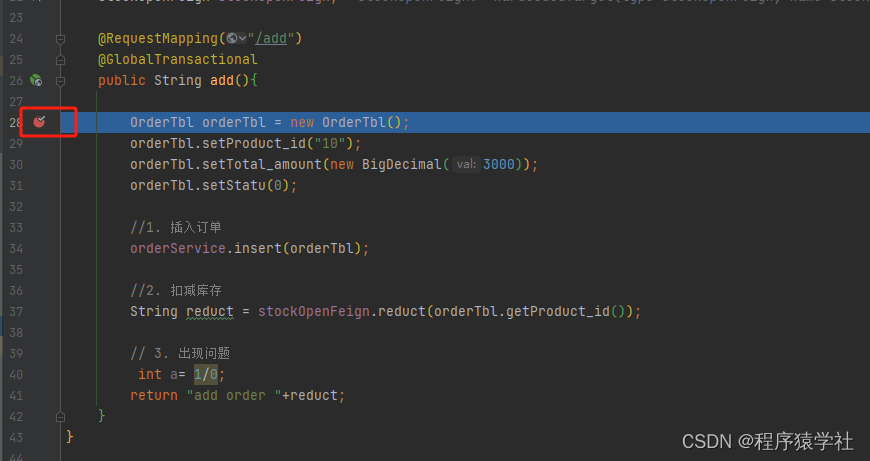
                                                                        • 输入http://localhost:8190/order/add,在进入方法的时候打入断点
                                                                          《springcloud alibaba》 四 seata安装以及使用

                                                                          《springcloud alibaba》 四 seata安装以及使用

                                                                        • global_table表生成了一个xid 拼接方式是ip+端口再加一个唯一id
                                                                        • xid 全局事务id
                                                                        • application_id 应用id
                                                                        • transaction_service_group 分组
                                                                        • transaction_name 事物加在那个方法上面(以前有个版本会标注在具体类具体方法),新版本后,变动了,好奇他底层是什么映射的,知道的,可以下方交流一下

                                                                          《springcloud alibaba》 四 seata安装以及使用

                                                                        • 断点执行到这里

                                                                          《springcloud alibaba》 四 seata安装以及使用

                                                                        • branch_table 表新增了一条数据,这个是分支Xid

                                                                          《springcloud alibaba》 四 seata安装以及使用

                                                                        • 订单库的undo-log,也新增了一条数据

                                                                          《springcloud alibaba》 四 seata安装以及使用

                                                                        • lock_table表变化会存储锁表的信息
                                                                        • pk就是主键的id
                                                                          #到order库调用该sql,查看blob存放的内容
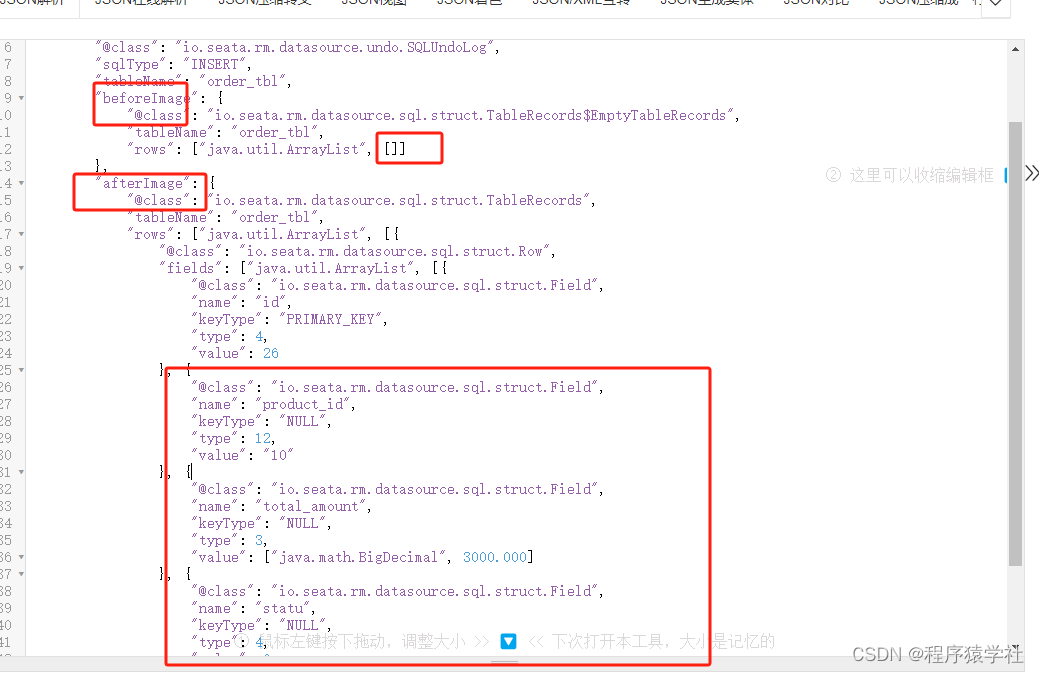
                                                                          select CONVERT(t.rollback_info USING utf8) from undo_log t
                                                                          
                                                                          • 如下图

                                                                            《springcloud alibaba》 四 seata安装以及使用

                                                                          • 因为是插入语句,所以beforeImage之前是没有数据的,afterImage存放的就是修改后的数据

                                                                            断点走完后,所有的seata表数据都会回滚,如果遇到异常退出的情况,请先清空表数据

                                                                            代码下载

VPS购买请点击我

免责声明:我们致力于保护作者版权,注重分享,被刊用文章因无法核实真实出处,未能及时与作者取得联系,或有版权异议的,请联系管理员,我们会立即处理! 部分文章是来自自研大数据AI进行生成,内容摘自(百度百科,百度知道,头条百科,中国民法典,刑法,牛津词典,新华词典,汉语词典,国家院校,科普平台)等数据,内容仅供学习参考,不准确地方联系删除处理! 图片声明:本站部分配图来自人工智能系统AI生成,觅知网授权图片,PxHere摄影无版权图库和百度,360,搜狗等多加搜索引擎自动关键词搜索配图,如有侵权的图片,请第一时间联系我们,邮箱:ciyunidc@ciyunshuju.com。本站只作为美观性配图使用,无任何非法侵犯第三方意图,一切解释权归图片著作权方,本站不承担任何责任。如有恶意碰瓷者,必当奉陪到底严惩不贷!

目录[+]