
关于Spring Boot 2.7后WebSecurityConfigurerAdapter的过期问题,SpringSecurity的最新最全配置
前言
进入springboot 2.7 后,一个重要的类WebSecurityConfigurerAdapter过期了
正文
①:如果想使用自定义的用户,只需要向Spring容器中注入一个UserDetailsService实例即可,此时用户是存在内存中的。如果用户是存在数据库中的,需要提供UserDetailsService接口的实现类并注入到Spring容器中
@Configuration
public class SecurityConfig {
    UserDetailsService userDetailsService(){
        InMemoryUserDetailsManager users = new InMemoryUserDetailsManager();
        users.createUser(User.withUsername("root").password("{noop}123456").roles("admin").build());
        return users;
    }
}
②:给公共资源放行,就是希望用户不用登录就能访问
(1):配置WebSecurity:注册WebSecurityCustomizer的一个实例
@Bean
WebSecurityCustomizer webSecurityCustomizer() {
    return new WebSecurityCustomizer() {
        @Override
        public void customize(WebSecurity web) {
            // 在 Spring Security 5.8 中,弃用 antMatchers 了 、 mvcMatchers 和 regexMatchers 方法,
            // 转而使用新 requestMatchers 方法
            web.ignoring().requestMatchers("/hello");// 放行/hello
        }
    };
}
(2):配置HttpSecurity
@Bean
SecurityFilterChain securityFilterChain(HttpSecurity http) throws Exception{
    http.authorizeRequests()
        // 在 Spring Security 5.8 中,弃用 antMatchers 了 、 mvcMatchers 和 regexMatchers 方法,
        // 转而使用新 requestMatchers 方法
        .requestMatchers("/login").permitAll()
        .anyRequest().authenticated()
        .and().formLogin();
    return http.build();
}
两种方式最大的区别在于,第一种方式是不走 Spring Security 过滤器链,而第二种方式走 Spring Security 过滤器链,在过滤器链中,给请求放行。
在我们使用 Spring Security 的时候,有的资源可以使用第一种方式额外放行,不需要验证,例如前端页面的静态资源,就可以按照第一种方式配置放行。
有的资源放行,则必须使用第二种方式,例如登录接口。大家知道,登录接口也是必须要暴露出来的,不需要登录就能访问到的,但是我们却不能将登录接口用第一种方式暴露出来,登录请求必须要走 Spring Security 过滤器链,因为在这个过程中,还有其他事情要做
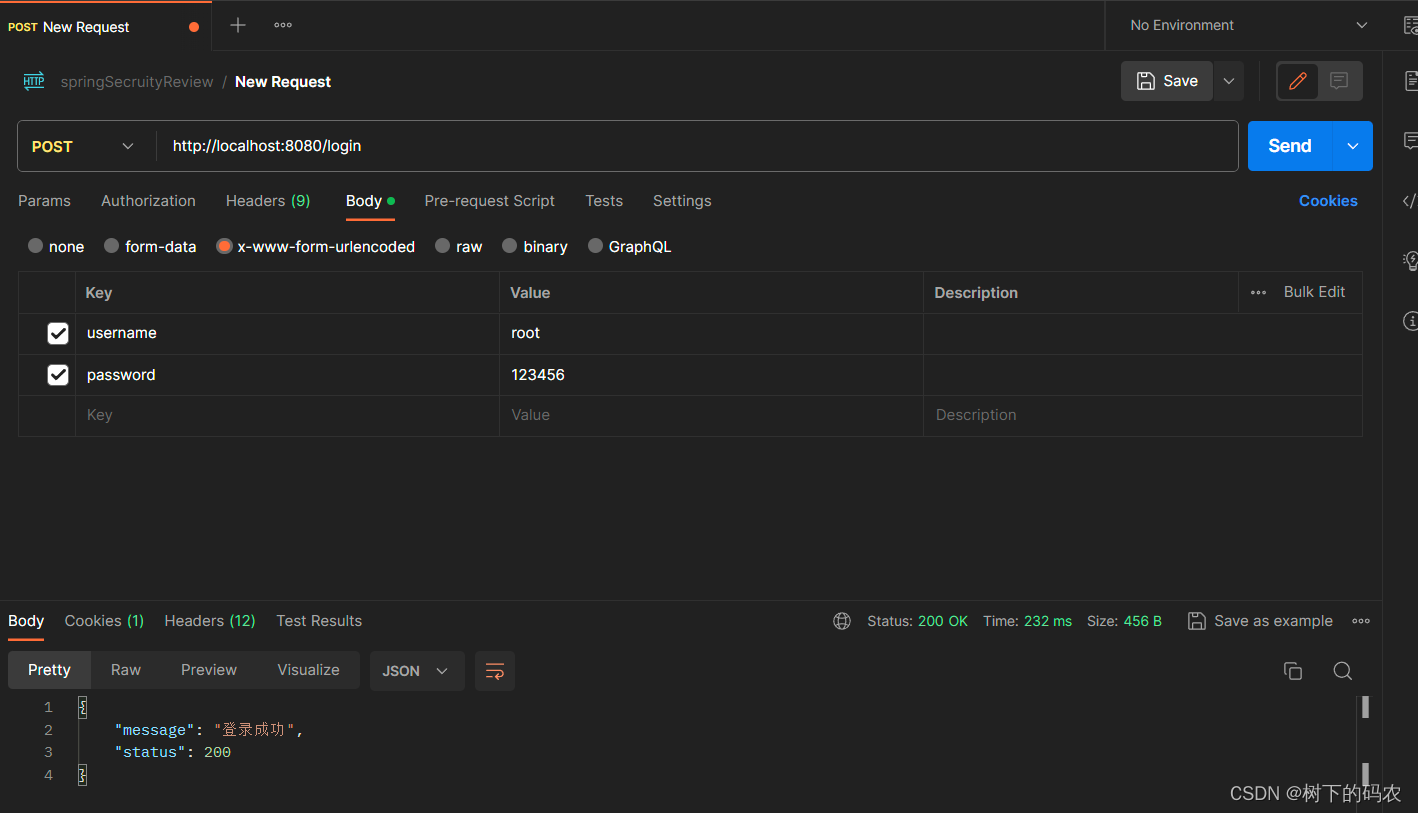
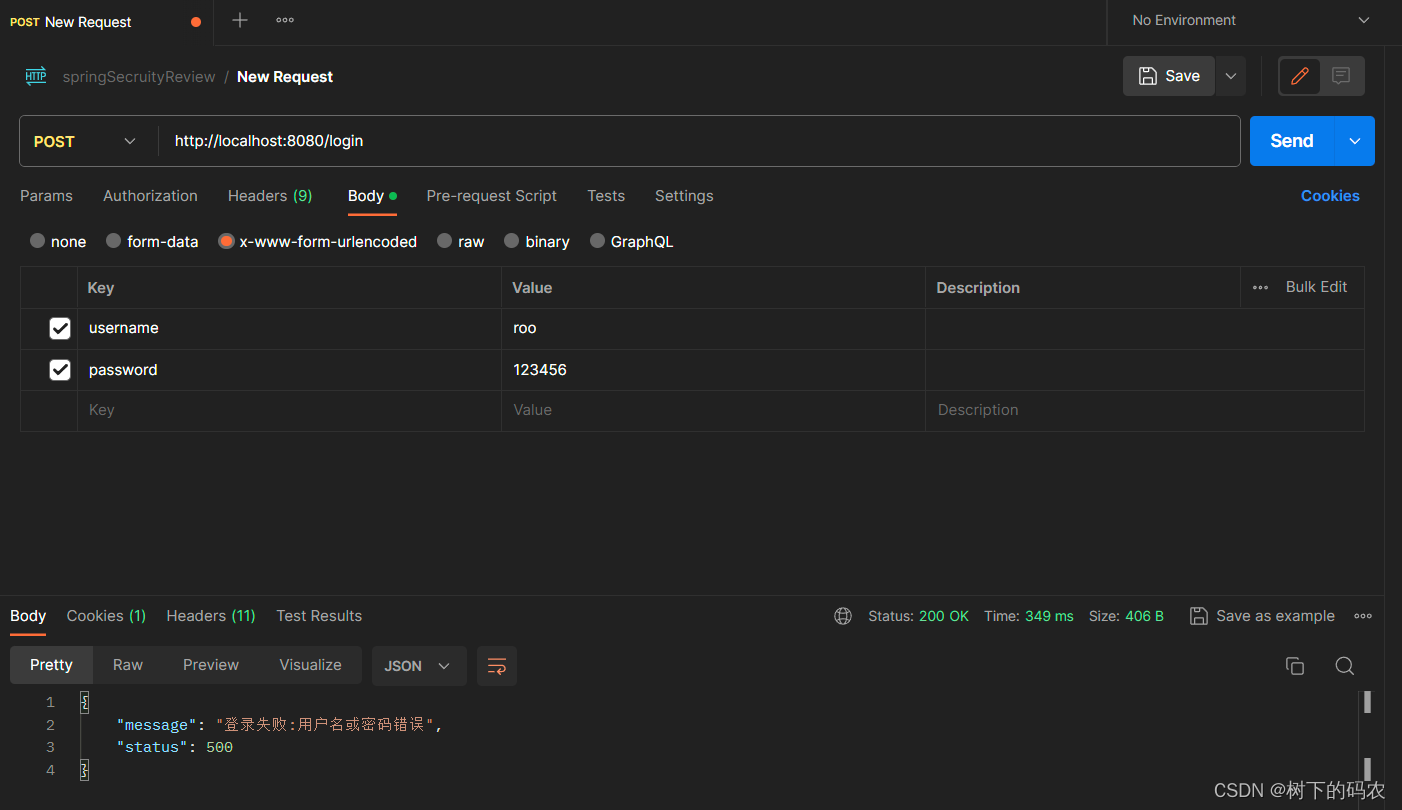
③:自定义登录成功与失败处理
public class MyAuthenticationSuccessHandler implements AuthenticationSuccessHandler {
    @Override
    public void onAuthenticationSuccess(HttpServletRequest request, HttpServletResponse response, Authentication authentication) throws IOException, ServletException {
        Map result=new HashMap();
        result.put("message","登录成功");
        result.put("status",200);
        response.setContentType("application/json;charset=UTF-8");
        // 返回结果
        String s = new ObjectMapper().writeValueAsString(result);
        response.getWriter().println(s);
    }
}
public class MyAuthenticationFailureHandler implements AuthenticationFailureHandler {
    @Override
    public void onAuthenticationFailure(HttpServletRequest request, HttpServletResponse response, AuthenticationException exception) throws IOException, ServletException {
        Map result=new HashMap();
        result.put("message","登录失败:"+exception.getMessage());
        result.put("status",500);
        response.setContentType("application/json;charset=UTF-8");
        // 返回结果
        String s = new ObjectMapper().writeValueAsString(result);
        response.getWriter().println(s);
    }
}
在HttpSecurity中进行配置
@Bean
SecurityFilterChain securityFilterChain(HttpSecurity http) throws Exception{
    http.authorizeRequests()
        // 在 Spring Security 5.8 中,弃用 antMatchers 了 、 mvcMatchers 和 regexMatchers 方法,
        // 转而使用新 requestMatchers 方法
        .requestMatchers("/login").permitAll()
        .anyRequest().authenticated()
        .and().formLogin()
        .successHandler(new MyAuthenticationSuccessHandler())
        .failureHandler(new MyAuthenticationFailureHandler())
        .and().csrf().disable();
    return http.build();
}
结果
④:自定义注销登录
@Override
public void onLogoutSuccess(HttpServletRequest request, HttpServletResponse response, Authentication authentication) throws IOException, ServletException {
    Map result = new HashMap();
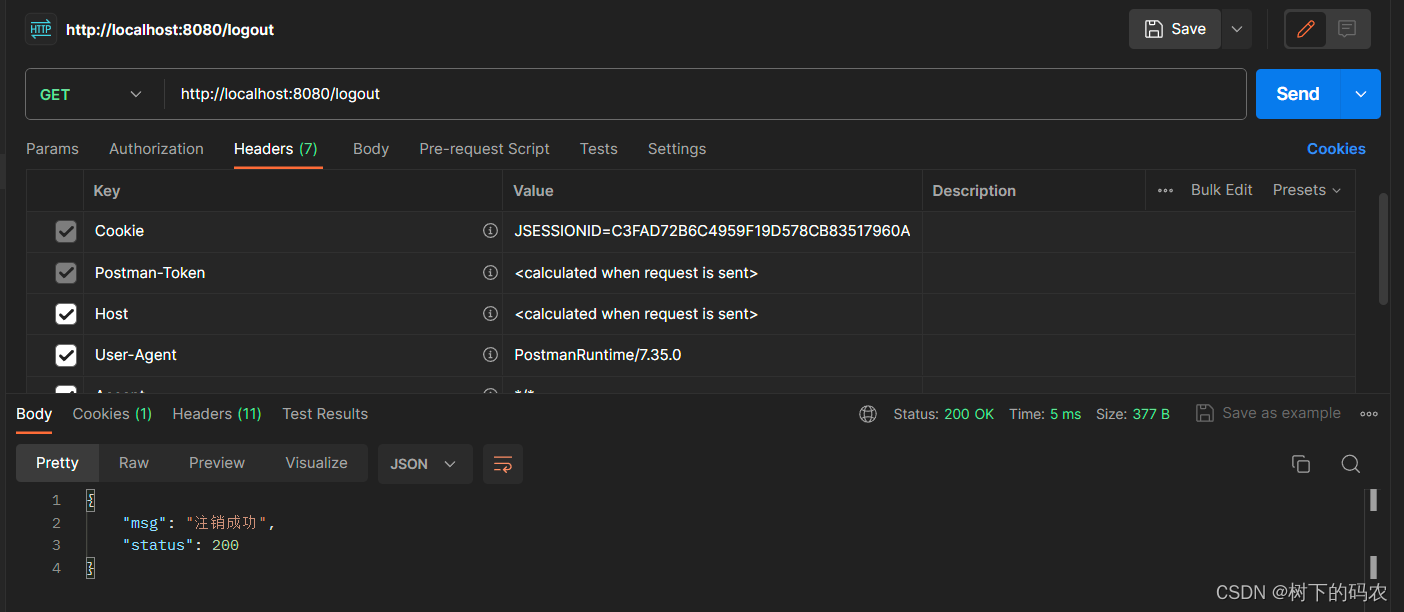
    result.put("msg", "注销成功");
    result.put("status", 200);
    response.setContentType("application/json;charset=UTF-8");
    String s = new
        ObjectMapper().writeValueAsString(result);
    response.getWriter().println(s);
}
在HttpSecurity中进行配置
@Bean
SecurityFilterChain securityFilterChain(HttpSecurity http) throws Exception{
    http.authorizeRequests()
        // 在 Spring Security 5.8 中,弃用 antMatchers 了 、 mvcMatchers 和 regexMatchers 方法,
        // 转而使用新 requestMatchers 方法
        .requestMatchers("/login").permitAll()
        .anyRequest().authenticated()
        .and().formLogin()
        .successHandler(new MyAuthenticationSuccessHandler())
        .failureHandler(new MyAuthenticationFailureHandler())
        .and().logout()
        .logoutRequestMatcher(new OrRequestMatcher(
            new AntPathRequestMatcher("/logout","GET"),
            new AntPathRequestMatcher("/logout1","GET")))
        .invalidateHttpSession(true)
        .clearAuthentication(true)
        .logoutSuccessHandler(new MyLogoutSuccessHandler())
        .and().csrf().disable();
    return http.build();
}
结果
免责声明:我们致力于保护作者版权,注重分享,被刊用文章因无法核实真实出处,未能及时与作者取得联系,或有版权异议的,请联系管理员,我们会立即处理! 部分文章是来自自研大数据AI进行生成,内容摘自(百度百科,百度知道,头条百科,中国民法典,刑法,牛津词典,新华词典,汉语词典,国家院校,科普平台)等数据,内容仅供学习参考,不准确地方联系删除处理! 图片声明:本站部分配图来自人工智能系统AI生成,觅知网授权图片,PxHere摄影无版权图库和百度,360,搜狗等多加搜索引擎自动关键词搜索配图,如有侵权的图片,请第一时间联系我们,邮箱:ciyunidc@ciyunshuju.com。本站只作为美观性配图使用,无任何非法侵犯第三方意图,一切解释权归图片著作权方,本站不承担任何责任。如有恶意碰瓷者,必当奉陪到底严惩不贷!


