
vue 使用高德地图实现自定义选取起点和终点功能,支持搜索地址跳转定位(保姆级教程)
温馨提示:这篇文章已超过367天没有更新,请注意相关的内容是否还可用!
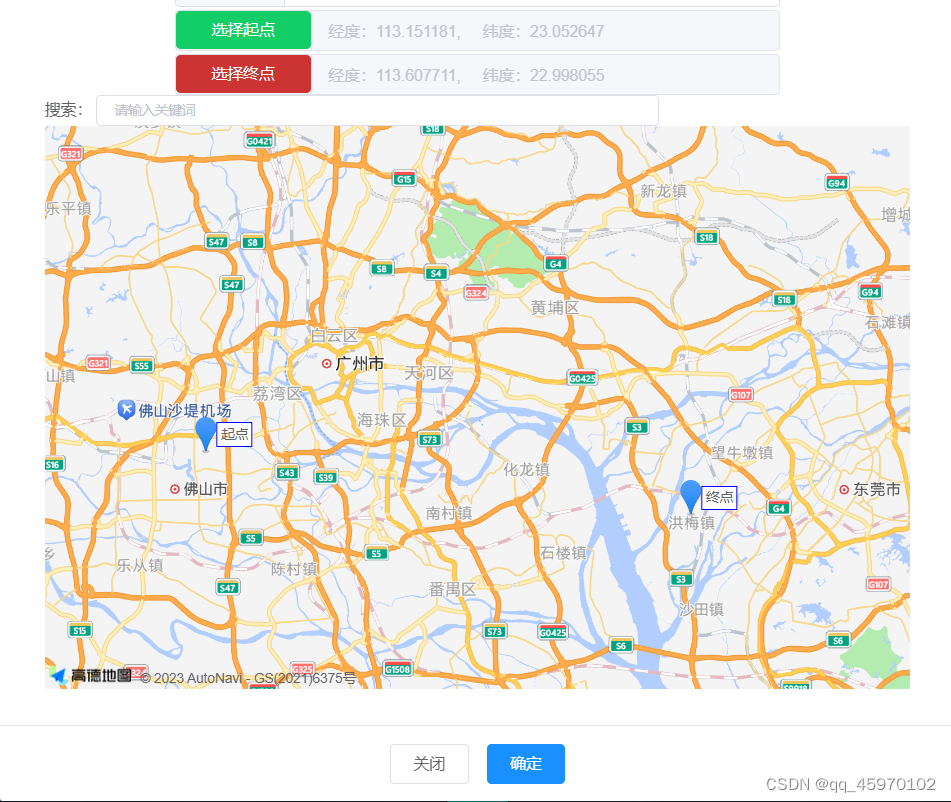
一、效果演示
1. 起点终点选择
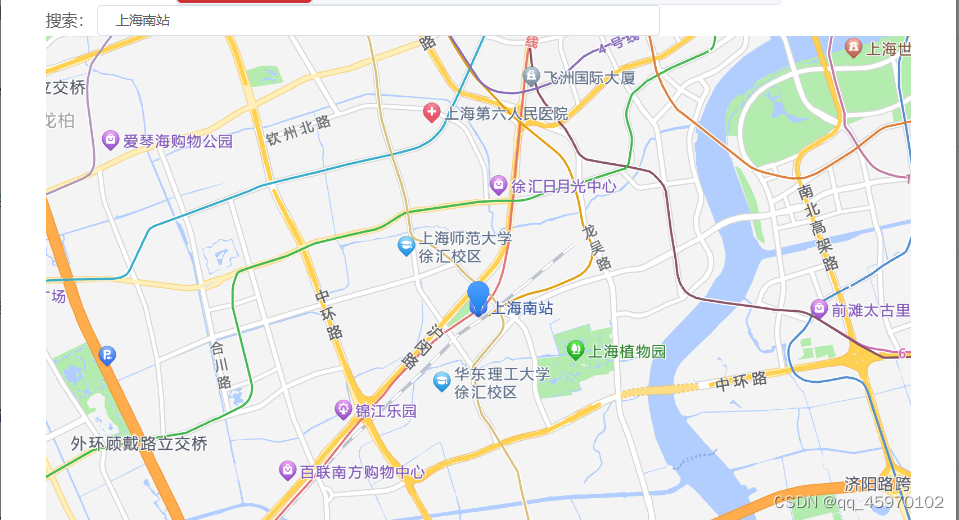
2. 地址搜索

二、准备工作
1. 获取高德地图key
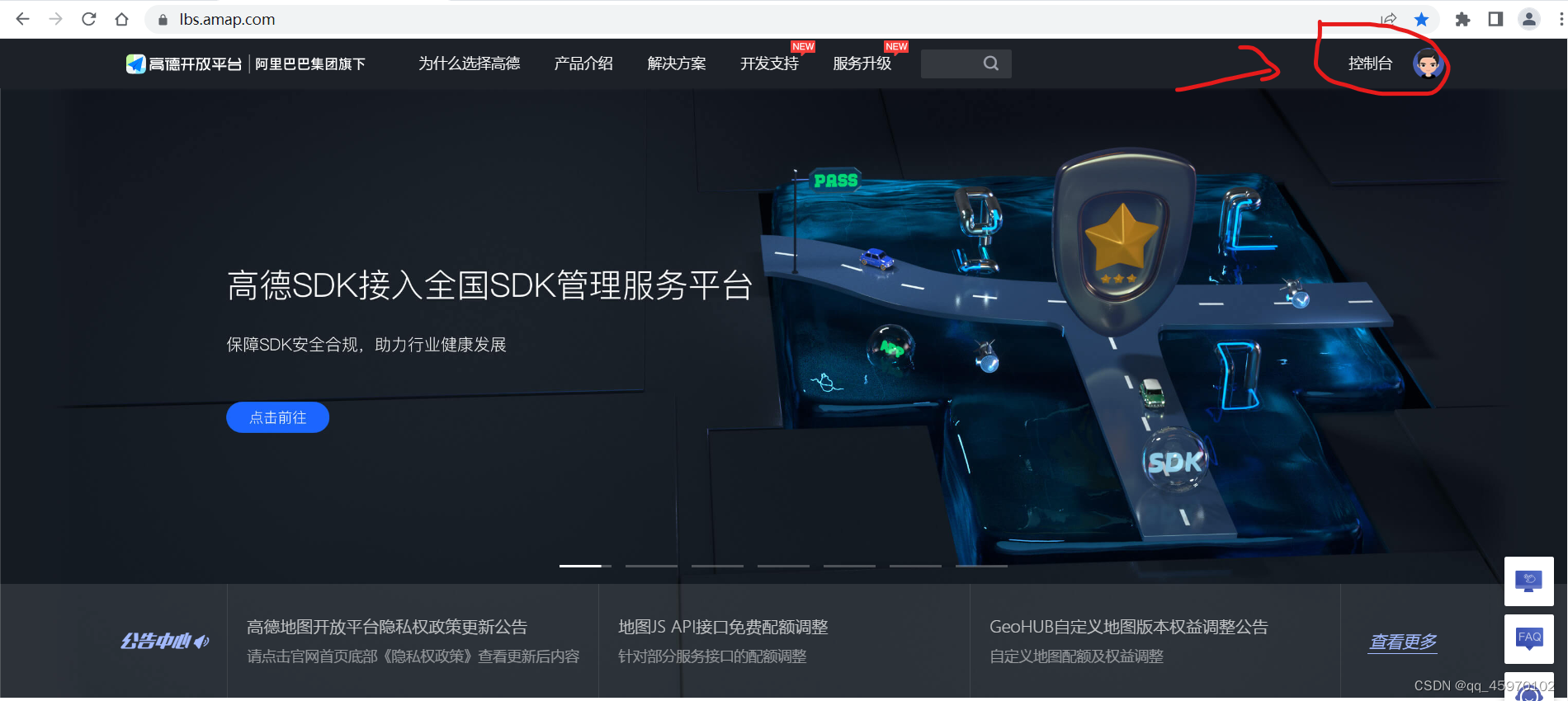
1.1 访问高德地图官网注册完成后登录,进入控制台
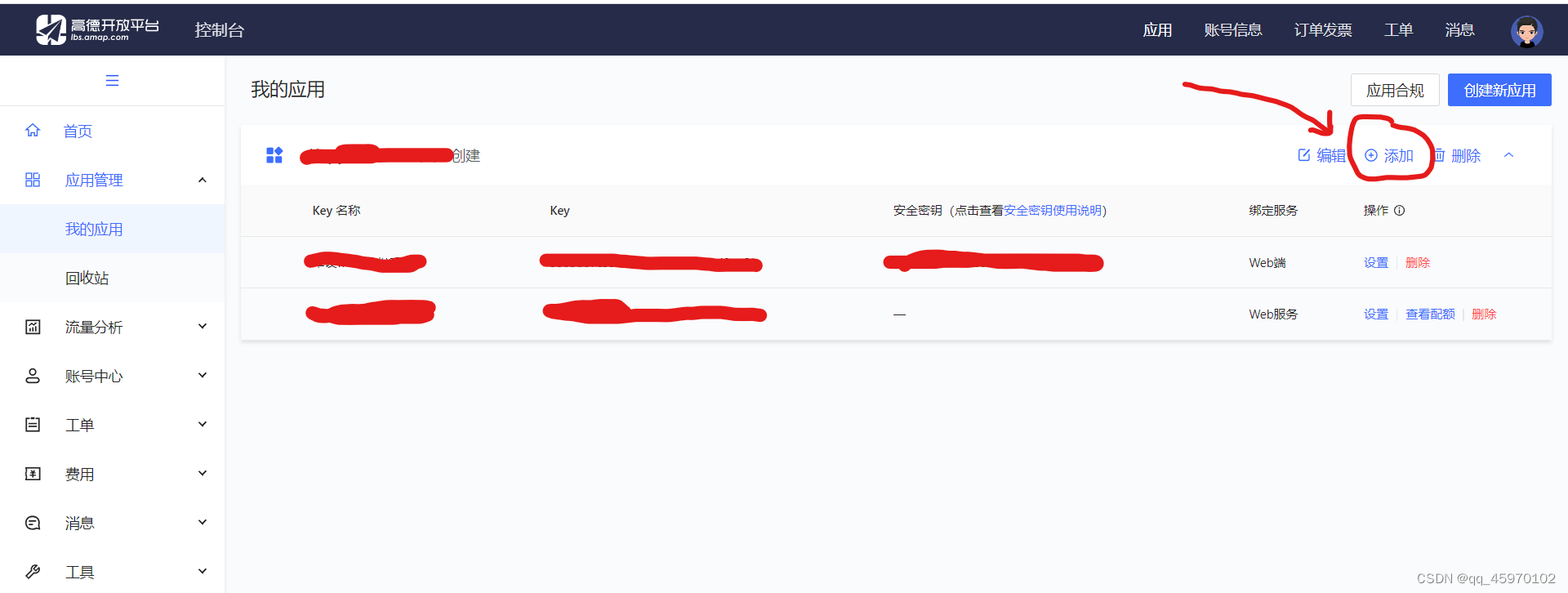
1.2 左侧 应用管理-我的应用,点击创建新应用

1.3 点击添加
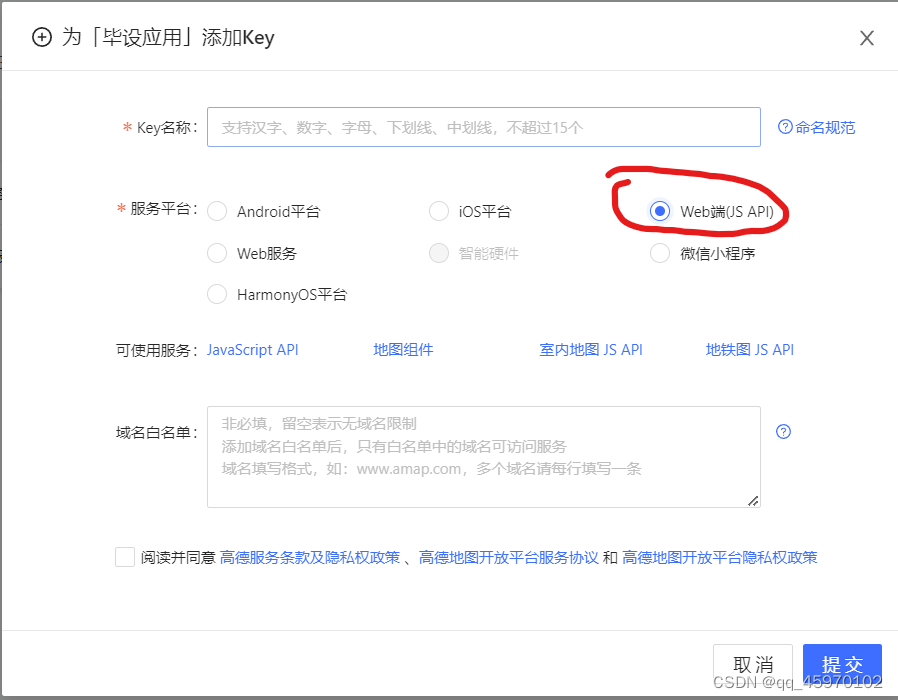
1.4 选择Web端(JS API)
1.5 创建完成,得到key和安全密钥

2. 引入高德地图npm包
npm i @amap/amap-jsapi-loader --save
三、正式开始写代码
提示:以下代码全部在*.vue文件中编写,无其他文件
1. 设置key和安全密钥,初始化地图
把xxxxxxxxxxxxxxxxxxx换成自己申请的
import AMapLoader from "@amap/amap-jsapi-loader";
// 设置安全密钥
window._AMapSecurityConfig = {
  securityJsCode: 'xxxxxxxxxxxxxxxxx',
}
export default {
    mounted() {
        this.initMap();
    },
    data(){
	  return {
		//提交表单
		form:{},
        //地图实例
        map: null,
        //路径坐标点集合
        coordinateList: [],
        //起点坐标
        startCoordinate: {},
        //终点坐标
        endCoordinate: {},
        //起点坐标描述
        startCoordinateDescription: '经度:请选择起点' + ',     纬度:请选择起点' ,
        //终点坐标描述
        endCoordinateDescription: '经度:请选择终点' + ',     纬度:请选择终点',
        //选择起点
        isStart: true,
        //起点Marker
        startMarker: null,
        //终点Marker
        endMarker: null,
        //搜索点Marker
        searchMarker: null,
        // 搜索提示
        AutoComplete: null,
        // 搜索关键字
        keywords: "",
        // 搜索节流阀
        loading: false,
        // 搜索提示信息
        options: [],
      }
	},
    methods: {
        //初始化地图
        initMap() {
        AMapLoader.reset()
        AMapLoader.load({
          key: 'xxxxxxxxxxxxxxxxxxxxxxxxx',
          version: '2.0',   // 指定要加载的 JSAPI 的版本,缺省时默认为 1.4.15
          plugins: ['AMap.AutoComplete', 'AMap.PlaceSearch', 'AMap.Marker'],  // 需要使用的的插件列表
          AMapUI: {
            version: '1.1',
            plugins: []
          }
        }).then((AMap)=>{
          // 初始化地图
          this.map = new AMap.Map('guide-map',{
            viewMode : "2D",  //  是否为3D地图模式
            zoom : 13,   // 初始化地图级别
            center : [113.370824,23.131265], //中心点坐标  广州
            resizeEnable: true,
            willreadoften: true
          });
          //鼠标点击事件
          this.map.on('click', this.clickMapHandler)
          // 搜索提示插件
          this.AutoComplete = new AMap.AutoComplete({ city: "全国" });
        }).catch(e => {
          console.log(e);
        });
      }
    }
}
2. 选取起点和终点
// 点击地图事件
      clickMapHandler(e){
        //选择起点
        if (this.isStart){
          if (this.startMarker !== null){
            this.map.remove(this.startMarker)
          }
          this.startCoordinate.lon = e.lnglat.getLng()
          this.startCoordinate.lat = e.lnglat.getLat()
          this.startCoordinateDescription = '经度:' + this.startCoordinate.lon + ',     纬度:' + this.startCoordinate.lat
          //标点
          this.startMarker = new AMap.Marker({
            position: new AMap.LngLat(e.lnglat.getLng(), e.lnglat.getLat()),   // 经纬度对象,也可以是经纬度构成的一维数组[116.39, 39.9]
            title: '起点',
            label: {
              content: '起点'
            }
          })
          // 将创建的点标记添加到已有的地图实例
          this.map.add(this.startMarker)
        }
        //选择终点
        else {
          if (this.endMarker !== null){
            this.map.remove(this.endMarker)
          }
          this.endCoordinate.lon = e.lnglat.getLng()
          this.endCoordinate.lat = e.lnglat.getLat()
          this.endCoordinateDescription = '经度:' + this.endCoordinate.lon + ',     纬度:' + this.endCoordinate.lat
          this.endMarker = new AMap.Marker({
            position: new AMap.LngLat(e.lnglat.getLng(), e.lnglat.getLat()),   // 经纬度对象,也可以是经纬度构成的一维数组[116.39, 39.9]
            title: '终点',
            label: {
              content: '终点'
            }
          })
          this.map.add(this.endMarker)
        }
      }
3.搜索地址功能
// 搜索地址
      remoteMethod(query) {
        if (query !== "") {
          this.loading = true;
          setTimeout(() => {
            this.loading = false;
            this.AutoComplete.search(query, (status, result) => {
              this.options = result.tips;
            });
          }, 200);
        } else {
          this.options = [];
        }
      },
      // 选中提示
      currentSelect(val) {
        // 清空时不执行后面代码
        if (!val) {
          return ;
        }
        // 自动适应显示想显示的范围区域
        this.map.setFitView();
        //清除marker
        if (this.searchMarker){
          this.map.remove(this.searchMarker)
        }
        //设置marker
        this.searchMarker = new AMap.Marker({
          map: this.map,
          position: [val.location.lng, val.location.lat],
        });
        this.keywords = val.name
        //定位
        this.map.setCenter([val.location.lng, val.location.lat])
      }
4. 页面代码
          路线名称


          选择起点


          选择终点


        搜索:


            {{ item.name }}
            {{
                item.district
              }}
5. 全部代码
          路线名称


          选择起点


          选择终点


        搜索:


            {{ item.name }}
            {{
                item.district
              }}


import AMapLoader from "@amap/amap-jsapi-loader";
// 设置安全密钥
window._AMapSecurityConfig = {
  securityJsCode: 'xxxxxxxxxxxxxxxxx',
}
export default {
    mounted() {
        this.initMap();
    },
    data(){
	  return {
		//提交表单
		form:{},
        //地图实例
        map: null,
        //路径坐标点集合
        coordinateList: [],
        //起点坐标
        startCoordinate: {},
        //终点坐标
        endCoordinate: {},
        //起点坐标描述
        startCoordinateDescription: '经度:请选择起点' + ',     纬度:请选择起点' ,
        //终点坐标描述
        endCoordinateDescription: '经度:请选择终点' + ',     纬度:请选择终点',
        //选择起点
        isStart: true,
        //起点Marker
        startMarker: null,
        //终点Marker
        endMarker: null,
        //搜索点Marker
        searchMarker: null,
        // 搜索提示
        AutoComplete: null,
        // 搜索关键字
        keywords: "",
        // 搜索节流阀
        loading: false,
        // 搜索提示信息
        options: [],
      }
	},
    methods: {
        //初始化地图
        initMap() {
        AMapLoader.reset()
        AMapLoader.load({
          key: 'xxxxxxxxxxxxxxxxxxxxxxxxx',
          version: '2.0',   // 指定要加载的 JSAPI 的版本,缺省时默认为 1.4.15
          plugins: ['AMap.AutoComplete', 'AMap.PlaceSearch', 'AMap.Marker'],  // 需要使用的的插件列表
          AMapUI: {
            version: '1.1',
            plugins: []
          }
        }).then((AMap)=>{
          // 初始化地图
          this.map = new AMap.Map('guide-map',{
            viewMode : "2D",  //  是否为3D地图模式
            zoom : 13,   // 初始化地图级别
            center : [113.370824,23.131265], //中心点坐标  广州
            resizeEnable: true,
            willreadoften: true
          });
          //鼠标点击事件
          this.map.on('click', this.clickMapHandler)
          // 搜索提示插件
          this.AutoComplete = new AMap.AutoComplete({ city: "全国" });
        }).catch(e => {
          console.log(e);
        });
      },
      // 点击地图事件
      clickMapHandler(e){
        //选择起点
        if (this.isStart){
          if (this.startMarker !== null){
            this.map.remove(this.startMarker)
          }
          this.startCoordinate.lon = e.lnglat.getLng()
          this.startCoordinate.lat = e.lnglat.getLat()
          this.startCoordinateDescription = '经度:' + this.startCoordinate.lon + ',     纬度:' + this.startCoordinate.lat
          //标点
          this.startMarker = new AMap.Marker({
            position: new AMap.LngLat(e.lnglat.getLng(), e.lnglat.getLat()),   // 经纬度对象,也可以是经纬度构成的一维数组[116.39, 39.9]
            title: '起点',
            label: {
              content: '起点'
            }
          })
          // 将创建的点标记添加到已有的地图实例
          this.map.add(this.startMarker)
        }
        //选择终点
        else {
          if (this.endMarker !== null){
            this.map.remove(this.endMarker)
          }
          this.endCoordinate.lon = e.lnglat.getLng()
          this.endCoordinate.lat = e.lnglat.getLat()
          this.endCoordinateDescription = '经度:' + this.endCoordinate.lon + ',     纬度:' + this.endCoordinate.lat
          this.endMarker = new AMap.Marker({
            position: new AMap.LngLat(e.lnglat.getLng(), e.lnglat.getLat()),   // 经纬度对象,也可以是经纬度构成的一维数组[116.39, 39.9]
            title: '终点',
            label: {
              content: '终点'
            }
          })
          this.map.add(this.endMarker)
        }
      },
      // 搜索地址
      remoteMethod(query) {
        if (query !== "") {
          this.loading = true;
          setTimeout(() => {
            this.loading = false;
            this.AutoComplete.search(query, (status, result) => {
              this.options = result.tips;
            });
          }, 200);
        } else {
          this.options = [];
        }
      },
      // 选中提示
      currentSelect(val) {
        // 清空时不执行后面代码
        if (!val) {
          return ;
        }
        // 自动适应显示想显示的范围区域
        this.map.setFitView();
        //清除marker
        if (this.searchMarker){
          this.map.remove(this.searchMarker)
        }
        //设置marker
        this.searchMarker = new AMap.Marker({
          map: this.map,
          position: [val.location.lng, val.location.lat],
        });
        this.keywords = val.name
        //定位
        this.map.setCenter([val.location.lng, val.location.lat])
      }
    }
}
参考:vue对高德地图的简单使用:点击标记并获取经纬度和详细地址
免责声明:我们致力于保护作者版权,注重分享,被刊用文章因无法核实真实出处,未能及时与作者取得联系,或有版权异议的,请联系管理员,我们会立即处理! 部分文章是来自自研大数据AI进行生成,内容摘自(百度百科,百度知道,头条百科,中国民法典,刑法,牛津词典,新华词典,汉语词典,国家院校,科普平台)等数据,内容仅供学习参考,不准确地方联系删除处理! 图片声明:本站部分配图来自人工智能系统AI生成,觅知网授权图片,PxHere摄影无版权图库和百度,360,搜狗等多加搜索引擎自动关键词搜索配图,如有侵权的图片,请第一时间联系我们,邮箱:ciyunidc@ciyunshuju.com。本站只作为美观性配图使用,无任何非法侵犯第三方意图,一切解释权归图片著作权方,本站不承担任何责任。如有恶意碰瓷者,必当奉陪到底严惩不贷!


