
javaAPI操作Elasticsearch
温馨提示:这篇文章已超过370天没有更新,请注意相关的内容是否还可用!
mapping属性
mapping是对索引库中文档的约束, 常见的mapping属性包括:
- type: 字段数据类型,常见的简单类型有:
- 字符串: text(可分词的文本), keyword(精确值, 例如: 品牌,国家)
- 数值: long, integer, short, byte, double, float
- 布尔: boolean
- 日期: date
- 对象: object
- index: 是否创建索引, 默认为true
- analyzer: 使用哪种分词器
- properties: 该字段的子字段
索引库操作
创建索引库
PUT /zyw
{
  "mappings": {
    "properties": {
      "info": {
        "type": "text",
        "analyzer": "ik_smart"
      },
      "email": {
        "type": "keyword",
        "index": false
      },
      "name": {
        "type": "object",
        "properties": {
          "firstName": {
            "type": "keyword"
          },
          "lastName":{
            "type":"keyword"
          }
        }
      }
    }
  }
}
查看索引库
GET /zyw
删除索引库
DELETE /zyw
修改索引库, 添加新字段
索引库和mapping一旦创建无法修改, 但是可以添加新字段
PUT /zyw/_mapping
{
  "properties": {
    "age": {
      "type": "integer"
    }
  }
}
文档操作
新增文档
POST /zyw/_doc/1
{
  "info": "java是最好的语言",
  "email": "zy@163.com",
  "name": {
    "firstName": "云",
    "lastName": "赵"
  }
}
查询文档
GET /zyw/_doc/1
删除文档
DELETE /zyw/_doc/1
修改文档
- 全量修改, 会删除旧文档, 添加新文档
PUT /zyw/_doc/1 { "info": "java是最好的语言", "email": "zy@163.com", "name": { "firstName": "云", "lastName": "赵" } }- 局部修改
POST /zyw/_update/1
{
  "doc": {
    "email": "test@163.com"
  }
}
RestClient操作索引库
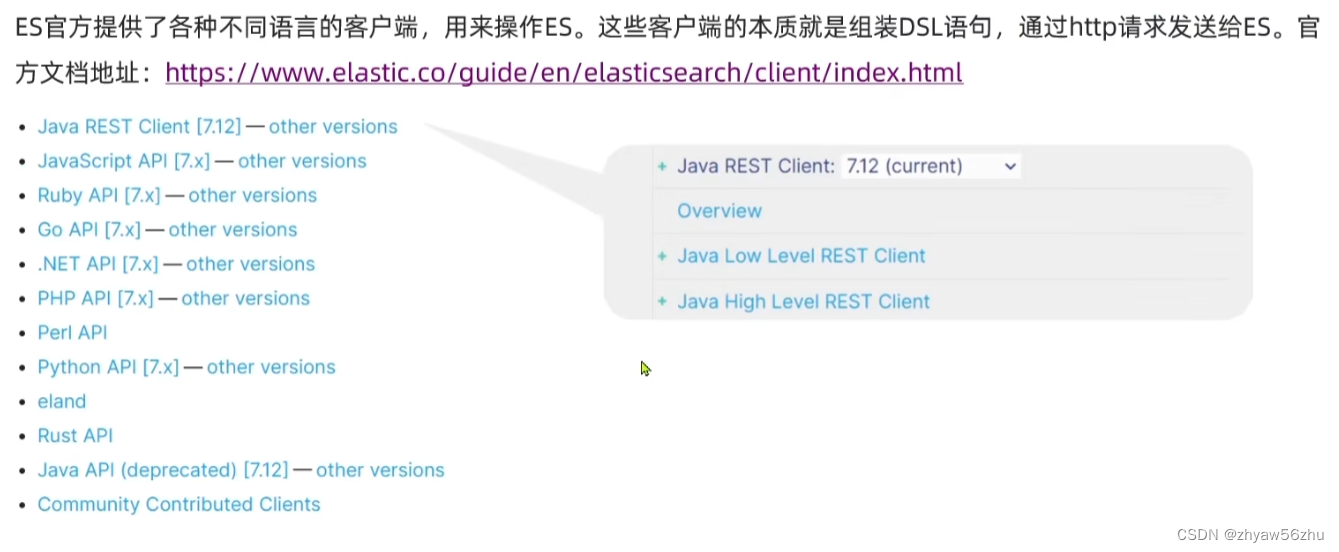
- 引入依赖
            org.elasticsearch.client
            elasticsearch-rest-high-level-client
            7.12.1
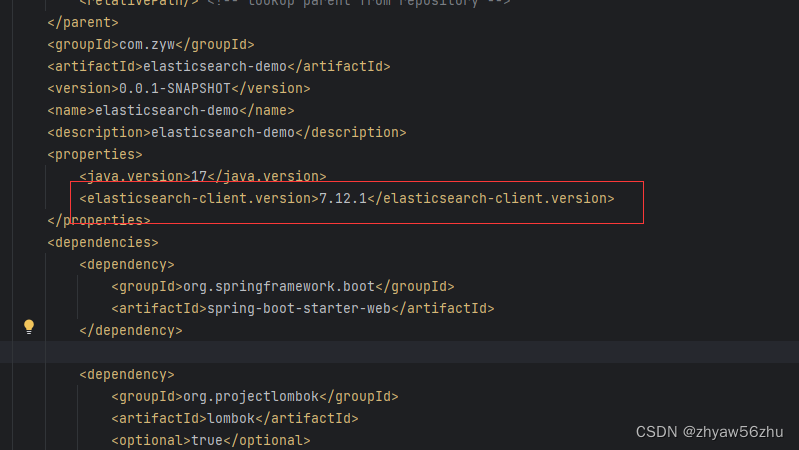
注意:
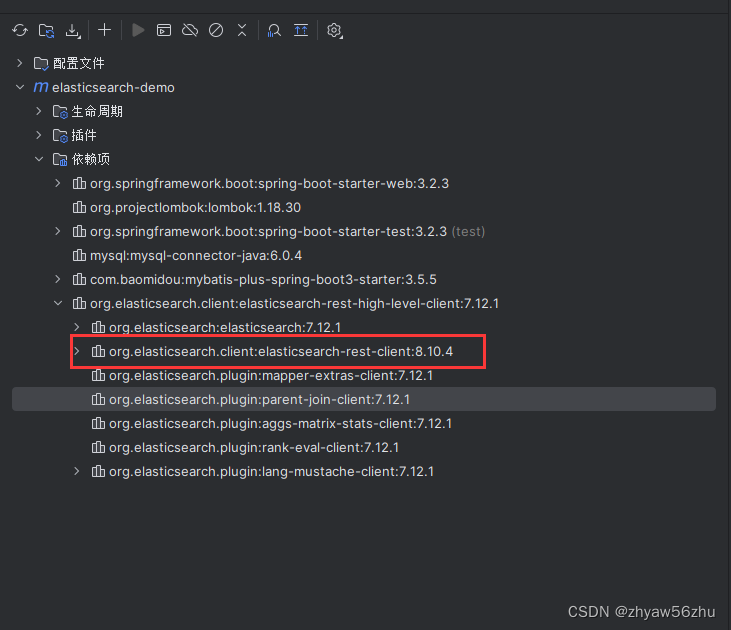
springboot管理了elasticsearch的部分依赖, 查看springboot的依赖管理
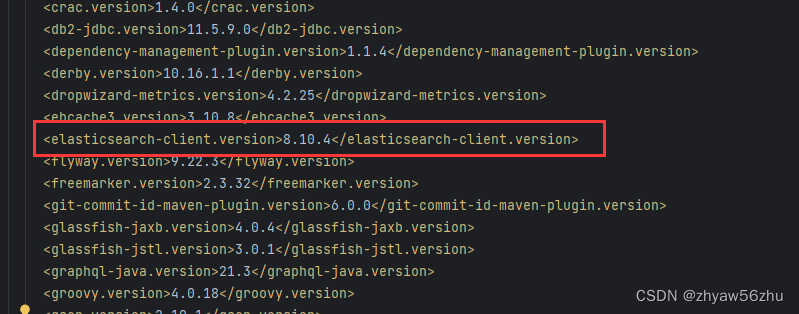
我们需要在pom文件中定义这个版本值,覆盖springboot的
- HotelDoc.java
@Data @NoArgsConstructor public class HotelDoc { private Long id; private String name; private String address; private Integer price; private Integer score; private String brand; private String city; private String starName; private String business; private String location; private String pic; public HotelDoc(Hotel hotel) { this.id = hotel.getId(); this.name = hotel.getName(); this.address = hotel.getAddress(); this.price = hotel.getPrice(); this.score = hotel.getScore(); this.brand = hotel.getBrand(); this.city = hotel.getCity(); this.starName = hotel.getStarName(); this.business = hotel.getBusiness(); this.location = hotel.getLatitude() + ", " + hotel.getLongitude(); this.pic = hotel.getPic(); } }- hotel索引库
{
  "mappings": {
    "properties": {
      "id": {
        "type": "keyword"
      },
      "name": {
        "type": "text",
        "analyzer": "ik_max_word",
        "copy_to": "all"
      },
      "address": {
        "type": "keyword",
        "index": false
      },
      "price": {
        "type": "integer"
      },
      "score": {
        "type": "integer"
      },
      "brand": {
        "type": "keyword",
        "copy_to": "all"
      },
      "city": {
        "type": "keyword"
      },
      "starName": {
        "type": "keyword"
      },
      "business": {
        "type": "keyword",
        "copy_to": "all"
      },
      "location": {
        "type": "geo_point"
      },
      "pic": {
        "type": "keyword",
        "index": false
      },
      "all": {
        "type": "text",
        "analyzer": "ik_max_word"
      }
    }
  }
}
基于elasticsearch的规则, id用keyword
- 操作索引库
import com.zyw.elasticsearchdemo.constants.HotelConstants;
import org.apache.http.HttpHost;
import org.elasticsearch.action.admin.indices.delete.DeleteIndexRequest;
import org.elasticsearch.client.RequestOptions;
import org.elasticsearch.client.RestClient;
import org.elasticsearch.client.RestHighLevelClient;
import org.elasticsearch.client.indices.CreateIndexRequest;
import org.elasticsearch.client.indices.GetIndexRequest;
import org.elasticsearch.common.xcontent.XContentType;
import org.junit.jupiter.api.AfterEach;
import org.junit.jupiter.api.BeforeEach;
import org.junit.jupiter.api.Test;
import java.io.IOException;
public class ElasticsearchDemoApplicationTests {
    private RestHighLevelClient client;
    /**
     * 删除索引库
     */
    @Test
    void deleteHotelIndex() throws IOException {
        DeleteIndexRequest request = new DeleteIndexRequest("hotel");
        client.indices().delete(request, RequestOptions.DEFAULT);
    }
    /**
     * 判断索引库是否存在
     */
    @Test
    void existHotelIndex() throws IOException {
        GetIndexRequest request = new GetIndexRequest("hotel");
        boolean exists = client.indices().exists(request, RequestOptions.DEFAULT);
        System.out.println(exists ? "索引库已经存在" : "索引库不存在");
    }
    /**
     * 创建索引库
     */
    @Test
    void createHotelIndex() throws IOException {
        // 1.创建request对象
        CreateIndexRequest request = new CreateIndexRequest("hotel");
        // 2.准备请求的参数, DSL语句
        request.source(HotelConstants.MAPPING_TEMPLATE, XContentType.JSON);
        // 3. 发送请求
        client.indices().create(request, RequestOptions.DEFAULT);
    }
    @BeforeEach
    void setUp() {
        this.client = new RestHighLevelClient(RestClient.builder(HttpHost.create("http://82.114.174.50:9200")));
    }
    @AfterEach
    void tearDown() throws IOException {
        client.close();
    }
}
RestClient操作文档
import cn.hutool.json.JSONUtil;
import com.zyw.elasticsearchdemo.mapper.HotelMapper;
import com.zyw.elasticsearchdemo.pojo.Hotel;
import com.zyw.elasticsearchdemo.pojo.HotelDoc;
import org.apache.http.HttpHost;
import org.elasticsearch.action.bulk.BulkRequest;
import org.elasticsearch.action.delete.DeleteRequest;
import org.elasticsearch.action.get.GetRequest;
import org.elasticsearch.action.get.GetResponse;
import org.elasticsearch.action.index.IndexRequest;
import org.elasticsearch.action.update.UpdateRequest;
import org.elasticsearch.client.RequestOptions;
import org.elasticsearch.client.RestClient;
import org.elasticsearch.client.RestHighLevelClient;
import org.elasticsearch.common.xcontent.XContentType;
import org.junit.jupiter.api.AfterEach;
import org.junit.jupiter.api.BeforeEach;
import org.junit.jupiter.api.Test;
import org.springframework.beans.factory.annotation.Autowired;
import org.springframework.boot.test.context.SpringBootTest;
import java.io.IOException;
import java.util.List;
@SpringBootTest
public class ElasticsearchDemoApplicationTests1 {
    private RestHighLevelClient client;
    @Autowired
    private HotelMapper hotelMapper;
    /**
     * 删除文档
     */
    @Test
    void deleteDocument() throws IOException {
        DeleteRequest request = new DeleteRequest("hotel", "200216665");
        client.delete(request, RequestOptions.DEFAULT);
    }
    /**
     * 修改文档-局部更新, 全量和创建一样
     */
    @Test
    void updateDocument() throws IOException {
        UpdateRequest request = new UpdateRequest("hotel", "200216665");
        request.doc("price", 2600, "starName", "六钻");
        client.update(request, RequestOptions.DEFAULT);
    }
    /**
     * 查询文档
     */
    @Test
    void getDocument() throws IOException {
        // 准备request对象
        GetRequest request = new GetRequest("hotel", "200216665");
        // 发送请求
        GetResponse response = client.get(request, RequestOptions.DEFAULT);
        String json = response.getSourceAsString();
        HotelDoc hotelDoc = JSONUtil.toBean(json, HotelDoc.class);
        System.out.println(hotelDoc);
    }
    /**
     * 新增文档
     */
    @Test
    void addDocument() throws IOException {
        // 根据id查询酒店数据
        Hotel hotel = hotelMapper.selectById(200216665);
        // 转换为文档对象
        HotelDoc hotelDoc = new HotelDoc(hotel);
        // 准备request对象
        IndexRequest request = new IndexRequest("hotel").id(hotel.getId().toString());
        // 准备json文档
        request.source(JSONUtil.toJsonStr(hotelDoc), XContentType.JSON);
        // 发送请求
        client.index(request, RequestOptions.DEFAULT);
    }
    /**
     * 批量导入文档
     */
    @Test
    void batchAddDocument() throws IOException {
        List hotels = hotelMapper.selectList(null);
        BulkRequest request = new BulkRequest();
        for (Hotel hotel : hotels) {
            HotelDoc hotelDoc = new HotelDoc(hotel);
            request.add(new IndexRequest("hotel").id(hotelDoc.getId().toString())
                    .source(JSONUtil.toJsonStr(hotelDoc), XContentType.JSON));
        }
        // 发送
        client.bulk(request, RequestOptions.DEFAULT);
    }
    @BeforeEach
    void setUp() {
        this.client = new RestHighLevelClient(RestClient.builder(HttpHost.create("http://82.114.174.50:9200")));
    }
    @AfterEach
    void tearDown() throws IOException {
        client.close();
    }
}
DSL查询语法
分类和基本语法
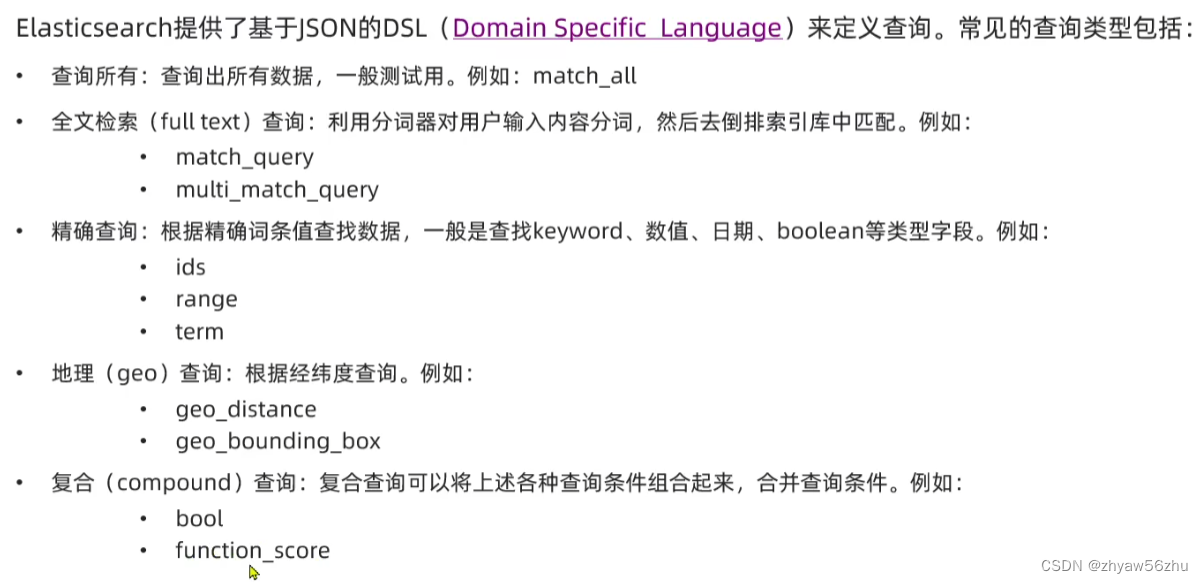
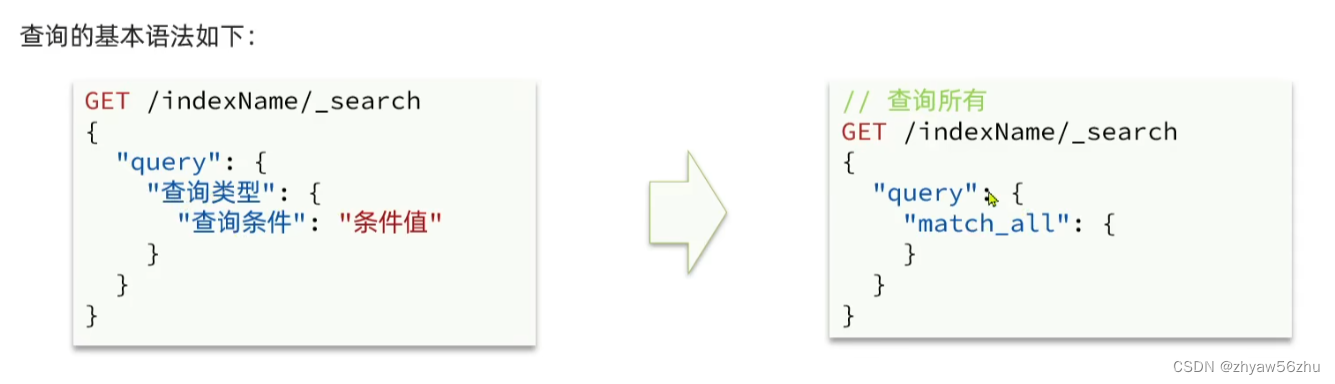
全文检索查询
全文检索查询, 会对用户输入内容分词, 常用于搜索框搜索
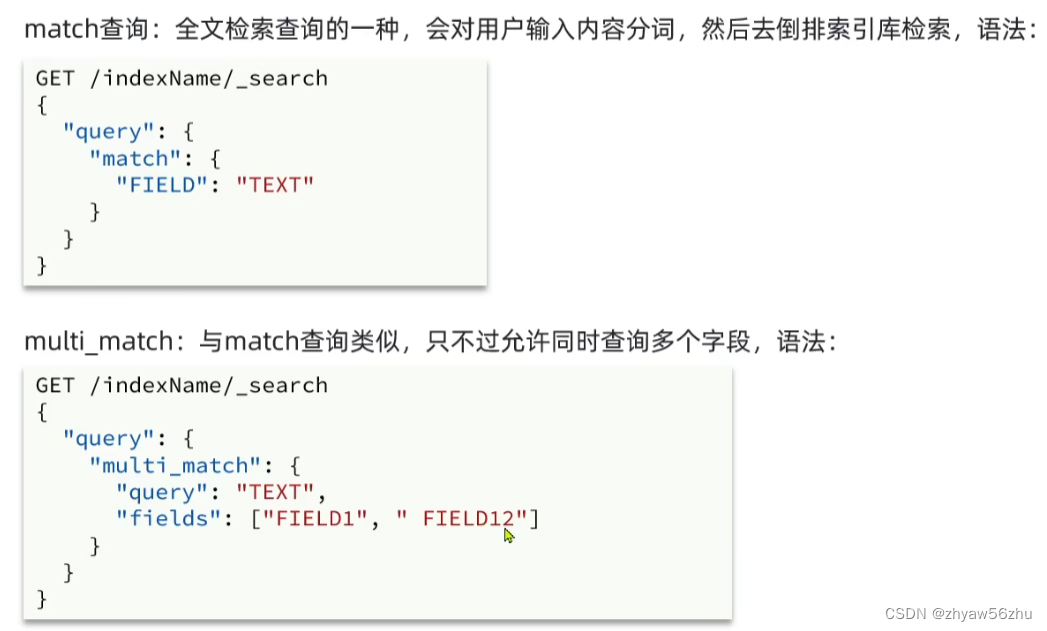
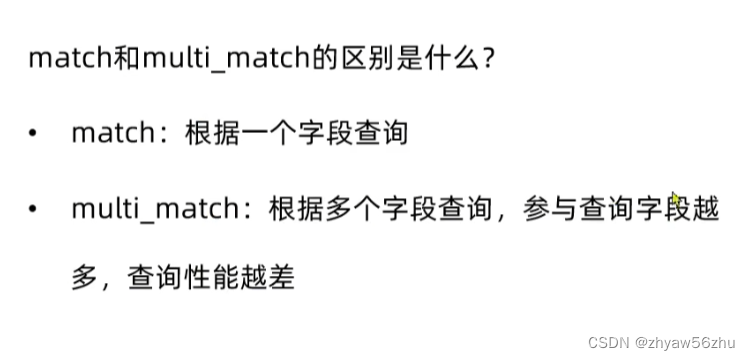
建议把多个字段copy到一个字段里
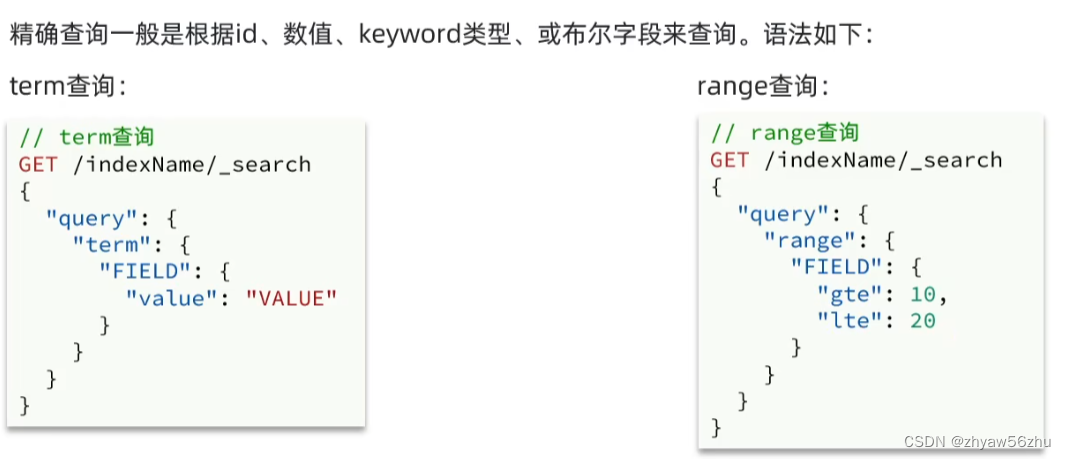
精确查询

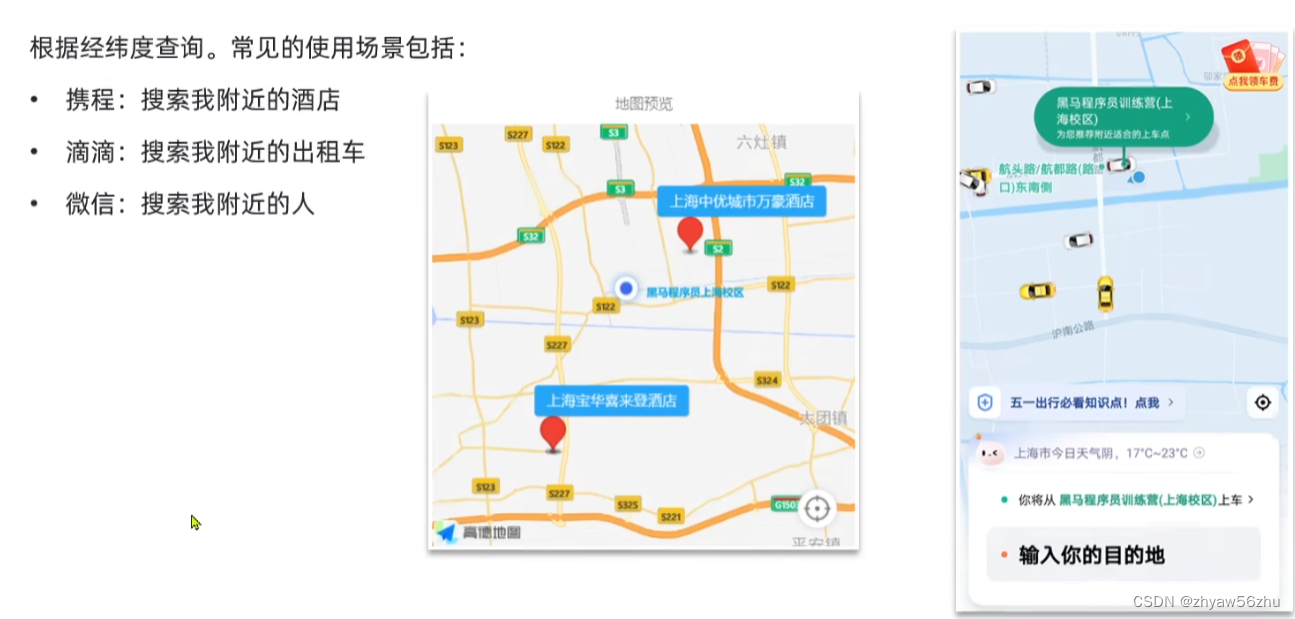
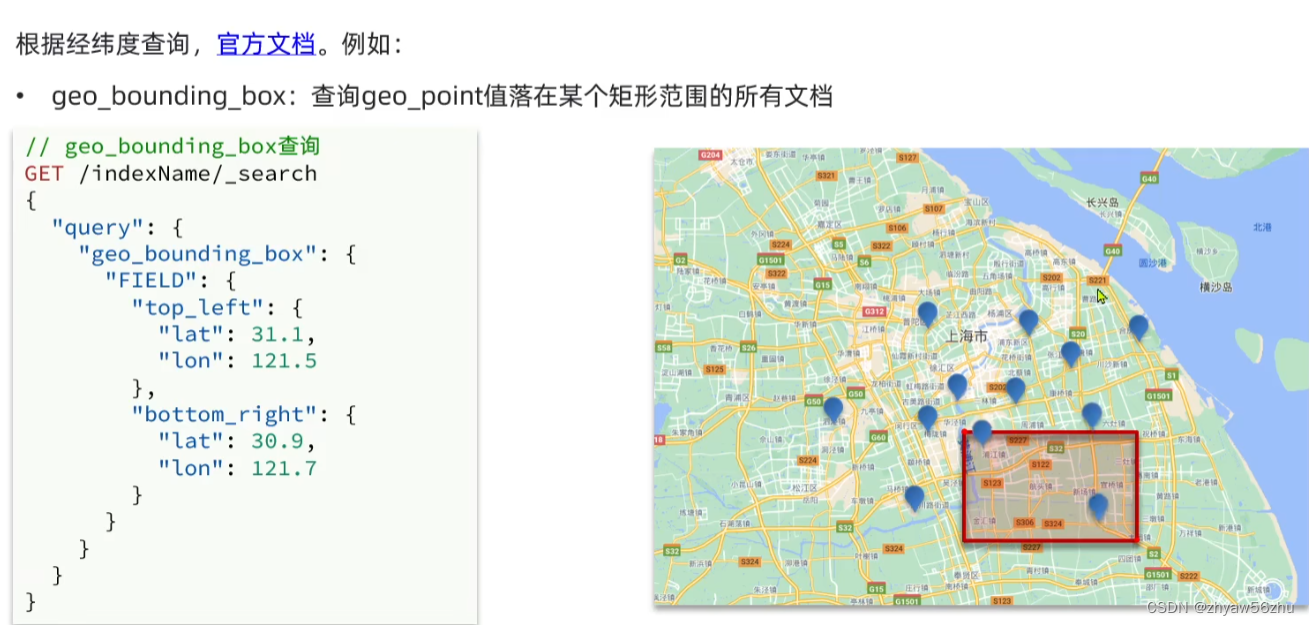
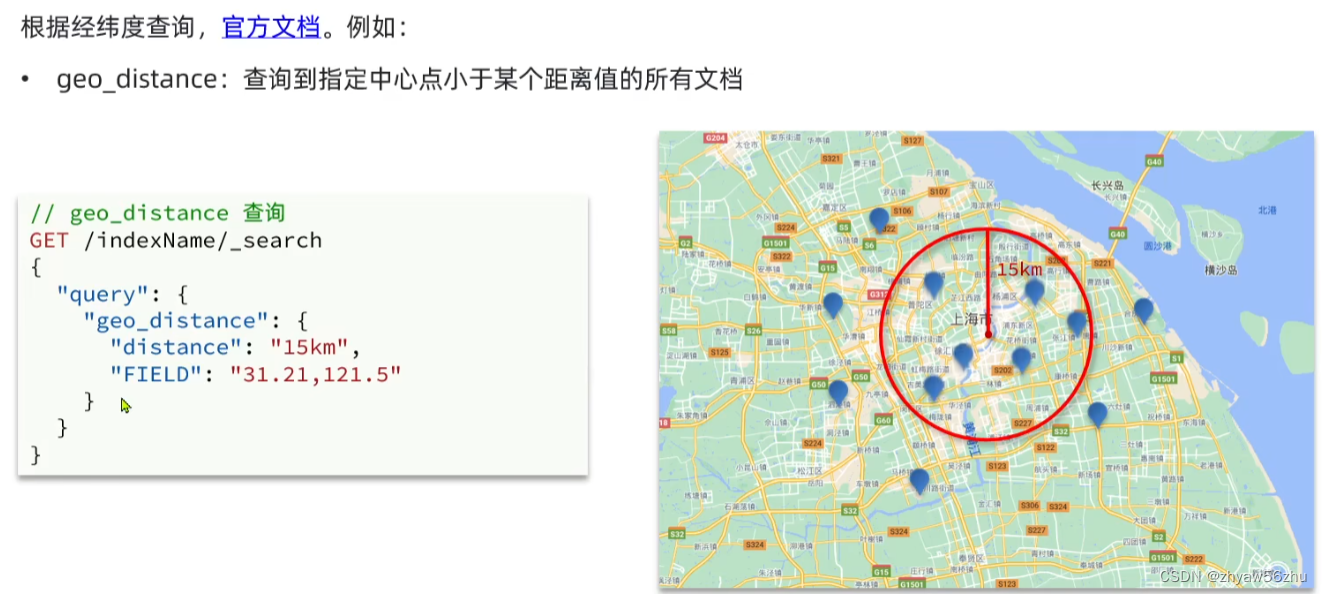
地理查询
复合查询
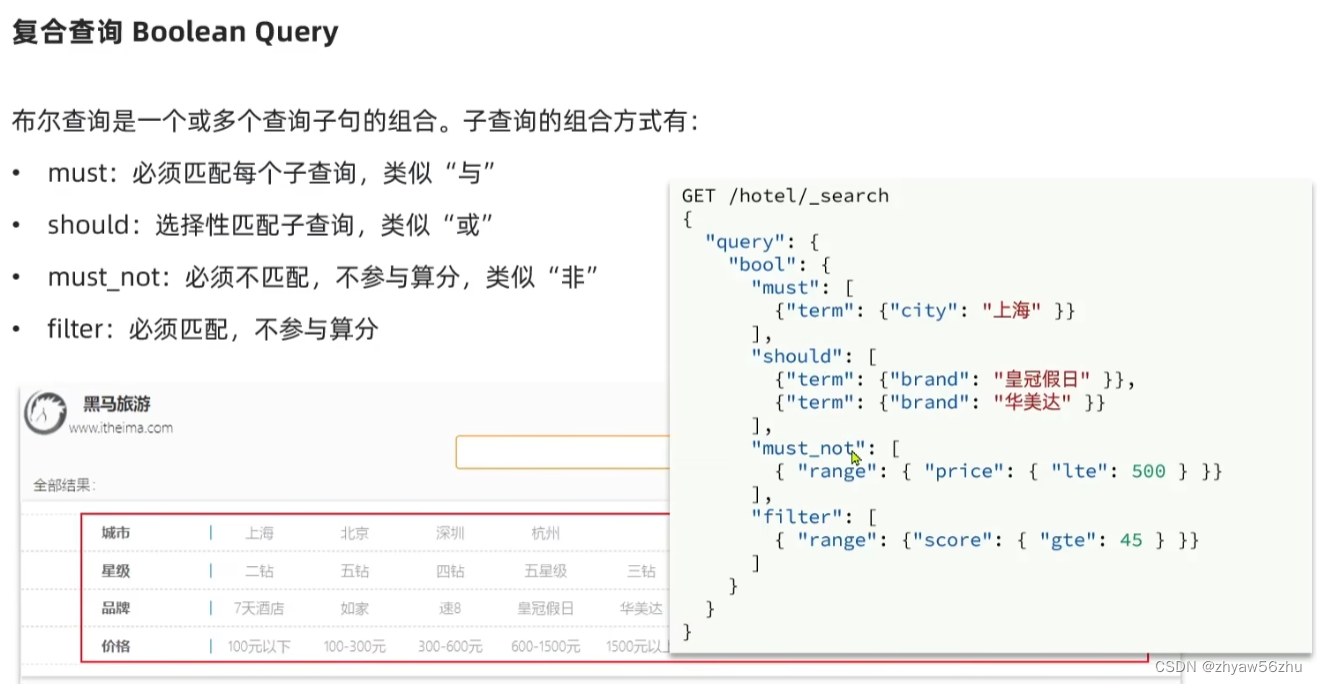
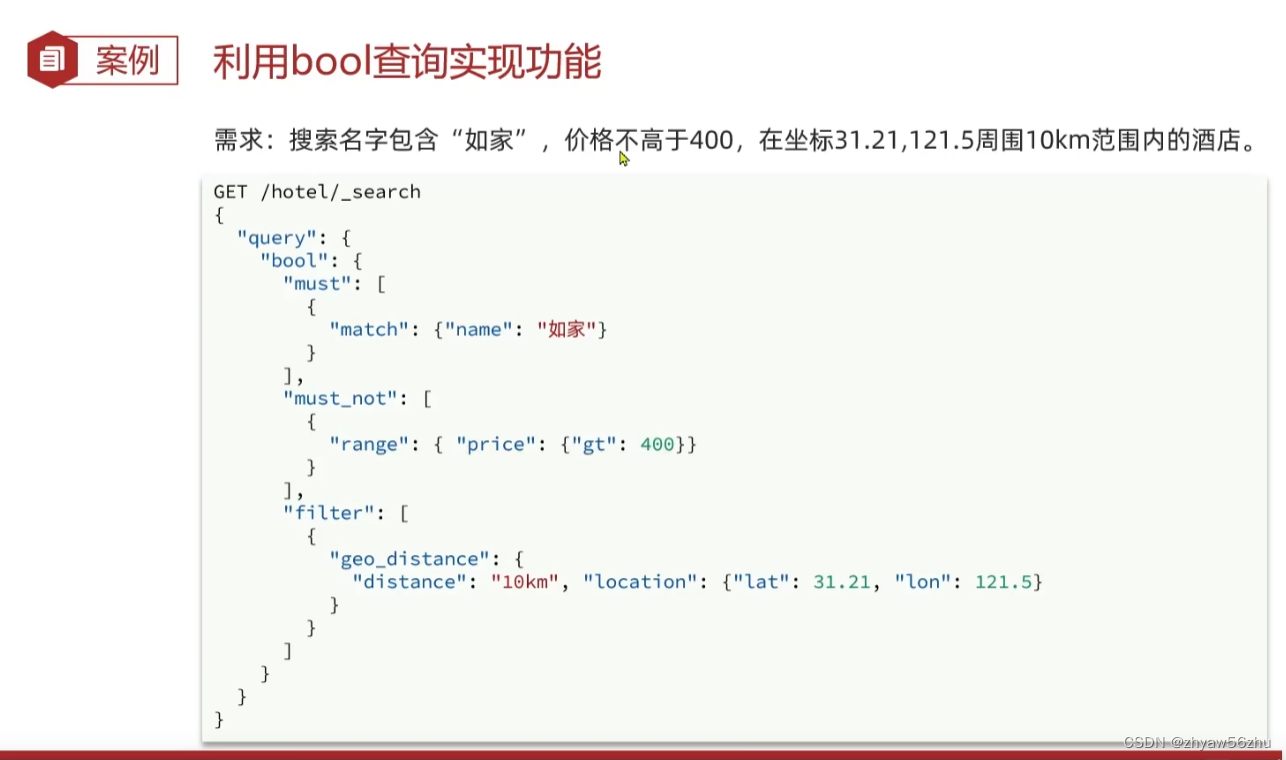
- 复合(compound)查询: 复合查询可以将其他简单查询组合起来, 实现更复杂的搜索逻辑.
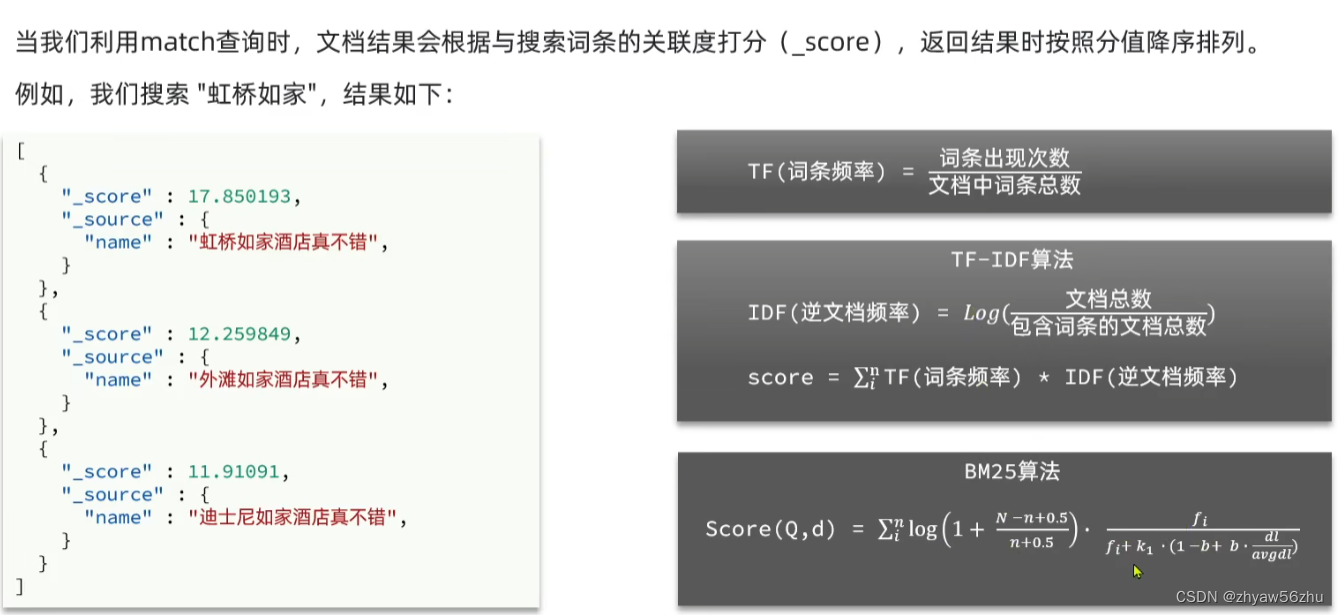
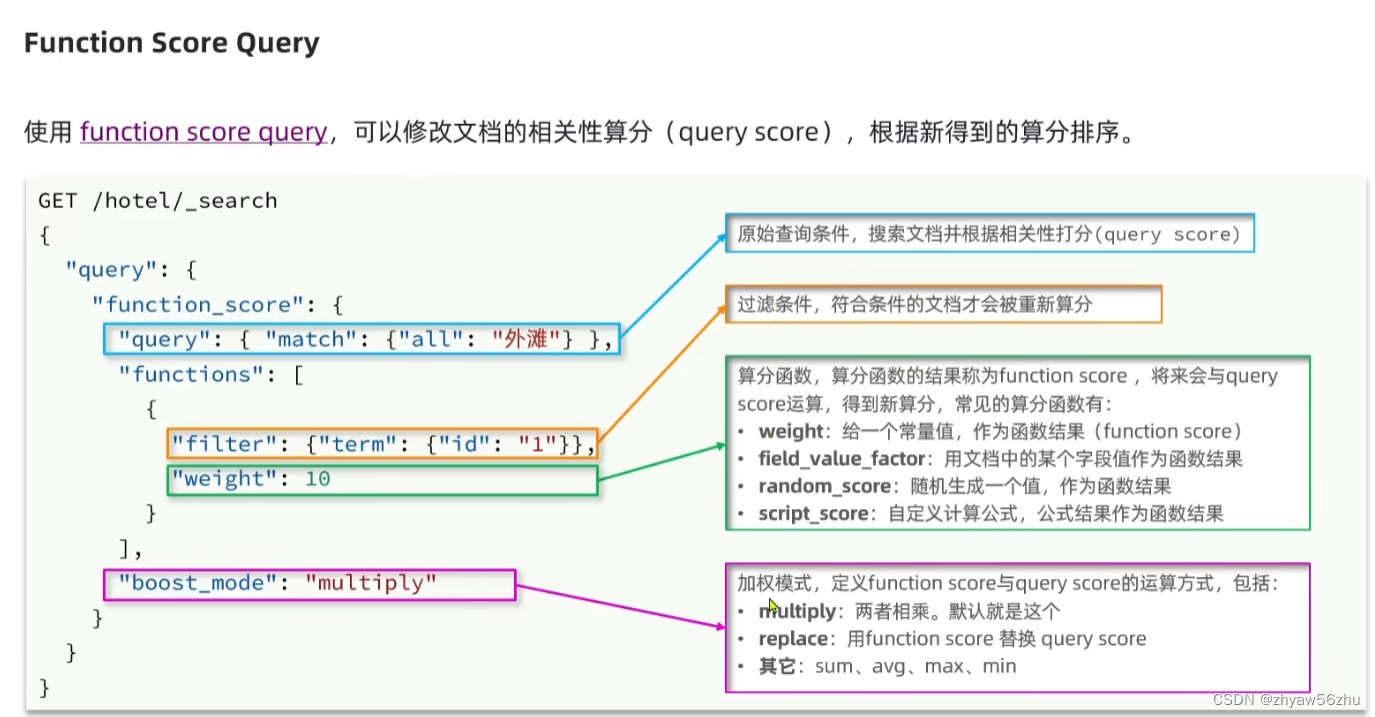
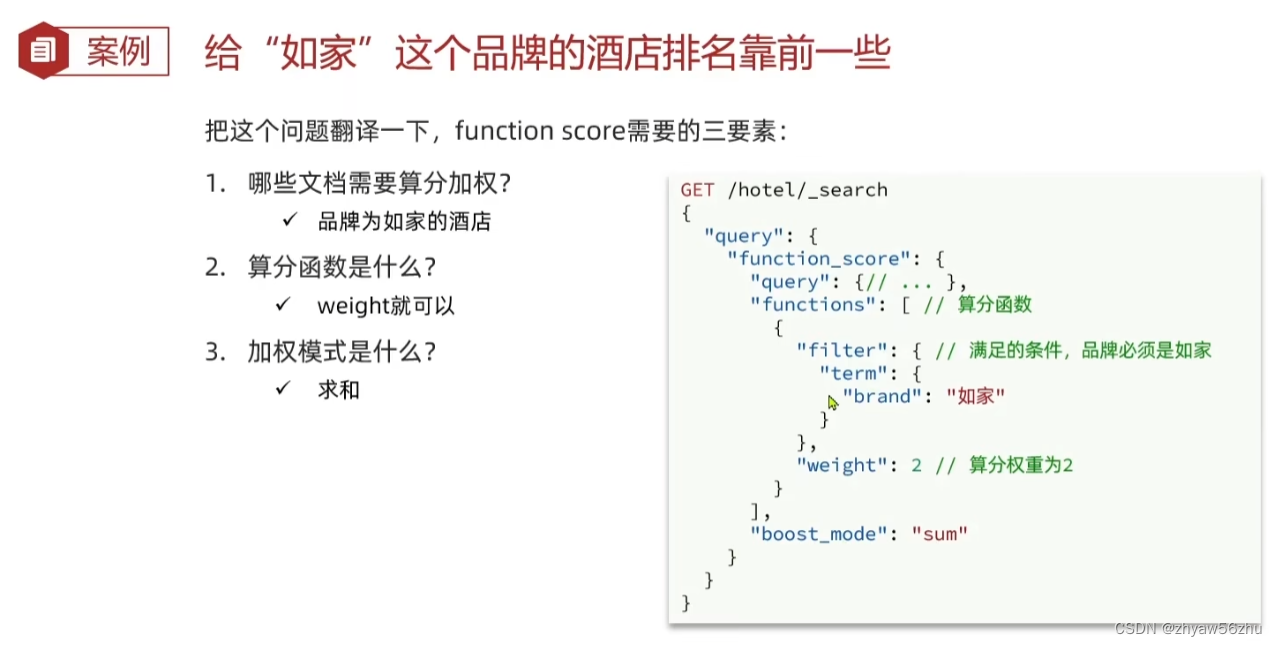
- function score: 复分函数查询, 可以控制文档相关性算分, 控制文档排名. 例如百度竞价
搜索结果处理
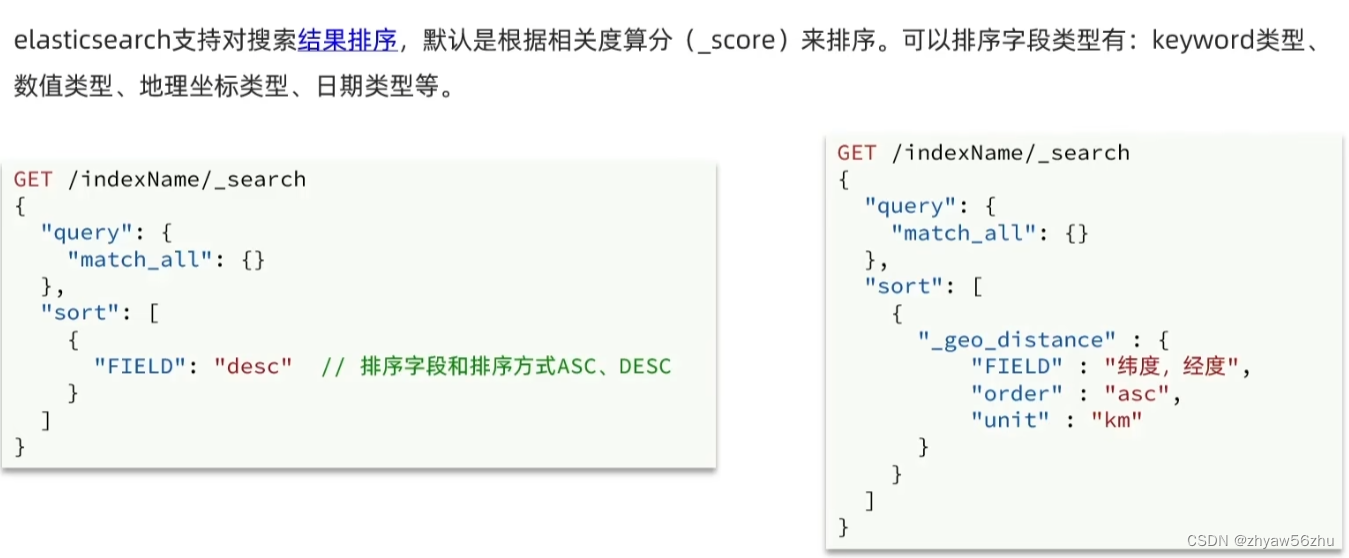
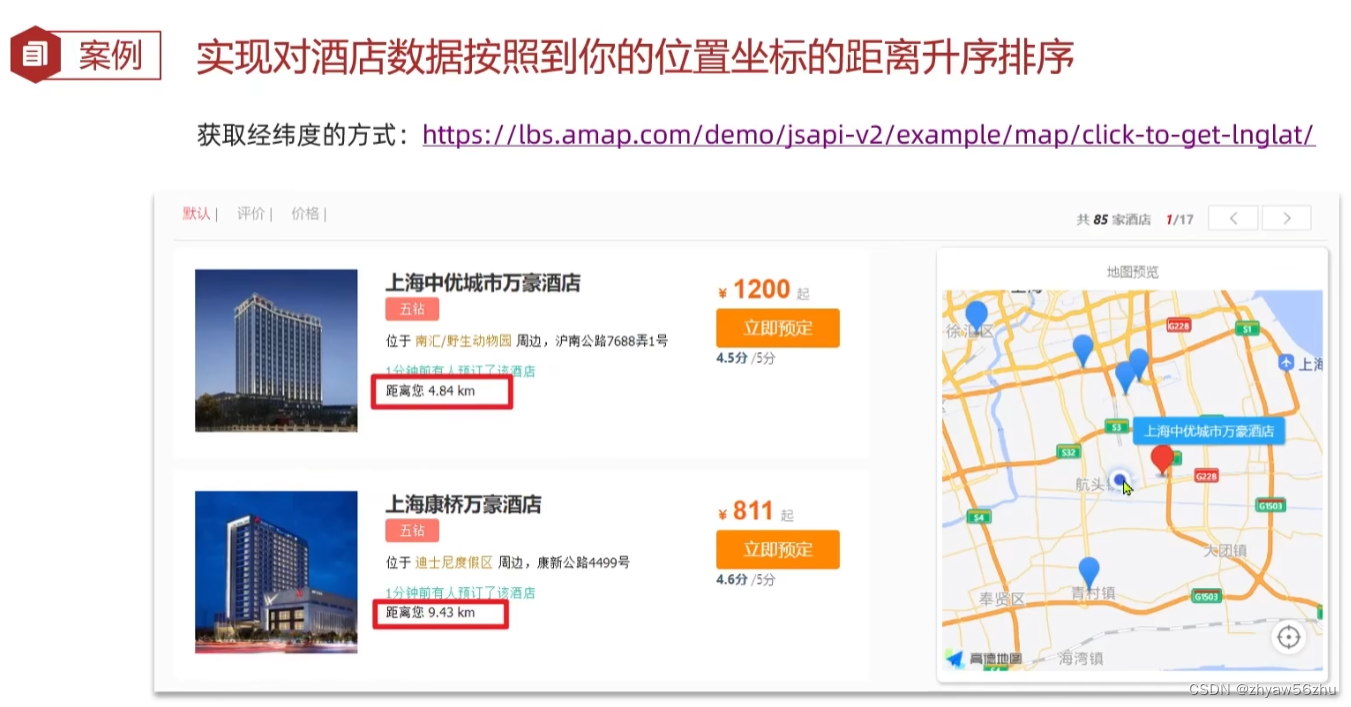
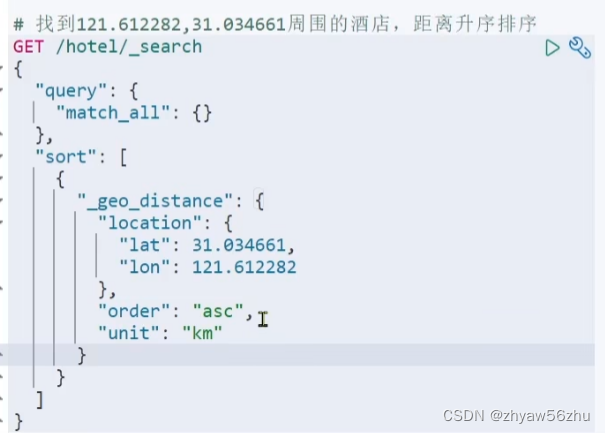
排序
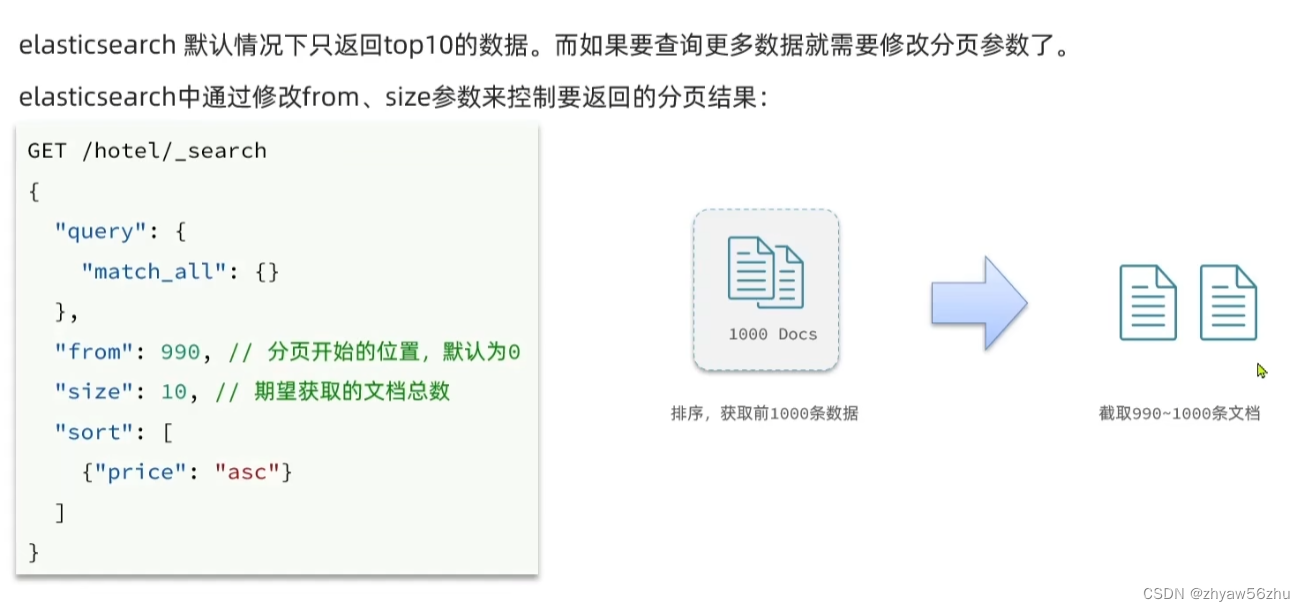
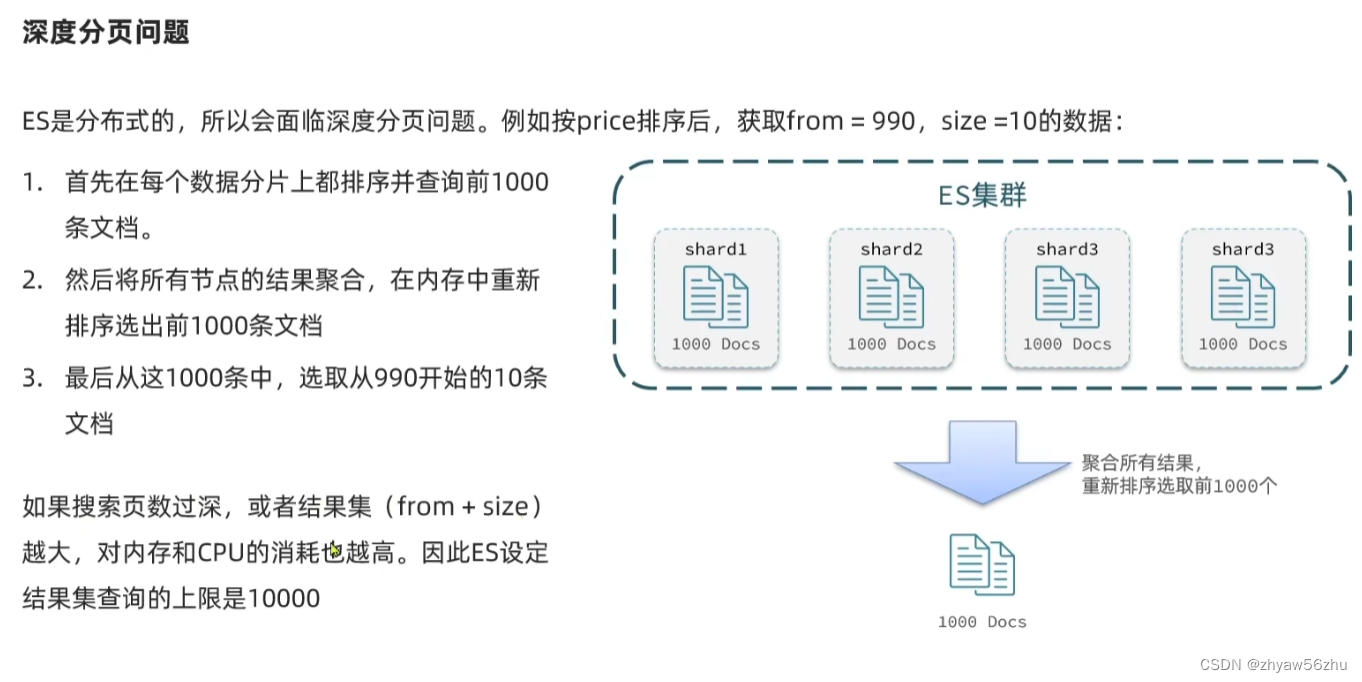
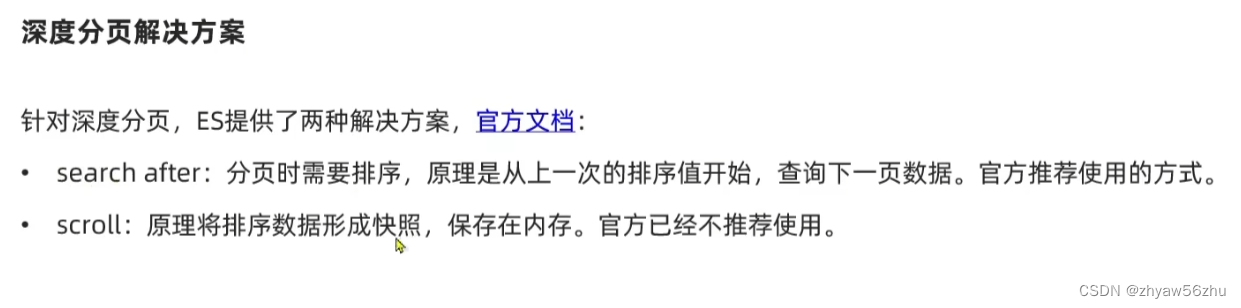
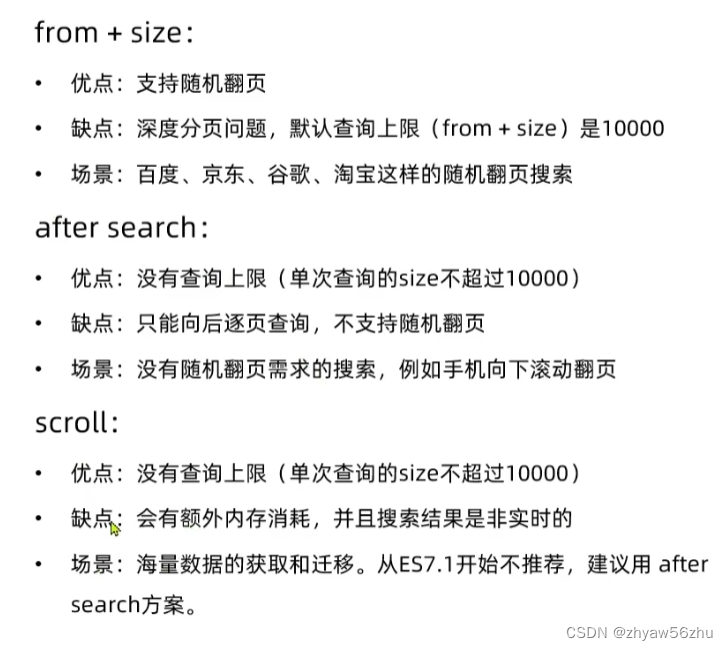
分页
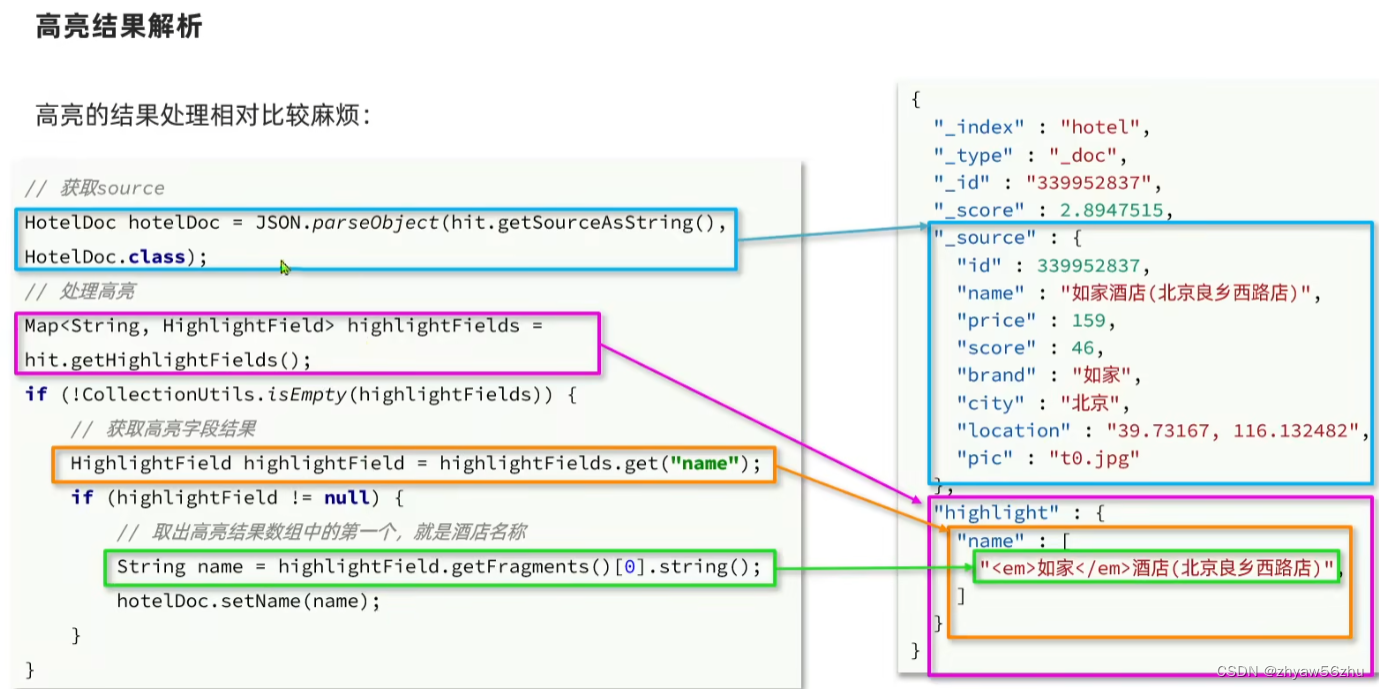
高亮
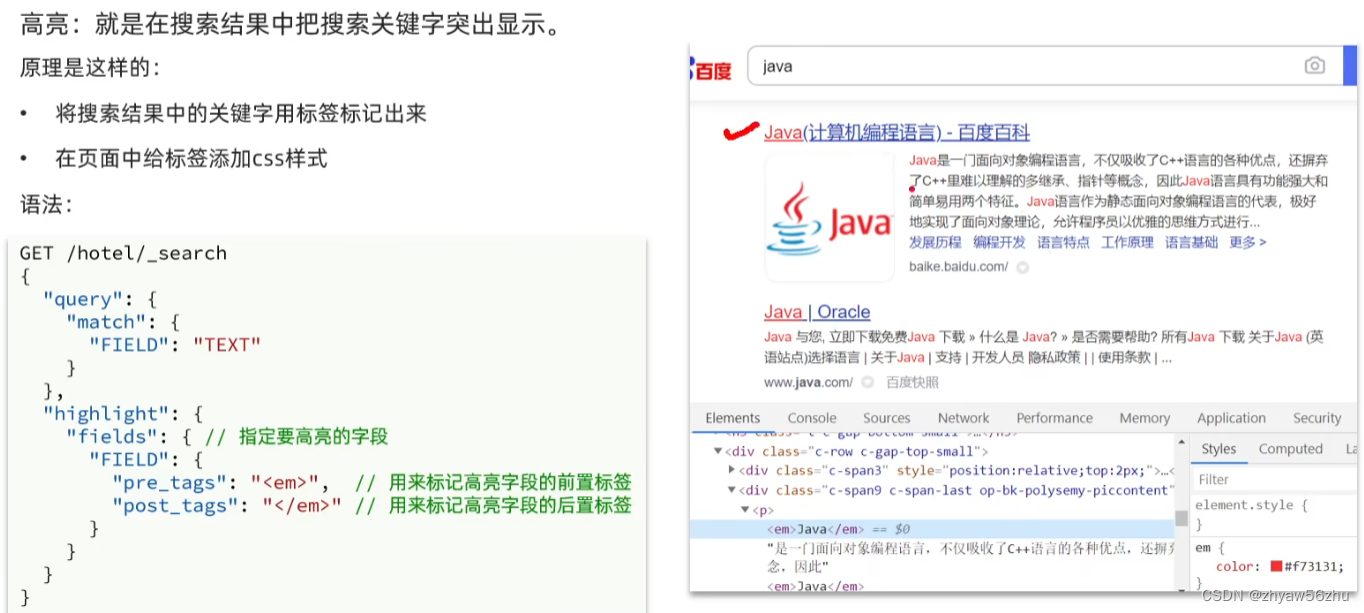
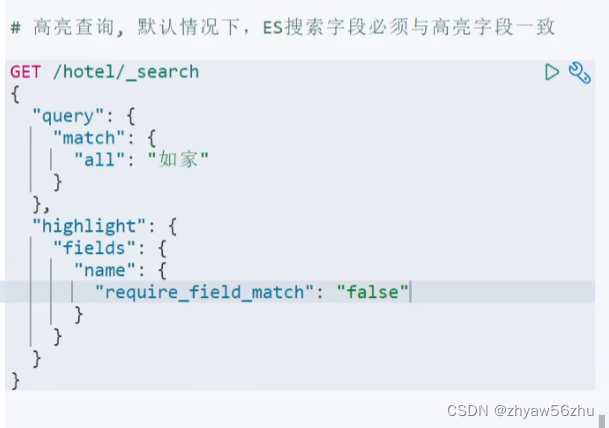
默认字段要一致, 可以用require_field_match 取消一致
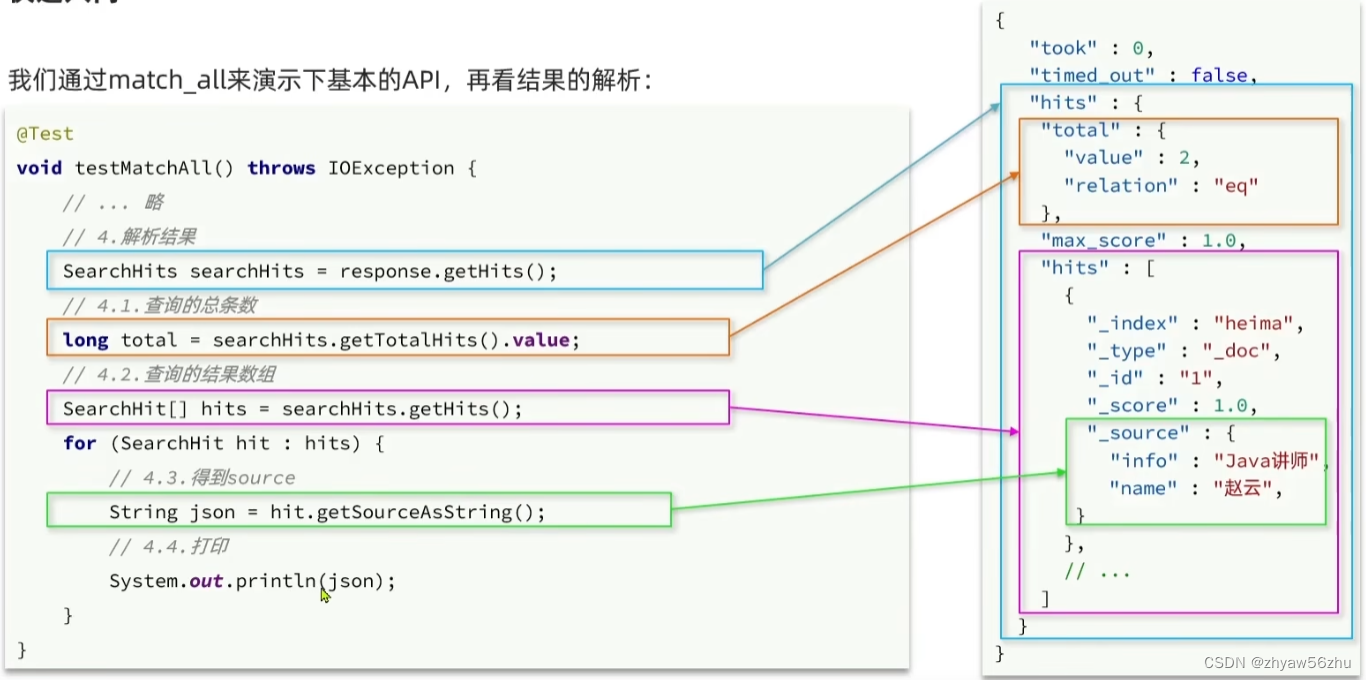
RestClient查询文档–高级查询
import cn.hutool.json.JSONUtil;
import com.zyw.elasticsearchdemo.pojo.HotelDoc;
import org.apache.http.HttpHost;
import org.elasticsearch.action.search.SearchRequest;
import org.elasticsearch.action.search.SearchResponse;
import org.elasticsearch.client.RequestOptions;
import org.elasticsearch.client.RestClient;
import org.elasticsearch.client.RestHighLevelClient;
import org.elasticsearch.index.query.BoolQueryBuilder;
import org.elasticsearch.index.query.QueryBuilders;
import org.elasticsearch.search.SearchHit;
import org.elasticsearch.search.SearchHits;
import org.elasticsearch.search.fetch.subphase.highlight.HighlightBuilder;
import org.elasticsearch.search.fetch.subphase.highlight.HighlightField;
import org.elasticsearch.search.sort.SortOrder;
import org.junit.jupiter.api.AfterEach;
import org.junit.jupiter.api.BeforeEach;
import org.junit.jupiter.api.Test;
import java.io.IOException;
import java.util.Map;
public class QueryDocumentTest {
    private RestHighLevelClient client;
    /**
     * 高亮
     */
    @Test
    void testHighlight() throws IOException {
        SearchRequest request = new SearchRequest("hotel");
        request.source().query(QueryBuilders.matchQuery("all", "维也纳"));
        // 高亮设置
        request.source().highlighter(new HighlightBuilder().field("name").requireFieldMatch(false));
        SearchResponse response = client.search(request, RequestOptions.DEFAULT);
        handleResponse(response);
    }
    /**
     * 排序和分页
     */
    @Test
    void sortAndPage() throws IOException {
        SearchRequest request = new SearchRequest("hotel");
        request.source().sort("price", SortOrder.ASC).from(20).size(5);
        request.source().query(QueryBuilders.matchAllQuery());
        SearchResponse response = client.search(request, RequestOptions.DEFAULT);
        handleResponse(response);
    }
    /**
     * bool查询
     * @throws IOException
     */
    @Test
    void testBool() throws IOException {
        SearchRequest request = new SearchRequest("hotel");
        BoolQueryBuilder boolQuery = QueryBuilders.boolQuery();
        // 添加term
        boolQuery.must(QueryBuilders.termQuery("city", "上海"));
        // 添加range
        boolQuery.filter(QueryBuilders.rangeQuery("price").lte(500));
        request.source().query(boolQuery);
        SearchResponse response = client.search(request, RequestOptions.DEFAULT);
        handleResponse(response);
    }
    /**
     * match查询
     */
    @Test
    void testMatch() throws IOException {
        SearchRequest request = new SearchRequest("hotel");
        request.source().query(QueryBuilders.matchQuery("all", "如家"));
        SearchResponse response = client.search(request, RequestOptions.DEFAULT);
        handleResponse(response);
    }
    /**
     * 处理结果
     * @param response
     */
    private static void handleResponse(SearchResponse response) {
        SearchHits searchHits = response.getHits();
        // 查询的总条数
        long total = searchHits.getTotalHits().value;
        System.out.println("total = " + total);
        // 查询的结果数组
        SearchHit[] hits = searchHits.getHits();
        for (SearchHit hit : hits) {
            // 得到source
            String json = hit.getSourceAsString();
            HotelDoc hotelDoc = JSONUtil.toBean(json, HotelDoc.class);
            // 获取高亮结果
            Map highlightFields = hit.getHighlightFields();
            // 根据字段名获取高亮结果
            HighlightField highlightField = highlightFields.get("name");
            // 获取高亮值
            String name = highlightField.getFragments()[0].toString();
            // 覆盖非高亮结果
            hotelDoc.setName(name);
            System.out.println("hotelDoc = " + hotelDoc);
        }
    }
    /**
     * 查询所有
     * @throws IOException
     */
    @Test
    void testMatchAll() throws IOException {
        SearchRequest request = new SearchRequest("hotel");
        request.source().query(QueryBuilders.matchAllQuery());
        SearchResponse response = client.search(request, RequestOptions.DEFAULT);
        handleResponse(response);
    }
    @BeforeEach
    void setUp() {
        this.client = new RestHighLevelClient(RestClient.builder(HttpHost.create("http://82.114.174.50:9200")));
    }
    @AfterEach
    void tearDown() throws IOException {
        client.close();
    }
}
补充
- 分词
POST /_analyze { "text": "java是最好的语言", "analyzer": "ik_smart" }- 查所有
GET /hotel/_search
- 查所有
- 分词
- function score: 复分函数查询, 可以控制文档相关性算分, 控制文档排名. 例如百度竞价
- 复合(compound)查询: 复合查询可以将其他简单查询组合起来, 实现更复杂的搜索逻辑.
- 操作索引库
- hotel索引库
- HotelDoc.java
- 引入依赖
- 局部修改
- 全量修改, 会删除旧文档, 添加新文档
免责声明:我们致力于保护作者版权,注重分享,被刊用文章因无法核实真实出处,未能及时与作者取得联系,或有版权异议的,请联系管理员,我们会立即处理! 部分文章是来自自研大数据AI进行生成,内容摘自(百度百科,百度知道,头条百科,中国民法典,刑法,牛津词典,新华词典,汉语词典,国家院校,科普平台)等数据,内容仅供学习参考,不准确地方联系删除处理! 图片声明:本站部分配图来自人工智能系统AI生成,觅知网授权图片,PxHere摄影无版权图库和百度,360,搜狗等多加搜索引擎自动关键词搜索配图,如有侵权的图片,请第一时间联系我们,邮箱:ciyunidc@ciyunshuju.com。本站只作为美观性配图使用,无任何非法侵犯第三方意图,一切解释权归图片著作权方,本站不承担任何责任。如有恶意碰瓷者,必当奉陪到底严惩不贷!


