
手把手教你用C#语言写一个简单计算器窗体(附源代码文件和演示视频)
温馨提示:这篇文章已超过371天没有更新,请注意相关的内容是否还可用!
手把手教你用C#语言写一个简单计算器窗体(附源代码文件和演示视频)!
目录
C#简介:
开发工具的介绍和安装:
计算器的编写过程:
下面是源代码(Form1.cs文件):
彩蛋:
1.插入并载入新的窗体(窗口):
2.插入图片并让其适中显示:
下面是“彩蛋”源代码(Form2.cs文件):
最终效果演示:
帮人帮到底!源代码文件分享链接如下:
C#简介:
C#是由C和C++衍生出来的一种安全的、稳定的、简单的、优雅的面向对象编程语言。它在继承C和C++强大功能的同时去掉了一些它们的复杂特性(例如没有宏以及不允许多重继承)。C#综合了VB简单的可视化操作和C++的高运行效率,以其强大的操作能力、优雅的语法风格、创新的语言特性和便捷的面向组件编程的支持成为.NET开发的首选语言。
开发工具的介绍和安装:
这里用的是VS2022,可以去官网下载安装(链接如下)Visual Studio: 面向软件开发人员和 Teams 的 IDE 和代码编辑器
Visual Studio2022除了体积较大,可以说是很强大的IDE了可以编写多种语言并且内置编译器,代码补全功能也十分优秀。
计算器的编写过程:
首先我们新建一个窗体文件以后,映入眼帘的是一个空白的窗体(窗口),默认为Form1,我们计算器的UI就是要在这上面绘制 这里我们就用到了“控件”,也就是像按钮和文本框这些我们在使用中所需要的东西。

如果vs2022打开后没有显示旁边的工具箱,可以在视图-->工具箱里面打开,或者CTRL+ALT+X;

这里面的分类可以方便我们查找我们所需的工具
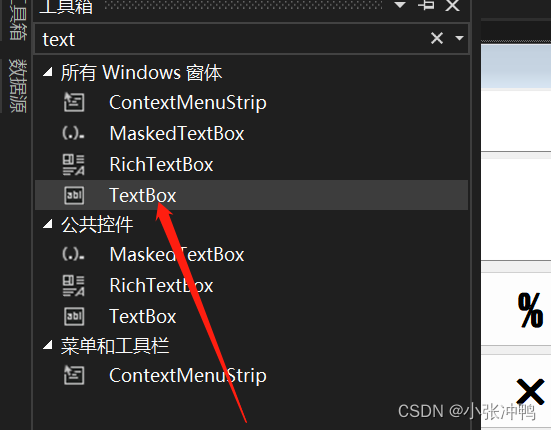 放置文本的控件
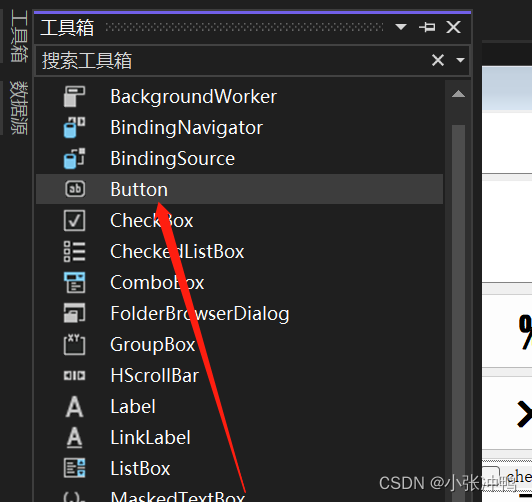 计算器的主要控件按钮
我们新建完控件会发现,我们需要设置他的标题,大小还有里面的内容的字体等等
这里就需要用到属性。
我们需要单击控件,选中后,右键,然后点击属性,然后对属性进行修改。
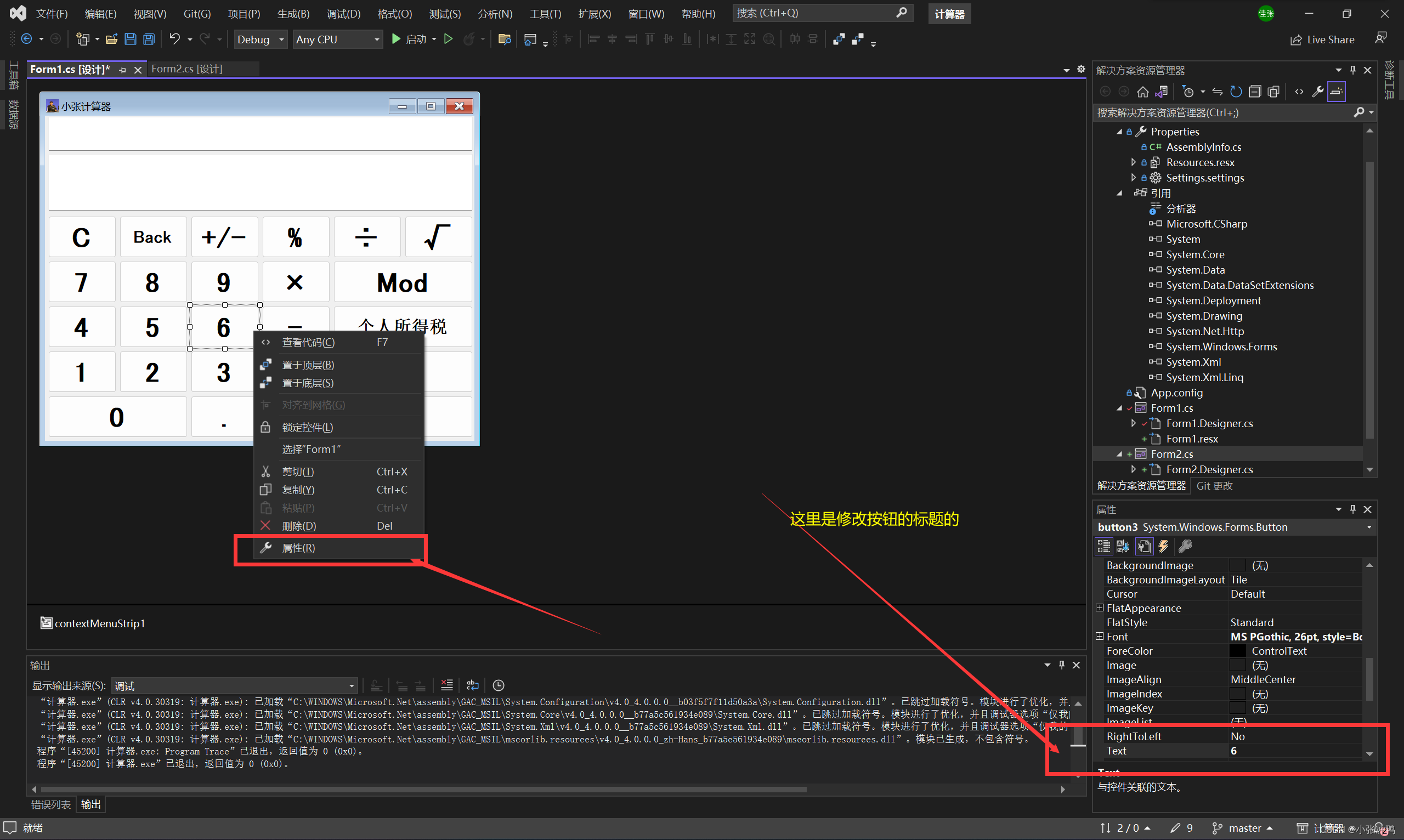
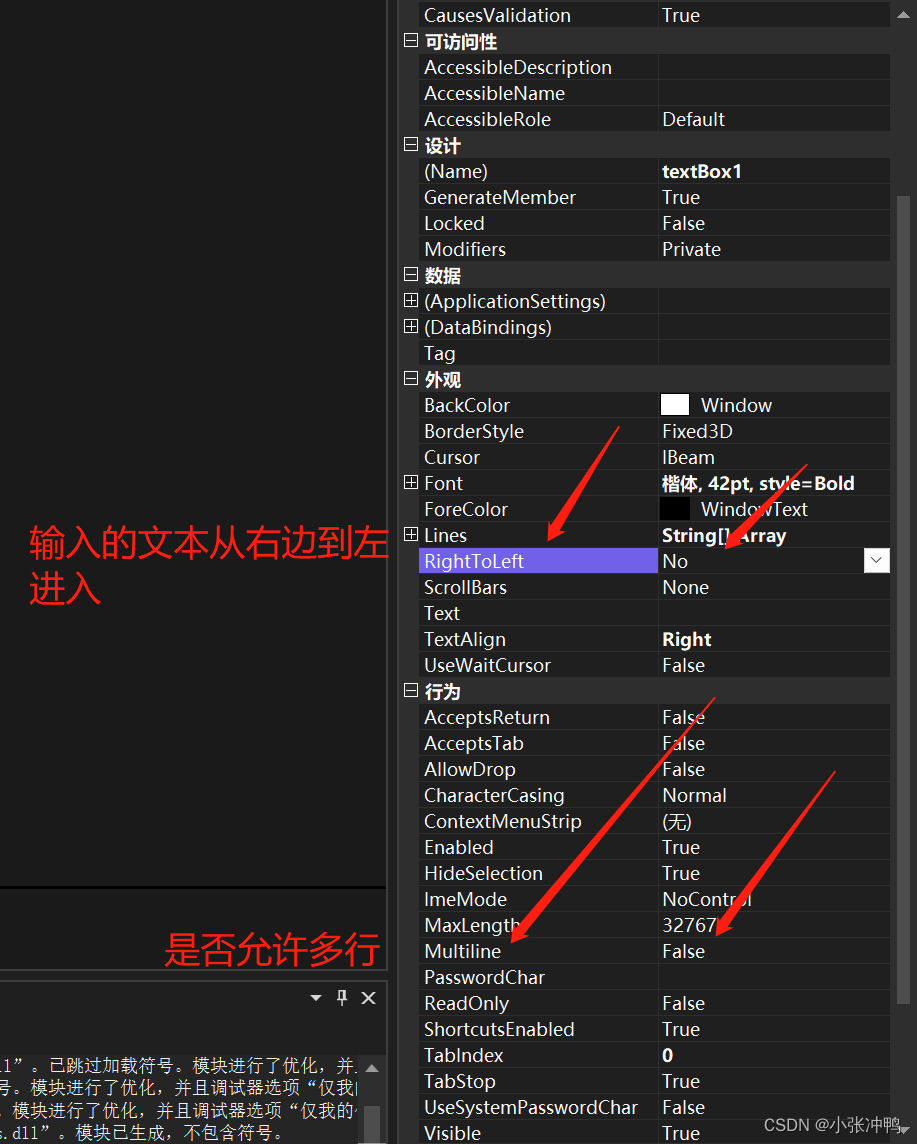 TextBox基础属性设置
我们双击任何一个按钮(控件)进入代码编辑区

我们会发现,每一个控件包括窗体都对应着一个函数,我们剩下的工作就是编辑代码,补全这些函数,使其联系起来,让代码运行顺利,并且达到我们想要的逻辑效果。
下面是源代码(Form1.cs文件):
using System;
using System.Collections.Generic;
using System.ComponentModel;
using System.Data;
using System.Drawing;
using System.Linq;
using System.Runtime.Remoting.Messaging;
using System.Text;
using System.Threading.Tasks;
using System.Windows.Forms;
namespace 计算器
{
    public partial class Form1 : Form
    {

        public Form1()
        {
            InitializeComponent();
        }
        private void button2_Click(object sender, EventArgs e)
        {
            textBox1.Text += "1";
        }
        private void button1_Click(object sender, EventArgs e)
        {
            textBox1.Text += "2";
        }
        private void button9_Click(object sender, EventArgs e)
        {
            textBox1.Text += "3";
        }
        private void button5_Click(object sender, EventArgs e)
        {
            textBox1.Text += "4";
        }
        private void button4_Click(object sender, EventArgs e)
        {
            textBox1.Text += "5";
        }
        private void button3_Click(object sender, EventArgs e)
        {
            textBox1.Text += "6";
        }
        private void button8_Click(object sender, EventArgs e)
        {
            textBox1.Text += "7";
        }
        private void button7_Click(object sender, EventArgs e)
        {
            textBox1.Text += "8";
        }
        private void button6_Click(object sender, EventArgs e)
        {
            textBox1.Text += "9";
        }
        private void button11_Click(object sender, EventArgs e)
        {
            textBox1.Text += "0";
        }
        private void button12_Click(object sender, EventArgs e)
        {
            if (textBox1.Text.Contains(".")) return;
            else
            { if (textBox1.Text != "") textBox1.Text += ".";
            }
        }
        private void button10_Click(object sender, EventArgs e)
        {
            textBox1.Text = "";
            textBox2.Text = "";
            chu.Enabled = true;
            cheng.Enabled = true;
            jia.Enabled = true;
            jian.Enabled = true;
        }
        private void button13_Click(object sender, EventArgs e)
        {
            if (textBox1.Text != ""&& textBox1.Text != "-") textBox1.Text = Convert.ToString(double.Parse(textBox1.Text) * -1);
            else if (textBox1.Text != "-") textBox1.Text += "-";
        }
        private void button14_Click(object sender, EventArgs e)
        {
            if(textBox1.Text!=""&& textBox1.Text != "-") textBox1.Text = Convert.ToString(double.Parse(textBox1.Text) * 0.01);
        }
        private void chu_Click(object sender, EventArgs e)
        {
            chu.Enabled = false;
            cheng.Enabled = true;
            jia.Enabled = true;
            jian.Enabled = true;
            if(textBox1.Text!="")
            {
                textBox2.Text = textBox1.Text;
                textBox1.Text = "";
            }
            else textBox2.Text = "0";
        }
        private void cheng_Click(object sender, EventArgs e)
        {
            chu.Enabled = true;
            cheng.Enabled = false;
            jia.Enabled = true;
            jian.Enabled = true;
            if (textBox1.Text != "")
            {
                textBox2.Text = textBox1.Text;
                textBox1.Text = "";
            }
            else textBox2.Text = "0";
        }
        private void jian_Click(object sender, EventArgs e)
        {
            chu.Enabled = true;
            cheng.Enabled = true;
            jia.Enabled = true;
            jian.Enabled = false;
            if (textBox1.Text != "")
            {
                textBox2.Text = textBox1.Text;
                textBox1.Text = "";
            }
            else textBox2.Text = "0";
        }
        private void jia_Click(object sender, EventArgs e)
        {
            chu.Enabled = true;
            cheng.Enabled = true;
            jia.Enabled = false;
            jian.Enabled = true;
            if (textBox1.Text != "")
            {
                textBox2.Text = textBox1.Text;
                textBox1.Text = "";
            }
            else textBox2.Text = "0";
        }
        private void button19_Click(object sender, EventArgs e)
        {
            double hou;
            double qian = double.Parse(textBox2.Text);
            if (textBox1.Text == "")  hou = 0;
            else  hou = double.Parse(textBox1.Text);

            if(chu.Enabled==false)
            {
                if (hou != 0)
                {
                    textBox2.Text = "结果如下";
                    textBox1.Text = Convert.ToString(qian / hou);
                    chu.Enabled = true;
                }
                else
                {
                    MessageBox.Show("除数不能为0", "温馨提示");
                    textBox1.Text = "";
                    return;
                }
            }
            if (cheng.Enabled == false)
            {
                textBox2.Text = "结果如下";
                textBox1.Text = Convert.ToString(qian * hou);
                cheng.Enabled = true;
            }
            if (jia.Enabled == false)
            {
                textBox2.Text = "结果如下";
                textBox1.Text = Convert.ToString(qian + hou);
                jia.Enabled = true;
            }
            if (jian.Enabled == false)
            {
                textBox2.Text = "结果如下";
                textBox1.Text = Convert.ToString(qian - hou);
                jian.Enabled = true;
            }
            if (mod.Enabled == false)
            {
                double s = double.Parse(textBox1.Text);
                int a = (int)s;
                if (a != s)
                {
                    MessageBox.Show("小数不能取余数!");
                    textBox1.Text = "";
                    return;
                }
                else
                {
                    textBox2.Text = "结果如下";
                    textBox1.Text = Convert.ToString(qian % hou);
                    mod.Enabled = true;
                }
                }
        }
        private void button15_Click(object sender, EventArgs e)
        {
            double r=double.Parse(textBox1.Text);
            if(r


