
【鸿蒙 HarmonyOS 4.0】通知
温馨提示:这篇文章已超过373天没有更新,请注意相关的内容是否还可用!
一、介绍
通知旨在让用户以合适的方式及时获得有用的新消息,帮助用户高效地处理任务。应用可以通过通知接口发送通知消息,用户可以通过通知栏查看通知内容,也可以点击通知来打开应用,通知主要有以下使用场景:
- 显示接收到的短消息、即时消息等。
- 显示应用的推送消息,如广告、版本更新等。
- 显示当前正在进行的事件,如下载等。
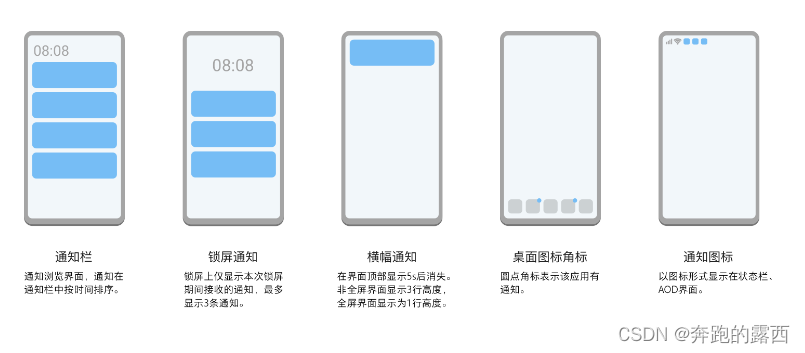
1.1、通知表现形式
通知会在不同场景以不同形式提示用户,例如通知在状态栏上显示为图标、在通知栏上会显示通知详细信息。重要的信息还可以使用横幅通知,浮动在界面顶部显示。
1.2、通知结构
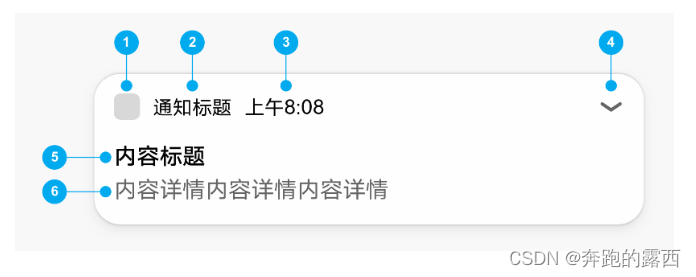
1. 通知小图标:表示通知的功能与类型。
2. 通知名称:应用名称或功能名称。
3. 时间:发送通知的时间,系统默认显示。
4. 展开箭头:点击标题区,展开被折叠的内容和按钮。若无折叠的内容和按钮,不显示此箭头。
5. 内容标题:描述简明概要。
6. 内容详情:描述具体内容或详情。
二、创建通知
在创建通知前需要先导入notificationManager模块
import notification from '@ohos.notificationManager';
2.1、发布基础类型通知
基础类型通知主要应用于发送短信息、提示信息、广告推送等,支持普通文本类型、长文本类型、多行文本类型和图片类型,可以通过contentType指定通知的内容类型。下面以普通文本类型和图片类型为例来介绍基础通知的发布,其它基础类型您可以查阅API。
- 发布普通文本类型通知,需要设置contentType类型为ContentType.NOTIFICATION_CONTENT_BASIC_TEXT。
import notification from '@ohos.notificationManager';
@Entry
@Component
struct NotificationDemo {
  publishNotification() {
    let notificationRequest: notification.NotificationRequest = { // 描述通知的请求
      id: 1, // 通知ID
      slotType: notification.SlotType.SERVICE_INFORMATION,
      content: { // 通知内容
        contentType: notification.ContentType.NOTIFICATION_CONTENT_BASIC_TEXT, // 普通文本类型通知
        normal: { // 基本类型通知内容
          title: '通知内容标题',
          text: '通知内容详情',
          additionalText: '通知附加内容', // 通知附加内容,是对通知内容的补充。
        }
      }
    }
    notification.publish(notificationRequest).then(() => { // 发布通知
      console.info('publish success');
    }).catch((err) => {
      console.error(`publish failed, dcode:${err.code}, message:${err.message}`);
    });
  }
  build() {
    Column() {
      Button('发送通知')
        .onClick(() => {
          this.publishNotification()
        })
    }
    .width('100%')
  }
}
效果图如下:

- 发布图片类型通知,需要设置contentType类型为ContentType.NOTIFICATION_CONTENT_PICTURE。
import notification from '@ohos.notificationManager';
import image from '@ohos.multimedia.image';
@Entry
@Component
struct NotificationTest1 {
  async publishPictureNotification() {
    // 将资源图片转化为PixelMap对象
    let resourceManager = getContext(this).resourceManager;
    let imageArray = await resourceManager.getMediaContent($r('app.media.mateBookProX').id);
    let imageResource = image.createImageSource(imageArray.buffer);
    let pixelMap = await imageResource.createPixelMap();
    let notificationRequest: notification.NotificationRequest = { // 描述通知的请求
      id: 1,
      content: {
        contentType: notification.ContentType.NOTIFICATION_CONTENT_PICTURE,
        picture: {
          title: '好物热销中', // 通知内容标题
          text: '展开查看详情', // 通知内容
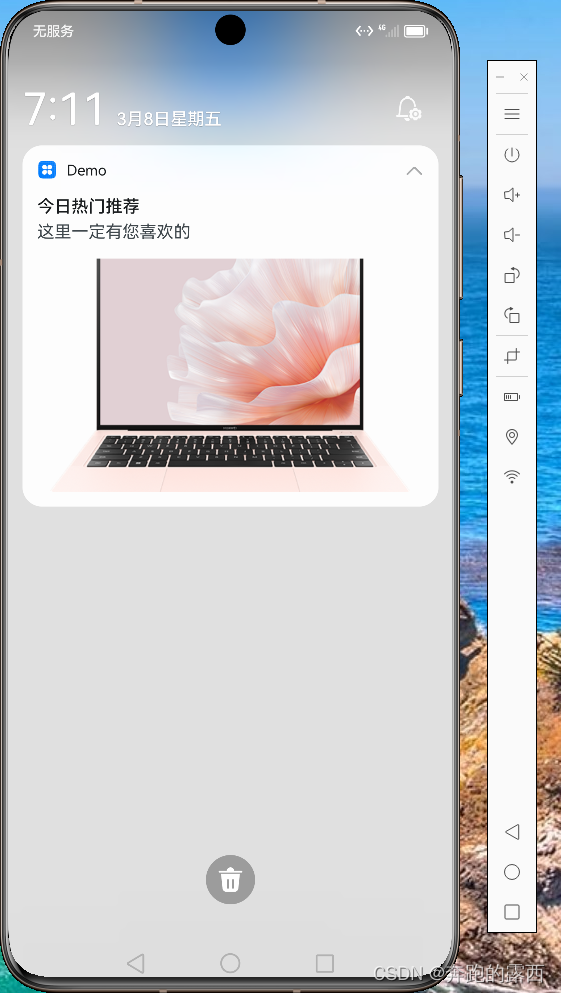
          expandedTitle: '今日热门推荐', // 通知展开时的内容标题
          briefText: '这里一定有您喜欢的', // 通知概要内容,是对通知内容的总结
          picture: pixelMap // 通知的图片内容
        }
      }
    }
    notification.publish(notificationRequest).then(() => { // 发布通知
      console.info('publish success');
    }).catch((err) => {
      console.error(`publish failed, dcode:${err.code}, message:${err.message}`);
    });
  }
  build() {
    Column() {
      Button('发送大图通知')
        .onClick(() => {
          this.publishPictureNotification()
        })
    }
    .width('100%')
  }
}
效果图如下:
2.2、发布进度类型通知
进度条通知会展示一个动态的进度条,主要用于文件下载,长任务处理的进度显示
①在发布进度类型通知前需要查询系统是否支持进度条模板。
notification.isSupportTemplate('downloadTemplate').then((data) => {
  console.info(`[ANS] isSupportTemplate success`);
  let isSupportTpl: boolean = data; // isSupportTpl的值为true表示支持支持downloadTemplate模板类通知,false表示不支持
  // ...
}).catch((err) => {
  console.error(`[ANS] isSupportTemplate failed, error[${err}]`);
});
②构造进度条模板,name字段当前需要固定配置为downloadTemplate。
let template = {
  name: 'downloadTemplate',
  data: {
    progressValue: 60, // 当前进度值
    progressMaxValue: 100 // 最大进度值
   }
}
let notificationRequest = {
  id: 1,
  content: {
    contentType: notification.ContentType.NOTIFICATION_CONTENT_BASIC_TEXT,
    normal: {
      title: '文件下载:music.mp4',
      text: 'senTemplate',
      additionalText: '60%'
    }
  },
   template: template
}
// 发布通知
notification.publish(notificationRequest).then(() => {
  console.info(`publish success`);
}).catch(error => {
  console.error(`[ANS] publish failed, code is ${error.code}, message is ${error.message}`);
})
2.3、添加操作按钮
最多可以给通知添加三个按钮,便于用户快速响应,比如关闭提醒。
let notificationRequest = {
  id: 1,
  slotType: notification.SlotType.SOCIAL_COMMUNICATION,
  content: {
    contentType: notification.ContentType.NOTIFICATION_CONTENT_BASIC_TEXT,
    normal: {
      title: '张三',
      text: '吃饭了吗'
    }
  },
  actionButtons: [
    {
      title: '回复',
      wantAgent: wantAgentObj
    }
  ]
};
2.4、更新通知
在发出通知后,使用您之前使用的相同通知ID,再次调用notification.publish来实现通知的更新。如果之前的通知是关闭的,将会创建新通知。
2.5、移除通知
- 通过通知ID取消已发布的通知。
notification.cancel(notificationId)
- 取消所有已发布的通知。
notification.cancelAll()
三、设置通知通道
通过通知通道,您可让通知有不同的表现形式,比如社交类型的通知是横幅显示的,并且有提示音,而一般的通知则不会横幅显示,您可以使用slotType来实现,设置slotType为SlotType.SOCIAL_COMMUNICATION,表示为社交类型通知。示例代码如下:
let imageArray = await getContext(this).resourceManager.getMediaContent($r('app.media.largeIcon').id);
let imageResource = image.createImageSource(imageArray.buffer);
let opts = { desiredSize: { height: 72, width: 72 } };
let largePixelMap = await imageResource.createPixelMap(opts);
let notificationRequest: notification.NotificationRequest = { // 描述通知的请求
  id: 1, // 通知ID
  content: { // 通知内容
    contentType: notification.ContentType.NOTIFICATION_CONTENT_BASIC_TEXT, // 普通文本类型通知
    slotType: notification.SlotType.SOCIAL_COMMUNICATION,
    normal: { // 基本类型通知内容
      title: '张三', // 通知内容标题。
      text: '等会下班一起吃饭哦', // 通知内容
    }
  },
  largeIcon: largePixelMap // 通知大图标。可选字段,大小不超过30KB。
}
通知通道类型主要有以下几种:
- SlotType.SOCIAL_COMMUNICATION:社交类型,状态栏中显示通知图标,有横幅和提示音。
- SlotType.SERVICE_INFORMATION:服务类型,状态栏中显示通知图标,没有横幅但有提示音。
- SlotType.CONTENT_INFORMATION:内容类型,状态栏中显示通知图标,没有横幅或提示音。
- SlotType.OTHER_TYPES:其它类型,状态栏中不显示通知图标,没有横幅或提示音。
四、创建通知组
将不同类型的通知分为不同的组,以便用户可以更好的管理他们。当同组的通知有多条的时候,会自动折叠起来,避免通知比较多的时候,通知界面比较杂乱,例如当通知栏里有聊天消息通知和商品推荐通知时,我们只需要通过设置字段groupName,就可以对通知进行分组,给groupName设置不同的值可以将通知分为不同的组。
let notifyId = 0;
let chatRequest: notification.NotificationRequest = {
  id: notifyId++,
  groupName:'ChatGroup',
  content: {
    ...
   }
 };
let productRequest: notification.NotificationRequest = {
  id: notifyId++,
  groupName: 'ProductGroup',
  content: {
    ...
   }
 };
五、为通知添加行为意图
WantAgent提供了封装行为意图的能力,这里所说的行为意图主要是指拉起指定的应用组件及发布公共事件等能力。给通知添加行为意图后,点击通知后可以拉起指定的UIAbility或者发布公共事件,您可以按照以下步骤来实现:
5.1、导入模块。
import notification from '@ohos.notificationManager';
import wantAgent from '@ohos.app.ability.wantAgent';
5.2、创建WantAgentInfo信息。
场景一:拉起UIAbility。
var wantAgentInfo = {
  wants: [
    {
      bundleName: "com.example.notification",
      abilityName: "EntryAbility"
    }
  ],
  operationType: wantAgent.OperationType.START_ABILITY,
  requestCode: 100
}
场景二:发布公共事件。
let wantAgentInfo = {
  wants: [
    {
      action: 'event_name', // 设置事件名
      parameters: {},
    }
  ],
  operationType: wantAgent.OperationType.SEND_COMMON_EVENT,
  requestCode: 100,
  wantAgentFlags: [wantAgent.WantAgentFlags.CONSTANT_FLAG],
}
5.3、创建WantAgent对象。
let wantAgentObj = null;
wantAgent.getWantAgent(wantAgentInfo)
  .then((data) => {
    wantAgentObj = data;
  })
  .catch((err) => {
    console.error(`get wantAgent failed because ${JSON.stringify(err)}`);
  })
5.4、构造NotificationRequest对象。
var notificationRequest = {
  id: 1,
  content: {
    contentType: notification.ContentType.NOTIFICATION_CONTENT_BASIC_TEXT,
    normal: {
      title: "通知标题",
      text: "通知内容"
    }
  },
  wantAgent: wantAgentObj
};
5.5、发布WantAgent通知。
notification.publish(notificationRequest).then(() => { // 发布通知
  console.info("publish success");
}).catch((err) => {
  console.error(`publish failed, code is ${err.code}, message is ${err.message}`);
});
用户通过点击通知栏上的通知,即可触发WantAgent的动作。
- 取消所有已发布的通知。
- 通过通知ID取消已发布的通知。
- 发布图片类型通知,需要设置contentType类型为ContentType.NOTIFICATION_CONTENT_PICTURE。
- 发布普通文本类型通知,需要设置contentType类型为ContentType.NOTIFICATION_CONTENT_BASIC_TEXT。


