
vue3关于Echarts的简单使用及配置
温馨提示:这篇文章已超过388天没有更新,请注意相关的内容是否还可用!
前言:
ECharts,一个使用 JavaScript 实现的开源可视化库,可以流畅的运行在 PC 和移动设备上,兼容当前绝大部分浏览器(IE9/10/11,Chrome,Firefox,Safari等),底层依赖矢量图形库 ZRender,提供直观,交互丰富,可高度个性化定制的数据可视化图表。
1、安装
(1)安装echarts包
npm install echarts --save
cnpm install echarts --save
(2)安装vue echarts工具包
npm install echarts vue-echarts
cnpm install echarts vue-echarts
2、挂载
(1)按需引入的挂载方式
本文选择vue3,以下是挂载/注册方式:
import { createApp } from 'vue'
import ECharts from 'vue-echarts'
import { use } from "echarts/core";
// 手动引入 ECharts 各模块来减小打包体积
import {
  CanvasRenderer
} from 'echarts/renderers'
import {
  BarChart
} from 'echarts/charts'
import {
  GridComponent,
  TooltipComponent
} from 'echarts/components'
use([
  CanvasRenderer,
  BarChart,
  GridComponent,
  TooltipComponent
]);
const app = createApp(...)
// 全局注册组件(也可以使用局部注册)
app.component('v-chart', ECharts)
(2)全局引入的挂载方式
在main.js文件中
import { createApp } from 'vue'
import App from './App.vue'
import ECharts from 'vue-echarts'  // 引入ECharts
import "echarts";                  // 全局引入echarts
// 挂载ECharts   参数1:vue文件中挂载echarts的名字  参数2:挂载的组件
const app=createApp(App)
app.component('ECharts',ECharts)
app.mount('#app')
3、示例
3.1 情形一:一个页面中只使用1~2个ECharts图表
import { ref,computed } from 'vue'
const data = ref([
    {value:67,name:'A'},
    {value:40,name:'B'},
    {value:120,name:'C'},
    {value:58,name:'D'},
    {value:85,name:'E'},
])
setInterval(()=>{
   data.value = data.value.map(item=>({
    ...item,
    value:Math.random()*100,
   }))
},1000)
const option = computed(()=>{
    return {
        xAxis: {
            type: 'category',
            data: data.value.map(el=>el.name)
        },
        yAxis: {
            type: 'value'
        },
        series: [
            {
            data: data.value.map(el=>el.value),
            type: 'line'
            }
        ]
    }
})


.chart {
  height: 400px;
}
3.1 情形二:一个页面中使用了多个ECharts图表
注意:如果要在一个页面中使用多个ECharts图表,就会出现很多很多option和类名chart,容易混乱,所以最好把图表们封装成组件使用。
(1)组件
import { onMounted } from "vue";
import * as echarts from 'echarts';
onMounted(() => {
	var chartDom = document.getElementById('main');
	var myChart = echarts.init(chartDom);
	var option;

	option = {
	  legend: {
	    top: 'bottom'
	  },
	  toolbox: {
	    show: true,
	    feature: {
	      mark: { show: true },
	      dataView: { show: true, readOnly: false },
	      restore: { show: true },
	      saveAsImage: { show: true }
	    }
	  },
	  series: [
	    {
	      name: 'Nightingale Chart',
	      type: 'pie',
	      radius: [50, 250],
	      center: ['50%', '50%'],
	      roseType: 'area',
	      itemStyle: {
	        borderRadius: 8
	      },
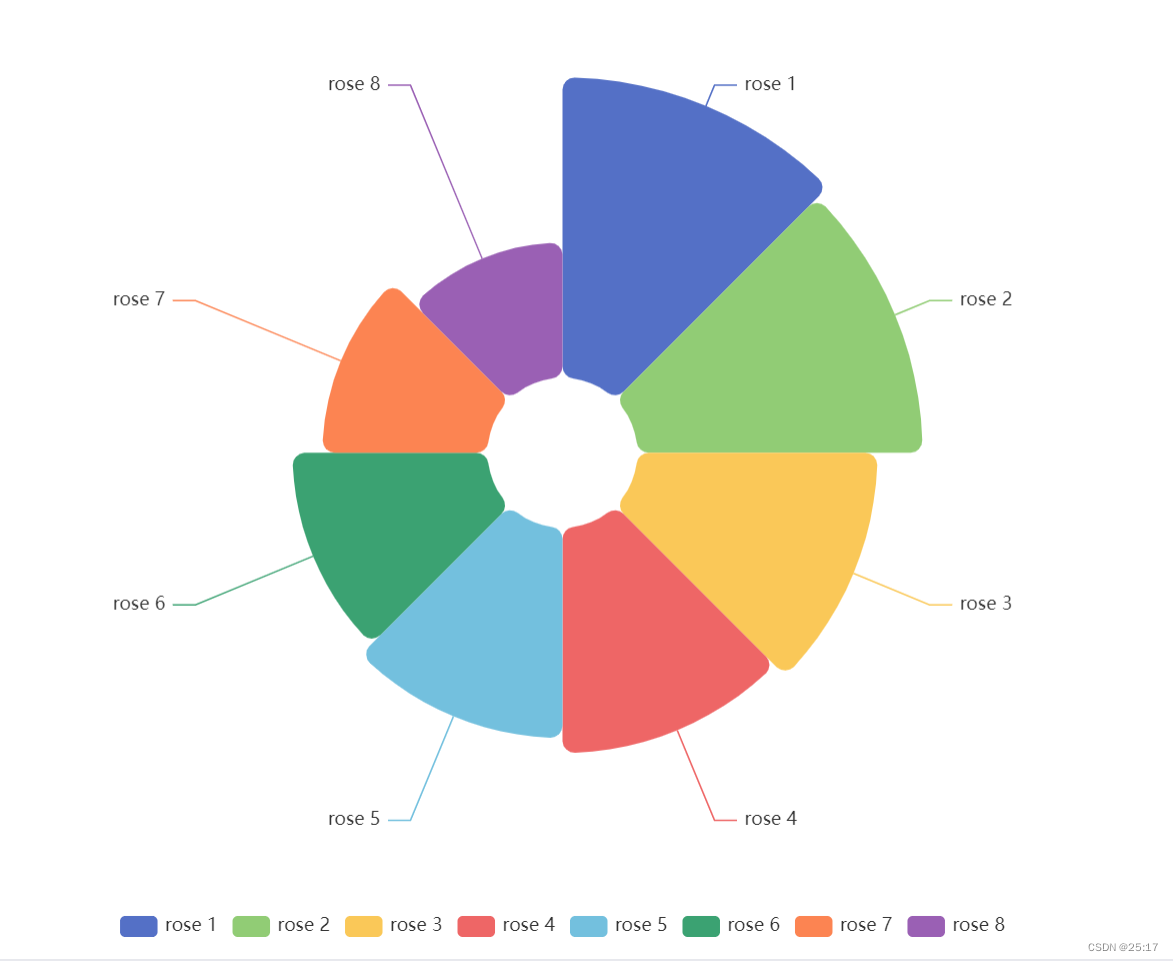
	      data: [
	        { value: 40, name: 'rose 1' },
	        { value: 38, name: 'rose 2' },
	        { value: 32, name: 'rose 3' },
	        { value: 30, name: 'rose 4' },
	        { value: 28, name: 'rose 5' },
	        { value: 26, name: 'rose 6' },
	        { value: 22, name: 'rose 7' },
	        { value: 18, name: 'rose 8' }
	      ]
	    }
	  ]
	};
	option && myChart.setOption(option);
});


// 宽高根据自身情况调整
.chart {
  width: 500px;
  height: 500px;
}
(2)vue文件中
// 根据自身组件存放的位置进行引入
import Nightingale from "@/components/Echarts/NightingaleChart.vue";


.echarts {
  height: 500px;
  width: 500px;
}
(3)效果
可以根据自身情况对options内的数据进行调整
免责声明:我们致力于保护作者版权,注重分享,被刊用文章因无法核实真实出处,未能及时与作者取得联系,或有版权异议的,请联系管理员,我们会立即处理! 部分文章是来自自研大数据AI进行生成,内容摘自(百度百科,百度知道,头条百科,中国民法典,刑法,牛津词典,新华词典,汉语词典,国家院校,科普平台)等数据,内容仅供学习参考,不准确地方联系删除处理! 图片声明:本站部分配图来自人工智能系统AI生成,觅知网授权图片,PxHere摄影无版权图库和百度,360,搜狗等多加搜索引擎自动关键词搜索配图,如有侵权的图片,请第一时间联系我们,邮箱:ciyunidc@ciyunshuju.com。本站只作为美观性配图使用,无任何非法侵犯第三方意图,一切解释权归图片著作权方,本站不承担任何责任。如有恶意碰瓷者,必当奉陪到底严惩不贷!


