
Web Serial API串口通信,实现web和electron扫码枪读取数据
温馨提示:这篇文章已超过387天没有更新,请注意相关的内容是否还可用!
文章目录
- 前言
- 一、Serial API是什么?
- 二、API使用步骤
- 1.navigator.serial.requestPort()
- 2.port.open(options)
- 3.reader.read()
- 4.port.close()
- 其他常见API:
- 完整代码
- 三、electron使用
前言
本文将讲述Web Serial API简单应用,以扫码枪为示例,通过代码实现web端读取扫码枪扫码内容。
一、Serial API是什么?
Serial API为浏览器提供的一些接口函数,能实现与USB串行端口的硬件设备进行通信。诸如扫码枪或者打印机等
二、API使用步骤
以扫码枪为例子实现读取扫码数据
1.navigator.serial.requestPort()
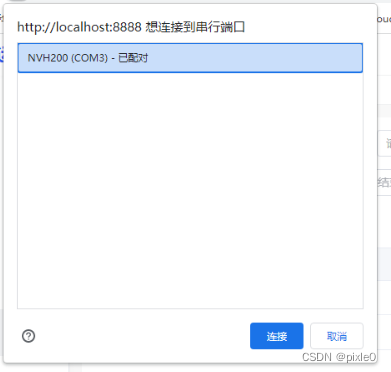
作用:弹窗让用户选择一个串行端口设备,类似授权
if ('serial' in navigator) {
		try {
		    const port = (await navigator.serial.requestPort()) || null;
			console.log('选择串口设备成功');

		} catch (e) {
			console.log('选择串口设备失败');
		}
	} else {
		console.log('浏览器不支持serial API');
	}
2.port.open(options)
作用:打开并连接到指定串行端口
await port.value.open({ baudRate: 9600 })参数option属性:
baudRate:波特率,9600
dataBits:数据位,7或8
stopBits:停止位,1或2
parity:奇偶校验模式,默认none
flowControl:流控制类型,none或hardware
3.reader.read()
作用:读取流数据
返回2个字段value和done,value为读取的数据,类型为Uint8Array,需要通过其他方式转换为字符串
done为true表示没有正在接收数据或者串口已关闭,通过如下循环获取数据:
const reader = port.readable.getReader();
while (true) {
  const { value, done } = await reader.read();
  if (done) {
    // 允许稍后关闭串口
    reader.releaseLock();
    break;
  }
  //处理数据
  console.log(value);//数据Uint8Array类型
}
2.也可以利用 port.readable.pipeTo和TextDecoderStream实现数据解析为字符串
const textDecoder = new TextDecoderStream();
const readableStreamClosed = port.readable.pipeTo(textDecoder.writable);
const reader = textDecoder.readable.getReader();
   while (true) {
      const { value, done } = await reader.read();
      if (done) {
       // 允许稍后关闭串口
        reader.releaseLock();
        break;
      }
      // 处理数据
      console.log(value);//数据String类型
   }
  }
while循环读取数据不是一次性读取的,有可能是多次,需要拼接和判断是否读取结束,一般以"\n"结尾来判断。
二维码数据为{name:“张三”,age:20}通过测试三次获取到value数据如下:
console.log(value.includes('\r'),'value',value)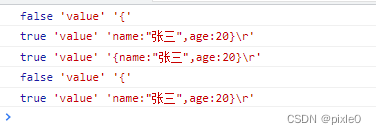
通过测试发现有时候一次性读完有时候分2次读完,不确定,但是读取完毕都是以"\r"结尾,所以我们可以以此为判断依据改进如下:
const textDecoder = new TextDecoderStream();
const readableStreamClosed = port.readable.pipeTo(textDecoder.writable);
const reader = textDecoder.readable.getReader();
let data= ''; //扫码数据
   while (true) {
      const { value, done } = await reader.read();
      if (done) {
       // 允许稍后关闭串口
        reader.releaseLock();
        break;
      }
      // 处理数据
      data=`${data}${value}`
	   if(value.includes('\r')){//读取结束
			console.log(`二维码数据:${data}`)
	   }
   }
  }
4.port.close()
作用:关闭串口
port.close();
其他常见API:
port.write(data):数据写入串口
reader.cancel():取消读取流数据
navigator.serial.getPorts():获取用户之前授权过的所有端口,返回port数组
完整代码
  选择扫码枪串口


import { ref } from 'vue';
const port = ref(null);
//选择串口设备
const chooseSerial = async () => {
	if ('serial' in navigator) {
		try {
			port.value = (await navigator.serial.requestPort()) || null;
			console.log('选择串口成功');
			port.value && openSerial();

		} catch (e) {
			console.log('选择串口失败');
		}
	} else {
		console.log('浏览器不支持serial API');
	}
};
//打开串口读取数据
const openSerial = async () => {
    await port.value.open({ baudRate: 9600 });
	try {
		const textDecoder = new TextDecoderStream();
		port.value.readable.pipeTo(textDecoder.writable);
		const reader = textDecoder.readable.getReader();
		let data = ''; //扫码数据
		while (true) {
			const { value, done } = await reader.read();
			if (done) {
				reader.releaseLock();
				break;
			}
			data=`${data}${value}`
			if(value.includes('\r')){//读取结束
                 let codeData=data;
				 data="";//清空下次读取不会叠加
				 console.log(`二维码数据:${codeData}`)
				 //处理拿到数据逻辑
			}
		}
	} catch (error) {
		console.error(error);
		port.value = null;
	} finally {
		reader.releaseLock();
		console.log('关闭串口');
		await port.value.close();
		port.value = null;
	}
};
运行:
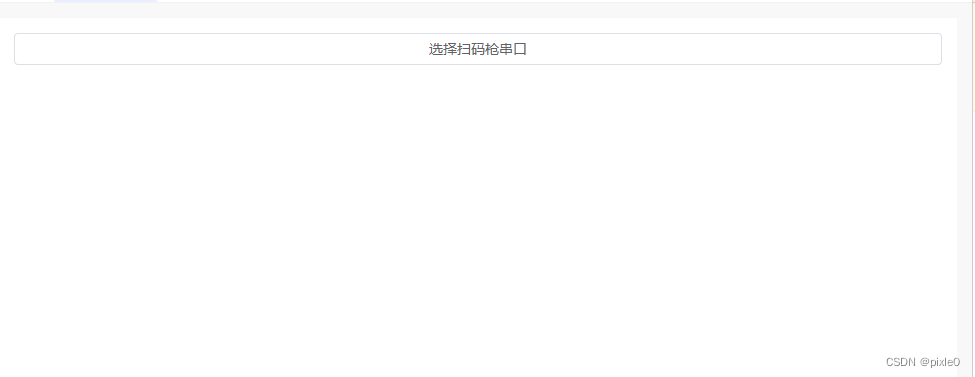

说明:只要点击按钮选择一次串口设备,选择完隐藏按钮,后续就能一直扫码获取数据,如果中途扫码枪拔出来port属性将变成null,按钮重新显示,再次插入扫码枪需要在点击按钮选择一次串口设备。
三、electron使用
electron支持Web Serial API使用,但是有点区别,在于无法弹窗让用户选择串口设备,此时需要在主进程里面授权并获取设备串口ID(portId)返给渲染进程
主进程main/index.js
function createWindow() {
  // Create the browser window.
  const mainWindow = new BrowserWindow({
    width: 900,
    height: 670,
    show: false,
    backgroundColor :'#ffffff',
    autoHideMenuBar: true,
    ...(process.platform === 'linux' ? { icon } : {}),
    webPreferences: {
      preload: join(__dirname, '../preload/index.js'),
      sandbox: false
    }
  })
  //处理serialApi
    serialApiHandle(mainWindow)
  }
function serialApiHandle(mainWindow){
  mainWindow.webContents.session.on('select-serial-port', (event, portList, webContents, callback) => {
    // Add listeners to handle ports being added or removed before the callback for `select-serial-port`
    // is called.
    mainWindow.webContents.session.on('serial-port-added', (event, port) => {
      console.log('serial-port-added FIRED WITH', port)
      // Optionally update portList to add the new port
    })
    mainWindow.webContents.session.on('serial-port-removed', (event, port) => {
      console.log('serial-port-removed FIRED WITH', port)
      // Optionally update portList to remove the port
    })
    event.preventDefault();
    console.log(portList,'portList')
    if (portList && portList.length > 0) {
    //默认返回第一个串口id
      callback(portList[0].portId)
    } else {
      // eslint-disable-next-line n/no-callback-literal
      callback('') // Could not find any matching devices
    }
  })
//授权
  mainWindow.webContents.session.setPermissionCheckHandler((webContents, permission, requestingOrigin, details) => {
    if (permission === 'serial') {
      return true
    }
    return false
  })
//授权
  mainWindow.webContents.session.setDevicePermissionHandler((details) => {
    if (details.deviceType === 'serial') {
      return true
    }
    return false
  })
}
渲染进程写法跟web端一样
ps:默认返回第一个串口id


