
numpy与python版本不匹配-ImportError: Unable to import required dependencies: numpy
温馨提示:这篇文章已超过391天没有更新,请注意相关的内容是否还可用!
问题
你在运行python代码的时候,是否遇到过下面这种错误
ImportError: Unable to import required dependencies:
numpy:
IMPORTANT: PLEASE READ THIS FOR ADVICE ON HOW TO SOLVE THIS ISSUE!
Importing the numpy C-extensions failed. This error can happen for
many reasons, often due to issues with your setup or how NumPy was
installed.
We have compiled some common reasons and troubleshooting tips at:
    https://numpy.org/devdocs/user/troubleshooting-importerror.html
Please note and check the following:
  * The Python version is: Python3.7 from "C:\Users\MSI-NB\.conda\envs\python37\python.exe"
  * The NumPy version is: "1.21.6"
and make sure that they are the versions you expect.
Please carefully study the documentation linked above for further help.
Original error was: DLL load failed: 找不到指定的模块。
如上信息所示,我的python版本是3.7,Numpy版本是1.21.6,他们的版本不匹配,导致运行报错。
解决方法
1.通过安装对应的版本号,python3.7对应的是numpy1.19.5,直接按照对应版本即可。
如果你使用的pip,只需要执行
pip uninstall numpy
pip install numpy==1.19.5
如果你使用的是conda,需要执行
conda uninstall numpy
conda install numpy==1.19.5
那么如何知道他们的对应关系呢,这个网站你一定要收藏
https://www.lfd.uci.edu/~gohlke/pythonlibs/
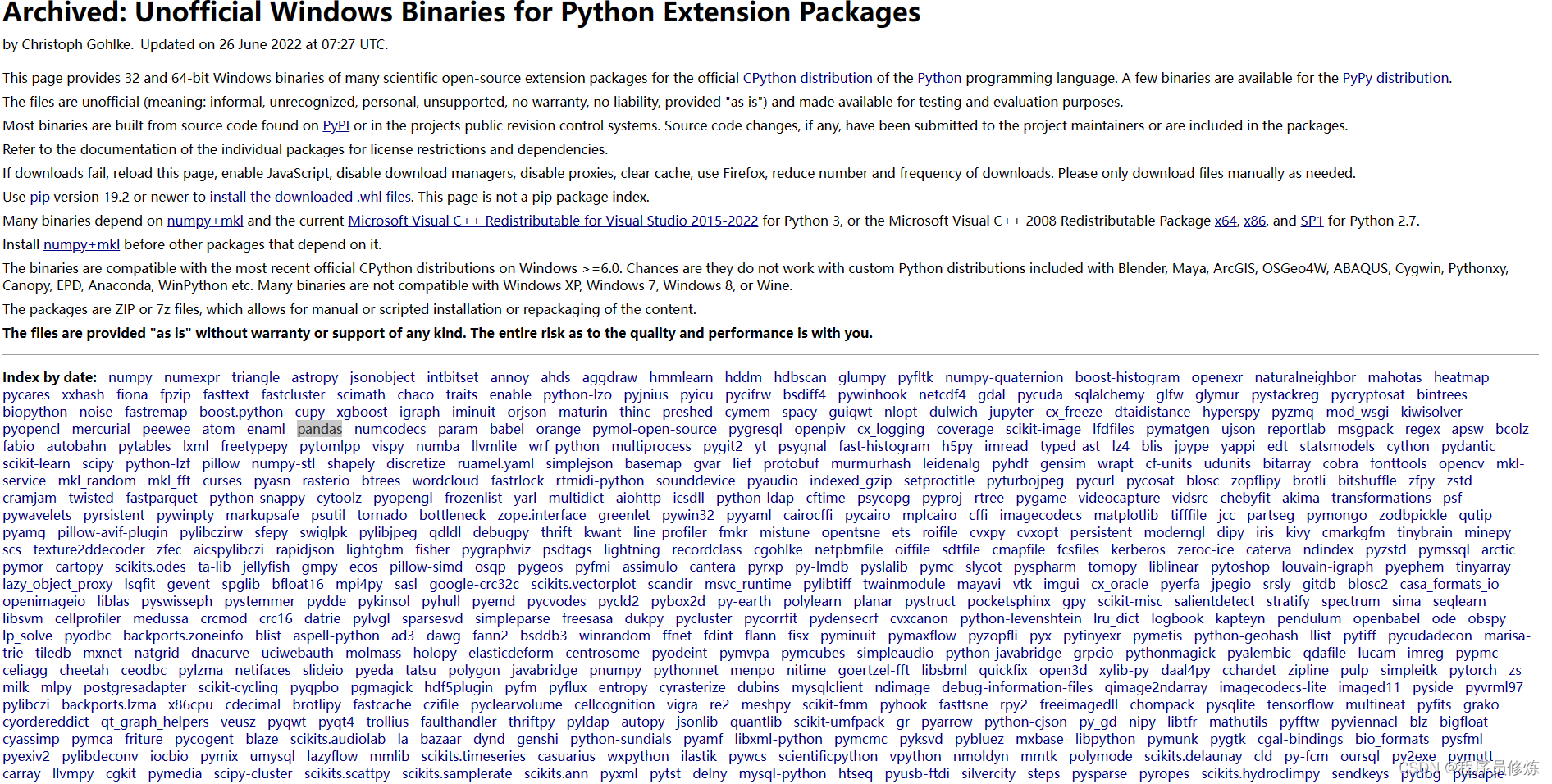
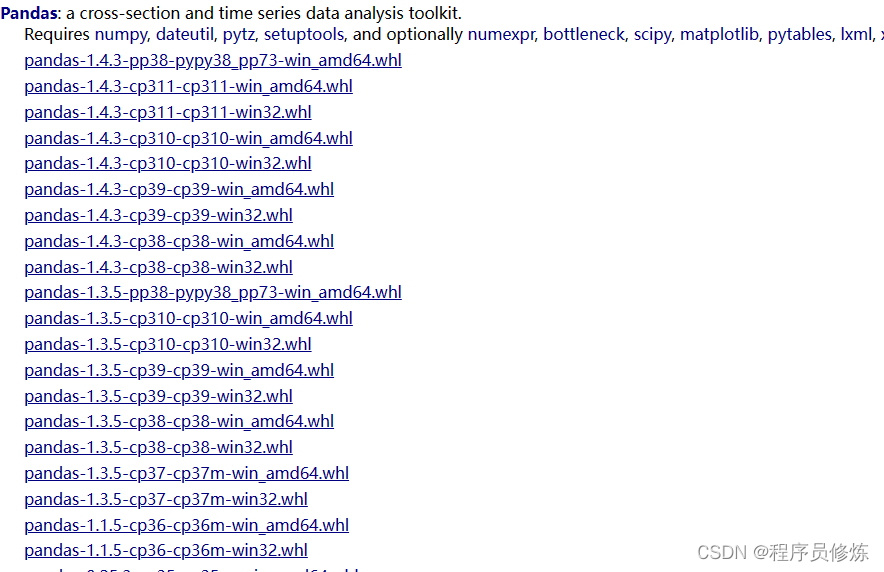
在这里,你能够看到所有python库和python版本的对应关系。以pandas为例,如下图所示,cp后面指的就是python版本,cp39就是python3.9,那么它对应的pandas版本就是pandas==1.3.5
如果依然无法解决你的问题,可以尝试安装numpy-base
conda install -c anaconda numpy-base
如果依旧没有解决,你可以看下你的pip下和conda下是不是都有Numpy,通过执行pip list 和conda list,如果是的话,需要将pip种的删除,pip uninstall numpy.
不过的执行后,又报了另外一个错误,
~\.conda\envs\python37\lib\site-packages\pandas\_typing.py in
     82 # array-like
     83
---> 84 ArrayLike = Union["ExtensionArray", np.ndarray]
     85 AnyArrayLike = Union[ArrayLike, "Index", "Series"]
     86
AttributeError: module 'numpy' has no attribute 'ndarray'
这个报错是因为numpy和panda版本不匹配导致的,需要卸载后重新安装,注意,需要先安装numpy,再安装pandas
免责声明:我们致力于保护作者版权,注重分享,被刊用文章因无法核实真实出处,未能及时与作者取得联系,或有版权异议的,请联系管理员,我们会立即处理! 部分文章是来自自研大数据AI进行生成,内容摘自(百度百科,百度知道,头条百科,中国民法典,刑法,牛津词典,新华词典,汉语词典,国家院校,科普平台)等数据,内容仅供学习参考,不准确地方联系删除处理! 图片声明:本站部分配图来自人工智能系统AI生成,觅知网授权图片,PxHere摄影无版权图库和百度,360,搜狗等多加搜索引擎自动关键词搜索配图,如有侵权的图片,请第一时间联系我们,邮箱:ciyunidc@ciyunshuju.com。本站只作为美观性配图使用,无任何非法侵犯第三方意图,一切解释权归图片著作权方,本站不承担任何责任。如有恶意碰瓷者,必当奉陪到底严惩不贷!


