
一文完全弄懂EndPoint组件
温馨提示:这篇文章已超过389天没有更新,请注意相关的内容是否还可用!
Endpoint
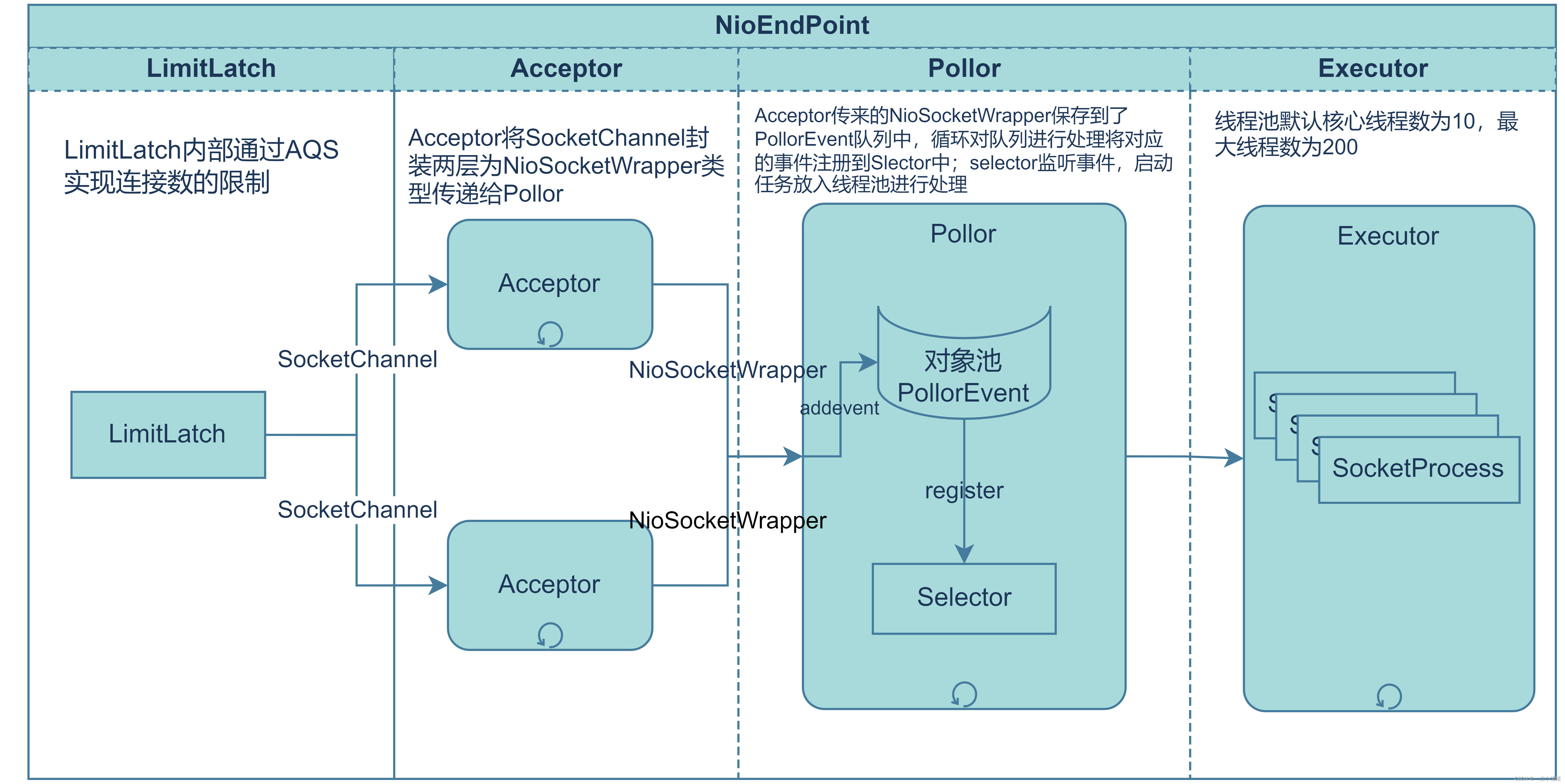
NioEndPoint组件的构成
LimitLatch
LimitLatch是连接控制器,其内部通过变量count和limit两个变量进行连接的控制,默认情况下最大连接数为1024*8,达到最大连接数不接受连接直到有线程释放了资源。
Acceptor
Acceptor是单独的线程,内部通过循环一直运行,每次循环都会使用LimitLatch中count+1,如果SocketChannel.accept成功则将其封装为NioSocketWrapper传递给Pollor中的PollorEvent队列中,Pollor会对其进行处理;accept失败则再将Limitlatch中count-1。
Pollor
Pollor线程也是单独的线程,内部通过while(true)一直循环运行。Acceptor传来的NioSocketWrapper封装为PollorEvent放入到PollorEvent队列中,Pollor线程循环对队列进行处理将对应的事件注册到Slector中;selector监听事件的发生,并启动对应的任务放入线程池进行处理
Executor
线程池默认核心线程数为10,最大线程数为200。这个线程池维护的线程就是我们非常熟悉的“http-nio-8080-exec-N”线程,也就是用户请求的实际处理线程。主要负责运行Pollor提交的任务,以及后续的处理
EndPoint组件的运行
启动的时候调用startInternal(),启动时首先开启几个对象池,分别为ProcessorCache,EventCache和BufferPool默认的大小为128,创建这些对象池节省创建与销毁对象的开销。
之后调用initializeConnectionLatch()开启一个连接控制器,createExecutor()创建线程池、并开启一个Pollor线程。
public void startInternal() throws Exception {
        if (!running) {
            running = true;
            paused = false;
            if (socketProperties.getProcessorCache() != 0) {
                processorCache = new SynchronizedStack(SynchronizedStack.DEFAULT_SIZE,
                        socketProperties.getProcessorCache());
            }
            if (socketProperties.getEventCache() != 0) {
                eventCache = new SynchronizedStack(SynchronizedStack.DEFAULT_SIZE,
                        socketProperties.getEventCache());
            }
            if (socketProperties.getBufferPool() != 0) {
                nioChannels = new SynchronizedStack(SynchronizedStack.DEFAULT_SIZE,
                        socketProperties.getBufferPool());
            }
            // Create worker collection
            if (getExecutor() == null) {
                createExecutor();
            }
            //初始化LimitLatch
            initializeConnectionLatch();
            // Start poller thread
            //开启一个pollor线程
            poller = new Poller();
            Thread pollerThread = new Thread(poller, getName() + "-Poller");
            pollerThread.setPriority(threadPriority);
            pollerThread.setDaemon(true);
            pollerThread.start();
            //开启Acceptor
            startAcceptorThread();
        }
    }
Aceptor
Acceptor的启动
startInternal() 调用了startAcceptorThread() 方法来开启acceptor线程,下面是该方法的源代码。Acceptor类实现了runnable接口,startAcceptorThread() 中开启了该线程,并将该线程设置为守护线程。
protected void startAcceptorThread() {
        acceptor = new Acceptor(this);
        String threadName = getName() + "-Acceptor";
        acceptor.setThreadName(threadName);
        Thread t = new Thread(acceptor, threadName);
        t.setPriority(getAcceptorThreadPriority());
        //设置守护线程
        t.setDaemon(getDaemon());
        t.start();
    }
Acceptor的主要逻辑
下面来看看Acceptor线程运行的主要逻辑,这里只给出了Acceptor中run方法的主要逻辑。
- 该线程一直循环运行直到接收到关闭的指令,每次循环使用endpoint.countUpOrAwaitConnection() 方法来向系统申请一个连接,这里的方法本质上是使用LimitLatch的countUpOrAwait() 方法,具体的实现细节可以看前面的文章点击这里。
- 如果申请成功,则LimitLatch中的count+1;否则当前的线程就会被阻塞到LimitLatch中的AQS队列中。
- 接下来使用endpoint.serverSocketAccept() 方法接收一个SocketChannel,如果接收失败则调用endpoint.countDownConnection() 方法将LimitLatch中的count-1。
如果接收到SocketChannel则调用endpoint.setSocketOptions(socket) 将SocketChannel包装成NioSocketWrapper类型传递给Pollor。
Acceptor中run方法的主要逻辑
@Override
public class Acceptor implements Runnable {
public void run() {
    try {
            // Loop until we receive a shutdown command
            while (!stopCalled) {
                if (stopCalled) {
                    break;
                }
                state = AcceptorState.RUNNING;
                //以下为主要逻辑
                try {
                    //申请一个连接:count+1
                    endpoint.countUpOrAwaitConnection();
                    if (endpoint.isPaused()) {
                        continue;
                    }
                    U socket = null;
                    try {
                        socket = endpoint.serverSocketAccept();
                    } catch (Exception ioe) {
                        // We didn't get a socket:count-1
                        endpoint.countDownConnection();
                        if (endpoint.isRunning()) {
                            // Introduce delay if necessary
                            errorDelay = handleExceptionWithDelay(errorDelay);
                            // re-throw
                            throw ioe;
                        } else {
                            break;
                        }
                    }
                    errorDelay = 0;
                    // setSocketOptions()方法将socketchannel包装成NioSocketWrapper类型传递给Pollor
                    if (!stopCalled && !endpoint.isPaused()) {
                        if (!endpoint.setSocketOptions(socket)) {
                            endpoint.closeSocket(socket);
                        }
                    } else {
                        endpoint.destroySocket(socket);
                    }
                } catch (Throwable t) {
                    ExceptionUtils.handleThrowable(t);
                    String msg = sm.getString("endpoint.accept.fail");
                    if (t instanceof org.apache.tomcat.jni.Error) {
                        org.apache.tomcat.jni.Error e = (org.apache.tomcat.jni.Error) t;
                        if (e.getError() == 233) {
                            log.warn(msg, t);
                        } else {
                            log.error(msg, t);
                        }
                    } else {
                            log.error(msg, t);
                    }
                }
            }
        } finally {
            stopLatch.countDown();
        }
        state = AcceptorState.ENDED;
    }
}
Acceptor与Pollor之间的通信方式
-
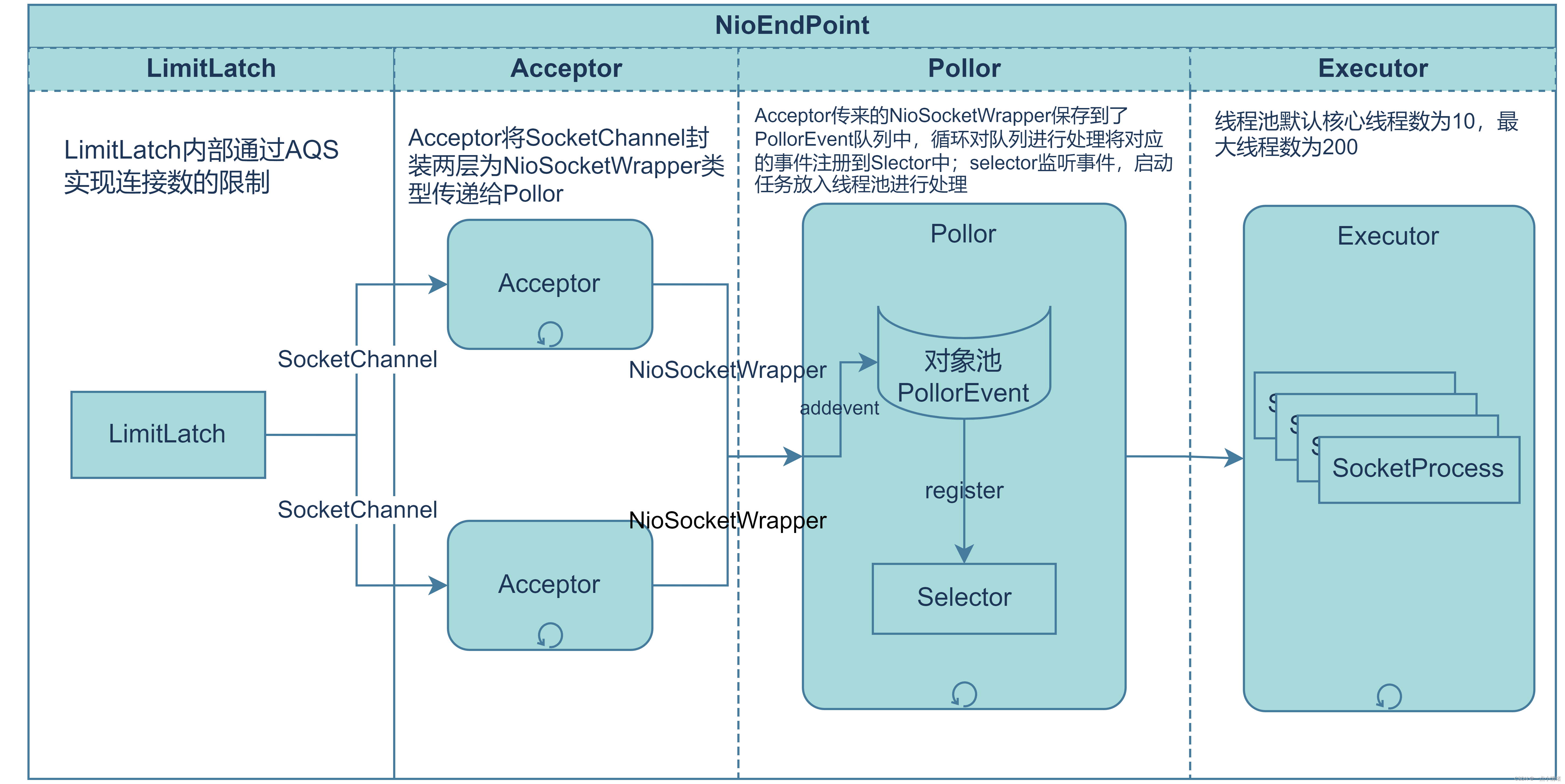
上面提到了Acceptor调用setSocketOptions() 方法将接收到的SocketChannel包装成NioSocketWrapper类型传递给Pollor。
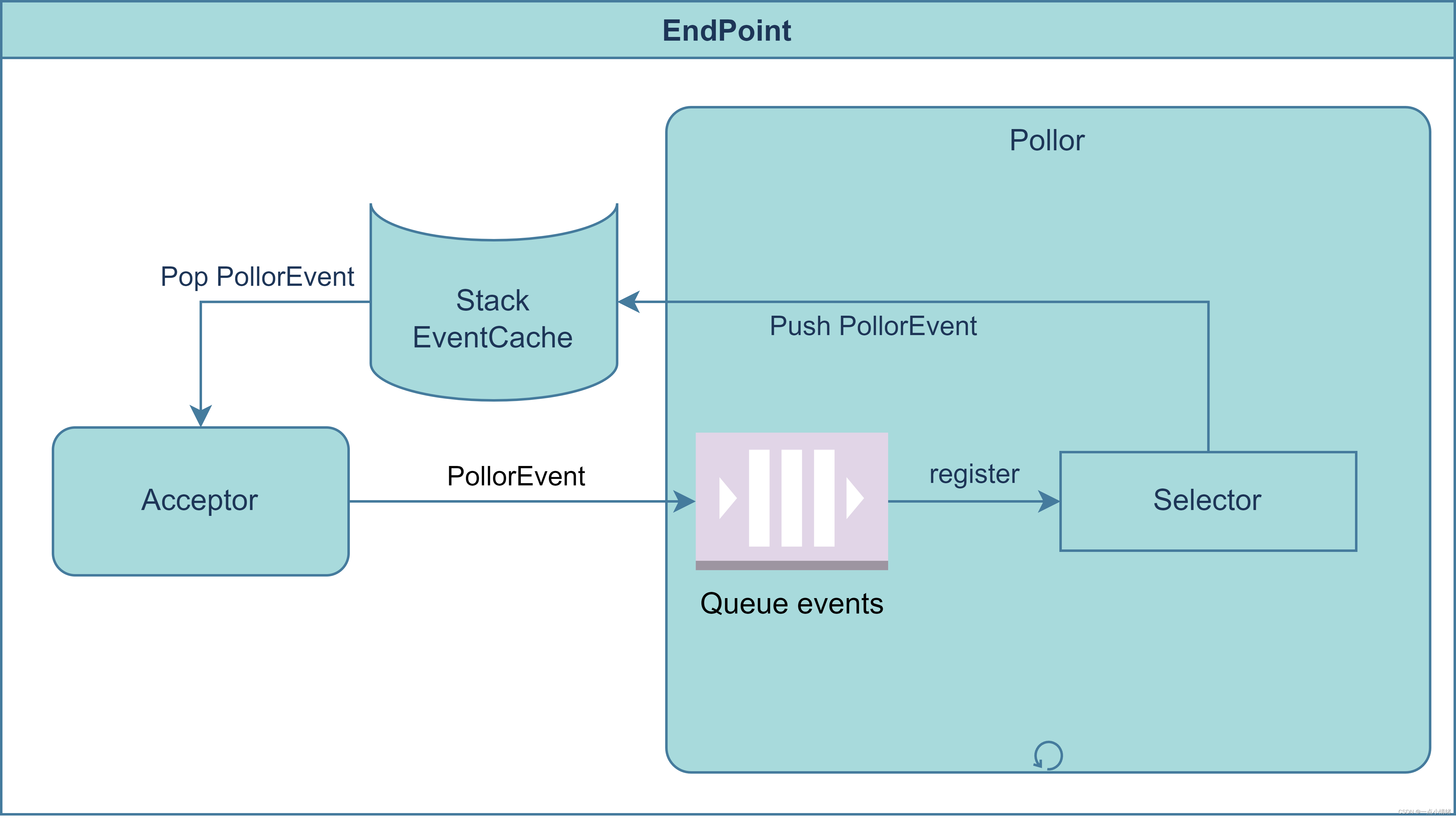
这里来看看该方法主要逻辑:该方法传入一个参数就是acceptor接收到的SocketChannel,之后将SocketChannel通过两层包装,先包装成NioChannel类型,再将NioChannel包装为NioSocketWrapper类型,调用poller.register(socketWrapper) 方法将NioSocketWrapper传递给了pollor。
-
register方法内部通过createPollerEvent(socketWrapper, OP_REGISTER) 方法从EndPoint的Event对象池中获取一个PollorEvent,并通过addEvent(pollerEvent) 方法将该PollorEvent添加到了名为events的队列中。这里就能看出Acceptor与Pollor队列之间就是典型的生产者消费者关系,Acceptor作为生产者不断向events队列中添加被包装为PollorEvent的SocketChannel,Pollor则作为消费者不断对PollorEvent进行处理,将其注册到slelector中,再将PollorEvent放入EndPoint的Event对象池,以达到对PollorEvent对象的复用。
setSocketOptions()源代码
public class NioEndpoint extends AbstractJsseEndpoint {
    @Override
    //NioEndpoint中setSocketOptions()方法源码
    protected boolean setSocketOptions(SocketChannel socket) {
        NioSocketWrapper socketWrapper = null;
        try {
            // Allocate channel and wrapper
            NioChannel channel = null;
            if (nioChannels != null) {
                //从nioChannel对象池中拿出一个nioChannel
                channel = nioChannels.pop();
            }
            //如果没有对象池或对象池空则新建一个NioChannel
            if (channel == null) {
                SocketBufferHandler bufhandler = new SocketBufferHandler(
                        socketProperties.getAppReadBufSize(),
                        socketProperties.getAppWriteBufSize(),
                        socketProperties.getDirectBuffer());
                if (isSSLEnabled()) {
                    channel = new SecureNioChannel(bufhandler, this);
                } else {
                    channel = new NioChannel(bufhandler);
                }
            }
            //创建一个NioSocketWrapper对NioChannel再进行包装
            NioSocketWrapper newWrapper = new NioSocketWrapper(channel, this);
            channel.reset(socket, newWrapper);
            connections.put(socket, newWrapper);
            socketWrapper = newWrapper;
            // Set socket properties
            // Disable blocking, polling will be used
            socket.configureBlocking(false);
            socketProperties.setProperties(socket.socket());
            socketWrapper.setReadTimeout(getConnectionTimeout());
            socketWrapper.setWriteTimeout(getConnectionTimeout());
            socketWrapper.setKeepAliveLeft(NioEndpoint.this.getMaxKeepAliveRequests());
            //调用了register将NioSocketWrapper传递给pollor
            poller.register(socketWrapper);
            return true;
        } catch (Throwable t) {
            ExceptionUtils.handleThrowable(t);
            try {
                log.error(sm.getString("endpoint.socketOptionsError"), t);
            } catch (Throwable tt) {
                ExceptionUtils.handleThrowable(tt);
            }
            if (socketWrapper == null) {
                destroySocket(socket);
            }
        }
        // Tell to close the socket if needed
        return false;
    }
}
//Pollor中与register方法相关的部分
public class Poller implements Runnable {
    public void register(final NioSocketWrapper socketWrapper) {
            //将socketWrapper包装成PollerEvent添加到pollerEventQueue中
            socketWrapper.interestOps(SelectionKey.OP_READ);//this is what OP_REGISTER turns into.
            PollerEvent pollerEvent = createPollerEvent(socketWrapper, OP_REGISTER);
            addEvent(pollerEvent);
    }
    private void addEvent(PollerEvent event) {
            events.offer(event);
            if (wakeupCounter.incrementAndGet() == 0) {
                selector.wakeup();
            }
    }
    private final SynchronizedQueue events =new SynchronizedQueue();
}
Pollor
Pollor的启动
Pollor实际上是NioEndPoint的一个内部类,在NioEndPoint的startInternal() 方法中就通过下面的代码启动了一个Pollor线程
poller = new Poller();
Thread pollerThread = new Thread(poller, getName() + "-Poller");
pollerThread.setPriority(threadPriority);
pollerThread.setDaemon(true);
pollerThread.start();
Pollor的主要逻辑
Pollor类实现了Runnable接口重写了run()方法,内部通过while(true)一直循环运行。下面来看看run()方法每次循环都做了什么:
-
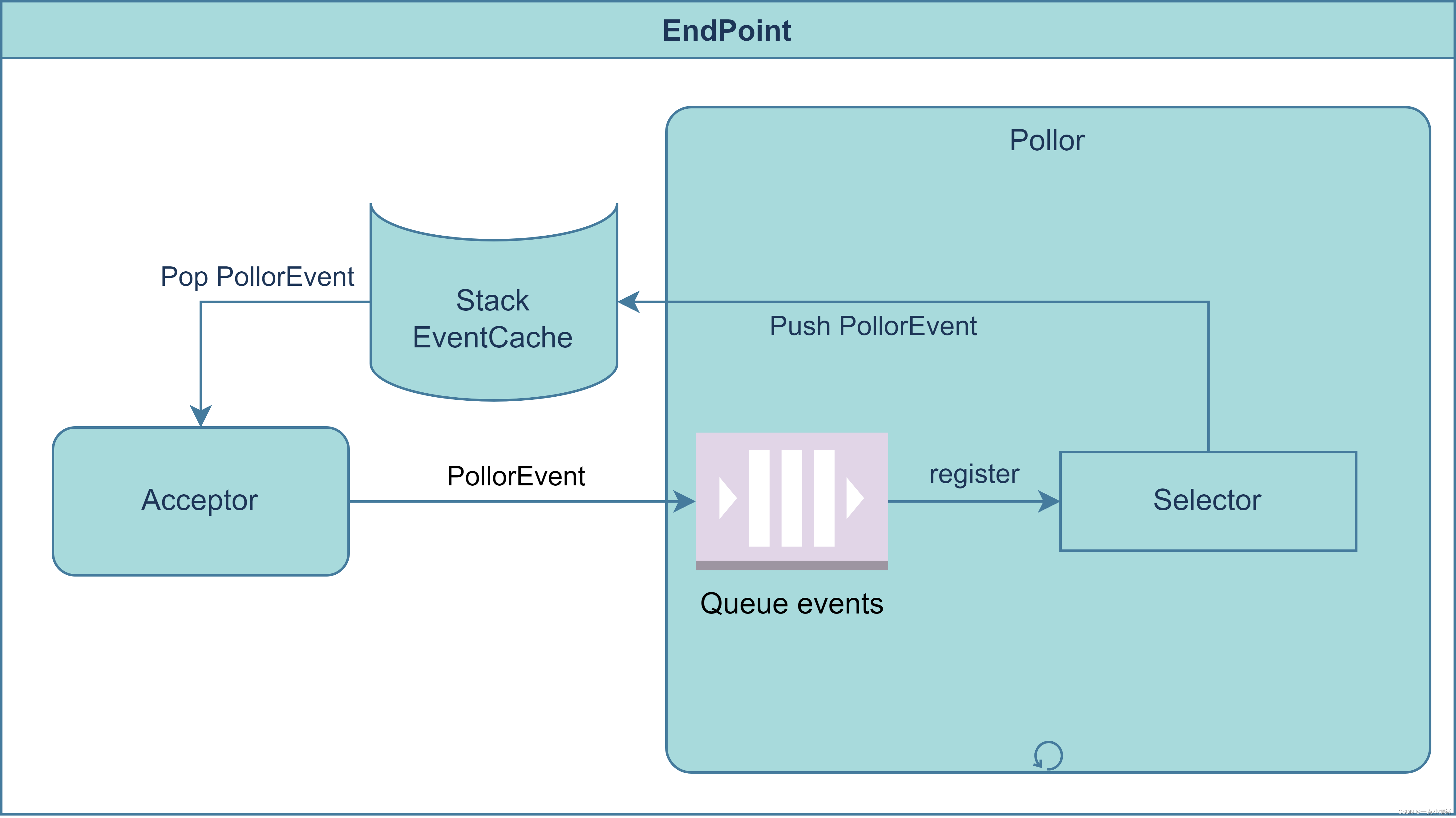
首先调用了events() 方法,这个方法实际上就是遍历PollorEvent队列对其进行处理,将里面的事件全部都注册到selector上,然后将使用完的PollorEvent再放入NioEndPoint中的eventCache对象池中,达到对PollorEvent对象的复用。
-
接下来调用了selector.select() 方法对注册到该多路复用器上面的事件进行轮询,之后使用iterator遍历事件集合对事件进行处理,通过processKey(sk, socketWrapper) 函数将任务交给Executer进行处理。
下面是Pollor中几个主要的方法
public class Poller implements Runnable { @Override public void run() { // Loop until destroy() is called while (true) { boolean hasEvents = false; try { //循环持续对PollerEventQueue中的event进行处理 if (!close) { hasEvents = events(); if (wakeupCounter.getAndSet(-1) > 0) { // If we are here, means we have other stuff to do // Do a non blocking select keyCount = selector.selectNow(); } else { keyCount = selector.select(selectorTimeout); } wakeupCounter.set(0); } if (close) { events(); timeout(0, false); try { selector.close(); } catch (IOException ioe) { log.error(sm.getString("endpoint.nio.selectorCloseFail"), ioe); } break; } // Either we timed out or we woke up, process events first if (keyCount == 0) { hasEvents = (hasEvents | events()); } } catch (Throwable x) { ExceptionUtils.handleThrowable(x); log.error(sm.getString("endpoint.nio.selectorLoopError"), x); continue; } Iterator iterator = keyCount > 0 ? selector.selectedKeys().iterator() : null; // Walk through the collection of ready keys and dispatch // any active event. while (iterator != null && iterator.hasNext()) { SelectionKey sk = iterator.next(); iterator.remove(); NioSocketWrapper socketWrapper = (NioSocketWrapper) sk.attachment(); // Attachment may be null if another thread has called // cancelledKey() if (socketWrapper != null) { processKey(sk, socketWrapper); } } // Process timeouts timeout(keyCount,hasEvents); } getStopLatch().countDown(); } public boolean events() { boolean result = false; PollerEvent pe = null; //循环对event队列中的事件进行处理 for (int i = 0, size = events.size(); iExecuter
Executer的启动
在AbstractEndPoint类中定义了createExecutor() 方法,该方法开启“http-nio-8080-exec-N”线程,也就是用户请求的实际处理线程,默认情况下核心线程数为10,最大线程数为200。
public void createExecutor() { internalExecutor = true; TaskQueue taskqueue = new TaskQueue(); TaskThreadFactory tf = new TaskThreadFactory(getName() + "-exec-", daemon, getThreadPriority()); //getMinSpareThreads()默认值为10,getMaxThreads()默认值为200 executor = new ThreadPoolExecutor(getMinSpareThreads(), getMaxThreads(), 60, TimeUnit.SECONDS,taskqueue, tf); taskqueue.setParent( (ThreadPoolExecutor) executor); }Pollor任务提交到Executor
//process()方法将Pollor中的任务提交给线程池进行处理 protected boolean process() { try { //将任务提交到线程池进行处理 getEndpoint().getExecutor().execute(this); return true; } catch (RejectedExecutionException ree) { log.warn(sm.getString("endpoint.executor.fail", SocketWrapperBase.this) , ree); } catch (Throwable t) { ExceptionUtils.handleThrowable(t); // This means we got an OOM or similar creating a thread, or that // the pool and its queue are full log.error(sm.getString("endpoint.process.fail"), t); } return false; } // public boolean processSocket(SocketWrapperBase socketWrapper,SocketEvent event, boolean dispatch) { try { if (socketWrapper == null) { return false; } SocketProcessorBase sc = null; if (processorCache != null) { sc = processorCache.pop(); } if (sc == null) { sc = createSocketProcessor(socketWrapper, event); } else { sc.reset(socketWrapper, event); } Executor executor = getExecutor(); if (dispatch && executor != null) { //任务提交到线程池运行 executor.execute(sc); } else { sc.run(); } } catch (RejectedExecutionException ree) { getLog().warn(sm.getString("endpoint.executor.fail", socketWrapper) , ree); return false; } catch (Throwable t) { ExceptionUtils.handleThrowable(t); // This means we got an OOM or similar creating a thread, or that // the pool and its queue are full getLog().error(sm.getString("endpoint.process.fail"), t); return false; } return true; } ch (RejectedExecutionException ree) { getLog().warn(sm.getString("endpoint.executor.fail", socketWrapper) , ree); return false; } catch (Throwable t) { ExceptionUtils.handleThrowable(t); // This means we got an OOM or similar creating a thread, or that // the pool and its queue are full getLog().error(sm.getString("endpoint.process.fail"), t); return false; } return true; } -


