
前端mqtt的详细使用(包含mqtt服务器部署,前端vue3使用mqtt连接、订阅主题、发布等)
温馨提示:这篇文章已超过390天没有更新,请注意相关的内容是否还可用!
一、简述
MQTT(消息队列遥测传输协议),是一种基于发布/订阅(publish/subscribe)模式的通讯协议,该协议构建于TCP/IP协议上。MQTT最大优点在于,可以以极少的代码和有限的带宽,为连接远程设备提供实时可靠的消息服务。MQTT 协议的应用场景包括物联网、移动应用、车联网、智能家居、即时聊天等。
二、特性
-
使用发布/订阅消息模式。
-
对负载内容屏蔽的消息传输。
-
使用TCP/IP提供网络连接。
-
有三种消息发布服务质量:
-
“至多一次”,消息发布完全依赖底层TCP/IP网络。会发生消息丢失或重复。这一级别可用于如下情况,环境传感器数据,丢失一次读记录无所谓,因为不久后还会有第二次发送。这一种方式主要普通APP的推送,倘若你的智能设备在消息推送时未联网,推送过去没收到,再次联网也就收不到了。
-
“至少一次”,确保消息到达,但消息重复可能会发生。
-
“只有一次”,确保消息到达一次。在一些要求比较严格的计费系统中,可以使用此级别。在计费系统中,消息重复或丢失会导致不正确的结果。这种最高质量的消息发布服务还可以用于即时通讯类的APP的推送,确保用户收到且只会收到一次。
-
-
小型传输,开销很小(固定长度的头部是2字节),协议交换最小化,以降低网络流量。
-
使用Last Will和Testament特性通知有关各方客户端异常中断的机制。
Last Will:即遗言机制,用于通知同一主题下的其他设备发送遗言的设备已经断开了连接。
Testament:遗嘱机制,功能类似于Last Will。
三、MQTT协议中的订阅、主题、会话
1.订阅(Subscription)
订阅包含主题筛选器(Topic Filter)和最大服务质量(QoS)。订阅会与一个会话(Session)关联。一个会话可以包含多个订阅。每一个会话中的每个订阅都有一个不同的主题筛选器。
2.会话(Session)
每个客户端与服务器建立连接后就是一个会话,客户端和服务器之间有状态交互。会话存在于一个网络之间,也可能在客户端和服务器之间跨越多个连续的网络连接。
3.主题名(Topic Name)
连接到一个应用程序消息的标签,该标签与服务器的订阅相匹配。服务器会将消息发送给订阅所匹配标签的每个客户端。
4.主题筛选器(Topic Filter)
一个对主题名通配符筛选器,在订阅表达式中使用,表示订阅所匹配到的多个主题。
5.负载(Payload)
消息订阅者所具体接收的内容。
四、MQTT协议中的方法
- Connect。等待与服务器建立连接。
- Disconnect。等待MQTT客户端完成所做的工作,并与服务器断开TCP/IP会话。
- Subscribe。等待完成订阅。
- UnSubscribe。等待服务器取消客户端的一个或多个topics订阅。
- Publish。MQTT客户端发送消息请求,发送完成后返回应用程序线程。
五、前端使用mqtt
1. mqtt服务器的部署
使用 EMQX CLOUD 进行mqtt服务的部署
EMQX Cloud: 全托管的 MQTT 消息云服务
部署教程:https://www.bilibili.com/video/BV1Bx4y1K7hN/
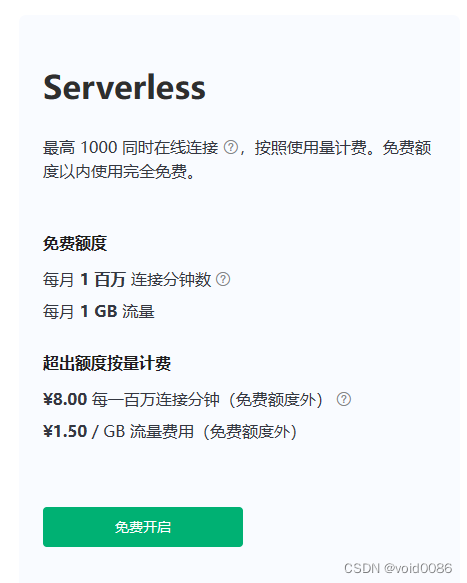
使用Serverless版本每月有免费额度
2. 安装js的mqtt包
npm i mqtt
3. 前端代码
完整代码已上传至github
https://github.com/void00013/8.mqtt_vue3_test/tree/main
请自行下载依赖后运行
// Home.vue


        Configuration


              {{ client.connected ? 'Connected' : 'Connect' }}


              Disconnect


        Subscribe


              {{ subscribeSuccess ? 'Subscribed' : 'Subscribe' }}


              Unsubscribe


        Publish


          Publish


        Receive


import mqtt from 'mqtt'
export default {
  name: 'Home',
  data() {
    return {
      connection: {
        protocol: 'wss',
        host: '你的mqtt服务器地址',
        // server less服务器只有两种协议:mqtts: 8883; wss: 8084
        port: 8084,
        endpoint: '/mqtt',
        clean: true,
        connectTimeout: 30 * 1000, // ms
        reconnectPeriod: 4000, // ms
        clientId: 'emqx_vue_' + Math.random().toString(16).substring(2, 8),
        // auth
        username: 'void',
        password: '123',
      },
      subscription: {
        topic: 'topic/mqttx',
        qos: 0,
      },
      publish: {
        topic: 'topic/browser',
        qos: 0,
        payload: '{ "msg": "Hello, I am browser." }',
      },
      receiveNews: '',
      qosList: [0, 1, 2],
      client: {
        connected: false,
      },
      subscribeSuccess: false,
      connecting: false,
      retryTimes: 0,
    }
  },
  methods: {
    initData() {
      this.client = {
        connected: false,
      }
      this.retryTimes = 0
      this.connecting = false
      this.subscribeSuccess = false
    },
    handleOnReConnect() {
      this.retryTimes += 1
      if (this.retryTimes > 5) {
        try {
          this.client.end()
          this.initData()
          this.$message.error('Connection maxReconnectTimes limit, stop retry')
        } catch (error) {
          this.$message.error(error.toString())
        }
      }
    },
    createConnection() {
      try {
        this.connecting = true
        const { protocol, host, port, endpoint, ...options } = this.connection
        const connectUrl = `${protocol}://${host}:${port}${endpoint}`
        this.client = mqtt.connect(connectUrl, options)
        if (this.client.on) {
          this.client.on('connect', () => {
            this.connecting = false
            console.log('Connection succeeded!')
          })
          this.client.on('reconnect', this.handleOnReConnect)
          this.client.on('error', (error) => {
            console.log('Connection failed', error)
          })
          this.client.on('message', (topic, message) => {
            this.receiveNews = this.receiveNews.concat(message)
            console.log(`Received message ${message} from topic ${topic}`)
          })
        }
      } catch (error) {
        this.connecting = false
        console.log('mqtt.connect error', error)
      }
    },
    // subscribe topic
    doSubscribe() {
      const { topic, qos } = this.subscription
      this.client.subscribe(topic, { qos }, (error, res) => {
        if (error) {
          console.log('Subscribe to topics error', error)
          return
        }
        this.subscribeSuccess = true
        console.log('Subscribe to topics res', res)
      })
    },
    // unsubscribe topic
    doUnSubscribe() {
      const { topic } = this.subscription
      this.client.unsubscribe(topic, (error) => {
        if (error) {
          console.log('Unsubscribe error', error)
        }
      })
    },
    // publish message
    doPublish() {
      const { topic, qos, payload } = this.publish
      this.client.publish(topic, payload, { qos }, (error) => {
        if (error) {
          console.log('Publish error', error)
        }
      })
    },
    // disconnect
    destroyConnection() {
      if (this.client.connected) {
        try {
          this.client.end(false, () => {
            this.initData()
            console.log('Successfully disconnected!')
          })
        } catch (error) {
          console.log('Disconnect failed', error.toString())
        }
      }
    },
    handleProtocolChange(value) {
      this.connection.port = value === 'wss' ? '8084' : '8083'
    },
  },
}


@import url('../assets/style/home.scss');
.home-container {
  max-width: 1100px;
  margin: 0 auto;
  .conn-btn {
    color: #fff;
    background-color: #00b173;
    font-size: 14px;
  }
  .publish-btn {
    margin-bottom: 20px;
    float: right;
  }
  .el-button--success {
    background-color: #34c388 !important;
    border-color: #34c388 !important;
    font-size: 14px !important;
  }
  .el-button--danger {
    background-color: #f5222d !important;
    border-color: #f5222d !important;
  }
  .el-form-item {
    &.is-error {
      .el-input__inner,
      .el-textarea__inner {
        box-shadow: 0 0 0 2px rgba(245, 34, 45, 0.2);
      }
    }
    &.is-success {
      .el-input__inner,
      .el-textarea__inner {
        border-color: #34c388 !important;
      }
    }
  }
}
// home.scss body { background-color: #f0f2f5; padding: 0; margin: 0; color: rgba(0, 0, 0, 0.65); font-size: 14px; font-family: -apple-system, BlinkMacSystemFont, Segoe UI, PingFang SC, Hiragino Sans GB, Microsoft YaHei, Helvetica Neue, Helvetica, Arial, sans-serif, Apple Color Emoji, Segoe UI Emoji, Segoe UI Symbol; } .emq-title { font-size: 16px; color: #333333; font-weight: bolder; margin-bottom: 15px; &.h3 { font-size: 14px; } &[size='small'] { font-size: 14px; } .sub-title { font-weight: normal; display: block; font-size: 12px; color: #8f9297; margin-top: 12px; } &.required-title { &:before { content: '*'; color: #f5222d; margin-right: 4px; } } } .el-select { width: 100%; } .subscribe-btn { margin-top: 42px !important; } .publish-btn { margin-bottom: 30px; }4. EMQX官方示例
官方提供了vue、react、java、python等各种语言的代码案例,如有需要请自行查看
https://github.com/emqx/MQTT-Client-Examples/tree/master


