
鸿蒙(HarmonyOS)项目方舟框架(ArkUI)之AlphabetIndexer组件
温馨提示:这篇文章已超过402天没有更新,请注意相关的内容是否还可用!
鸿蒙(HarmonyOS)项目方舟框架(ArkUI)之AlphabetIndexer组件
一、操作环境
操作系统: Windows 10 专业版、IDE:DevEco Studio 3.1、SDK:HarmonyOS 3.1+
二、AlphabetIndexer组件
可以与容器组件联动用于按逻辑结构快速定位容器显示区域的组件。
子组件
无
接口
AlphabetIndexer(value: {arrayValue: Array, selected: number})
参数
| 参数名 | 参数类型 | 必填 | 参数描述 |
|---|---|---|---|
| arrayValue | Array | 是 | 字母索引字符串数组,不可设置为空。 |
| selected | number | 是 | 初始选中项索引值,若超出索引值范围,则取默认值0。 |
属性
除支持通用属性外,还支持以下属性:
| 名称 | 参数类型 | 描述 |
|---|---|---|
| color | ResourceColor | 设置文字颜色。 默认值:0x99000000。 |
| selectedColor | ResourceColor | 设置选中项文字颜色。 默认值:0xFF254FF7。 |
| popupColor | ResourceColor | 设置提示弹窗文字颜色。 默认值:0xFF254FF7。 |
| selectedBackgroundColor | ResourceColor | 设置选中项背景颜色。 默认值:0x1F0A59F7。 |
| popupBackground | ResourceColor | 设置提示弹窗背景色。 默认值:0xFFFFFFFF。 |
| usingPopup | boolean | 设置是否使用提示弹窗。 默认值:false。 |
| selectedFont | Font | 设置选中项文字样式。 默认值: { size:'12.0fp', style:FontStyle.Normal, weight:FontWeight.Normal, family:'HarmonyOS Sans' } |
| popupFont | Font | 设置提示弹窗字体样式。 默认值: { size:'24.0vp', style:FontStyle.Normal, weight:FontWeight.Normal, family:'HarmonyOS Sans' } |
| font | Font | 设置字母索引条默认字体样式。 默认值: { size:'12.0fp', style:FontStyle.Normal, weight:FontWeight.Normal, family:'HarmonyOS Sans' } |
| itemSize | string | number | 设置字母索引条字母区域大小,字母区域为正方形,即正方形边长。不支持设置为百分比。 默认值:24.0 单位:vp |
| alignStyle | IndexerAlign | 设置字母索引条弹框的对齐样式,支持弹窗显示在索引条右侧和左侧。 默认值:IndexerAlign.Right。 |
| selected | number | 设置选中项索引值。 默认值:0。 |
| popupPosition | Position | 设置弹出窗口相对于索引器条上边框中点的位置。 默认值:{x:60.0, y:48.0}。 |
IndexerAlign枚举说明
| 名称 | 描述 |
|---|---|
| Left | 弹框显示在索引条右侧。 |
| Right | 弹框显示在索引条左侧。 |
事件
支持通用事件外,还支持以下事件:
| 名称 | 功能描述 |
|---|---|
| onSelected(callback: (index: number) => void)(deprecated) | 索引条选中回调,返回值为当前选中索引。 从API Version 8开始废弃,建议使用onSelect代替。 |
| onSelect(callback: (index: number) => void)8+ | 索引条选中回调,返回值为当前选中索引。 |
| onRequestPopupData(callback: (index: number) => Array)8+ | 选中字母索引后,请求索引提示弹窗显示内容回调。 返回值:索引对应的字符串数组,此字符串数组在弹窗中竖排显示,字符串列表最多显示5个,超出部分可以滑动显示。 |
| onPopupSelect(callback: (index: number) => void)8+ | 字母索引提示弹窗字符串列表选中回调。 |
示例
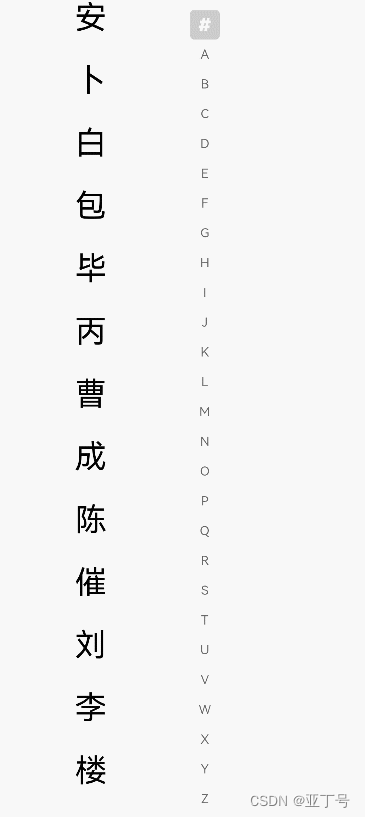
代码
// xxx.ets
@Entry
@Component
struct AlphabetIndexerSample {
  private arrayA: string[] = ['安']
  private arrayB: string[] = ['卜', '白', '包', '毕', '丙']
  private arrayC: string[] = ['曹', '成', '陈', '催']
  private arrayL: string[] = ['刘', '李', '楼', '梁', '雷', '吕', '柳', '卢']
  private value: string[] = ['#', 'A', 'B', 'C', 'D', 'E', 'F', 'G',
  'H', 'I', 'J', 'K', 'L', 'M', 'N',
  'O', 'P', 'Q', 'R', 'S', 'T', 'U',
  'V', 'W', 'X', 'Y', 'Z']
  build() {
    Stack({ alignContent: Alignment.Start }) {
      Row() {
        List({ space: 20, initialIndex: 0 }) {
          ForEach(this.arrayA, (item) => {
            ListItem() {
              Text(item)
                .width('80%')
                .height('5%')
                .fontSize(30)
                .textAlign(TextAlign.Center)
            }.editable(true)
          }, item => item)
          ForEach(this.arrayB, (item) => {
            ListItem() {
              Text(item)
                .width('80%')
                .height('5%')
                .fontSize(30)
                .textAlign(TextAlign.Center)
            }.editable(true)
          }, item => item)
          ForEach(this.arrayC, (item) => {
            ListItem() {
              Text(item)
                .width('80%')
                .height('5%')
                .fontSize(30)
                .textAlign(TextAlign.Center)
            }.editable(true)
          }, item => item)
          ForEach(this.arrayL, (item) => {
            ListItem() {
              Text(item)
                .width('80%')
                .height('5%')
                .fontSize(30)
                .textAlign(TextAlign.Center)
            }.editable(true)
          }, item => item)
        }
        .width('50%')
        .height('100%')
        AlphabetIndexer({ arrayValue: this.value, selected: 0 })
          .selectedColor(0xFFFFFF) // 选中项文本颜色
          .popupColor(0xFFFAF0) // 弹出框文本颜色
          .selectedBackgroundColor(0xCCCCCC) // 选中项背景颜色
          .popupBackground(0xD2B48C) // 弹出框背景颜色
          .usingPopup(true) // 是否显示弹出框
          .selectedFont({ size: 16, weight: FontWeight.Bolder }) // 选中项字体样式
          .popupFont({ size: 30, weight: FontWeight.Bolder }) // 弹出框内容的字体样式
          .itemSize(28) // 每一项的尺寸大小
          .alignStyle(IndexerAlign.Left) // 弹出框在索引条右侧弹出
          .onSelect((index: number) => {
            console.info(this.value[index] + ' Selected!')
          })
          .onRequestPopupData((index: number) => {
            if (this.value[index] == 'A') {
              return this.arrayA // 当选中A时,弹出框里面的提示文本列表显示A对应的列表arrayA,选中B、C、L时也同样
            } else if (this.value[index] == 'B') {
              return this.arrayB
            } else if (this.value[index] == 'C') {
              return this.arrayC
            } else if (this.value[index] == 'L') {
              return this.arrayL
            } else {
              return [] // 选中其余子母项时,提示文本列表为空
            }
          })
          .onPopupSelect((index: number) => {
            console.info('onPopupSelected:' + index)
          })
      }
      .width('100%')
      .height('100%')
    }
  }
}
你有时间常去我家看看我在这里谢谢你啦...
我家地址:亚丁号
最后送大家一首诗:
山高路远坑深,
大军纵横驰奔,
谁敢横刀立马?
惟有点赞加关注大军。


