
代码实现对selenium的驱动器WebDrive的配置
温馨提示:这篇文章已超过446天没有更新,请注意相关的内容是否还可用!
1.条件
1.使用的浏览器是Microsoft Edge。
2.简述过程(代码实现)
1.pip 安装
2.下载
3.解压
4.运行
3.发现一个报错
1)原因
在给出代码之前,我发现一个报错,很离谱。且听笔者慢慢细说。首先,安装了selenium4.11.2,也配置edge webdriver。在其中一个项目中,解释器是python3.10,运行如下代码
from selenium import webdriver
browser = webdriver.Edge()
browser.get('https://www.baidu.com')
发现报错了,报错的原因,在最后有这样一段话
selenium.common.exceptions.NoSuchDriverException: Message: Unable to obtain driver for MicrosoftEdge using Selenium Manager.; For documentation on this error, please visit: https://www.selenium.dev/documentation/webdriver/troubleshooting/errors/driver_location
如果去网上搜原因,如下结果
selenium打开浏览器报错成功解决selenium.common.exceptions.NoSuchDriverException: Message: Unable to obtain..._sinnp的博客-CSDN博客
可惜,可以这位大佬的解决不适应于笔者的报错。虽然报错是一样的,但是终究还是不一样,具体情况具体分析。
2)推理
因此笔者把报错全部写出来
Traceback (most recent call last):
  File "C:\Users\520\AppData\Roaming\Microsoft\Windows\Start Menu\Programs\pythonProject4\lib\site-packages\selenium\webdriver\common\selenium_manager.py", line 124, in run
    stdout = completed_proc.stdout.decode("utf-8").rstrip("\n")
AttributeError: 'str' object has no attribute 'decode'. Did you mean: 'encode'?
The above exception was the direct cause of the following exception:
Traceback (most recent call last):
  File "C:\Users\520\AppData\Roaming\Microsoft\Windows\Start Menu\Programs\pythonProject4\lib\site-packages\selenium\webdriver\common\driver_finder.py", line 38, in get_path
    path = SeleniumManager().driver_location(options) if path is None else path
  File "C:\Users\520\AppData\Roaming\Microsoft\Windows\Start Menu\Programs\pythonProject4\lib\site-packages\selenium\webdriver\common\selenium_manager.py", line 90, in driver_location
    output = self.run(args)
  File "C:\Users\520\AppData\Roaming\Microsoft\Windows\Start Menu\Programs\pythonProject4\lib\site-packages\selenium\webdriver\common\selenium_manager.py", line 129, in run
    raise WebDriverException(f"Unsuccessful command executed: {command}") from err
selenium.common.exceptions.WebDriverException: Message: Unsuccessful command executed: C:\Users\520\AppData\Roaming\Microsoft\Windows\Start Menu\Programs\pythonProject4\lib\site-packages\selenium\webdriver\common\windows\selenium-manager.exe --browser MicrosoftEdge --output json
The above exception was the direct cause of the following exception:
Traceback (most recent call last):
  File "C:\Users\520\PycharmProjects\pythonProject4\selenium的故事\6.py", line 2, in
    browser = webdriver.Edge()
  File "C:\Users\520\AppData\Roaming\Microsoft\Windows\Start Menu\Programs\pythonProject4\lib\site-packages\selenium\webdriver\edge\webdriver.py", line 45, in __init__
    super().__init__(
  File "C:\Users\520\AppData\Roaming\Microsoft\Windows\Start Menu\Programs\pythonProject4\lib\site-packages\selenium\webdriver\chromium\webdriver.py", line 51, in __init__
    self.service.path = DriverFinder.get_path(self.service, options)
  File "C:\Users\520\AppData\Roaming\Microsoft\Windows\Start Menu\Programs\pythonProject4\lib\site-packages\selenium\webdriver\common\driver_finder.py", line 41, in get_path
    raise NoSuchDriverException(msg) from err
selenium.common.exceptions.NoSuchDriverException: Message: Unable to obtain driver for MicrosoftEdge using Selenium Manager.; For documentation on this error, please visit: https://www.selenium.dev/documentation/webdriver/troubleshooting/errors/driver_location
从browser = webdriver.Edge()开始。
往下走,走到这里 self.service.path = DriverFinder.get_path(self.service, options),进去看看源代码。再进get_path方法,其中代码如下
    @staticmethod
    def get_path(service: Service, options: BaseOptions) -> str:
        path = service.path
        try:
            path = SeleniumManager().driver_location(options) if path is None else path
        except Exception as err:
            msg = f"Unable to obtain driver for {options.capabilities['browserName']} using Selenium Manager."
            raise NoSuchDriverException(msg) from err
        if path is None or not Path(path).is_file():
            raise NoSuchDriverException(f"Unable to locate or obtain driver for {options.capabilities['browserName']}")
        return path
可以尝试打印path,第一个path为空,第二个path没有打印出来就报错了。再看报错中的内容,其中有这段话
Traceback (most recent call last):
  File "C:\Users\520\AppData\Roaming\Microsoft\Windows\Start Menu\Programs\pythonProject4\lib\site-packages\selenium\webdriver\common\driver_finder.py", line 38, in get_path
    path = SeleniumManager().driver_location(options) if path is None else path
也指出这行代码有问题,所以进入这行代码中的driver_location方法,看看其中的内容,再看下一个报错
  File "C:\Users\520\AppData\Roaming\Microsoft\Windows\Start Menu\Programs\pythonProject4\lib\site-packages\selenium\webdriver\common\selenium_manager.py", line 89, in driver_location
    output = self.run(args)
可以在driver_location方法发现有这行代码,所以猜测这行代码有问题,也可以打印一些变量,比如,args,最后可以确定这个猜测。
因此,进入self.run方法。其中主要代码如下
    @staticmethod
    def run(args: List[str]) -> dict:
        """
        Executes the Selenium Manager Binary.
        :Args:
         - args: the components of the command being executed.
        :Returns: The log string containing the driver location.
        """
        if logger.getEffectiveLevel() == logging.DEBUG:
            args.append("--debug")
        args.append("--output")
        args.append("json")
        command = " ".join(args)
        logger.debug(f"Executing process: {command}")
        try:
            if sys.platform == "win32":
                completed_proc = subprocess.run(
                    args, stdout=subprocess.PIPE, stderr=subprocess.PIPE, creationflags=subprocess.CREATE_NO_WINDOW
                )
            else:
                completed_proc = subprocess.run(args, stdout=subprocess.PIPE, stderr=subprocess.PIPE)
            stdout = completed_proc.stdout.decode("utf-8").rstrip("\n")
            stderr = completed_proc.stderr.decode("utf-8").rstrip("\n")
            output = json.loads(stdout)
            result = output["result"]
再看报错
Traceback (most recent call last):
  File "C:\Users\520\AppData\Roaming\Microsoft\Windows\Start Menu\Programs\pythonProject4\lib\site-packages\selenium\webdriver\common\selenium_manager.py", line 123, in run
    stdout = completed_proc.stdout.decode("utf-8").rstrip("\n")
AttributeError: 'str' object has no attribute 'decode'. Did you mean: 'encode'?
很明显是self.run中的stdout = completed_proc.stdout.decode("utf-8").rstrip("\n")有问题,报错的原因是str没有这个decode属性,确实是没有。
打印一下completed_proc,返回的结果如下
CompletedProcess(args=['C:\\Users\\520\\AppData\\Roaming\\Microsoft\\Windows\\Start Menu\\Programs\\pythonProject4\\lib\\site-packages\\selenium\\webdriver\\common\\windows\\selenium-manager.exe', '--browser', 'MicrosoftEdge', '--output', 'json'], returncode=0, stdout='{\n "logs": [\n {\n "level": "INFO",\n "timestamp": 1692601797,\n "message": "Driver path: C:\\\\Users\\\\520\\\\AppData\\\\Local\\\\Programs\\\\Python\\\\Python310\\\\msedgedriver.exe"\n },\n {\n "level": "INFO",\n "timestamp": 1692601797,\n "message": "Browser path: C:\\\\Program Files (x86)\\\\Microsoft\\\\Edge\\\\Application\\\\msedge.exe"\n }\n ],\n "result": {\n "code": 0,\n "message": "C:\\\\Users\\\\520\\\\AppData\\\\Local\\\\Programs\\\\Python\\\\Python310\\\\msedgedriver.exe",\n "driver_path": "C:\\\\Users\\\\520\\\\AppData\\\\Local\\\\Programs\\\\Python\\\\Python310\\\\msedgedriver.exe",\n "browser_path": "C:\\\\Program Files (x86)\\\\Microsoft\\\\Edge\\\\Application\\\\msedge.exe"\n }\n}', stderr=b'')
返回是个CompletedProcess对象,没错,再次打印completed_proc.stdout,代码如下
{
  "logs": [
    {
      "level": "INFO",
      "timestamp": 1692601871,
      "message": "Driver path: C:\\Users\\520\\AppData\\Local\\Programs\\Python\\Python310\\msedgedriver.exe"
    },
    {
      "level": "INFO",
      "timestamp": 1692601871,
      "message": "Browser path: C:\\Program Files (x86)\\Microsoft\\Edge\\Application\\msedge.exe"
    }
  ],
  "result": {
    "code": 0,
    "message": "C:\\Users\\520\\AppData\\Local\\Programs\\Python\\Python310\\msedgedriver.exe",
    "driver_path": "C:\\Users\\520\\AppData\\Local\\Programs\\Python\\Python310\\msedgedriver.exe",
    "browser_path": "C:\\Program Files (x86)\\Microsoft\\Edge\\Application\\msedge.exe"
  }
}
这个结果是字符串,很明显,str是没有decode属性。以此这个才是报错的根本原因。
3)思考
为什么print(completed_proc.stdout),打印的对象的类型是str,很明显根据代码的理解,应该打印是个bytes类型,才会有decode。可以去官网看看解释,如下图。
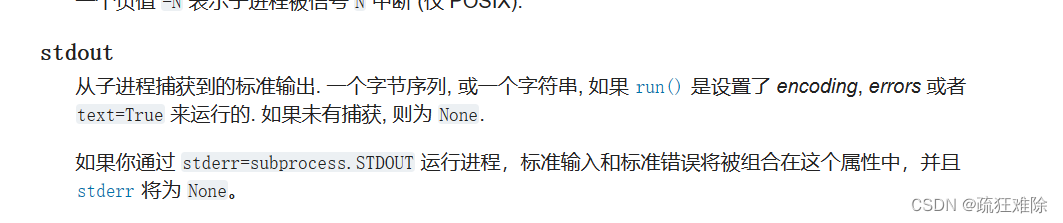
返回的是字节序列或者字符串,这个或有意思
因为笔者的电脑上有·python310和python311,但笔者使用python311作为编辑器创建的项目,运行代码没有报错,而且打印的completed_proc.stdout是字节序列,因此没有报错。
为什么同样的代码,在不用python环境中运行结果不一样,至于原因我也不知道。
4)修改
既然completed_proc.stdout是字符串,那么直接注释掉decode,代码如下
            stdout=completed_proc.stdout
            # stdout = completed_proc.stdout.decode("utf-8").rstrip("\n")
            # stderr = completed_proc.stderr.decode("utf-8").rstrip("\n")
            output = json.loads(stdout)
运行没有报错。
4.正文
上面的报错只是个插曲。现在要实现真正的配置了,首先我看到这位大佬的代码
https://blog.csdn.net/weixin_49958813/article/details/125580029
写得好,于是我就有个想法,这位大佬的代码中只有更新。感觉不完善。
因此,代码如下:
import time
from xml.dom import minidom as xml
from xml.dom.minicompat import NodeList
from xml.dom.minidom import Element
from tqdm import tqdm
import requests
import re
import getpass
from zipfile import ZipFile
from logging import StreamHandler,getLogger,DEBUG
from colorlog import ColoredFormatter
import sys
from pathlib import Path
import subprocess
class WebDriver:
    def __init__(self,output_path,zip_file=None):
        self.has_zip=False
        self.dom = xml.parse(r'C:/Program Files (x86)/Microsoft/Edge/Application/msedge.VisualElementsManifest.xml')
        self.logger=self.log()
        self.output_path=output_path
        self.zip_file='C:/Users/'+self.user+'/Downloads/edgedriver.zip'
    def log(self):
        """
        日志的配置
        :return:
        """
        colors = {
            'DEBUG': 'bold_red',
            'INFO': 'bold_blue',
            'WARNING': 'bold_yellow',
        }
        logger = getLogger(__file__)
        stream_handler = StreamHandler()
        logger.setLevel(DEBUG)
        color_formatter = ColoredFormatter(
            fmt='%(log_color)s %(asctime)s %(filename)s  %(funcName)s line:%(lineno)d %(levelname)s : %(message)s',
            datefmt='%Y-%m-%d %H:%M:%S',
            log_colors=colors
        )
        stream_handler.setFormatter(color_formatter)
        logger.addHandler(stream_handler)
        return logger
    def decompression(self,delete_zip=True):
        """
        解压
        :return:
        """
        if self.has_zip:
            zip=ZipFile(self.zip_file)
            zip.extractall(self.output_path)
            zip.close()
            self.logger.info(f'解压成功,webdriver的路径为{self.output_path}')
            if delete_zip:
                Path(self.zip_file).unlink()
                self.logger.debug('删除webdriver.zip文件')
        else:
            self.logger.warning('没有发现webdriver.zip文件')
    def download(self):
        """
        下载webriver
        :return:
        """
        if Path(self.zip_file).exists():
            self.has_zip=True
            self.logger.info('找到webdriver.zip文件,即将积压')
            return
        self.logger.info('没有发现webdriver.zip,即将下载!')
        version=self.get_version
        url = 'https://msedgedriver.azureedge.net/' + version + '/edgedriver_win64.zip'
        self.logger.info('正在发送请求...')
        response=requests.get(url=url)
        self.logger.info('请求成功')
        total=response.headers['Content-Length']
        total = int(total)
        self.logger.info('文件大小为 '+str(total)+' B')
        with open(self.zip_file,'wb') as f:
            with tqdm(total=total,desc="webdriver下载") as p:
                    for i in response.iter_content(1024*100):
                        f.write(i)
                        time.sleep(0.2)
                        p.update(1024*100)
        self.logger.debug('webdriver.zip 下载完成!!')
        self.has_zip=True
    def __display(self):
        """
        安装、运行、更新
        :return:
        """
        try:
            from selenium import webdriver
            from selenium.common.exceptions import SessionNotCreatedException,NoSuchDriverException
            self.logger.info('selenium存在,即将打开edge')
            browser = webdriver.Edge()
            browser.get('https://www.baidu.com')
            browser.quit()
            self.logger.info('edge关闭,运行成功')
        except ModuleNotFoundError as e:
            self.logger.warning('selenium 不存在,即将安装...')
            cmd='pip install -i https://pypi.tuna.tsinghua.edu.cn/simple selenium'
            result=subprocess.run(cmd, shell=True, stdout=subprocess.PIPE, stderr=subprocess.PIPE, text=True)
            self.logger.debug('安装过程:\n'+result.stdout)
            self.logger.info('下载selenium成功,')
            self.logger.info('等待安装..')
            time.sleep(10)
            self.__display()
        except SessionNotCreatedException as e:
            self.logger.warning('需要更新webdriver!!!!')
            self.download()
            self.decompression()
            self.logger.info('更新成功')
            self.logger.info('再次运行seleniun')
            self.__display()
    def up_to_date(self):
        """
        更新webdriver版本
        :return:
        """
    @property
    def get_version(self):
        """
        得到edge的版本
        :return:
        """
        dom = self.dom.documentElement
        nodeList:NodeList = dom.getElementsByTagName('VisualElements')
        element:Element=nodeList[0]
        text=element.toxml()
        version='.'.join(re.findall('(\d+)\.(\d+)\.(\d+)\.(\d+)', text)[0])
        return version
    @property
    def user(self):
        """
        得到当前的使用者
        :return:
        """
        return getpass.getuser()
    def install(self):
        self.__display()
if __name__ == '__main__':
    webdriver=WebDriver(output_path=sys.path[6])
    webdriver.install()
这个代码,可以直接安装selenium和webdriver,并且可以更新。如果遇到上面的报错,如果报错的内容是一样的,那么可以按照其中的内容修改,如果有其他报错,可看个人具体分析。
对于其他浏览器,查不多。
5.结果
 笔者发现好像第一次运行,会自动下载msedgedriver.exe,selenium变高级了,以前都没有。笔者的路径如下
C:/Users/520/.cache/selenium/msedgedriver/win64/115.0.1901.203/msedgedriver.exe


