
【Java】实现图书管理系统
温馨提示:这篇文章已超过449天没有更新,请注意相关的内容是否还可用!
文章目录
- 1. 设计背景
- 2. 需求分析
- 3. 设计思路
- 4. 实现
- 4.1 book包
- 4.1.1 Book类
- 4.1.2 BookList类(书架)
- 4.2 user包
- 4.2.1 User 类
- 4.2.2 AdminUser类(管理员用户)
- 4.2.3 NormalUser类(普通用户)
- 4.3 operation包
- 4.3.1 IOPeration接口
- 4.3.2 FindOperation类(查找图书)
- 4.3.3 AddOperation类(新增图书)
- 4.3.4 DelOperation类(删除图书)
- 4.3.5 ShowOperation类(显示图书)
- 4.3.6 ExitOperation类(退出系统)
- 4.3.7 BorrowOperation类(借阅图书)
- 4.3.8 ReturnOperation类(归还图书)
- 4.4 Main类
- 4.5 完整代码
1. 设计背景
- 随着社会的发展和科技的进步,图书馆的规模和藏书量都在不断扩大,图书的管理和维护变得越来越复杂。传统的图书管理方式已经无法满足现代图书馆的需求,因此需要开发一种高效、便捷的图书管理系统来提高图书管理效率和读者的借阅体验。
- 在这种背景下,我们设计了Java图书管理系统。该系统采用Java语言开发,具有跨平台、可扩展、可维护等优点,可以满足现代图书馆的管理需求。该系统分为管理员用户和普通用户,主要实现了图书的查询、新增、删除、借阅、归还等功能。
- 此外,图书管理系统是 java 知识学习的运用,运用了到了类和对象,构造方法,方法调用,数组,继承,多态,封装,接口,抽象类等知识。通过这个图书管理系统的练习,能更好的帮助我们更好的巩固对前面学习知识。
2. 需求分析
这个图书系统在登陆页面分为管理员用户和普通用户,管理员用户和普通用户的实现页面不一样
- 管理员用户需要实现的功能有查找图书, 新增图书,删除图书,显示图书,退出系统。
- 普通用户需要实现的功能有查找图书, 借阅图书,归还图书 退出系统。
3. 设计思路
回顾面向对象的核心:
- 找到对象
- 创建对象
- 使用对象
- 首先我们需要找出图书馆里系统里的所有对象:
在图书管理系统在的对象有书,用户(普通用户和管理员用户),其中还有存放书本的书架。
- 普通用户和管理员用户所展示的页面有所不同,利用继承和多态实现这一思路。
- 我们将普通用户和管理员用户的操作单独封装起来设计成一个类,并且定义一个接口来接收方法,接口达到了统一性。
4. 实现
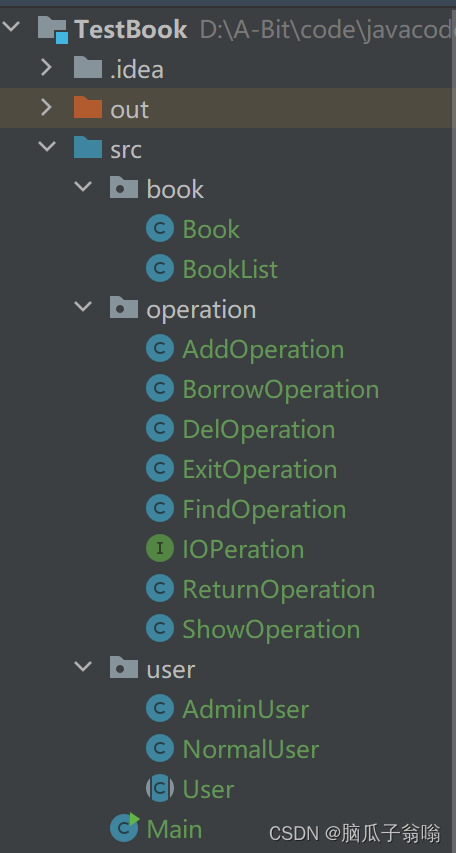
我们要完成图书系统,可以先搭框架,再完善细节。其中使用了三个包,book包;operation 包和 user 包。
4.1 book包
book包中包含Book类和BookList类(书架)
4.1.1 Book类
Book类针对书籍,定义了有关书的属性,作者、价格、名字、类别,状态(判断是否被借出),通过构造方法,获取 get 和 set 方法,重写了toString 函数。
代码实现:
package book;
public class Book {
    private String name;
    private String author;
    private int price;
    private String type;
    private boolean isBorrowed;
    //构造方法
    public Book(String name, String author, int price,String type) {
        this.name = name;
        this.author = author;
        this.price = price;
        this.type = type;
    }
    public String getName() {
        return name;
    }
    public void setName(String name) {
        this.name = name;
    }
    public String getAuthor() {
        return author;
    }
    public void setAuthor(String author) {
        this.author = author;
    }
    public int getPrice() {
        return price;
    }
    public void setPrice(int price) {
        this.price = price;
    }
    public String getType() {
        return type;
    }
    public void setType(String type) {
        this.type = type;
    }
    public boolean isBorrowed() {
        return isBorrowed;
    }
    public void setBorrowed(boolean borrowed) {
        isBorrowed = borrowed;
    }
    @Override
    public String toString() {
        return "Book{" +
                "name='" + name + '\'' +
                ", author='" + author + '\'' +
                ", price=" + price +
                ", type='" + type + '\'' +
                ((isBorrowed == true) ? " 已经借出" : " 未被借出") +
                //", isBorrowed=" + isBorrowed +
                '}';
    }
}
4.1.2 BookList类(书架)
这么多本书怎么放到书架上?其中数组可以组织数据,所以我们在书架类里会使用一个数组来存放书本
代码实现:
package book;
public class BookList {
    private Book[] books;
    private int usedSize;//记录当前书架上 实际存放书的数量
    private static final int DEFAULT_CAPACITY = 10;
    public BookList(){
        this.books = new Book[DEFAULT_CAPACITY];//当前书架能存放10本书
        //放好书!
        this.books[0] = new Book("三国演义","罗贯中",10,"小说");
        this.books[1] = new Book("西游记","吴承恩",23,"小说");
        this.books[2] = new Book("红楼梦","曹雪芹",28,"小说");
        this.usedSize = 3;
    }
    public int getUsedSize() {
        return usedSize;
    }
    public void setUsedSize(int usedSize) {
        this.usedSize = usedSize;
    }
    public Book getBook(int pos){
        return books[pos];
    }
    public void setBooks(int pos,Book book){
        books[pos] = book;
    }
    public Book[] getBooks(){
        return books;
    }
}
4.2 user包
user包中存放User类,AdminUser 类(管理员用户)和 NormalUser类(普通用户)
4.2.1 User 类
User 类是 AdminUser 类和 NormalUser类的父类,创建User为抽象类,抽象方法menu菜单和IOperation数组的初始化。
代码实现:
package user;
import book.BookList;
import operation.IOPeration;
public abstract class User {
    protected String name;
    protected IOPeration[] ioPerations;
    public User(String name) {
        this.name = name;
    }
    public abstract int menu();
    public void doOperstion(int choice, BookList bookList){
        ioPerations[choice].work(bookList);
    }
}
4.2.2 AdminUser类(管理员用户)
通过继承User类,调用到IOperation功能接口以调用管理员用户所需的功能
代码实现:
package user;
import operation.*;
import java.util.Scanner;
//子类继承父类要先帮父类进行构造,父类对name进行初始化,
//子类就要提供一个构造方法,在构造方法中使用super方法对继承过来的成员name进行初始化
public class AdminUser extends User {
    public AdminUser(String name) {
        super(name);
        this.ioPerations = new IOPeration[]{
            new ExitOperation(),
            new FindOperation(),
            new AddOperation(),
            new DelOperation(),
            new ShowOperation()
        };
    }
    public int menu(){
        System.out.println("*****管理员用户*****");
        System.out.println("1. 查找图书");
        System.out.println("2. 新增图书");
        System.out.println("3. 删除图书");
        System.out.println("4. 显示图书");
        System.out.println("0. 退出系统");
        System.out.println("******************");
        Scanner scanner = new Scanner(System.in);
        System.out.println("请输入你的操作:");
        int choice = scanner.nextInt();
        return choice;
    }
}
4.2.3 NormalUser类(普通用户)
通过继承User类,调用到IOperation功能接口以调用普通用户所需的功能
代码实现:
package user;
import operation.*;
import java.util.Scanner;
public class NormalUser extends User{
    public NormalUser(String name){
        super(name);
        this.ioPerations = new IOPeration[]{
                new ExitOperation(),
                new FindOperation(),
                new BorrowOperation(),
                new ReturnOperation()
        };
    }
    public int menu(){
        System.out.println("******普通用户******");
        System.out.println("1. 查找图书");
        System.out.println("2. 借阅图书");
        System.out.println("3. 归还图书");
        System.out.println("0. 退出系统");
        System.out.println("******************");
        Scanner scanner = new Scanner(System.in);
        System.out.println("请输入你的操作:");
        int choice = scanner.nextInt();
        return choice;
    }
}
4.3 operation包
一些操作类的方法放在operation包中
4.3.1 IOPeration接口
定义一个接口来接收方法,接口达到了统一性,利用多态进行操作,在以下的类中执行接口,并重载。
代码实现:
package operation;
import book.BookList;
public interface IOPeration {
    void work(BookList bookList);
}
4.3.2 FindOperation类(查找图书)
根据输入的书名来查找图书,有两种情况一种是找到了,输出图书信息,另一种则是没有找到。
代码实现:
package operation; import book.Book; import book.BookList; import java.util.Scanner; public class FindOperation implements IOPeration{ @Override public void work(BookList bookList) { System.out.println("查找图书!"); System.out.println("请输入你要查找的图书名字:"); //输入书名 Scanner scanner = new Scanner(System.in); String name = scanner.nextLine(); //遍历数组 int currentSize = bookList.getUsedSize();//获取当前有几本书 for (int i = 0; i Book book = bookList.getBook(i); if(book.getName().equals(name)){ System.out.println("找到了这本书,信息如下:"); System.out.println(book); return; } } System.out.println("很抱歉,没有找到这本书!"); } } @Override public void work(BookList bookList) { System.out.println("新增图书!"); Scanner scanner = new Scanner(System.in); System.out.println("请输入书名:"); String name = scanner.nextLine(); System.out.println("请输入作者:"); String author = scanner.nextLine(); System.out.println("请输入类型:"); String type = scanner.nextLine(); System.out.println("请输入价格:"); int price = scanner.nextInt(); Book book = new Book(name,author,price,type); //检查当前书架(数组)中有没有这本书 int currentSize = bookList.getUsedSize(); for (int i = 0; i - 首先我们需要找出图书馆里系统里的所有对象:
免责声明:我们致力于保护作者版权,注重分享,被刊用文章因无法核实真实出处,未能及时与作者取得联系,或有版权异议的,请联系管理员,我们会立即处理! 部分文章是来自自研大数据AI进行生成,内容摘自(百度百科,百度知道,头条百科,中国民法典,刑法,牛津词典,新华词典,汉语词典,国家院校,科普平台)等数据,内容仅供学习参考,不准确地方联系删除处理! 图片声明:本站部分配图来自人工智能系统AI生成,觅知网授权图片,PxHere摄影无版权图库和百度,360,搜狗等多加搜索引擎自动关键词搜索配图,如有侵权的图片,请第一时间联系我们,邮箱:ciyunidc@ciyunshuju.com。本站只作为美观性配图使用,无任何非法侵犯第三方意图,一切解释权归图片著作权方,本站不承担任何责任。如有恶意碰瓷者,必当奉陪到底严惩不贷!


