
C# 实现 Word 加盖骑缝章效果
温馨提示:这篇文章已超过410天没有更新,请注意相关的内容是否还可用!
目录
实现效果
范例运行环境
Office DCOM 配置
设计实现
创建stamp图章类
电子章图片的计算与定位
旋转图片方法
总结
实现效果
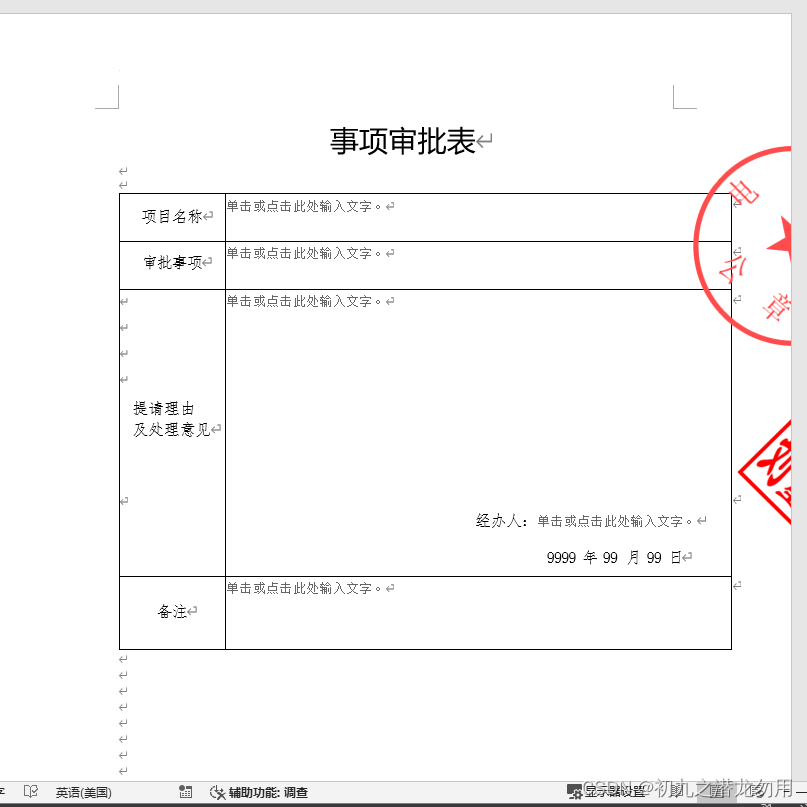
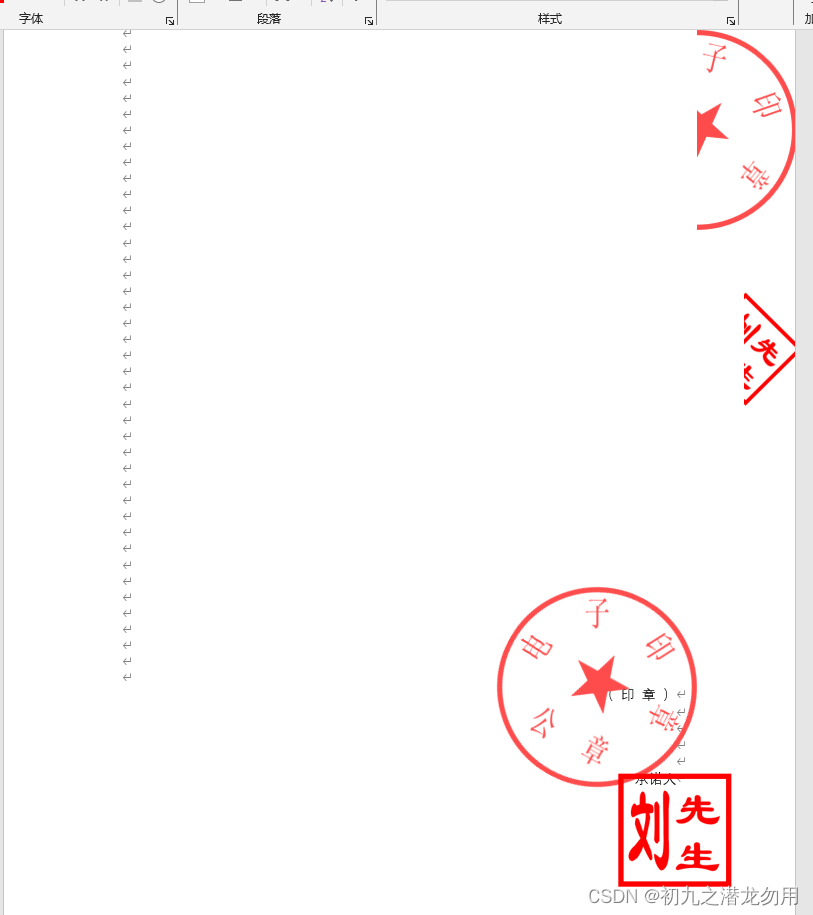
在OA的自动化处理系统中,通过审批的最终节点,可能会对WORD文件加盖电子章,比如定位带有指定文字的Range周围加盖电子章,骑缝章,甚至水印图片。比如如下效果图:
范例运行环境
操作系统: Windows Server 2019 DataCenter
操作系统上安装 Office Word 2016 ,客户端使用的 Office Word 2019
.net版本: .netFramework4.7.1 或以上
开发工具:VS2019 C#
Office DCOM 配置
请参考我的文章《C# 读取Word表格到DataSet》有对Office DCOM详细配置介绍,这里不再赘述。
设计实现
创建stamp图章类
导出WORD文件可以传入多个图章类(如果需要的话),图章类主要包括实现如下设置:
1、可设置三种图片(标准的盖章图片、骑缝章图片、水印图片)
2、标准的盖章图片是否显示,不显示则可以只显示骑缝章或水印图片,这个可以模拟多次盖骑缝章的效果
3、定位盖章文字,可以设置一下 x、y的偏移量,以校准指定的模板文件,达到最佳重叠效果。
4、可设置各种章的翻转角度(可随机选取)
示例代码如下:
public class stamp
        {
            public string stampImageFilename = "";  //盖章图片
            public string stampImageFilename2 = "";  //骑缝章图片
            public string stampImageFilename3 = "";  //水印章图片
            public bool stampImageVisible = true;  //主章是否可显示
            public string findWord = "";   //查找盖章定位文字
            public int findWordOffsetX = 0; //查找盖章文字后,章的定位偏移量
            public int findWordOffsetY = 0; //查找盖章文字后,章的定位偏移量
            public int stamp2X = 0; //骑缝章偏移量
            public int stamp2Y = 0; //骑缝章偏移量
            public int roteAngle = 0; //骑缝章翻转角度,12点方向为0度,顺时针计算角度
            public bool roteReFix = false; //骑缝章翻转角度重新计算适应图片(多见于对角线)
            public bool randomRoteAngle = false; //骑缝章是否按指定角度的最大随机值提取
            public int stampImageWidth = 0; //章宽度
            public int stampImageHeight = 0; //章高度
            public string stamp2Direction = "right";  //骑缝章盖章方向 默认right ,包括 left/top/bottom
            public int stampAngle = 0; //骑缝章翻转角度,12点方向为0度,顺时针计算角度
            public bool randomStampAngle = false; //骑缝章是否按指定角度的最大随机值提取
            public int stamp3X = 0; //水印章每页X
            public int stamp3Y = 0; //水印章每页Y
            public int stamp3Angle = 0; //水印章翻转角度,12点方向为0度,顺时针计算角度
        }
电子章图片的计算与定位
可以创建多个图章类添加 ArrayList 中进行方法传递, 初始值为public ArrayList Stamps = null;
创建方法 public string setWordStamps(string _filename,ArrayList Stamps)
实现的功能大致如下:
1、主章根据提供查找的关键字,如 “盖章处:”、“盖章:”,然后添加图片重叠在文字的上方周围
2、骑缝章根据页数进行分割计算,每页分隔宽度不小于 1 像素
3、骑缝章可选择“盖”在页面的上下左右位置,如果多个位置方向都需要“盖”,则传递多个 stamp 图章类
4、章可以随机和指定旋转角度
示例代码如下:
public string setWordStamps(string _filename,ArrayList Stamps){
            Object Nothing =System.Reflection.Missing.Value;
			string _file="",_path=Path.GetDirectoryName(_filename)+"\\tempbfile\\",_ext="";
			_file=Path.GetFileNameWithoutExtension(_filename);
			_ext=Path.GetExtension(_filename);
			string _validfilename=Guid.NewGuid().ToString()+_ext;
			string _lastfile=_path+_validfilename;
            string _pdfFile = _path + Guid.NewGuid().ToString() + ".pdf";
            System.IO.File.Copy(_filename,_lastfile,true);
			if(!File.Exists(_lastfile))
			{
				return "";
			}
            //取得Word文件保存路径
            object filename=_lastfile;
			//创建一个名为WordApp的组件对象
			Word.Application WordApp=new Word.Application();

			//创建一个名为WordDoc的文档对象
			WordApp.DisplayAlerts=Word.WdAlertLevel.wdAlertsNone;
			Word.Document WordDoc=WordApp.Documents.Open(ref filename,ref Nothing,ref Nothing,ref Nothing,ref Nothing,ref Nothing,ref Nothing,ref Nothing,ref Nothing,ref Nothing,ref Nothing,ref Nothing,ref Nothing,ref Nothing,ref Nothing,ref Nothing);
            WordDoc.SpellingChecked = false;
            WordDoc.ShowSpellingErrors = false;
            WordDoc.ActiveWindow.View.Type = Word.WdViewType.wdNormalView;
//遍历stamp图章类
    foreach (stamp Stamp in Stamps)
    {
                    bool isfirst = true;
                    int iii = 0;
                    int selectStart = 0;
                    ArrayList restoreRange = new ArrayList();
                    while (true)
                    {
                        iii++;
                        bool findstamptext = false;
                        if (Stamp.findWord != "")
                        {

                            WordApp.Selection.Range.Start = selectStart;

                            Word.Find fnd = WordApp.Selection.Find;

                            Object findText = Stamp.findWord;
                            Object matchCase = false;
                            Object matchWholeWord = Type.Missing;
                            Object matchWildcards = false;
                            Object matchSoundsLike = false;
                            Object matchAllWordForms = false;
                            Object forward = true;
                            Object wrap = Word.WdFindWrap.wdFindContinue;
                            Object format = false;
                            Object replaceWith = "";
                            Object replace = Type.Missing; ;
                            Object matchKashida = Type.Missing;
                            Object matchDiacritics = Type.Missing;
                            Object matchAlefHamza = Type.Missing;
                            Object matchControl = Type.Missing;
                            if (fnd.Execute(ref findText, ref matchCase, ref matchWholeWord, ref matchWildcards, ref matchSoundsLike, ref matchAllWordForms,
                                ref forward, ref wrap, ref format, ref replaceWith, ref replace, ref matchKashida, ref matchDiacritics, ref matchAlefHamza, ref matchControl))
                            {
                                selectStart = WordApp.Selection.Range.Start;
                                restoreRange.Add(WordApp.Selection.Range);
                                findstamptext = true;
                            }
                            else
                            {
                                findstamptext = false;
                            }
                        }
                        if (findstamptext == false)
                        {
                            break;
                        }
                        Word.InlineShape pic = WordApp.Selection.Range.InlineShapes.AddPicture(Stamp.stampImageFilename, false, true);
                        Word.Shape picshape = pic.ConvertToShape();

                        picshape.WrapFormat.Type = Word.WdWrapType.wdWrapNone;
                        if (Stamp.stampImageWidth != 0)
                        {
                            picshape.Width = Stamp.stampImageWidth;
                        }
                        if (Stamp.stampImageHeight != 0)
                        {
                            picshape.Height = Stamp.stampImageHeight;
                        }
                        float pagewidth = 0;
                        float pageheight = 0;
                        if (findstamptext == true)
                        {
                            if (Stamp.stampAngle > 0)
                            {
                                Random rnd = new Random();
                                picshape.Rotation = Stamp.randomStampAngle == false ? Stamp.stampAngle : rnd.Next(Stamp.stampAngle);
                            }
                            pagewidth = WordApp.Selection.PageSetup.PageWidth;
                            pageheight = WordApp.Selection.PageSetup.PageHeight;
                            int ox = 0; int oy = 0; int ow = 0; int oh = 0;
                            WordApp.Windows[1].GetPoint(out ox, out oy, out ow, out oh, WordApp.Selection.Range);
                            WordApp.Selection.Range.Text = "";
                            picshape.RelativeHorizontalPosition = Word.WdRelativeHorizontalPosition.wdRelativeHorizontalPositionPage;
                            picshape.RelativeVerticalPosition = Word.WdRelativeVerticalPosition.wdRelativeVerticalPositionPage;
                            picshape.Left = (float)(ox * 0.405402299) - (picshape.Width / 2);
                            picshape.Top = WordApp.Selection.Range.Information[Word.WdInformation.wdVerticalPositionRelativeToPage] - (picshape.Height / 2);
                            if ((bool)WordApp.Selection.Range.Information[Word.WdInformation.wdWithInTable] == true)
                            {
                                picshape.RelativeHorizontalPosition = Word.WdRelativeHorizontalPosition.wdRelativeHorizontalPositionCharacter;
                                picshape.RelativeVerticalPosition = Word.WdRelativeVerticalPosition.wdRelativeVerticalPositionLine;
                                picshape.Left = 0;
                                picshape.Top = 0;
                            }
                        }
                        picshape.Left = picshape.Left + Stamp.findWordOffsetX;
                        picshape.Top = picshape.Top + Stamp.findWordOffsetY;
                        if (Stamp.stampImageVisible == false)
                        {
                            picshape.Visible = Microsoft.Office.Core.MsoTriState.msoFalse;
                        }
                        if (Stamp.stampImageFilename2 != ""&&isfirst==true)
                        {
                            int ra = Stamp.roteAngle;
                            if (ra > 0)
                            {
                                Random rnd = new Random();
                                ra = Stamp.randomRoteAngle == false ? ra : rnd.Next(ra);
                            }
                            Bitmap cc = (Bitmap)Image.FromFile(Stamp.stampImageFilename2);
                            Bitmap bb = Rotate(cc, -ra, Stamp.roteReFix);
WordDoc.Windows[1].Panes[1].Pages;
                            int pages2 = WordDoc.ComputeStatistics(Word.WdStatistic.wdStatisticPages, ref Nothing);


                            if (pages2 == 1)
                            {
                                pages2 = 0; //如果一页就不盖骑缝章
                            }
                            for (int pi = 1; pi  0)
                            {
                                Random rnd = new Random();
                                ra = Stamp.randomRoteAngle == false ? ra : rnd.Next(ra);
                            }
                            Bitmap cc = (Bitmap)Image.FromFile(Stamp.stampImageFilename3);
                            Bitmap bb = Rotate(cc, -ra, true);
                            int pages2 = WordDoc.ComputeStatistics(Word.WdStatistic.wdStatisticPages, ref Nothing);
                            resultReport += string.Format(" PageCount3:{0}
", pages2);
for (int pi = 1; pi 


