
Java获取本机IP地址的方法(内网、公网)
起因是公司一个springboot项目启动类打印了本机IP地址加端口号,方便访问项目页面,但是发现打印出来的不是“无线局域网”的ip而是“以太网适配器”ip,如下图所示
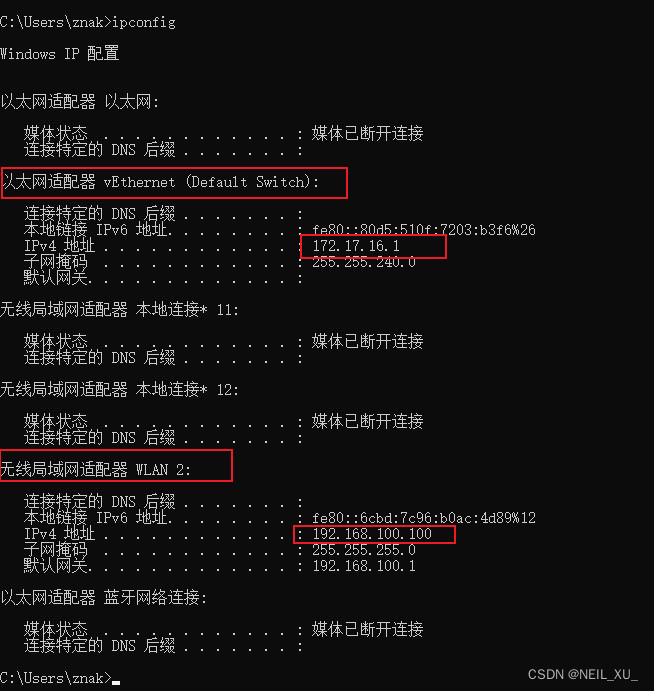
这样就导致后续本地起项目连接xxl-job注册节点的时候因为不在同个局域网下ping不通出问题,所以需要解决一下。
一、直接获取本机IP(会受到虚拟机干扰)
public static String getInterIP1() throws Exception {
    return InetAddress.getLocalHost().getHostAddress();
}
二、获取本机IP(排除虚拟机干扰)
public static InetAddress getLocalHostLANAddress() throws UnknownHostException {
        try {
            InetAddress candidateAddress = null;
            // 遍历所有的网络接口
            for (Enumeration ifaces = NetworkInterface.getNetworkInterfaces(); ifaces.hasMoreElements();) {
                NetworkInterface iface = (NetworkInterface) ifaces.nextElement();
                // 在所有的接口下再遍历IP
                for (Enumeration inetAddrs = iface.getInetAddresses(); inetAddrs.hasMoreElements();) {
                    InetAddress inetAddr = (InetAddress) inetAddrs.nextElement();
                    if (!inetAddr.isLoopbackAddress()) {// 排除loopback类型地址
                        if (inetAddr.isSiteLocalAddress()) {
                            // 如果是site-local地址,就是它了
                            return inetAddr;
                        } else if (candidateAddress == null) {
                            // site-local类型的地址未被发现,先记录候选地址
                            candidateAddress = inetAddr;
                        }
                    }
                }
            }
            if (candidateAddress != null) {
                return candidateAddress;
            }
            // 如果没有发现 non-loopback地址.只能用最次选的方案
            InetAddress jdkSuppliedAddress = InetAddress.getLocalHost();
            if (jdkSuppliedAddress == null) {
                throw new UnknownHostException("The JDK InetAddress.getLocalHost() method unexpectedly returned null.");
            }
            return jdkSuppliedAddress;
        } catch (Exception e) {
            UnknownHostException unknownHostException = new UnknownHostException(
                    "Failed to determine LAN address: " + e);
            unknownHostException.initCause(e);
            throw unknownHostException;
        }
    }
三、获取本机公网IP
public static String getOutIP() {
    try {
        URL whatismyip = new URL("http://checkip.amazonaws.com");
        BufferedReader in = new BufferedReader(new InputStreamReader(whatismyip.openStream()));
        String ip = in.readLine();
        return ip;
        } catch (Exception e) {}
        return "";
}
四、测试
public class IpTest {
        public static void main(String[] args) throws Exception {
            System.out.println("获取本机ip: " + getInterIP1());
//            System.out.println("getInterIP2: " + getInterIP2());
            System.out.println("获取本机ip(排除虚拟机干扰): " + String.valueOf(getLocalHostLANAddress()).substring(1));
//            System.out.println("getOutIPV4: " + getOutIPV4());
            System.out.println("获取本机公网ip: " + getOutIP());
        }
        public static String getInterIP1() throws Exception {
            return InetAddress.getLocalHost().getHostAddress();
        }
    public static InetAddress getLocalHostLANAddress() throws UnknownHostException {
        try {
            InetAddress candidateAddress = null;
            // 遍历所有的网络接口
            for (Enumeration ifaces = NetworkInterface.getNetworkInterfaces(); ifaces.hasMoreElements();) {
                NetworkInterface iface = (NetworkInterface) ifaces.nextElement();
                // 在所有的接口下再遍历IP
                for (Enumeration inetAddrs = iface.getInetAddresses(); inetAddrs.hasMoreElements();) {
                    InetAddress inetAddr = (InetAddress) inetAddrs.nextElement();
                    if (!inetAddr.isLoopbackAddress()) {// 排除loopback类型地址
                        if (inetAddr.isSiteLocalAddress()) {
                            // 如果是site-local地址,就是它了
                            return inetAddr;
                        } else if (candidateAddress == null) {
                            // site-local类型的地址未被发现,先记录候选地址
                            candidateAddress = inetAddr;
                        }
                    }
                }
            }
            if (candidateAddress != null) {
                return candidateAddress;
            }
            // 如果没有发现 non-loopback地址.只能用最次选的方案
            InetAddress jdkSuppliedAddress = InetAddress.getLocalHost();
            if (jdkSuppliedAddress == null) {
                throw new UnknownHostException("The JDK InetAddress.getLocalHost() method unexpectedly returned null.");
            }
            return jdkSuppliedAddress;
        } catch (Exception e) {
            UnknownHostException unknownHostException = new UnknownHostException(
                    "Failed to determine LAN address: " + e);
            unknownHostException.initCause(e);
            throw unknownHostException;
        }
    }

        public static String getOutIP() {
            try {
                URL whatismyip = new URL("http://checkip.amazonaws.com");
                BufferedReader in = new BufferedReader(new InputStreamReader(whatismyip.openStream()));
                String ip = in.readLine();
                return ip;
//                System.out.println("Public IP Address: " + ip);
            } catch (Exception e) {
//                System.out.println("Error occurred: " + e.getMessage());
            }
            return "";
        }
}
获取本机ip: 172.17.16.1
获取本机ip(排除虚拟机干扰): 192.168.100.100
获取本机公网ip: 14.145.43.147
这里打印出来的便对应上前言命令行截图里的ip信息,然后公网ip对应的是百度搜索ip查到的公网ip地址
五、手动禁用虚拟机排除干扰
除了用代码逻辑排除虚拟机干扰,我们也可以直接禁用电脑的虚拟机适配器。
步骤:
- win+R
- devmgmt.msc 打开设备管理器
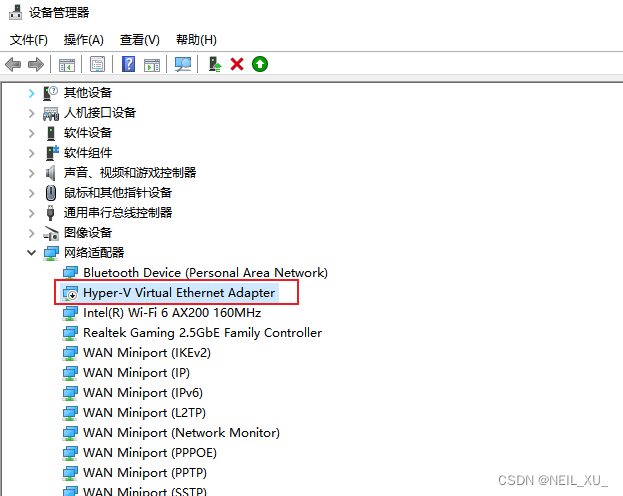
- 找到网络适配器-Hyper-V Virtual 开头的 右键禁用
此时win+R cmd 输入ipconfig,可以看到已经没有虚拟机ip了
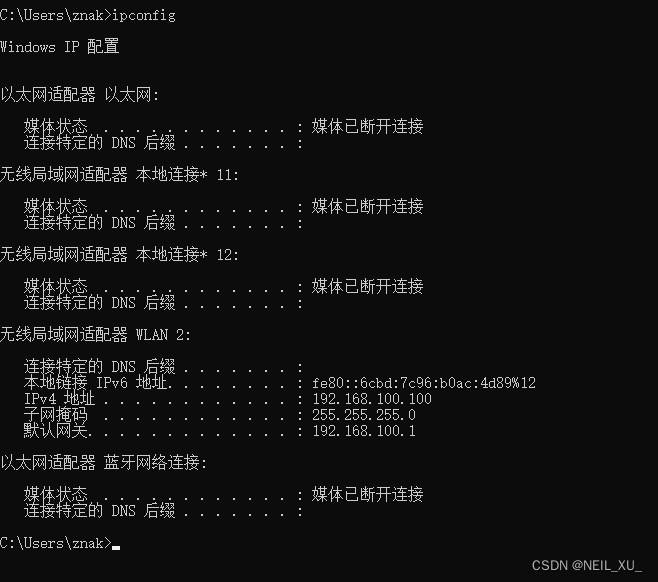
此时java使用
InetAddress.getLocalHost().getHostAddress()
也可以获取到192.168开头的wifi地址了
免责声明:我们致力于保护作者版权,注重分享,被刊用文章因无法核实真实出处,未能及时与作者取得联系,或有版权异议的,请联系管理员,我们会立即处理! 部分文章是来自自研大数据AI进行生成,内容摘自(百度百科,百度知道,头条百科,中国民法典,刑法,牛津词典,新华词典,汉语词典,国家院校,科普平台)等数据,内容仅供学习参考,不准确地方联系删除处理! 图片声明:本站部分配图来自人工智能系统AI生成,觅知网授权图片,PxHere摄影无版权图库和百度,360,搜狗等多加搜索引擎自动关键词搜索配图,如有侵权的图片,请第一时间联系我们,邮箱:ciyunidc@ciyunshuju.com。本站只作为美观性配图使用,无任何非法侵犯第三方意图,一切解释权归图片著作权方,本站不承担任何责任。如有恶意碰瓷者,必当奉陪到底严惩不贷!


