
EON安装ASE Interface
EON安装
我的eon路径于/eon/。
则环境为
export PYTHONPATH=/eon/:$PYTHONPATH
export PATH=/eon/bin:$PATH
source: https://theory.cm.utexas.edu/eon/installation.html
ASE
测试系统ubuntu。如果你python2和python3总是纠缠不清,可以sudo apt install python-is-python3直接解决。
经检查,我PC的
python地址为:
/usr/include/python3.8/
pybind11地址为:
/usr/include/pybind11/
已确认python地址下存有python.h,pybind11地址下存有pybind.h。
即得到
CXXFLAGS += -DASE_POT -I/usr/include/pybind11/ -I/usr/include/python3.8/
第二部分,libpython3.8.so地址在:
/usr/lib/x86_64-linux-gnu/libpython3.8.so
得到
LDFLAGS += -L/usr/lib/x86_64-linux-gnu/ -lpython3.8
如果什么都找不到可以通过以下代码搜索:
find / -name libpython3.8.so
vim 位于$EON_DIR/client/的Rules.mk,修改即可。
此时在client目录下make ASE_POT=1即可查看结果。

使用
教程表示要eon client可以连到Python dynamic library,就是LDFLAGS上的地址
export LD_LIBRARY_PATH=/path/to/python/rootdir/lib:$LD_LIBRARY_PATH
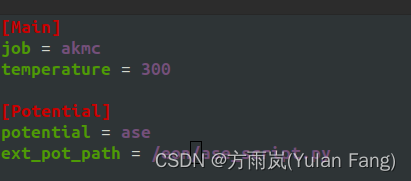
在程序的config.ini里面添加如下内容即可让EON利用ASE。
[Potential]
potential = ase
ext_pot_path = /full/path/to/the/ase_script.py
不过我觉得我系统已经有类似export LD_LIBRARY_PATH=/path/to/python/rootdir/lib:$LD_LIBRARY_PATH这样的操作了,便跳过了这一步。
这里最好用absolute path而不是relative path。
 然后这个python code我则放到了eon的位置。
from ase import Atoms
from ase.calculators.lj import LennardJones
def ase_calc():
    # MODIFY THIS SECTION
    calc = LennardJones(epsilon=0.0103, sigma=3.40, rc=10.0, ro=0.0, smooth=True)
    return calc
#=======================================================================
# DO NOT EDIT
def _calculate(R, atomicNrs, box, calc):
    system = Atoms(symbols=atomicNrs, positions=R, pbc=True, cell=box)
    system.calc = calc
    forces = system.get_forces()
    energy = system.get_potential_energy()
    return energy, forces
#=======================================================================
if __name__ == '__main__':
    # This is just to verify that the script runs properly with `python3 `
    from ase.io import read
    atoms = read("...")  # structure file name
    pos = atoms.positions  # array of positions (n x 3)
    atomicNrs = atoms.get_atomic_numbers()  # array of atomic numbers (n)
    cell = atoms.cell  # cell array (3 x 3)
    calc = ase_calc()
    e, f = _calculate(pos, atomicNrs, cell, calc)
    print(f"E = {e}")
    print("F =")
    print(f)
测试
Source
https://theory.cm.utexas.edu/eon/ase_interface.html#ase-interface


