
基于Nacos实现Sentinel规则持久化
基于Nacos实现Sentinel规则持久化
- 一、Sentinel使用痛点
- 二、解决方案
- 2.1 保存本地文件
- 2.2 保存数据库
- 2.3 保存到Nacos
- 三、规则持久化到Nacos
- 3.1 Nacos服务端修改配置
- 3.2 Sentinel控制台修改配置
- 3.3 Nacos数据源整合到Sentinel中
一、Sentinel使用痛点
SpringCloudAlibaba帮我们提供了微服务的限流、熔断、降级组件Sentinel。并且它的功能非常强大,使用起来也非常方便,只需要给需要限流的资源添加注解,配置对应的规则,就能实现效果。(使用可以参考Sentinel使用)但是有个问题就是Sentinel的规则是保存在客户端的内存中,控制台(服务端)查询规则也是基于客户端内存查询。
这样就存在一个很严重的问题,如果客户端发生了重启那么配置的众多规则都会失效。想想都觉得很严重,谁还敢在生产环境使用它。那么基于这个问题,我们有多种方案可以来解决。
二、解决方案
2.1 保存本地文件
既然是担心规则保存在客户端内存中会丢失,那么我们可以将规则持久化到本地文件,但是这样也有一个问题,如果微服务是高可用部署,有多个实例节点,那么保存到本地文件就不可取了。
2.2 保存数据库
将规则持久化到数据库中,这样多个节点访问同一个数据库也能拿到配置,这样的缺点是如果规则变化从数据库中直接修改,微服务则没那么容易感知到变化,不过也不是解决不了,可以使用canel组件,监听mysql的binlog日志,从而刷新规则,但这这样又要引入新的中间件,增加了系统的复杂性。
2.3 保存到Nacos
我们知道nacos的客户端在启动时会主动从服务端拉取一次配置,之后会通过延迟定时任务拉取配置,同时对配置文件配置监听器。双层保证服务端的变化能被客户端感知到,基于Nocos本来的特性,再整合Sentinel的扩展点,我们就可以实现如下图的结构。
在Nacos服务端或者Sentinel控制台修改配置,都能将规则推送到Sentinel客户端。并且在Nacos服务端修改配置规则Sentinel控制台的规则会发生变化,在Sentinel控制台修改规则,Naocs的配置文件就会发生变化。

三、规则持久化到Nacos
梳理一下配置变更的两条线
- Nacos服务端修改配置,规则同步到Sentinel客户端及Sentinel控制台
- Sentinel控制台修改配置,规则同步到Sentinel客户端和Nacos服务端
3.1 Nacos服务端修改配置
- 我们在使用nacos作为规则持久化时需要引入一下相关依赖。
com.alibaba.cloud spring-cloud-starter-alibaba-sentinel com.alibaba.csp sentinel-datasource-nacos com.alibaba.cloud spring-cloud-starter-alibaba-nacos-discovery- spring-cloud-starter-alibaba-sentinel这个依赖会包含spring-cloud-starter-alibaba-sentinel-datasource
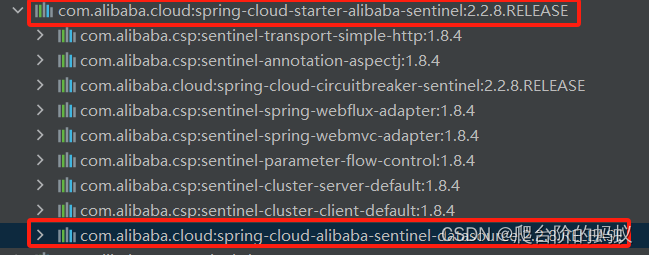
- spring-cloud-starter-alibaba-sentinel-datasource依赖中引入了关键类NacosDataSourceFactoryBean
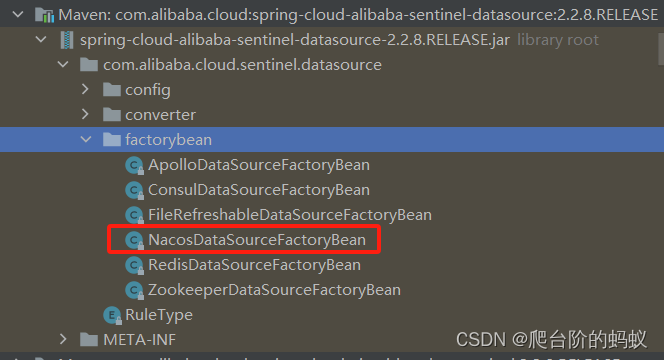
- NacosDataSourceFactoryBean的构造方法中实例化了NacosDataSource
public class NacosDataSourceFactoryBean implements FactoryBean { public NacosDataSource getObject() throws Exception { // 中间代码省略... return new NacosDataSource(properties, this.groupId, this.dataId, this.converter); } }- NacosDataSource由sentinel-datasource-nacos依赖引入
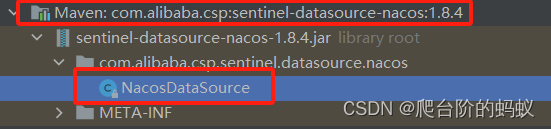
- NacosDataSource的构造方法中会定义监听器,并且将监听器和配置文件绑定,这样当Nacos服务端修改配置后,客户端就能拿到最新的规则,并且将规则更新内存中。同时会先从Nacos服务拉去一次配置做初始化。
public NacosDataSource(final Properties properties, final String groupId, final String dataId, Converter parser) {
        super(parser);
        this.pool = new ThreadPoolExecutor(1, 1, 0L, TimeUnit.MILLISECONDS, new ArrayBlockingQueue(1), new NamedThreadFactory("sentinel-nacos-ds-update", true), new DiscardOldestPolicy());
        this.configService = null;
        if (!StringUtil.isBlank(groupId) && !StringUtil.isBlank(dataId)) {
            AssertUtil.notNull(properties, "Nacos properties must not be null, you could put some keys from PropertyKeyConst");
            this.groupId = groupId;
            this.dataId = dataId;
            this.properties = properties;
            // 1.定义监听器,当配置发生变更监听器就能获取最新的配置
            this.configListener = new Listener() {
                public Executor getExecutor() {
                    return NacosDataSource.this.pool;
                }
                public void receiveConfigInfo(String configInfo) {
                    RecordLog.info("[NacosDataSource] New property value received for (properties: {}) (dataId: {}, groupId: {}): {}", new Object[]{properties, dataId, groupId, configInfo});
                    T newValue = NacosDataSource.this.parser.convert(configInfo);
                    NacosDataSource.this.getProperty().updateValue(newValue);
                }
            };
            // 2.将监听器和配置文件绑定
            this.initNacosListener();
            // 3.从Nacos服务端拉取配置放在内存中
            this.loadInitialConfig();
        } else {
            throw new IllegalArgumentException(String.format("Bad argument: groupId=[%s], dataId=[%s]", groupId, dataId));
        }
    }
3.2 Sentinel控制台修改配置
-
Sentinel控制台发布规则后会调用Sentinel客户端的ModifyRulesCommandHandler,将修改的规则传过来。
-
ModifyRulesCommandHandler的handle方法中是真正的处理逻辑,这里以流控规则为例,其他规则一样只是代码没展示。在Handle方法中会先将最新的规则加载到内存中,并且进行规则的持久化处理。
@CommandMapping(name = "setRules", desc = "modify the rules, accept param: type={ruleType}&data={ruleJson}") public class ModifyRulesCommandHandler implements CommandHandler { @Override public CommandResponse handle(CommandRequest request) { // 省略部分代码... if (FLOW_RULE_TYPE.equalsIgnoreCase(type)) { List flowRules = JSONArray.parseArray(data, FlowRule.class); // 1.将规则加载到内存中 FlowRuleManager.loadRules(flowRules); // 2.规则持久化(如果增加了扩展,默认没有实现) if (!writeToDataSource(getFlowDataSource(), flowRules)) { result = WRITE_DS_FAILURE_MSG; } return CommandResponse.ofSuccess(result); } }- 上面的持久化最终会调用到我们自己实现的Nacos实现类中,最终将配置发布到Nacos服务端。
public class NacosWritableDataSource implements WritableDataSource {
@Override
    public void write(T t) throws Exception {
        lock.lock();
        try {
            configService.publishConfig(dataId, groupId, this.configEncoder.convert(t), ConfigType.JSON.getType());
        } finally {
            lock.unlock();
        }
    }
}
3.3 Nacos数据源整合到Sentinel中
- application.yml中需要对Nacos数据进行配置(以流控规则为例)
spring: application: name: sentinel-rule-push-demo #微服务名称 #配置nacos注册中心地址 cloud: nacos: discovery: server-addr: 127.0.0.1:8848 sentinel: transport: # 添加sentinel的控制台地址 dashboard: 127.0.0.1:8080 datasource: flow-rules: nacos: server-addr: 127.0.0.1:8848 dataId: ${spring.application.name}-flow groupId: SENTINEL_GROUP # 注意groupId对应Sentinel Dashboard中的定义 data-type: json rule-type: flow- 将Nacos数据源注册为Sentinel的写数据源
public class NacosDataSourceListener implements ApplicationListener {
    @Autowired
    private SentinelProperties sentinelProperties;
	@Override
    public void onApplicationEvent(ContextRefreshedEvent event) {
    	// 1.获取流控规则数据源信息
        NacosDataSourceProperties nacosDataSourceProperties = sentinelProperties.getDatasource().get("flow-rules").getNacos();
        // 2.初始化流控规则数据源
        WritableDataSource writableDataSource = new NacosWritableDataSource(
                nacosDataSourceProperties.getServerAddr(), nacosDataSourceProperties.getGroupId(), nacosDataSourceProperties.getDataId(), JSON::toJSONString);
        // 将Nacos数据源注册为Sentinel写数据源
        WritableDataSourceRegistry.registerFlowDataSource(writableDataSource);
    }
}


