
【MySQL】MySQL用户管理
温馨提示:这篇文章已超过427天没有更新,请注意相关的内容是否还可用!
文章目录
- 一、用户
- 1.用户信息
- 2.创建用户
- 3.删除用户
- 4.修改用户密码
- 二、数据库的权限
- 1.给用户授权
- 2.回收权限
一、用户
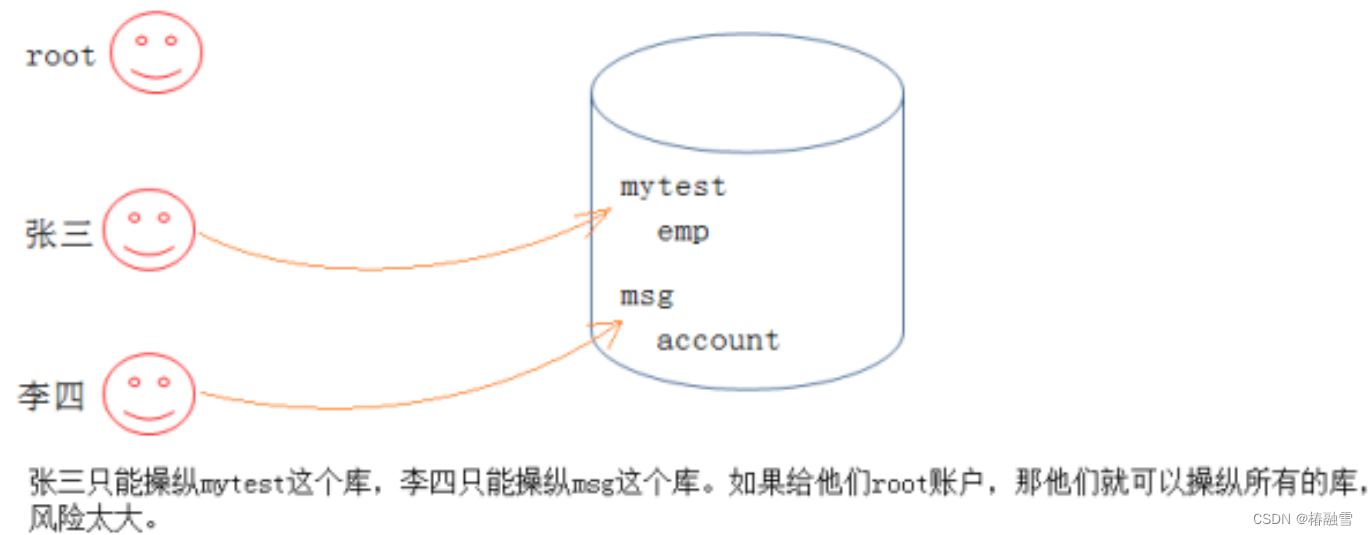
如果我们只能使用root用户,这样存在安全隐患。这时,就需要使用MySQL的用户管理。
1.用户信息
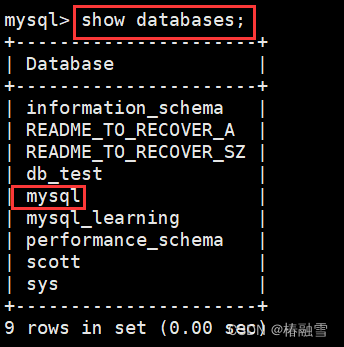
我们安装mysql之后,会自动创建一个mysql的数据库。MySQL中的用户,都存储在系统数据库mysql的user表中
我们可以查询如下信息:
select host,user,authentication_string from user;
mysql> select host,user,authentication_string from user;
+-----------+---------------+-------------------------------------------+
| host | user | authentication_string |
+-----------+---------------+-------------------------------------------+
| localhost | root | *81F5E21E35407D884A6CD4A731AEBFB6AF209E1B |
| localhost | mysql.session | *THISISNOTAVALIDPASSWORDTHATCANBEUSEDHERE |
| localhost | mysql.sys | *THISISNOTAVALIDPASSWORDTHATCANBEUSEDHERE |
+-----------+---------------+-------------------------------------------+
--可以通过desc user初步查看一下表结构
字段解释:
host: 表示这个用户可以从哪个主机登陆,如果是localhost,表示只能从本机登陆
user: 用户名
authentication_string: 用户密码通过password函数加密后的
*_priv: 用户拥有的权限
2.创建用户
语法:
create user '用户名'@'登陆主机/ip' identified by '密码';
案例:
mysql> create user 'hdp'@'localhost' identified by '123456';
Query OK, 0 rows affected (0.00 sec)
mysql> select user,host,authentication_string from user;
+---------------+-----------+-------------------------------------------+
| user          | host      | authentication_string                     |
+---------------+-----------+-------------------------------------------+
| root          | localhost | *5ADB87D1C6448A109DCC4D61C8C6DD5637B0683B |
| mysql.session | localhost | *THISISNOTAVALIDPASSWORDTHATCANBEUSEDHERE |
| mysql.sys     | localhost | *THISISNOTAVALIDPASSWORDTHATCANBEUSEDHERE |
| hdp           | localhost | *6BB4837EB74329105EE4568DDA7DC67ED2CA2AD9 |
+---------------+-----------+-------------------------------------------+
4 rows in set (0.00 sec)
此时便可以使用新账号新密码进行登陆啦
备注:可能实际在设置密码的时候,因为mysql本身的认证等级比较高,一些简单的密码无法设置,会爆出如下报错:
ERROR 1819 (HY000): Your password does not satisfy the current policy requirements
解决方案:https://blog.csdn.net/zhanaolu4821/article/details/93622812
查看密码设置相关要求:
show variables like 'validate_password';
SHOW VARIABLES LIKE 'validate_password%';
登录主机设置为%的时候表示可以在任意主机登录
关于新增用户这里,需要大家注意,不要轻易添加一个可以从任意地方登陆的user
3.删除用户
语法:
drop user '用户名'@'主机名'
mysql> select user,host,authentication_string from user;
+---------------+-----------+-------------------------------------------+
| user          | host      | authentication_string                     |
+---------------+-----------+-------------------------------------------+
| root          | localhost | *5ADB87D1C6448A109DCC4D61C8C6DD5637B0683B |
| mysql.session | localhost | *THISISNOTAVALIDPASSWORDTHATCANBEUSEDHERE |
| mysql.sys     | localhost | *THISISNOTAVALIDPASSWORDTHATCANBEUSEDHERE |
| hdp           | localhost | *6BB4837EB74329105EE4568DDA7DC67ED2CA2AD9 |
+---------------+-----------+-------------------------------------------+
4 rows in set (0.00 sec)
mysql> drop user hdp;
ERROR 1396 (HY000): Operation DROP USER failed for 'hdp'@'%' -直接给个用户名,不能删除
mysql> drop user 'hdp'@'localhost';
Query OK, 0 rows affected (0.00 sec)
mysql> select user,host,authentication_string from user;
+---------------+-----------+-------------------------------------------+
| user          | host      | authentication_string                     |
+---------------+-----------+-------------------------------------------+
| root          | localhost | *5ADB87D1C6448A109DCC4D61C8C6DD5637B0683B |
| mysql.session | localhost | *THISISNOTAVALIDPASSWORDTHATCANBEUSEDHERE |
| mysql.sys     | localhost | *THISISNOTAVALIDPASSWORDTHATCANBEUSEDHERE |
+---------------+-----------+-------------------------------------------+
3 rows in set (0.00 sec)
直接给个用户名,不能进行删除,而是应该使用用户名+主机名
drop user 'hdp'@'localhost';
4.修改用户密码
自己改自己密码
set password=password('新的密码');root用户修改指定用户的密码
set password for '用户名'@'主机名'=password('新的密码');示例:
mysql> create user 'hdp'@'localhost' identified by '123456';
Query OK, 0 rows affected (0.00 sec)
mysql> select user,host,authentication_string from user;
+---------------+-----------+-------------------------------------------+
| user          | host      | authentication_string                     |
+---------------+-----------+-------------------------------------------+
| root          | localhost | *5ADB87D1C6448A109DCC4D61C8C6DD5637B0683B |
| mysql.session | localhost | *THISISNOTAVALIDPASSWORDTHATCANBEUSEDHERE |
| mysql.sys     | localhost | *THISISNOTAVALIDPASSWORDTHATCANBEUSEDHERE |
| hdp           | localhost | *6BB4837EB74329105EE4568DDA7DC67ED2CA2AD9 |
+---------------+-----------+-------------------------------------------+
4 rows in set (0.00 sec)
mysql> set password for 'hdp'@'localhost'=password('654321');
Query OK, 0 rows affected, 1 warning (0.00 sec)
mysql> select user,host,authentication_string from user;
+---------------+-----------+-------------------------------------------+
| user          | host      | authentication_string                     |
+---------------+-----------+-------------------------------------------+
| root          | localhost | *5ADB87D1C6448A109DCC4D61C8C6DD5637B0683B |
| mysql.session | localhost | *THISISNOTAVALIDPASSWORDTHATCANBEUSEDHERE |
| mysql.sys     | localhost | *THISISNOTAVALIDPASSWORDTHATCANBEUSEDHERE |
| hdp           | localhost | *2A032F7C5BA932872F0F045E0CF6B53CF702F2C5 |
+---------------+-----------+-------------------------------------------+
4 rows in set (0.00 sec)
二、数据库的权限
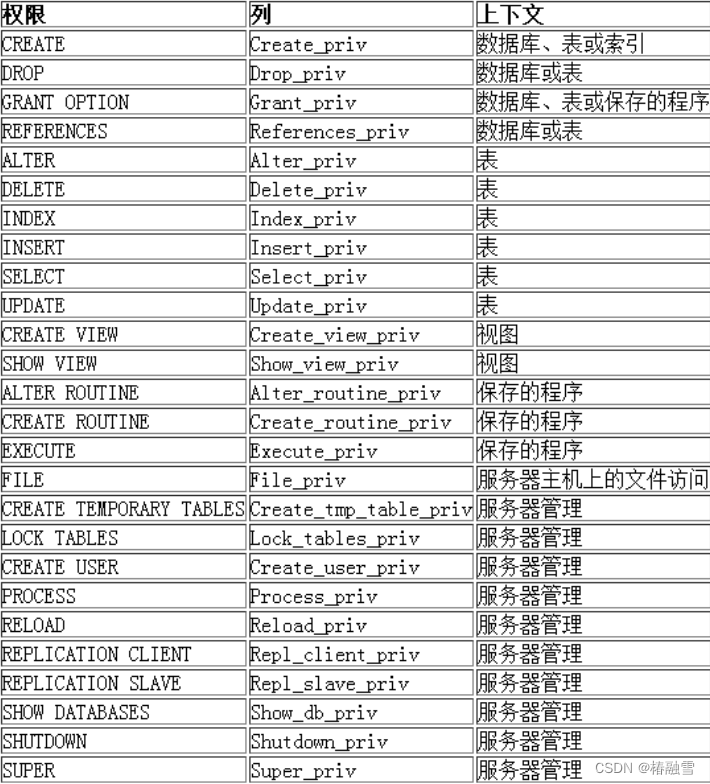
MySQL数据库提供的权限列表:
1.给用户授权
刚创建的用户没有任何权限。需要给用户授权。
语法:
grant 权限列表 on 库.对象名 to '用户名'@'登陆位置' [identified by '密码']
说明:
1.权限列表,多个权限用逗号分开
grant select on ...
grant select, delete, create on ....
grant all [privileges] on ... -- 表示赋予该用户在该对象上的所有权限
2.*.*: 代表本系统中的所有数据库的所有对象(表,视图,存储过程等)
3.库.* : 表示某个数据库中的所有数据对象(表,视图,存储过程等)
4.identified by可选。 如果用户存在,赋予权限的同时修改密码,如果该用户不存在,就是创建用户
使用root账号
mysql> show databases;
+----------------------+
| Database             |
+----------------------+
| information_schema   |
| README_TO_RECOVER_A  |
| README_TO_RECOVER_SZ |
| db_test              |
| mysql                |
| mysql_learning       |
| performance_schema   |
| scott                |
| sys                  |
+----------------------+
9 rows in set (0.00 sec)
mysql> use scott;
Reading table information for completion of table and column names
You can turn off this feature to get a quicker startup with -A
Database changed
mysql> show tables;
+-----------------+
| Tables_in_scott |
+-----------------+
| dept            |
| emp             |
| salgrade        |
+-----------------+
3 rows in set (0.00 sec)
给用户hdp赋予scott数据库下所有文件的select权限
mysql> grant select on scott.* to 'hdp'@'localhost';
Query OK, 0 rows affected (0.00 sec)
使用hdp账号
mysql> show databases;
+--------------------+
| Database           |
+--------------------+
| information_schema |
| scott              |
+--------------------+
2 rows in set (0.00 sec)
mysql> use scott;
Reading table information for completion of table and column names
You can turn off this feature to get a quicker startup with -A
Database changed
mysql> select * from dept;
+--------+------------+----------+
| deptno | dname      | loc      |
+--------+------------+----------+
|     10 | ACCOUNTING | NEW YORK |
|     20 | RESEARCH   | DALLAS   |
|     30 | SALES      | CHICAGO  |
|     40 | OPERATIONS | BOSTON   |
+--------+------------+----------+
4 rows in set (0.02 sec)
没有删除权限
mysql> delete from dept;
ERROR 1142 (42000): DELETE command denied to user 'hdp'@'localhost' for table 'dept'
特定用户现有查看权限
how grants for 'hdp'@'localhost';
mysql> show grants for 'hdp'@'localhost';
+------------------------------------------------+
| Grants for hdp@localhost                       |
+------------------------------------------------+
| GRANT USAGE ON *.* TO 'hdp'@'localhost'        |
| GRANT SELECT ON `scott`.* TO 'hdp'@'localhost' |
+------------------------------------------------+
2 rows in set (0.00 sec)
mysql> show grants for 'root'@'localhost';
+---------------------------------------------------------------------+
| Grants for root@localhost                                           |
+---------------------------------------------------------------------+
| GRANT ALL PRIVILEGES ON *.* TO 'root'@'localhost' WITH GRANT OPTION |
| GRANT PROXY ON ''@'' TO 'root'@'localhost' WITH GRANT OPTION        |
+---------------------------------------------------------------------+
2 rows in set (0.00 sec)
注意:如果发现赋权限后,没有生效,执行如下指令:
flush privileges;
2.回收权限
语法:
revoke 权限列表 on 库.对象名 from '用户名'@'登陆位置';
root身份回收hdp对scott数据库的所有权限
mysql> revoke all on scott.* from 'hdp'@'localhost';
Query OK, 0 rows affected (0.00 sec)
hdp身份
mysql> show databases;
+--------------------+
| Database           |
+--------------------+
| information_schema |
+--------------------+
1 row in set (0.00 sec)


